Keychron K11 Max vs K15 Max65% vs 75% Layout Choice
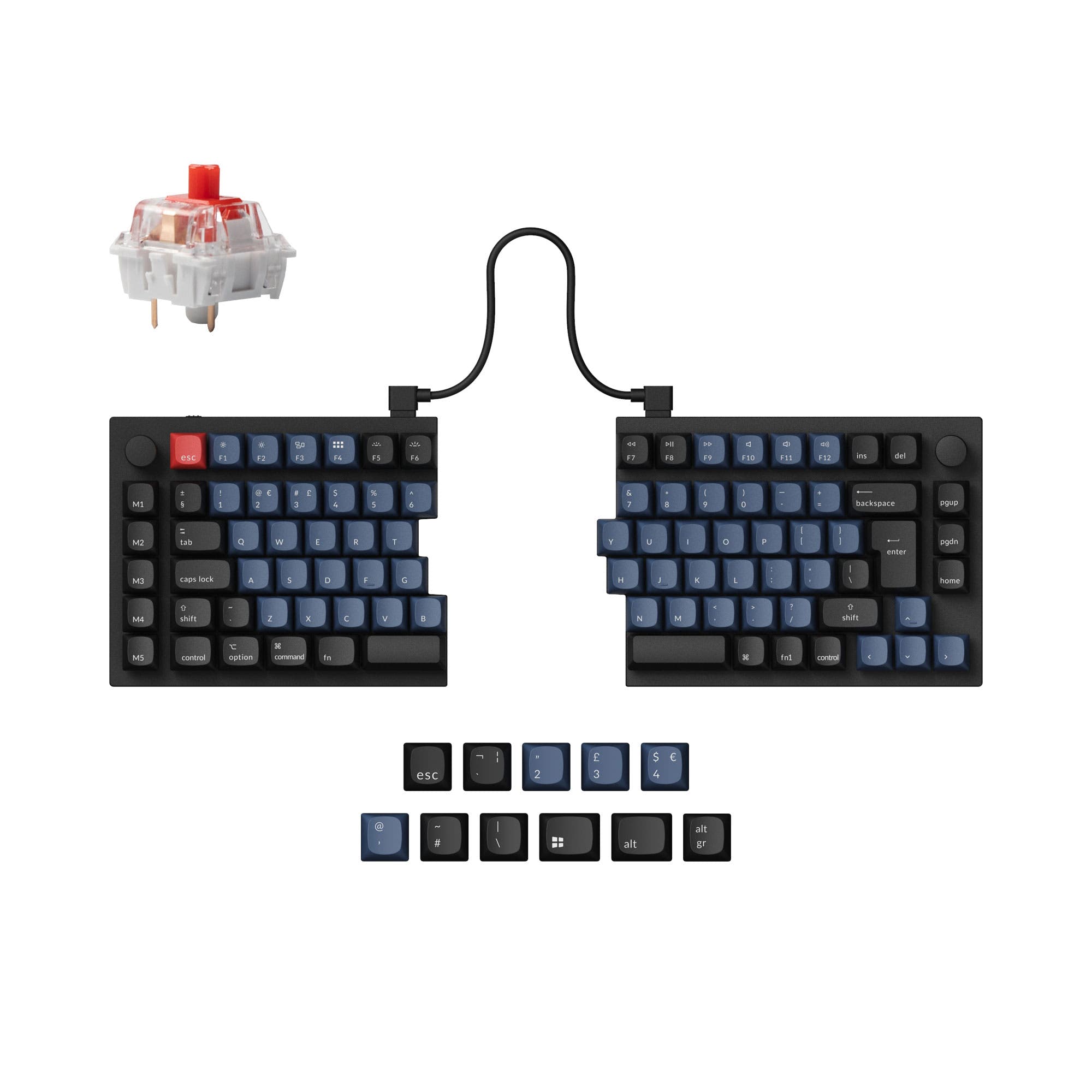
Choose the K11 Max for maximum portability or the K15 Max for dedicated navigation keys in a low-profile Alice format.


Which one should you get?
Get the
Keychron K11 Max
65%
- More compact 65% Alice layout for superior portability.
- Vendor description highlights programmable aluminum rotary encoder (knob) support.
- Includes VIA support alongside QMK for easier graphical key remapping.
- Lacks dedicated navigation and function keys, requiring layers for Home, End, etc.
- Fewer overall keys may be a limitation for users who rely on a numpad or full nav cluster.
- Based on a user review, one unit exhibited wireless connectivity issues with repeated inputs.
Get the
Keychron K15 Max
75% Layout Choice
- 75% Alice layout provides dedicated arrow keys, navigation cluster, and function row.
- Includes a 3-degree typing angle, as noted in its specifications.
- Deep programmability via QMK firmware and the Keychron Launcher web app.
- Larger 75% size is less portable than the 65% K11 Max.
- Vendor description does not mention knob support as a feature.
- Some user reviews note the lack of an End key in the nav cluster and desire for more keycap set availability.
Select the Keychron K11 Max if your priority is a highly portable, minimalist Alice keyboard and you value the option for a programmable knob. Choose the Keychron K15 Max if you need immediate access to navigation keys and a function row without using layers, making it better suited for office tasks and programming. Both deliver excellent low-profile wireless performance and customization in their respective form factors.
The differences that matter
Skip the 40-row spec sheet. These are the specs that change how each board feels, sounds, and fits your desk.
Keychron K11 Max
Keychron K15 Max
Layout size
65%
75%
Knob
Yes
No
Weight
520 g
700 g
Backlight
RGB, north-facing
RGB
Dimensions
11 x 346 x 115 mm
29 x 370 x 143 mm
- Keychron K11 Max
- Keychron K15 Max
- Performance
- 7981
- Build quality
- 8280
- Productivity
- 9393
- Customizability
- 9288
- Portability
- 8979
- Connection: Bluetooth, 2.4 GHz, Wired
- Hot-swappable
- Battery: 2,000 mAh
- Low profile
- Ergonomics: Alice
- Max polling rate: 1,000 Hz
What will you mostly use it for?
The K15 Max is the clear choice for office work and programming due to its more complete key set with dedicated navigation keys. The K11 Max wins for travel thanks to its smaller 65% footprint. For gaming and content creation, the shared core specs make them equally capable, leaving the decision to layout preference. Modders might lean toward the K11 Max for its advertised knob support.
It's a tie
- Both offer a 1000Hz polling rate in 2.4GHz and wired modes for low latency.
- Both feature N-key rollover for simultaneous key presses.
- The Alice layout on both can provide ergonomic comfort during long sessions.
What owners say
Ratings and quotes collected from verified store reviews, including the critical ones.
Keychron K11 Max
4 owner reviews
“A really well-made keyboard, compact and very comfortable to use. Despite its small size, it still offers good ergonomics and allows for a more natural typing position compared to many traditional keyboards. The keys are quiet, pleasant to press, and suitable…”
Keychron K15 Max
18 owner reviews
“This keyboard is perfect for me. Combined with the side-scrolling mouse I purchased, it does everything I need it to do, and is extremely comfortable to use all day.”
“My biggest issue is easily that they advertise these products as being Linux compatible, but as a recent convert, I wasn't aware how often companies will claim that, but then offer little or no support for actual functionality. When trying to flash updated…”
Keychron K11 Max vs K15 Max specs
Every tracked spec, side by side. Rows marked with a dot differ between the boards.
5 of 26 specs differ
Keychron K11 Max
Keychron K15 Max
Switch options
Hot-swappable
Mount style
Low profile
Sound dampening
Layout size
Layout standard
Ergonomics
Knob
Display
Media keys
Connection
Max polling rate
Battery
USB-C
Case material
Keycaps
Weight
Dimensions
Typing angle
Backlight
QMK
VIA
N-key rollover
Mac & Windows
Released
Compare prices
Live prices from the stores we track, cheapest in-stock offer first.
Lowest price across stores, Amazon excluded.


Prices in USD are converted to your currency and can change at any time. KeebFinder may earn a commission when you buy through these links, at no extra cost to you.
Keychron K11 Max vs K15 Max: your questions
The core difference is the layout size. The K11 Max uses a 65% Alice layout, which is more compact and lacks a dedicated function row and navigation cluster. The K15 Max uses a 75% Alice layout, which retains the arrow keys, a column of navigation keys, and a full function row for more direct key access.
Yes, both the K11 Max and K15 Max offer hot-swappable versions. According to Keychron, they are compatible with Gateron and Keychron low-profile mechanical switches. The hot-swap feature is specific to the RGB Backlight Hot-Swappable version of each model.
Both keyboards support QMK for open-source firmware customization. The K11 Max listing explicitly includes VIA support for real-time graphical remapping, while the K15 Max description confirms QMK support but does not specify VIA.
The K15 Max is generally better for programming. Its 75% layout provides dedicated arrow keys and navigation keys like Home, PgUp, PgDn, which are frequently used in code editors. The K11 Max requires using function layers to access these keys, which can be less efficient.
The vendor description for the K15 Max does not mention knob support as a feature. In contrast, the K11 Max description highlights a programmable aluminum rotary encoder. If a knob is essential, the K11 Max is the confirmed choice between the two.
Both keyboards come with low-profile, double-shot PBT keycaps. Keychron states these are made of durable, oil-resistant PBT material in an LSA (low-profile spherical-angled) profile. They include keycaps for both Windows and macOS layouts.
Both keyboards are equipped with a 2000mAh battery. The exact battery life in hours is not specified by the manufacturer, but they share the same battery capacity, suggesting similar wireless endurance under comparable use conditions.
Both are viable for gaming. They share a 1000Hz polling rate in their 2.4GHz and wired modes, which minimizes latency. They also feature N-key rollover to ensure all key presses are registered, and the Alice layout may offer ergonomic benefits during long sessions.
According to Keychron, both the K11 Max and K15 Max hot-swappable versions are compatible with Gateron low-profile mechanical switches and Keychron's own low-profile mechanical switches. The manufacturer notes that QMK does not support low-profile optical switches for these models.
The Keychron K11 Max is more portable due to its smaller 65% form factor. It will take up less space in a backpack and on a desk. The K15 Max, at 75%, is larger and heavier, with listed dimensions of 370mm x 143mm and a weight of 700g.
Yes, both models feature internal sound-dampening foam. Keychron's description states they use advanced IXPE acoustic foam for quieter keystrokes and resilient latex foam for switch support and responsiveness.
Yes, Keychron states that both the K11 Max and K15 Max can be customized using the Keychron Launcher web app. This app allows for key remapping and macro creation and is compatible with macOS, Windows, and Linux when the keyboard is connected via wired mode.
Not sold on either?




Still torn?
Answer a few quick questions and the keyboard finder ranks 2,000+ boards by how you will actually use yours.