Keychron K11 Max vs Q11Wireless Low-Profile vs Wired Split Metal
Choose the K11 Max for wireless portability and a low-profile Alice layout, or the Q11 for a premium, customizable split metal build that stays on your desk.

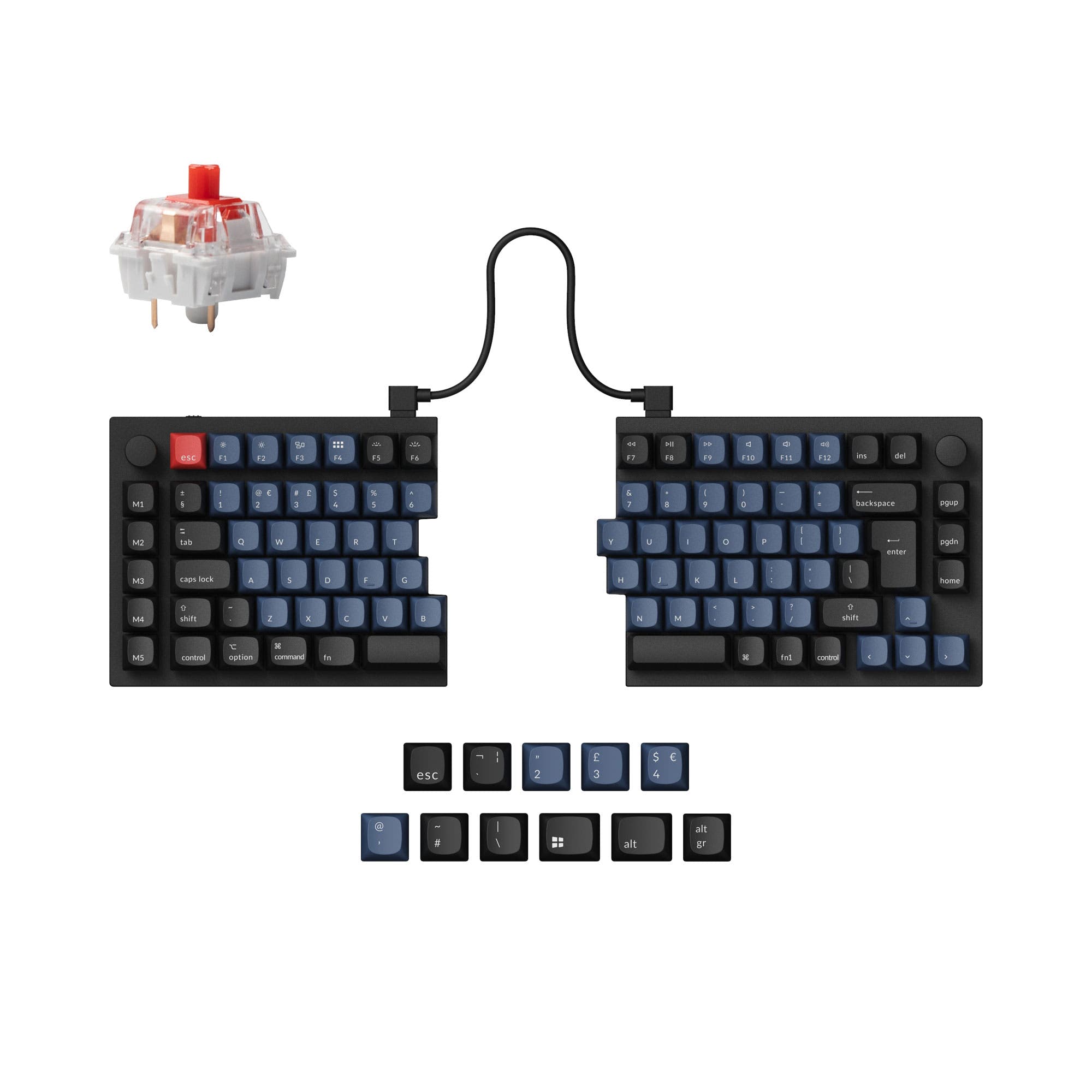
Which one should you get?
Get the
Keychron K11 Max
Wireless Low-Profile
- Triple-mode connectivity with Bluetooth, 2.4 GHz, and wired options.
- Ultra-slim, low-profile design with Gateron low-profile mechanical switches.
- Includes IXPE and latex foam for sound dampening and a quieter typing experience.
- Limited to low-profile Gateron or Keychron switches only, restricting switch compatibility.
- Uses an ABS and aluminum frame composite, not a full metal case.
- Wireless connectivity issues like key chatter were noted in a user review.
Get the
Keychron Q11
Wired Split Metal
- Full aluminum body construction for premium durability and feel.
- True split design allows independent positioning of each half for ergonomics.
- Extensive layout support including ANSI, ISO, JIS, and multiple European ISO variants.
- Wired-only connectivity (Type-C), with no wireless option.
- Very heavy at 1186g, making it impractical to move frequently.
- Higher price point compared to the K11 Max.
Your primary need dictates the choice. If you want a single, versatile keyboard for a clean desk, multiple devices, and easy portability, the Keychron K11 Max is the clear option. If your priority is a premium, stationary typing experience focused on ergonomics and deep customization, and you don't mind being tethered, the Keychron Q11 is the superior investment. Consider the K11 Max for flexibility and the Q11 for a dedicated, top-tier typing foundation.
The differences that matter
Skip the 40-row spec sheet. These are the specs that change how each board feels, sounds, and fits your desk.
Keychron K11 Max
Keychron Q11
Connection
Bluetooth, 2.4 GHz, Wired
Wired
Low profile
Yes
No
Ergonomics
Alice
Split
Case material
ABS, Aluminum
Aluminum
Mount style
PCB Mount
Plate Mount, Tray Mount
- Keychron K11 Max
- Keychron Q11
- Performance
- 7968
- Build quality
- 8288
- Productivity
- 9397
- Customizability
- 9298
- Portability
- 8973
- Hot-swappable
- Max polling rate: 1,000 Hz
- Switch options: Clicky, Linear, Tactile
- Knob
- QMK
- VIA
What will you mostly use it for?
The K11 Max wins for gaming and travel due to its wireless performance and portability. The Q11 is the stronger choice for programming and modding, thanks to its split ergonomics and extensive customization options. For office work and content creation, the choice is a tie, hinging on whether you prioritize a wireless, low-profile form factor or the postural benefits of a split design.
Pick the Keychron K11 Max
- Offers a 1000 Hz polling rate over both 2.4 GHz wireless and wired modes for low latency.
- The Alice layout can provide a more natural hand position for extended sessions.
- Its lower weight and wireless capability allow for easier desk rearrangement.
What owners say
Ratings and quotes collected from verified store reviews, including the critical ones.
Keychron K11 Max
4 owner reviews
“A really well-made keyboard, compact and very comfortable to use. Despite its small size, it still offers good ergonomics and allows for a more natural typing position compared to many traditional keyboards. The keys are quiet, pleasant to press, and suitable…”
Keychron Q11
13 owner reviews
“I wish that the "launcher" app had more layer options and more layer options for the RGB, but that's ok. I have a Moonlander as well and I recommend the Q11 to almost everyone, the ortholinear boards take a lot of relearning for most people to type on.”
Keychron K11 Max vs Q11 specs
Every tracked spec, side by side. Rows marked with a dot differ between the boards.
13 of 28 specs differ
Keychron K11 Max
Keychron Q11
Switch options
Hot-swappable
Mount style
Low profile
Sound dampening
Screw-in stabilizers
Layout size
Layout standard
Ergonomics
Knob
Display
Media keys
Connection
Max polling rate
Battery
USB-C
Case material
Plate material
Keycaps
Weight
Dimensions
Typing angle
Backlight
QMK
VIA
N-key rollover
Mac & Windows
Released
Compare prices
Live prices from the stores we track, cheapest in-stock offer first.
Lowest price across stores, Amazon excluded.




Prices in USD are converted to your currency and can change at any time. KeebFinder may earn a commission when you buy through these links, at no extra cost to you.
Keychron K11 Max vs Q11: your questions
Yes, the Keychron K11 Max supports three connection modes: 2.4 GHz wireless, Bluetooth 5.1, and wired USB-C. The 2.4 GHz and wired modes offer a 1000 Hz polling rate.
Yes, the Keychron Q11's split design allows you to use the left or right half independently. You can also link them together with the included bridge cable to use as a standard keyboard.
They address ergonomics differently. The K11 Max's Alice layout curves the key columns to match natural finger arcs. The Q11's split design allows you to position each half to shoulder width, which can reduce shoulder and wrist strain.
Yes, both the K11 Max and Q11 feature hot-swappable sockets. However, the K11 Max is only compatible with Gateron or Keychron low-profile mechanical switches, while the Q11 supports standard 3-pin and 5-pin MX mechanical switches.
Yes, both keyboards are compatible with macOS and Windows. They include keycap sets for both operating systems and have a system toggle switch to switch between key mappings.
The Q11 has a full aluminum body, contributing to its 1186g weight and premium feel. The K11 Max uses a composite ABS and aluminum frame, making it lighter and part of its low-profile design.
Yes, both keyboards support full programmability via the open-source QMK firmware and can be configured using the Keychron Launcher web app or VIA software.
Both have RGB backlighting. The Q11 features south-facing RGB LEDs, which prevent interference with Cherry-profile keycaps and may provide better illumination from the typist's angle with its non-shine-through keycaps.
Yes, the Keychron Q11 is offered in a barebone kit version, which includes the metal case and PCB but does not include keycaps or switches, allowing for complete customization.
The K11 Max comes with low-profile, double-shot PBT keycaps in an LSA (Low Profile Spherical-Angled) profile. These are designed for the low-profile switches and offer oil resistance.
Yes, the Keychron Q11 specifically supports ISO, ISO-DE, ISO-Nordic, ISO-UK, ANSI, and JIS layouts. Keychron offers fully assembled versions with various European language keycaps.
Not sold on either?


Still torn?
Answer a few quick questions and the keyboard finder ranks 2,000+ boards by how you will actually use yours.