Keychron K2 Max vs V2Wireless vs Wired Custom Keyboard Choice
Choose the K2 Max for wireless flexibility and a more complete layout, or the V2 for a lower-cost, wired entry into custom keyboard building.

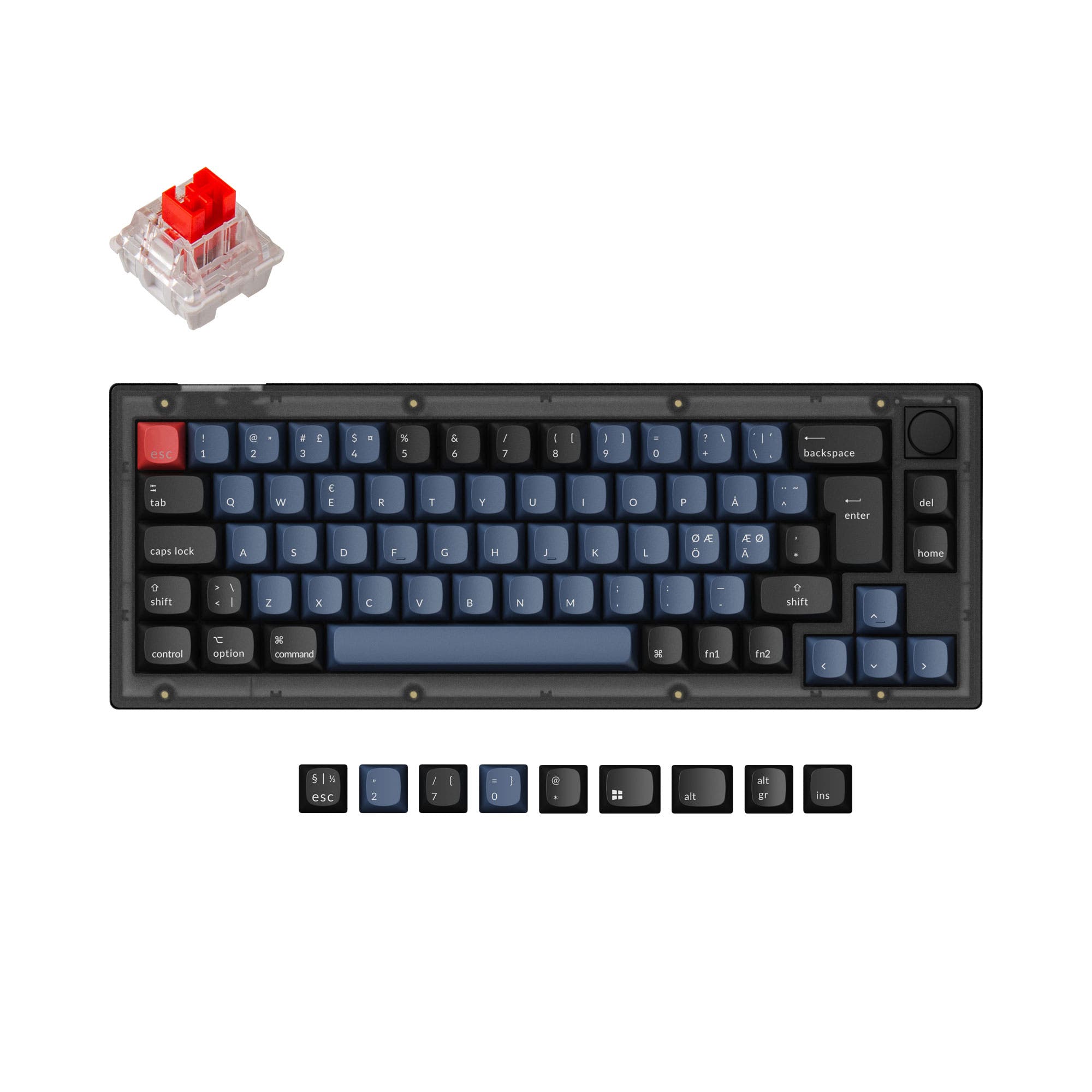
Which one should you get?
Get the
Keychron K2 Max
Wireless
- Triple-mode wireless connectivity (Bluetooth 5.1, 2.4 GHz, and wired).
- Aluminum case construction for a premium feel and added stability.
- 75% layout includes arrow keys and a column of navigation keys.
- Higher weight (940g) and slightly larger footprint than the 65% V2.
- Generally commands a higher price point than the V2.
- No option for a barebones kit, only pre-built configurations.
Get the
Keychron V2
Wired Custom Keyboard Choice
- Available as a more affordable barebones kit for ultimate customization.
- 65% layout is very compact while retaining arrow keys.
- Offers a version with a programmable aluminum rotary encoder (knob).
- Wired-only connectivity, lacking Bluetooth or 2.4 GHz wireless options.
- Plastic (ABS) case construction, compared to the K2 Max's aluminum.
- Smaller 65% layout lacks dedicated function row and some navigation keys.
Your primary need dictates the choice. If wireless operation and a more complete key layout are non-negotiable for your desk setup, the Keychron K2 Max is the clear option. If your goal is to enter the custom keyboard hobby with a highly modifiable, compact, and more budget-friendly wired board, the Keychron V2 is an excellent starting point, especially in its barebones or knob-equipped forms.
The differences that matter
Skip the 40-row spec sheet. These are the specs that change how each board feels, sounds, and fits your desk.
Keychron K2 Max
Keychron V2
Layout size
75%
65%
Connection
Bluetooth, 2.4 GHz, Wired
Wired
Case material
ABS, Aluminum
ABS, Plastic
Mount style
PCB Mount, Plate Mount
Plate Mount, Tray Mount
Knob
No
Yes
- Keychron K2 Max
- Keychron V2
- Performance
- 8169
- Build quality
- 8687
- Productivity
- 9596
- Customizability
- 9199
- Portability
- 7976
- Hot-swappable
- Max polling rate: 1,000 Hz
- Switch options: Clicky, Linear, Tactile
- QMK
- VIA
- Sound dampening
What will you mostly use it for?
The Keychron K2 Max is the stronger choice for users who need wireless connectivity, a more extensive key set for productivity and gaming, and a premium aluminum build. The Keychron V2 wins for travel due to its smaller size and for modding due to its barebones kit option and inherent design for customization. For content creation, it's a tie, with the V2's knob offering tangible control and the K2 Max's wireless providing setup flexibility.
Pick the Keychron K2 Max
- Offers a 1000 Hz polling rate on both its 2.4 GHz wireless and wired connections for low latency.
- The 75% layout retains dedicated function and navigation keys useful for game macros and controls.
- Includes multiple layers of acoustic foam (IXPE, PET, EPDM) which can provide a more consistent, damped sound profile.
What owners say
Ratings and quotes collected from verified store reviews, including the critical ones.
Keychron K2 Max
2 owner reviews
“Négatif: Le temps de livraison et la clareté des infos”
Keychron V2
17 owner reviews
“Was looking for a good budget board to customize and this keyboard was great! Good price and high quality materials as well as fast shipping. Love it.”
Keychron K2 Max vs V2 specs
Every tracked spec, side by side. Rows marked with a dot differ between the boards.
12 of 27 specs differ
Keychron K2 Max
Keychron V2
Switch options
Hot-swappable
Mount style
Sound dampening
Screw-in stabilizers
Layout size
Layout standard
Ergonomics
Knob
Display
Media keys
Connection
Max polling rate
Battery
USB-C
Case material
Plate material
Keycaps
Weight
Dimensions
Typing angle
Backlight
QMK
VIA
N-key rollover
Mac & Windows
Released
Compare prices
Live prices from the stores we track, cheapest in-stock offer first.
Lowest price across stores, Amazon excluded.




Prices in USD are converted to your currency and can change at any time. KeebFinder may earn a commission when you buy through these links, at no extra cost to you.
Keychron K2 Max vs V2: your questions
Yes, the Keychron K2 Max is suitable for gaming. It features a 1000 Hz polling rate on both its 2.4 GHz wireless and wired connections, which minimizes latency. Its 75% layout also keeps useful navigation keys accessible for game controls or macros.
No, the Keychron V2 is a wired-only mechanical keyboard. It connects via its included USB Type-C cable and does not have Bluetooth or a 2.4 GHz wireless receiver.
The Keychron K2 Max is generally better suited for programming due to its 75% layout. This layout includes dedicated arrow keys and a column of navigation keys (like Home, End, PgUp, PgDn), which are frequently used in coding environments, without taking up as much space as a full-size board.
Yes, both the Keychron K2 Max and V2 support macOS and Windows. According to their listings, each keyboard includes a system toggle switch and extra keycaps tailored for both operating systems.
Yes, both keyboards are hot-swappable. This means you can change the mechanical switches without soldering. Their PCBs support both 3-pin and 5-pin MX-style switches.
The main layout difference is size. The K2 Max uses a 75% layout, which includes a function row, arrow keys, and a column of navigation keys. The V2 uses a 65% layout, which omits the function row and the dedicated navigation column but retains the arrow keys.
The Keychron V2 offers a version with a programmable aluminum rotary encoder (knob). The Keychron K2 Max, based on the provided specifications and description, does not have a knob option.
Yes, the Keychron V2 is available in a barebones kit version. This kit includes the plastic case, PCB with screw-in stabilizers, and steel plate, but does not include switches or keycaps, allowing you to choose your own.
The Keychron K2 Max comes with OSA profile double-shot PBT keycaps. The manufacturer states the OSA profile combines OEM height with an SA-like spherical shape for a comfortable typing feel.
Both keyboards are programmable using the open-source QMK firmware and the VIA configurator. Keychron also provides its own web-based tool, the Keychron Launcher app, for remapping keys and creating macros without installing software.
The Keychron K2 Max is heavier, weighing 940 grams. The Keychron V2 weighs 855 grams for its fully assembled version. The K2 Max's aluminum case and larger battery contribute to its higher weight.
Yes, the Keychron K2 Max features a USB Type-C port for its wired connection, which implies the use of a removable cable. This is a standard feature on both keyboards for connectivity and potential cable customization.
Not sold on either?


Still torn?
Answer a few quick questions and the keyboard finder ranks 2,000+ boards by how you will actually use yours.