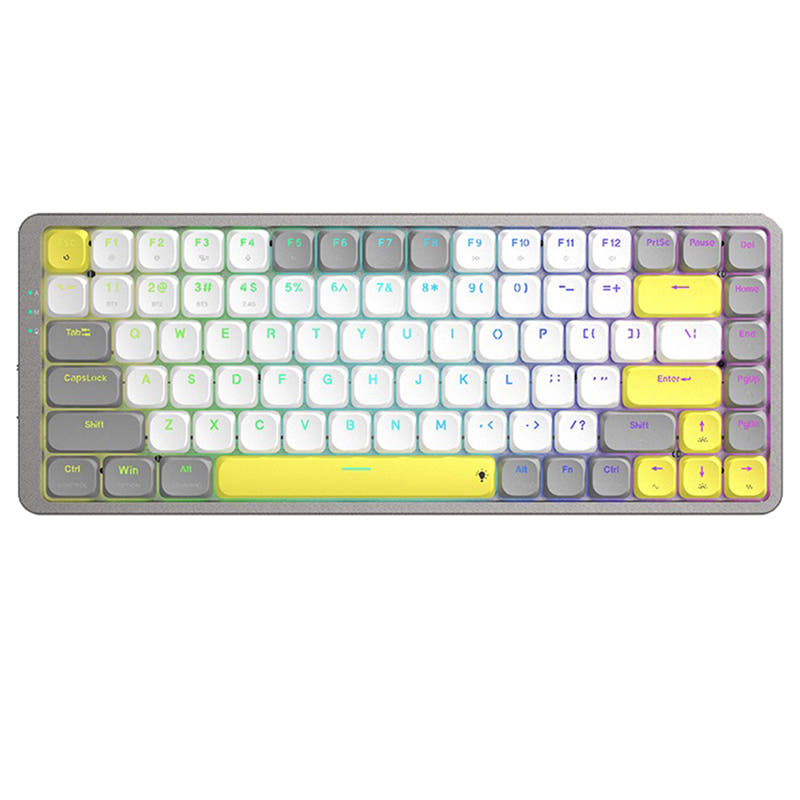
Keychron K2 vs K3 Pro
Battery or Low-Profile Control
Choose the Keychron K2 for its 4000mAh battery and hot-swap support for MX-style switches, or the Keychron K3 Pro for its low-profile build, QMK/VIA customization, and PBT keycaps.
Prices checked Nov 27, 2026. KeebFinder may earn a commission when you buy through these links, at no extra cost to you.
Battery


Which one should you get?
Get the
Keychron K2
Battery
Build quality in the top 50% of 75% boards under $50.
If you want
- 4000mAh battery capacity.
- The hot-swappable version supports MX-style 3-pin and 5-pin mechanical switches, according to Keychron.
Rules this board out
- North-facing LEDs. Cherry-profile keycaps can hit the switch housing.
- No ISO layout. ISO-DE, UK, and other ISO variants are not offered.
Get the
Keychron K3 Pro
QMK
Build quality in the top 15% of 75% boards under $100.
If you want
- Low-profile design with a listed thickness of 15 mm and weight of 525g.
- QMK and VIA support, with Keychron describing key remapping and macros through its Launcher web app.
- PBT keycaps, including double-shot PBT on standard versions and dye-sublimated PBT on the Special Edition.
Rules this board out
- Low-profile switches and keycaps only. Standard MX keycaps will not fit.
- North-facing LEDs. Cherry-profile keycaps can hit the switch housing.
- South-facing LEDs. Shine-through legends stay dark, and some sculpted keycaps can clip the LED.
Bottom line
Get the Keychron K2 if you want its 4000mAh battery and broader MX-style switch compatibility in the hot-swappable version. Choose the Keychron K3 Pro for its low-profile construction, QMK/VIA customization, PBT keycaps, and wider range of listed layouts.
The differences that matter
- Battery
4,000 mAh
1,550 mAh
A larger battery means fewer cables during the day - Low profile
No
Yes
- Mount style
Tray Mount
Plate Mount, Tray Mount
- Weight
794 g
525 g
Heavier boards stay planted and lighter ones travel - QMK
No
Yes
The deep option when you want to remap every key
KeebFinder scores
How we score- Keychron K2
- Keychron K3 Pro
- Performance
- 6981
- Build quality
- 7181
- Productivity
- 7779
- Customizability
- 7088
- Portability
- 8477
What they share
- Layout size: 75%
- Connection: Bluetooth, Wired
- Hot-swappable
- Max polling rate: 1,000 Hz
- Case material: ABS, Aluminum, Plastic
- Switch options: Clicky, Linear, Tactile
What will you mostly use it for?
For gaming, pick the Keychron K3 Pro
- Both list a 1000 Hz polling rate, and the K3 Pro vendor description specifies that this applies in wired mode.
- The K3 Pro has QMK support and wired key remapping through Keychron Launcher, which can suit custom gaming key assignments.
What owners say
Keychron K2
“It is an amazing keyboard. One thing, I don’t like that there is no battery indicator for this version so that I don’t when I need to charge it before it die out.”
Keychron K3 Pro
“For anyone buying this, remember to toggle the switch to the correct operating system. Other than that, the feel is good and it comes with a good feature set for a low price”
Keychron K2 vs K3 Pro specs
12 of 24 specs differ
 |  | |
| Keychron K2$45 | Keychron K3 Pro$66 | |
|---|---|---|
| Typing & switches | ||
| Switch options | Clicky, Linear, Tactile | Clicky, Linear, Tactile |
| Hot-swappable | Yes | Yes |
| Mount style (differs) | Tray Mount | Plate Mount, Tray Mount |
| Low profile (differs) | No | Yes |
| Layout | ||
| Layout size | 75% | 75% |
| Layout standard (differs) | ANSI | ANSI, ISO, ISO-DE, ISO-ES, ISO-FR, ISO-Nordic, ISO-SW, ISO-UK, JIS |
| Ergonomics | Standard | Standard |
| Display | None | None |
| Media keys | Yes | Yes |
| Connectivity & battery | ||
| Connection | Bluetooth, Wired | Bluetooth, Wired |
| Max polling rate | 1,000 Hz | 1,000 Hz |
| Battery (differs) | 4,000 mAhBest | 1,550 mAh |
| USB-C | Yes | Yes |
| Build & materials | ||
| Case material | ABS, Aluminum, Plastic | ABS, Aluminum, Plastic |
| Plate material (differs) | Not specified | Plastic |
| Keycaps (differs) | ABS | ABS, PBT |
| Weight (differs) | 794 g | 525 g |
| Dimensions (differs) | 40 x 317 x 129 mm | 15 x 306 x 116 mm |
| Backlight (differs) | Yes, north-facing | RGB, south-facing |
| Firmware & software | ||
| QMK (differs) | No | Yes |
| VIA (differs) | No | Yes |
| N-key rollover | Yes | Yes |
| Mac & Windows | Yes | Yes |
| Extras | ||
| Released (differs) | 2021 | 2022 |
Compare prices
Prices in USD are converted to your currency and can change at any time. KeebFinder may earn a commission when you buy through these links, at no extra cost to you.
Lowest price across stores, Amazon excluded.
- Lowest price now
- $52
- Lowest in range
- $52Aug 29 at Keychron K2
- Highest in range
- $67Aug 29 at Keychron K3 Pro
Price in USD
- Check on Amazon
AmazonGlobal
Check price - Extra 5% off


- Check on Amazon
AmazonGlobal
Check price - Extra 5% off

ISO layouts by store
Keychron K2
No ISO layout at the stores we track.
Keychron K3 Pro
- Go to Keychron
Keychron
ISO-DE, ISO-UK, ISO-Nordic, ISO-FR, ISO-ES, ISO-SW
Out of stockShips to you - Go to Keychron (DE)
Keychron (DE)
ISO-DE, ISO-UK, ISO-Nordic, ISO-FR, ISO-ES, ISO-SW
Out of stockDoes not ship to you