Keychron K4 Pro vs Leopold NP900RBTHot-Swap vs Pre-Built Choice
Choose the Keychron K4 Pro for extensive customization and a compact layout, or the Leopold NP900RBT for a straightforward, pre-built full-size experience.
KeebFinder may earn a commission when you buy through these links, at no extra cost to you.

4.7 (7)4.7 · 7 reviews
from$69at Keychron

No reviews
from$135at MK
90-day lowLowest price in 90 days
Which one should you get?
Get the
Keychron K4 Pro
Hot-Swap
Build quality in the top 10% of 96% boards under $100.
- Extensive customizability with hot-swap sockets, QMK/VIA support, and screw-in stabilizers.
- Compact 96% layout retains numpad in a smaller footprint.
- Includes multiple layout standards (ANSI and various ISO) and OS-specific keycaps.
- South-facing LEDs. Shine-through legends stay dark, and some sculpted keycaps can clip the LED.
- Compact full-size layout. The numpad is present, the gaps of a full-size board are not.
Get the
Leopold NP900RBT
Pre-Built Choice
Build quality in the bottom 45% of 100% boards under $150.
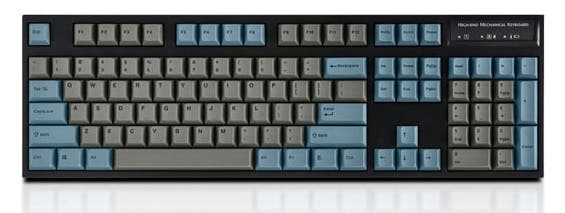
- Lightweight, plateless design as noted in the vendor description.
- Uses standard, easily replaceable AAA batteries for wireless operation.
- Features 1.5mm thick PBT double-shot keycaps and genuine Cherry MX switches.
- Switches are soldered. Swapping them means soldering.
- No ISO layout. ISO-DE, UK, and other ISO variants are not offered.
For most users, the Keychron K4 Pro is the recommended choice due to its superior feature set, customizability, and space-efficient design. It is a strong platform for enthusiasts and professionals who value programmability and the ability to modify their typing experience. Only choose the Leopold NP900RBT if you specifically want a lightweight, simple, pre-built full-size keyboard and have no interest in future modifications or backlighting.
The differences that matter
Skip the 40-row spec sheet. These are the specs that change how each board feels, sounds, and fits your desk.
Keychron K4 Pro
Leopold NP900RBT
Layout size
96%
100%
Hot-swappable
Yes
No
Switch changes without soldering
Case material
ABS, Plastic
Plastic
Switch options
Clicky, Linear, Tactile
Clicky, Linear, Silent, Tactile
Mount style
Tray Mount
PCB Mount
- Keychron K4 Pro
- Leopold NP900RBT
- Performance
- 8146
- Build quality
- 8451
- Productivity
- 9569
- Customizability
- 9645
- Portability
- 5450
- Connection: Bluetooth, Wired
- Sound dampening
What will you mostly use it for?
The Keychron K4 Pro is the more versatile choice, winning in gaming, programming, modding, and content creation due to its performance specs, programmability, and customizability. The Leopold NP900RBT's primary advantage is in travel, thanks to its lightweight, battery-powered design. For general office use, both keyboards are capable, offering the necessary wireless connectivity and quiet operation.
Pick the Keychron K4 Pro
- The Keychron K4 Pro has a specified 1000 Hz polling rate for wired use.
- Its 96% layout saves desk space for larger mouse movements while retaining a numpad.
- South-facing RGB lighting is listed, which can reduce interference with certain keycaps.
Keychron K4 Pro vs Leopold NP900RBT specs
Every tracked spec, side by side. Rows marked with a dot differ between the boards.
13 of 26 specs differ
Keychron K4 Pro
Leopold NP900RBT
Switch options
Hot-swappable
Mount style
Sound dampening
Screw-in stabilizers
Layout size
Layout standard
Ergonomics
Display
Media keys
Connection
Max polling rate
Battery
USB-C
Case material
Plate material
Keycaps
Weight
Dimensions
Typing angle
Backlight
QMK
VIA
N-key rollover
Mac & Windows
Released
ISO layouts by store
Which stores sell ISO-DE, UK, and the other regional layouts.
Keychron K4 Pro
Keychron
ISO-DE, ISO-UK, ISO-Nordic, ISO-FR, ISO-ES, ISO-SW
Out of stockShips to you
Keychron (DE)
ISO-DE, ISO-UK, ISO-FR, ISO-ES, ISO-SW
Out of stockDoes not ship to you
Leopold NP900RBT
No ISO layout at the stores we track.
Compare prices
Live prices from the stores we track, cheapest in-stock offer first.
Prices in USD are converted to your currency and can change at any time. KeebFinder may earn a commission when you buy through these links, at no extra cost to you.
Lowest price across stores, Amazon excluded.



Keychron K4 Pro vs Leopold NP900RBT: your questions
The Keychron K4 Pro is explicitly hot-swappable, allowing you to change switches without soldering. The Leopold NP900RBT is not hot-swappable, so its Cherry MX switches are soldered in place and cannot be easily changed.
No. According to the vendor description, the Leopold NP900RBT uses two AAA batteries for wireless operation. The Keychron K4 Pro has an integrated 4000mAh rechargeable battery.
The Leopold offers limited customization via physical DIP switches on the keyboard. For extensive remapping and macro creation, the Keychron K4 Pro supports the open-source QMK firmware and the VIA/Keychron Launcher web app.
The Keychron K4 Pro uses a 96% layout, which condenses the numpad and navigation cluster to save space. The Leopold NP900RBT is a standard 100% or full-size keyboard with a traditional spacing between all sections.
Both keyboards include sound dampening features. The Keychron K4 Pro has sound-absorbing foam and a silicone dampening pad. The Leopold NP900RBT lists a sound absorbing pad. The final sound will depend heavily on the switch type chosen (e.g., Silent Red vs. Blue).
Yes. The Keychron K4 Pro comes with OSA profile double-shot PBT keycaps. The Leopold NP900RBT features 1.5mm thick PBT double-shot keycaps with top-printed legends.
Yes, both product listings confirm compatibility with macOS. The Keychron K4 Pro listing specifically mentions it includes keycaps for both Windows and macOS layouts.
Both offer Bluetooth connectivity. The Keychron K4 Pro vendor description specifies Bluetooth 5.1. The Leopold NP900RBT vendor description also lists Bluetooth 5.1.
The Keychron K4 Pro lists a 1000 Hz polling rate in its specifications, which is a standard performance metric for gaming. Its compact layout also saves desk space for mouse movement.
Yes. According to the vendor page, a Barebone version of the Keychron K4 Pro is available, which does not include switches or keycaps.
The Keychron K4 Pro uses a tray mount style with a steel plate. The Leopold NP900RBT uses a PCB mount style and has a plateless design according to its vendor description.
The Keychron K4 Pro offers three adjustable typing angles (3°, 7°, and 10°) and uses curved OSA-profile keycaps. The Leopold NP900RBT's vendor description does not mention adjustable feet or specific ergonomic features.
Not sold on either?




Still torn?
Answer a few quick questions and the keyboard finder ranks 2,000+ boards by how you will actually use yours.