Leopold FC900RBT V2 vs NP900RBTFX Plate vs PCB Mount
The main decision is plate-mounted FR4 with Cherry MX2A switches and RGB on the FC900RBT V2 versus a lighter plateless PCB-mount build with dip switches and Mac and Linux support on the NP900RBT.
KeebFinder may earn a commission when you buy through these links, at no extra cost to you.
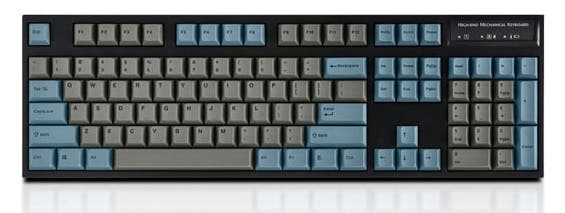

from$135at MK
90-day lowLowest price in 90 days
Which one should you get?
Get the
Leopold FC900RBT V2
FX Plate
Build quality in the bottom 30% of 100% boards under $200.
- Cherry MX2A switch variants including Silent Red and Speed Silver are listed for the FC900RBT V2.
- FR4 plate and flex cut PCB are part of the listed build.
- RGB backlighting with north-facing switches is listed.
- Magnetic switches only. Standard MX switches will not fit.
- North-facing LEDs. Cherry-profile keycaps can hit the switch housing.
Get the
Leopold NP900RBT
PCB Mount
Build quality in the bottom 45% of 100% boards under $150.
- Vendor page lists Mac and Linux compatibility alongside Windows.
- Dip switches allow customizing certain key functions without software.
- 1.5mm thick PBT double shot keycaps are specified on the NP900RBT page.
- Switches are soldered. Swapping them means soldering.
Choose the FC900RBT V2 if you want Cherry MX2A switches including Speed Silver, an FR4 plate, and RGB, and you work on Windows. Choose the NP900RBT if Mac or Linux support, dip switches for key remapping, thick 1.5mm PBT caps and a lighter plateless build matter more, and you can live without RGB. Both are 104-key ANSI boards with Bluetooth 5.1 and USB-C, so the platform and mount differences should drive the call.
The differences that matter
Skip the 40-row spec sheet. These are the specs that change how each board feels, sounds, and fits your desk.
Leopold FC900RBT V2
Leopold NP900RBT
Hall effect (magnetic)
Yes
No
Adjustable actuation helps in games and not in normal typing
Case material
ABS
Plastic
Mount style
Plate Mount
PCB Mount
Backlight
Yes, north-facing
None
RGB for looks and low light rather than speed
Mac & Windows
No
Yes
- Leopold FC900RBT V2
- Leopold NP900RBT
- Performance
- 6246
- Build quality
- 4851
- Productivity
- 5769
- Customizability
- 4645
- Portability
- 4950
- Layout size: 100%
- Connection: Bluetooth, Wired
- Switch options: Clicky, Linear, Silent, Tactile
- Sound dampening
- Keycaps: PBT
What will you mostly use it for?
The FC900RBT V2 takes gaming, modding and content creation because of its FR4 plate, flex cut PCB, Cherry MX2A switch line including Speed Silver, and installed RGB. The NP900RBT wins office, programming and travel through Mac and Linux support, dip switches, 1.5mm thick PBT caps, its lighter plateless plastic build and two-battery wireless. Both share the 104-key ANSI layout, Bluetooth 5.1 and a wired USB-C option, so most buyers are choosing a mount and platform rather than a size. Silent Red is available on both, which keeps quiet typing available on either side.
Pick the Leopold FC900RBT V2
- The FC900RBT V2 lists Cherry MX2A Speed Silver among its switch variants, a linear option aimed at fast keystrokes.
- An FR4 plate and flex cut PCB are listed for the FC900RBT V2, while the NP900RBT is a plateless PCB-mount design.
- The NP900RBT vendor page lists only Cherry MX Brown, Blue, Red and Silent Red, with no speed switch option.
Leopold FC900RBT V2 vs NP900RBT specs
Every tracked spec, side by side. Rows marked with a dot differ between the boards.
6 of 17 specs differ
Leopold FC900RBT V2
Leopold NP900RBT
Switch options
Hall effect (magnetic)
Mount style
Sound dampening
Layout size
Layout standard
Ergonomics
Display
Media keys
Connection
USB-C
Case material
Plate material
Keycaps
Backlight
Mac & Windows
Released
Compare prices
Live prices from the stores we track, cheapest in-stock offer first.
Prices in USD are converted to your currency and can change at any time. KeebFinder may earn a commission when you buy through these links, at no extra cost to you.
Lowest price across stores, Amazon excluded.


Leopold FC900RBT V2 vs NP900RBT: your questions
The FC900RBT V2 uses a plate-mounted design with an FR4 plate and flex cut PCB, while the NP900RBT is a plateless PCB-mount board with a plastic case. The FC900RBT V2 also lists Cherry MX2A switches and RGB, which the NP900RBT metadata does not include.
The NP900RBT vendor page lists Mac compatibility, while the FC900RBT V2 listing names Windows only. If you work on a Mac, the NP900RBT is the safer pick based on the listed platform support.
Yes, both are 104-key full-size boards with a US QWERTY logical layout and ANSI physical layout. Neither is a split or low-profile keyboard, so the footprint and key positions are broadly the same.
Neither the FC900RBT V2 nor the NP900RBT is listed as QMK or VIA compatible, and neither is hotswap. The NP900RBT does list dip switches for customizing certain key functions, which is the closest either board gets to remapping.
Yes, the FC900RBT V2 supports Bluetooth 5.1 wireless or a wired USB-C connection. Wireless mode is powered by three AAA batteries, which the vendor lists as included.
The NP900RBT vendor page states that wireless mode is powered by two AAA batteries, included in the box. That is one fewer cell than the FC900RBT V2, which uses three AAA batteries.
The FC900RBT V2 lists the newer Cherry MX2A line, including Brown, Blue, Red, Black, Silent Red and Speed Silver. The NP900RBT lists genuine Cherry MX switches in Brown, Blue, Red and Silent Red, so it covers the common types but skips Speed Silver and Black.
No, the NP900RBT metadata lists RGB as absent. The FC900RBT V2 lists RGB with north-facing switches, so it is the only one of the two with backlighting.
Yes, both use double shot PBT keycaps. The NP900RBT vendor page adds that its caps are 1.5mm thick, which is a detail the FC900RBT V2 listing does not specify.
Both list Silent Red among their switch options, and both include sound dampening. The FC900RBT V2 adds a sound absorbing pad and foam, while the NP900RBT lists a sound absorbing pad, so either can be configured quietly depending on switch choice.
The FC900RBT V2 costs more and adds an FR4 plate, Cherry MX2A switches including Speed Silver, and RGB. The NP900RBT is the cheaper option with Mac and Linux support and dip switches, so the extra spend only makes sense if the plate, switch line or lighting matter to you.
The NP900RBT is described by the vendor as a lightweight, plateless design with a plastic case, which points to it being the lighter board. The FC900RBT V2 uses an ABS case with an FR4 plate, and both are full-size 104-key boards, so neither is a compact travel keyboard.
Not sold on either?


Still torn?
Answer a few quick questions and the keyboard finder ranks 2,000+ boards by how you will actually use yours.