Keychron K6 HE vs K6Magnetic Switches or Mechanical
Choose the K6 HE for magnetic-switch controls and 2.4 GHz wireless, or the K6 for a lower-cost mechanical keyboard with lighter listed variants.
KeebFinder may earn a commission when you buy through these links, at no extra cost to you.

5.0 (1)5.0 · 1 reviews
from$129at MK

4.8 (507)4.8 · 507 reviews
from$59at Keychron
Which one should you get?
Get the
Keychron K6 HE
Hall effect
Build quality in the top 10% of 65% boards under $150.
- Magnetic switches with adjustable actuation from 0.2 to 3.8 mm and Rapid Trigger.
- 2.4 GHz, Bluetooth, and wired connectivity, with 1000 Hz polling listed for 2.4 GHz and wired modes.
- QMK support, plus vendor-described key remapping and macros through Keychron Launcher.
- Magnetic switches only. Standard MX switches will not fit.
- North-facing LEDs. Cherry-profile keycaps can hit the switch housing.
- No ISO layout. ISO-DE, UK, and other ISO variants are not offered.
Get the
Keychron K6
Build quality in the top 45% of 65% boards under $100.
- Lower-cost mechanical option with linear, tactile, or clicky switch types listed.
- Hot-swappable version is described by the vendor as compatible with almost all MX-style SMD-LED mechanical switches.
- Vendor-listed plastic-frame and aluminum-bezel variants weigh about 530 g and 664 g.
- North-facing LEDs. Cherry-profile keycaps can hit the switch housing.
- South-facing LEDs. Shine-through legends stay dark, and some sculpted keycaps can clip the LED.
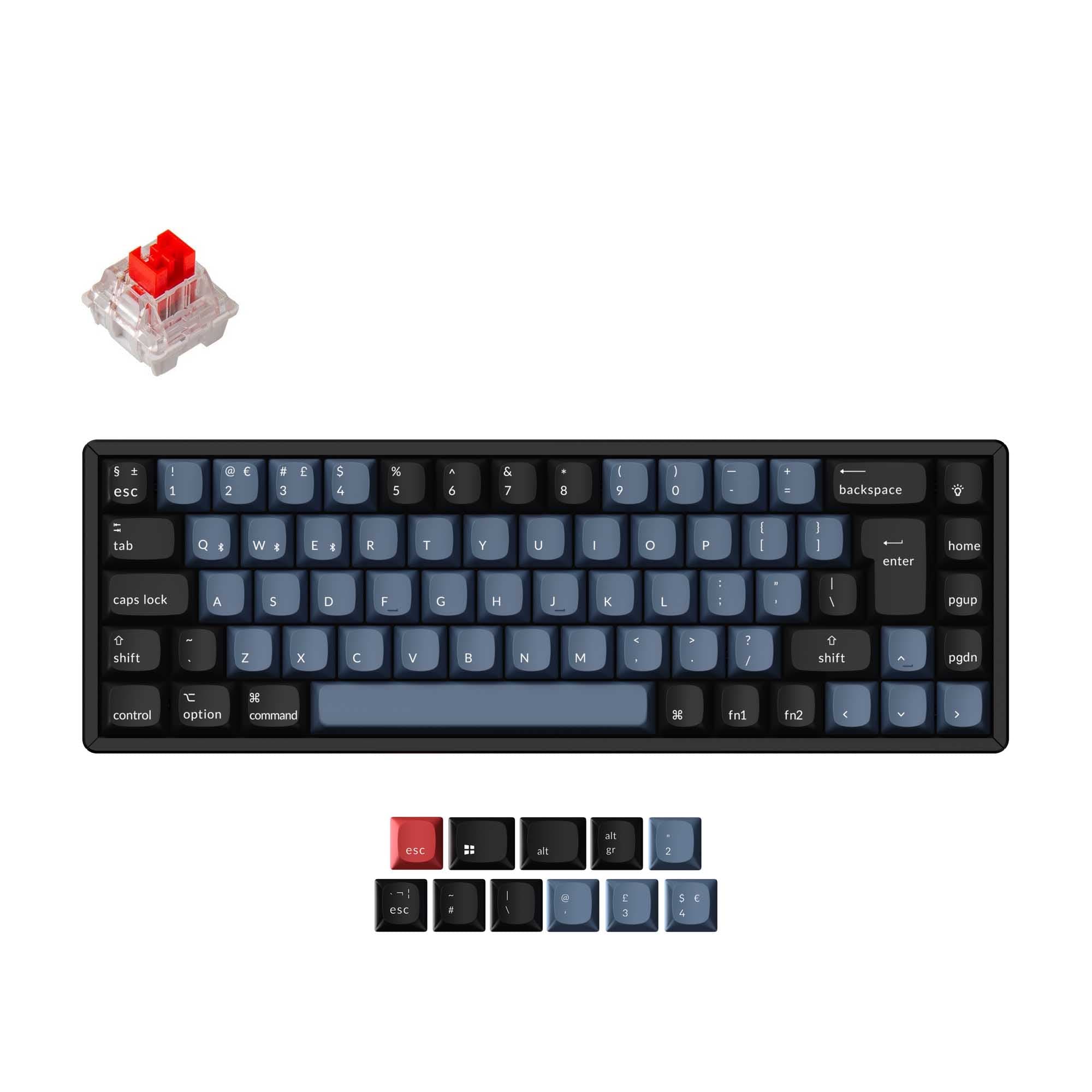
Choose the K6 HE if adjustable magnetic actuation, Rapid Trigger, 2.4 GHz, and QMK support are central to your setup. Choose the K6 if you prefer conventional mechanical switches, broader MX-style switch options on its hot-swappable version, or a lighter listed variant at a lower cost. Check the specific K6 version before buying, since its vendor listing describes different frame and switch options.
The differences that matter
Skip the 40-row spec sheet. These are the specs that change how each board feels, sounds, and fits your desk.
Keychron K6 HE
Keychron K6
Hall effect (magnetic)
Yes
No
Adjustable actuation helps in games and not in normal typing
Rapid trigger
Yes
No
Faster resets help in games and not in normal typing
Connection
Bluetooth, 2.4 GHz, Wired
Bluetooth, Wired
Wireless for several devices and wired for lower latency
Case material
ABS, Aluminum, Wood
ABS, Aluminum, Plastic
Switch options
Clicky, Linear, Magnetic, Tactile
Clicky, Linear, Tactile
- Keychron K6 HE
- Keychron K6
- Performance
- 9055
- Build quality
- 8469
- Productivity
- 8558
- Customizability
- 8667
- Portability
- 8988
- Layout size: 65%
- Hot-swappable
- Battery: 4,000 mAh
What will you mostly use it for?
The K6 HE is the clear fit for gaming features and has an edge for users who want QMK-based remapping and macros. The standard K6 is more appealing for buyers prioritizing a lower-cost mechanical board, media keys, or a lighter listed variant. Modding is a close call: both are hot-swappable, but the K6 HE is limited to compatible magnetic switches while the K6 vendor describes broader MX-style switch compatibility. Both are compact 65% keyboards, so the choice largely comes down to magnetic controls versus conventional mechanical switches.
Pick the Keychron K6 HE
- The K6 HE has Rapid Trigger and adjustable actuation from 0.2 to 3.8 mm.
- It supports 2.4 GHz wireless at a listed 1000 Hz polling rate, as well as wired mode at 1000 Hz.
- The vendor describes Dynamic Keystrokes and Analog Mode for assigning depth-based actions and variable inputs.
What owners say
Ratings and quotes collected from verified store reviews, including the critical ones.
Keychron K6 HE
1 owner reviews
“I've been waiting for this particular Keychron for a long time. It's got everything I want in a keyboard: magnetic switches, 65% form factor, solid aluminum build, north-facing LEDs, PBT double shot key caps, comprehensive/easy to use software. My only gripe…”
Keychron K6
507 owner reviews
“I’m a copywriter, so I spend a lot of time typing. This keyboard is great! I would have the IT layout! With è, à, ò and so on… But, as I’ve said, great product!”
Keychron K6 HE vs K6 specs
Every tracked spec, side by side. Rows marked with a dot differ between the boards.
16 of 27 specs differ
Keychron K6 HE
Keychron K6
Switch options
Hall effect (magnetic)
Rapid trigger
Hot-swappable
Mount style
Sound dampening
Layout size
Layout standard
Ergonomics
Display
Media keys
Connection
Max polling rate
Battery
USB-C
Case material
Plate material
Keycaps
Weight
Dimensions
Typing angle
Backlight
QMK
VIA
N-key rollover
Mac & Windows
Released
ISO layouts by store
Which stores sell ISO-DE, UK, and the other regional layouts.
Keychron K6 HE
No ISO layout at the stores we track.
Keychron K6
Keychron
ISO-UK
In stockShips to you
Keychron
ISO-DE
In stockShips to you
Keychron
ISO-Nordic
Out of stockShips to you
MK
ISO
Out of stockShips to you
Keychron (DE)
ISO-UK
Out of stockDoes not ship to you
Keychron (DE)
ISO-DE
Out of stockDoes not ship to you
Compare prices
Live prices from the stores we track, cheapest in-stock offer first.
Prices in USD are converted to your currency and can change at any time. KeebFinder may earn a commission when you buy through these links, at no extra cost to you.
Lowest price across stores, Amazon excluded.



Keychron K6 HE vs K6: your questions
The K6 HE uses magnetic switches and adds adjustable actuation, Rapid Trigger, and 2.4 GHz connectivity. The K6 is a conventional mechanical keyboard with linear, tactile, or clicky switch options listed.
The K6 HE has gaming-focused features including Rapid Trigger, adjustable actuation, and Dynamic Keystrokes. It also lists 1000 Hz polling over wired and 2.4 GHz connections, while 2.4 GHz is not listed for the K6.
Yes, Rapid Trigger is listed for the K6 HE. Its vendor also describes actuation adjustment from 0.2 to 3.8 mm and Dynamic Keystrokes.
Yes, the K6 HE supports 2.4 GHz, Bluetooth, and wired connectivity. The K6 listing includes Bluetooth and wired modes, but not 2.4 GHz.
The K6 HE is listed as hot-swappable, but it only supports compatible Gateron double-rail magnetic switches. It does not support every magnetic switch type.
The K6 has hot-swappable versions, and the vendor says those accept almost all MX-style SMD-LED mechanical switches. The specific version matters, since the vendor listing also offers non-hot-swappable Gateron G Pro options.
The K6 HE is listed at 820 g in its metadata. The K6 vendor lists variants at about 530 g for the plastic frame and 664 g for aluminum bezels.
Yes, both are listed as 65% keyboards. The K6 vendor also describes dedicated arrow keys on its compact layout.
Yes, QMK support is listed for the K6 HE, and its vendor describes remapping and macros through Keychron Launcher. QMK support is not listed for the K6.
The K6 vendor lists up to 240 hours with the backlight off, with shorter figures for single-LED and RGB use. The K6 HE vendor lists up to 120 hours, and actual battery life may vary with use.
Both have RGB options listed, with north-facing RGB specified for the K6 HE. The K6 vendor describes adjustable four-level RGB, and the metadata includes both RGB and white-backlight options.
Choose the K6 HE for magnetic switches, Rapid Trigger, adjustable actuation, 2.4 GHz, and QMK support. Choose the K6 for conventional mechanical switches, its lower-cost position, or a lighter listed frame option.
Not sold on either?






Still torn?
Answer a few quick questions and the keyboard finder ranks 2,000+ boards by how you will actually use yours.