Keychron P1 HE DayZ vs Lemokey P1HE vs. Mechanical
Choose the P1 HE DayZ if you want Hall effect advantages like adjustable actuation and rapid trigger; choose the Lemokey P1 for a traditional mechanical switch setup with QMK/VIA customization and south-facing RGB.
KeebFinder may earn a commission when you buy through these links, at no extra cost to you.

No reviews
from$224at Keychron (DE)

5.0 (10)5.0 · 10 reviews
from$104at Keychron
Which one should you get?
Get the
Keychron P1 HE DayZ
HE
Build quality in the bottom 10% of 75% boards under $300.
- Hall effect switches with adjustable actuation from 0.2 to 3.8 mm in 0.1 mm steps for personalized gaming response
- Dynamic Rapid Trigger and analog mode provide competitive gaming advantages
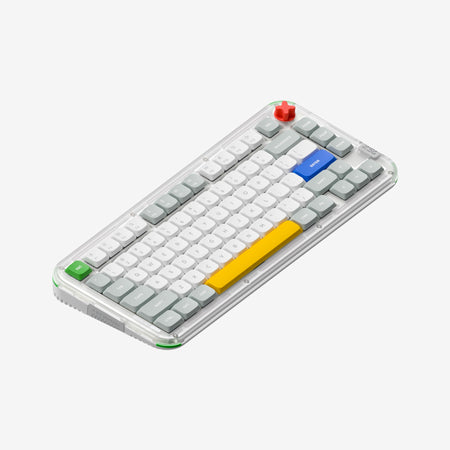
- Exclusive DayZ-inspired design elements including custom keycaps, knob, and stickers
- Magnetic switches only. Standard MX switches will not fit.
- No ISO layout. ISO-DE, UK, and other ISO variants are not offered.
Get the
Keychron Lemokey P1
Mechanical
Build quality in the top 5% of 75% boards under $150.
- Hot-swappable with almost all 3-pin and 5-pin MX mechanical switches for extensive switch choice
- Full QMK and VIA support for deep keymap, macro, and firmware-level customization
- Wireless P1 Pro version available with Bluetooth 5.1, 2.4 GHz, and a 4000 mAh battery lasting up to 200 hours backlit off
- South-facing LEDs. Shine-through legends stay dark, and some sculpted keycaps can clip the LED.
If your primary use is competitive gaming and you want to leverage Hall effect technology like dynamic rapid trigger and adjustable actuation, the Keychron P1 HE DayZ is the stronger choice. For everyone else, especially those needing keyboard customization, switch versatility, or wireless functionality, the Lemokey P1 offers a more complete package with QMK/VIA support, hot-swappable MX switches, and multiple connection options. The decision hinges on whether a specialized gaming feature set or broad customization and flexibility matters more to you.
The differences that matter
Skip the 40-row spec sheet. These are the specs that change how each board feels, sounds, and fits your desk.
Keychron P1 HE DayZ
Keychron Lemokey P1
Hall effect (magnetic)
Yes
No
Adjustable actuation helps in games and not in normal typing
Hot-swappable
No
Yes
Switch changes without soldering
Switch options
Magnetic
Clicky, Linear, Tactile
QMK
No
Yes
The deep option when you want to remap every key
VIA
No
Yes
GUI remapping without compiling firmware
- Keychron P1 HE DayZ
- Keychron Lemokey P1
- Performance
- 5881
- Build quality
- 4688
- Productivity
- 5097
- Customizability
- 4496
- Portability
- 5981
- Layout size: 75%
- Knob
What will you mostly use it for?
The Keychron P1 HE DayZ wins the gaming category thanks to its Hall effect advantages, including adjustable actuation, rapid trigger, and analog input. However, the Lemokey P1 dominates all other use cases: office, programming, travel, modding, and content creation. Its support for QMK/VIA, hot-swappable MX-style switches, and wireless (P1 Pro) provides the flexibility and customization that general-purpose users and enthusiasts need. The P1 HE DayZ is a specialized gaming tool, while the Lemokey P1 is a versatile platform for a wider range of activities.
Pick the Keychron P1 HE DayZ
- Hall effect Gateron double-rail magnetic switches with adjustable actuation from 0.2 to 3.8 mm
- Dynamic Rapid Trigger technology for immediate key resets and rapid-fire actions
- Analog mode for variable input in supported games
- Last Keystroke Prioritization (LKP) and Snap Click features available
Keychron P1 HE DayZ vs Lemokey P1 specs
Every tracked spec, side by side. Rows marked with a dot differ between the boards.
14 of 27 specs differ
Keychron P1 HE DayZ
Keychron Lemokey P1
Switch options
Hall effect (magnetic)
Hot-swappable
Mount style
Sound dampening
Screw-in stabilizers
Layout size
Layout standard
Ergonomics
Knob
Display
Connection
Max polling rate
Battery
USB-C
Case material
Plate material
Keycaps
Weight
Dimensions
Typing angle
Backlight
QMK
VIA
N-key rollover
Mac & Windows
Released
ISO layouts by store
Which stores sell ISO-DE, UK, and the other regional layouts.
Keychron P1 HE DayZ
No ISO layout at the stores we track.
Keychron Lemokey P1
Keychron
ISO-DE, ISO-UK, ISO-Nordic, ISO-SW
In stockShips to you
Keychron (DE)
ISO
In stockDoes not ship to you
Keychron (DE)
ISO-DE, ISO-UK, ISO-Nordic, ISO-SW
In stockDoes not ship to you
Compare prices
Live prices from the stores we track, cheapest in-stock offer first.
Prices in USD are converted to your currency and can change at any time. KeebFinder may earn a commission when you buy through these links, at no extra cost to you.
Lowest price across stores, Amazon excluded.


Keychron P1 HE DayZ vs Lemokey P1: your questions
No. The P1 HE DayZ is only compatible with Gateron double-rail magnetic switches sold on the Keychron and Lemokey website. It does not support other magnetic switches or standard MX mechanical switches.
Yes. The Lemokey P1 fully supports QMK open-source firmware and VIA software for key remapping and macro creation. You can also use the Lemokey Launcher web app for customization across Windows, macOS, and Linux.
Both the P1 HE DayZ and the Lemokey P1 Pro have a 4000 mAh battery. The P1 HE DayZ offers up to 100 hours of battery life with backlight off, while the Lemokey P1 Pro lasts up to 200 hours under the same conditions according to lab tests.
Yes. Both keyboards achieve a 1000 Hz polling rate in wired and 2.4 GHz wireless modes. In Bluetooth mode, the P1 HE DayZ operates at 125 Hz, while the Lemokey P1 Pro operates at 90 Hz.
The P1 HE DayZ uses Hall effect magnetic switches with adjustable actuation from 0.2 to 3.8 mm and dynamic rapid trigger for faster responses. The Lemokey P1 uses traditional mechanical switches and relies on its QMK/VIA programmability for game-specific macros.
Yes. The Lemokey P1 is available as a barebone (DIY) version that includes the case, PCB, and plate but not keycaps or switches. This allows you to choose your own mechanical switches and keycaps for a custom build.
The Lemokey P1 is generally better for office use because it supports hot-swappable MX mechanical switches, allowing you to install quieter linear switches. Its QMK/VIA support enables custom productivity macros, and the south-facing RGB is less intrusive with standard keycaps.
No. The P1 HE DayZ comes with Cherry profile dye-sub PBT keycaps with a DayZ color scheme. The Lemokey P1 uses Cherry double-shot PBT keycaps that are non-backlight shine-through and more neutral in design.
Yes. The P1 HE DayZ uses the Lemokey Launcher web app for remapping keys, adjusting actuation points, and configuring the knob. It does not support QMK or VIA directly.
The Lemokey P1 (P1 Pro version) is more travel-friendly due to its wireless connectivity options (Bluetooth 5.1 and 2.4 GHz) and longer Bluetooth battery life of up to 200 hours. However, both keyboards are relatively heavy at around 1650 grams.
Both the Keychron P1 HE DayZ and the Lemokey P1 use screw-in PCB stabilizers, which reduce rattle and wobble on larger keys like the spacebar and shift keys for a more stable typing experience.
Yes. The P1 HE DayZ is compatible with Windows, macOS, and Linux systems, as stated in its specifications. It also includes Mac keycaps in the box for Mac users.
Not sold on either?


Still torn?
Answer a few quick questions and the keyboard finder ranks 2,000+ boards by how you will actually use yours.