Keychron Q1 vs Q3 ProWired 75% or Wireless TKL Showdown
Choose the Q3 Pro if you need Bluetooth, or the Q1 if a compact wired 75% layout and more plate options matter more.
KeebFinder may earn a commission when you buy through these links, at no extra cost to you.

4.9 (10)4.9 · 10 reviews
from$109at Keychron
4.8 (24)4.8 · 24 reviews
from$149at Keychron
Which one should you get?
Get the
Keychron Q1
Build quality in the top 5% of 75% boards under $150.
- Compact 75% layout with knob version available.
- Available with aluminum, steel, or polycarbonate plate materials.
- Lighter weight of 1825g for easier desk repositioning.
- South-facing LEDs. Shine-through legends stay dark, and some sculpted keycaps can clip the LED.
- Missing ISO-Nordic. The other board is sold in those layouts.
- No numpad.
Get the
Keychron Q3 Pro
Build quality in the top 5% of 80% boards under $150.
- Wireless Bluetooth 5.1 with a 4000mAh battery lasting up to 300 hours.
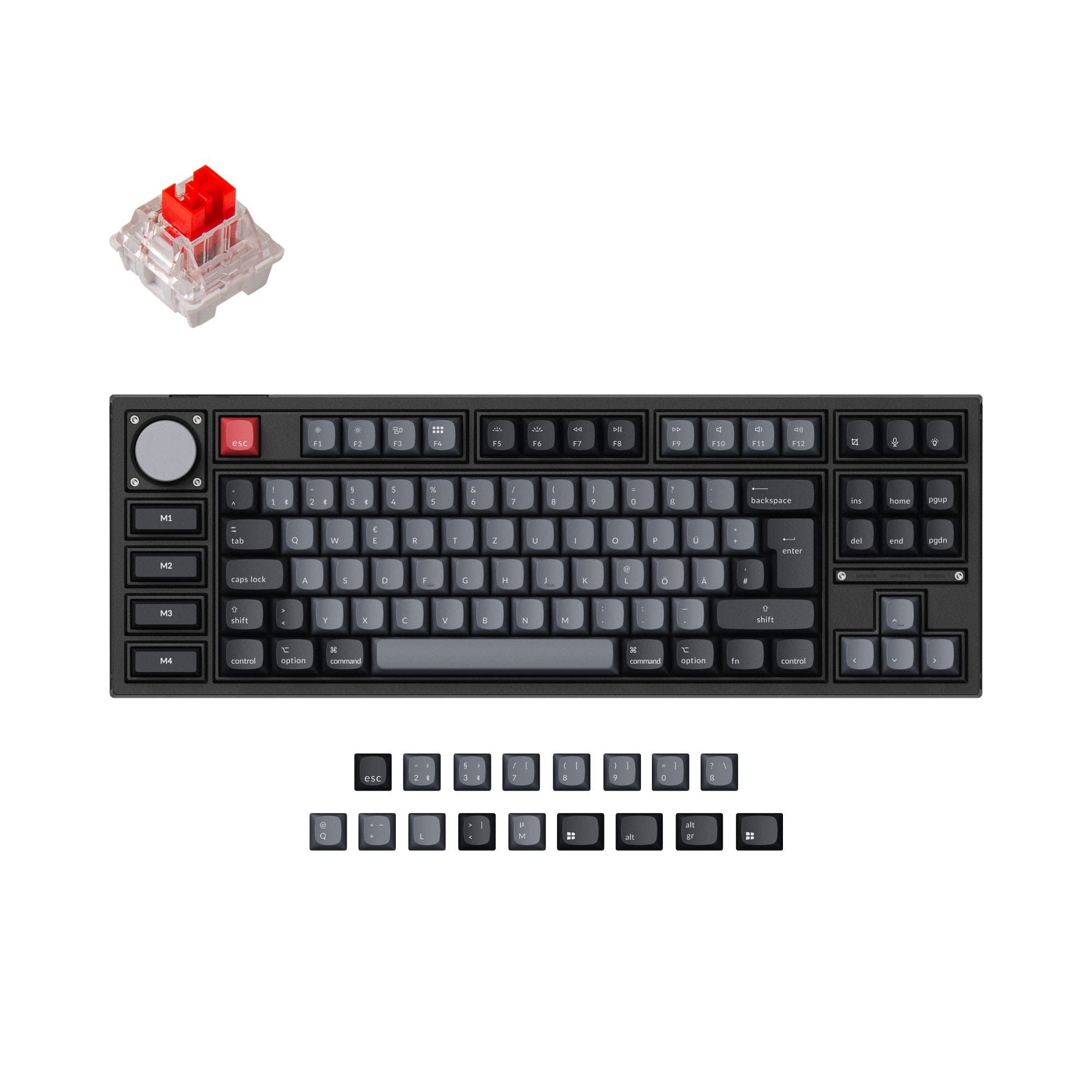
- Four programmable macro keys on the Special Edition version.
- Available in both Special Edition with ABS keycaps and standard with PBT keycaps.
- South-facing LEDs. Shine-through legends stay dark, and some sculpted keycaps can clip the LED.
- No numpad.
Choose the Keychron Q1 if you want a smaller 75% layout with more plate customization and don't need wireless. Go with the Keychron Q3 Pro if Bluetooth support and a full TKL layout with macro keys are essential to your workflow. Both keyboards deliver a premium aluminum typing experience with QMK/VIA programmability.
The differences that matter
Skip the 40-row spec sheet. These are the specs that change how each board feels, sounds, and fits your desk.
Keychron Q1
Keychron Q3 Pro
Layout size
75%
80%
Connection
Wired
Bluetooth, Wired
Wireless for several devices and wired for lower latency
Weight
1,825 g
2,300 g
Heavier boards stay planted and lighter ones travel
Layout standard
ANSI, ISO, ISO-DE, ISO-ES, ISO-FR, ISO-SW, ISO-UK, JIS
ANSI, ISO, ISO-DE, ISO-ES, ISO-FR, ISO-Nordic, ISO-SW, ISO-UK
ISO and JIS exist so regional layouts fit
Plate material
Aluminum, Polycarbonate, Steel
Polycarbonate
- Keychron Q1
- Keychron Q3 Pro
- Performance
- 7282
- Build quality
- 8989
- Productivity
- 9797
- Customizability
- 9898
- Portability
- 6576
- Hot-swappable
- Max polling rate: 1,000 Hz
- Case material: Aluminum
- Switch options: Clicky, Linear, Tactile
- Mount style: Gasket Mount, Plate Mount
- Knob
What will you mostly use it for?
For office use and travel, the Keychron Q3 Pro wins due to its wireless Bluetooth connectivity and long battery life. The Q1 takes the lead for modding with more plate material choices. In gaming and content creation, both perform equally well thanks to identical wired polling rates and knob support. Programming favors the Q1's more compact 75% layout.
It's a tie
- Both have a 1000 Hz polling rate in wired mode for low latency.
- Both offer hot-swappable switches and RGB options.
- The Q3 Pro drops to 90 Hz in wireless mode, but wired play is identical.
- Neither board is marketed as a dedicated gaming keyboard.
What owners say
Ratings and quotes collected from verified store reviews, including the critical ones.
Keychron Q1
10 owner reviews
“Very pretty and good quality, only con is it's kind of pingy but it's easy to mod and fix with some tape, force break mod.”
Keychron Q3 Pro
24 owner reviews
“I ordered this keyboard for myself and it sounds and feels amazing. I love the clacky feel over the clicky keyboard I had before!”
Keychron Q1 vs Q3 Pro specs
Every tracked spec, side by side. Rows marked with a dot differ between the boards.
9 of 27 specs differ
Keychron Q1
Keychron Q3 Pro
Switch options
Hot-swappable
Mount style
Sound dampening
Screw-in stabilizers
Layout size
Layout standard
Ergonomics
Knob
Display
Media keys
Connection
Max polling rate
Battery
USB-C
Case material
Plate material
Keycaps
Weight
Dimensions
Typing angle
Backlight
QMK
VIA
N-key rollover
Mac & Windows
Released
ISO layouts by store
Which stores sell ISO-DE, UK, and the other regional layouts.
Keychron Q1
Keychron
ISO-DE, ISO-UK, ISO-FR, ISO-ES, ISO-SW
In stockShips to you
MK
ISO
Out of stockShips to you
Keychron (DE)
ISO-DE, ISO-UK, ISO-FR, ISO-ES, ISO-SW
Out of stockDoes not ship to you
Keychron (DE)
ISO
Out of stockDoes not ship to you
Keychron Q3 Pro
Keychron
ISO-DE, ISO-UK, ISO-Nordic, ISO-FR, ISO-ES, ISO-SW
In stockShips to you
Keychron (DE)
ISO-DE, ISO-UK, ISO-Nordic, ISO-FR, ISO-ES, ISO-SW
In stockDoes not ship to you
Compare prices
Live prices from the stores we track, cheapest in-stock offer first.
Prices in USD are converted to your currency and can change at any time. KeebFinder may earn a commission when you buy through these links, at no extra cost to you.
Lowest price across stores, Amazon excluded.



Keychron Q1 vs Q3 Pro: your questions
Both keyboards are tied for gaming use when used in wired mode, as they each offer a 1000 Hz polling rate. In wireless mode, the Q3 Pro drops to 90 Hz, which may introduce more latency for competitive play. Neither board is explicitly marketed as a gaming keyboard.
Yes, the Q3 Pro supports Bluetooth 5.1 and can connect to up to three devices wirelessly, allowing you to switch between a laptop, phone, and tablet. It also has a USB Type-C wired connection for when you need it.
No, the Keychron Q1 is a wired-only keyboard with a USB Type-C connection. It does not support Bluetooth or any other form of wireless connectivity.
The Q3 Pro has a 4000mAh rechargeable battery. According to Keychron, it can last up to 300 hours with backlight off and up to 100 hours with RGB at the lowest brightness in lab tests.
Yes, both the Keychron Q1 and Q3 Pro support hot-swappable switches for 3-pin and 5-pin MX style switches. Note that the Q3 Pro Special Edition's four macro keys are not hot-swappable.
Both keyboards share the same double-gasket design and a full CNC machined 6063 aluminum case. The Q1 and Q3 Pro both have aluminum bodies and are finished with anodizing and sandblasting. Neither is clearly superior in build quality.
Yes, both keyboards support QMK firmware and can be configured using Keychron Launcher or VIA software for key remapping and macros. They are compatible with Mac, Windows, and Linux systems.
The Keychron Q1 comes with OSA profile ABS backlight shine-through keycaps. The Q3 Pro Standard version includes OSA double-shot PBT keycaps, while the Special Edition includes OSA backlight shine-through ABS keycaps.
The Keychron Q1 is lighter at 1825g, making it easier to slide or reposition on your desk. The Q3 Pro is heavier at 2300g, which adds stability but makes it more cumbersome to move.
Yes, the Keychron Q3 Pro includes a programmable rotary encoder knob that can be customized via VIA software for tasks like zooming, volume control, or adjusting brightness. The Q1 also offers a similar knob in certain versions.
The Keychron Q1 has a 75% layout with a compact design. The Keychron Q3 Pro has an 80% TKL layout, which is slightly larger and retains more separation between keys.
The Q3 Pro is typically priced higher but adds Bluetooth 5.1 wireless, a 4000mAh battery, and N-key rollover support in wireless mode. If you need wireless connectivity or macro keys, the Q3 Pro justifies its price; otherwise, the Q1 offers a similar typing experience for less.
Not sold on either?


Still torn?
Answer a few quick questions and the keyboard finder ranks 2,000+ boards by how you will actually use yours.