Not sure which keyboard to choose? Try the Keyboard Finder now!

Compare Keychron Q1 V1 vs Q3 Differences Side by Side

This comparison is for buyers deciding between the Keychron Q1 V1 (75% layout) and the Keychron Q3 (80% TKL layout). Both are fully wired all-metal keyboards with gasket mount, hot-swappable switches, QMK and VIA support, and south-facing RGB. The decision is challenging because both share premium build quality and extensive customizability, yet they differ significantly in layout size and key design features like mounting and plate material. The Q3 adds a double-gasket structure and a steel plate, while the Q1 V1 is lighter and uses an aluminum plate.

93
Keychron Q1 QMK Custom Mechanical Keyboard ISO Layout Collection - Version 1
97
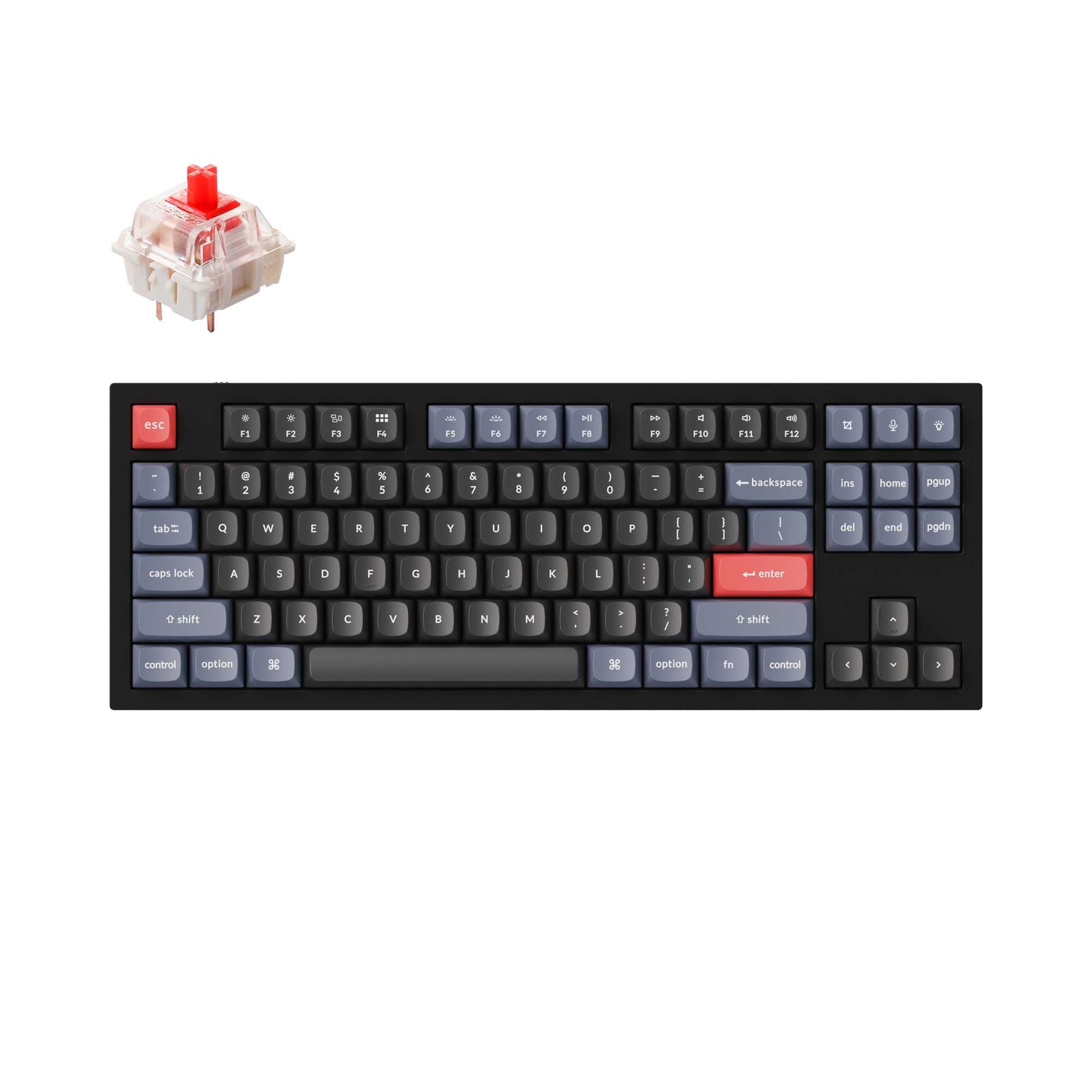
Keychron Q3 QMK Custom Mechanical Keyboard

Select a keyboard to compare

4.5 (1175)
4.7 (319)
  • Released in 2023
  • Has Linear, Tactile, Clicky switch options
  • Available in a 75% layout
  • Built with the ISO, JIS, ANSI layout standard
  • Supports Wired, Wired only connectivity
  • Weighs about 1700 g
  • Sized at 22 x 145 x 328 mm
  • Features ABS, PBT keycaps
  • Released in 2022
  • Has Linear, Tactile, Clicky, Silent switch options
  • Available in a 80% layout
  • Built with the ANSI, ISO, JIS, ISO-DE, ISO-ES, ISO-FR, ISO-SW, ISO-UK layout standard
  • Supports Wired, Wired only, connectivity
  • Weighs about 2000 g
  • Sized at 20 x 137 x 365 mm
  • Features PBT, ABS keycaps
Scores
  • Performance: 72.6
  • Build Quality: 89.7
  • Productivity: 97.9
  • Customizability: 99.9
  • Portability: 64.8
Scores
  • Performance: 71.7
  • Build Quality: 91
  • Productivity: 97.4
  • Customizability: 99.6
  • Portability: 57.4
Name
Keychron Q1 V1
Name
Keychron Q3
Release year
2023
Release year
2022
Switch Options
Linear, Tactile, Clicky
Switch Options
Linear, Tactile, Clicky, Silent
Profile
Normal Profile
Profile
Normal Profile
Hot Swappable
 
Hot Swappable
 
Layout Size
75%
Layout Size
80%
Layout Standard
ISO, JIS, ANSI
Layout Standard
ANSI, ISO, JIS, ISO-DE, ISO-ES, ISO-FR, ISO-SW, ISO-UK
Layout Ergonomics
Normal
Layout Ergonomics
Normal
Knob Support
 
Knob Support
 
Display Support
 
Display Support
 
Mac/Win Support
 
Mac/Win Support
 
Multi-Media Keys
 
Multi-Media Keys
 
USB-C
 
USB-C
 
USB passthrough
 
USB passthrough
 
Connection
Wired, Wired only
Connection
Wired, Wired only,
Polling Rate
1000 Hz
Polling Rate
1000 Hz
Battery capacity
-
Battery capacity
-
Hall Effect Support
 
Hall Effect Support
 
QMK Support
 
QMK Support
 
VIA Support
 
VIA Support
 
VIAL Support
 
VIAL Support
 
N-Key Rollover
 
N-Key Rollover
 
Rapid Trigger
 
Rapid Trigger
 
Mount Style
Gasket Mount
Mount Style
Gasket Mount
Screw in Stabilizers
 
Screw in Stabilizers
 
Sound Dampening
 
Sound Dampening
 
Backlight
 
Rgb, South-face
Backlight
 
Rgb, South-face
Case Colors
Case Colors
Case Material
Aluminum
Case Material
Aluminum
Keycaps Material
ABS, PBT
Keycaps Material
PBT, ABS
Dimensions
22 x 145 x 328 mm
Dimensions
20 x 137 x 365 mm
Weight
1700g
Weight
2000g
*Something incorrect or missing? Please
let me know
!

Pros and Trade-offs

Choose the Keychron Q3 if you value a full TKL layout with dedicated navigation keys, a double-gasket design for reduced resonance, and a steel plate. Choose the Keychron Q1 V1 if you prefer a lighter, more compact 75% form factor with an aluminum plate and are willing to modify it to address potential case ping. Both are excellent wired mechanical keyboards for enthusiasts, but the Q3 offers a more refined out-of-the-box typing experience while the Q1 V1 prioritizes compactness and modding freedom.

Keychron Q1 V1

  • +Lighter weight (1700g) compared to the Q3, making it slightly more portable.
  • +Aluminum plate included, which can produce a different typing feel and sound than steel.
  • +Slightly more compact 75% layout for users who want functionality in a smaller footprint.
  • +High customizability with QMK/VIA support and availability as a barebones kit.
  • +Review scores indicate a very high customizability score and strong build quality relative to its price tier.

  • Some customers reported keycap compatibility issues with MT3 and XDA profiles due to plate corner design on the knobless version.
  • Customer reviews mention case ping as a notable issue without modifications.
  • Smaller layout means no dedicated navigation cluster, requiring function layers for Home, End, PgUp, PgDn.

Keychron Q3

  • +80% TKL layout provides dedicated arrow keys and a full navigation cluster (Home, End, PgUp, PgDn).
  • +Double-gasket design with silicone pads between cases reduces metal acoustic resonance, according to the vendor.
  • +Steel plate offers a stiffer typing platform which some users prefer for consistency.
  • +ARM Cortex-M4 MCU with 128KB Flash provides more firmware flexibility for developers.
  • +OSA profile ABS backlight shine-through keycaps are included for better low-light visibility.

  • Heavier than the Q1 V1 at 2000g, less portable.
  • Larger footprint (365 x 137 mm) takes up more desk space.
  • Steel plate may feel too stiff for users who prefer a more flexible typing experience from an aluminum plate.

Which Keyboard Is Better for Your Needs?

The Keychron Q3 generally wins in productivity-focused use cases like Office, Programming, and Content Creation due to its larger TKL layout with dedicated navigation keys and arrow cluster. The Q3 also edges ahead in Gaming thanks to its stiff steel plate and TKL layout, though the margin is slim. The Q1 V1 takes the lead in Travel due to its lighter weight and smaller 75% footprint. For Modding, the two are tied because both share extensive hot-swappable and firmware customization options, with the Q1 V1 offering an aluminum plate and the Q3 providing a double-gasket design.

GamingKeychron Q3
  • The Q3 has an 80% TKL layout, providing dedicated arrow keys and a full navigation cluster without sacrificing desk space.
  • The steel plate on the Q3 may offer a stiffer typing feel, which some gamers prefer for rapid key presses.
  • The Q3 is equipped with an ARM Cortex-M4 MCU with 128KB Flash, described by the vendor as providing flexibility for developers.
OfficeKeychron Q3
  • The Q3's 80% layout includes a full set of navigation keys (Home, End, PgUp, PgDn) useful for spreadsheet and document navigation.
  • The Q3's double-gasket design is intended to significantly reduce acoustic resonance between metals, potentially making it quieter in shared spaces.
  • The Q3 comes with OSA profile ABS backlight shine-through keycaps, which can help in low-light office environments.
ProgrammingKeychron Q3
  • The dedicated arrow keys and navigation cluster on the Q3 are beneficial for code navigation without needing to hold function layers.
  • The Q3's double-gasket design may produce a different typing sound and feel that some programmers prefer for long typing sessions.
  • The steel plate on the Q3 could provide a more rigid typing platform, which some users find more consistent.
TravelKeychron Q1 V1
  • The Q1 V1 is lighter at 1700g compared to the Q3's 2000g, making it easier to transport.
  • The Q1 V1 has a smaller footprint (328 x 145 mm) versus the Q3 (365 x 137 mm), fitting better in bags.
  • Both keyboards are wired-only, but the smaller size of the Q1 V1 is slightly more portable.
ModdingTie
  • Both keyboards offer hot-swappable PCBs supporting 3-pin and 5-pin switches, QMK/VIA firmware, and screw-in PCB stabilizers.
  • Both come in fully assembled and barebones kits, allowing users to start from scratch or customize pre-built units.
  • The Q1 V1 uses an aluminum plate (or steel option) while the Q3 uses a steel plate, offering different plate materials for modding variety.
  • The Q3's double-gasket design adds an extra element of experimentation for modders looking to tune sound and flex.
Content CreationKeychron Q3
  • The Q3's 80% layout includes a full set of navigation keys (Home, End, PgUp, PgDn) which are commonly used in video editing and design software.
  • Both keyboards feature a programmable knob, but the Q3's inclusion of a dedicated Delete key (mentioned in the stabilizer description) may be useful for editing workflows.
  • The Q3's steel plate and double-gasket design are intended to reduce case resonance, which may produce a more refined typing sound during recording.

Frequently Asked Questions (FAQ)


Discover similar products

You might also like similar products in that price range:

95
$79
Keychron Q10 (Alice Layout) QMK Custom Mechanical Keyboard
Keychron Q10
75%,
Hotswap,
Wired,
RGB,
Knob,
VIA,
QMK,
Alu case,
Gasket Mount

96
$149
Keychron Q3 Pro QMK/VIA Wireless Custom Mechanical Keyboard ISO Layout Collection
Keychron Q3 Pro
80%,
Hotswap,
Wireless,
Wired,
RGB,
Knob,
VIA,
QMK,
Alu case,
Gasket Mount

95
$86
Keychron Q1 QMK Custom Mechanical Keyboard - Version 1
Keychron Q1
75%,
Hotswap,
Wired,
RGB,
Knob,
VIA,
QMK,
Alu case,
Gasket Mount

96
$54
Keychron V3 QMK Custom Mechanical Keyboard ISO Layout Collection
Keychron V3
80%,
Hotswap,
Wired,
RGB/ White LEDs,
Knob,
VIA,
QMK,
Tray Mount

98
$94
Keychron V1 Max QMK Wireless Custom Mechanical Keyboard ISO Layout Collection
Keychron V1 Max
75%,
Hotswap,
Wireless,
Wired,
RGB,
Knob,
VIA,
QMK,
Gasket Mount

93
$59
Keychron Q2 QMK Custom Mechanical Keyboard
Keychron Q2
65%,
Hotswap,
Wired,
RGB,
Knob,
VIA,
QMK,
Alu case,
Gasket Mount

94
$85
Keychron Q8 Pro (Alice Layout) QMK/VIA Wireless Custom Mechanical Keyboard
Keychron Q8 Pro
65%,
Hotswap,
Wireless,
Wired,
RGB,
Knob,
VIA,
QMK,
Alu case,
Gasket Mount

92
$59
Keychron Q7 QMK Custom Mechanical Keyboard
Keychron Q7
70%,
Hotswap,
Wired,
RGB,
Knob,
VIA,
QMK,
Alu case,
Gasket Mount

93
$97
Keychron V1 Ultra 8K Wireless Custom Mechanical Keyboard ISO Layout Collection
Keychron V1 Ultra
75%,
Hotswap,
Wireless,
Wired,
RGB/ White LEDs,
Knob,
VIA,
QMK,
Gasket Mount

94
$59
Keychron K8 Pro QMK/VIA Wireless Mechanical Keyboard
Keychron K8 Pro
80%,
Hotswap,
Wireless,
Wired,
RGB/ White LEDs,
VIA,
QMK,
Alu case,
Tray Mount