Keychron Q1 Max vs Q3 Pro75% vs 80% Wireless
Choose the Q1 Max for its 2.4 GHz wireless gaming performance; choose the Q3 Pro if you need the extra navigation keys of an 80% layout.
KeebFinder may earn a commission when you buy through these links, at no extra cost to you.

4.3 · 25 reviews
from$209at MK
4.8 · 24 reviews
from$149at Keychron
Which one should you get?
Get the
Keychron Q1 Max
75%
Build quality in the top 5% of 75% boards under $200.
- 2.4 GHz wireless allows 1000 Hz polling without USB cable, confirmed by Keychron
- Multiple acoustic foam layers (IXPE, PET, Latex) for a deeper sound signature
- Lighter weight (1724g) and smaller 75% footprint for easier transport
- South-facing LEDs. Shine-through legends stay dark, and some sculpted keycaps can clip the LED.
- Missing ISO-FR, ISO-ES. The other board is sold in those layouts.
- No numpad.
Get the
Keychron Q3 Pro
80% Wireless
Build quality in the top 5% of 80% boards under $150.
- 80% TKL layout includes dedicated navigation and arrow keys without layers
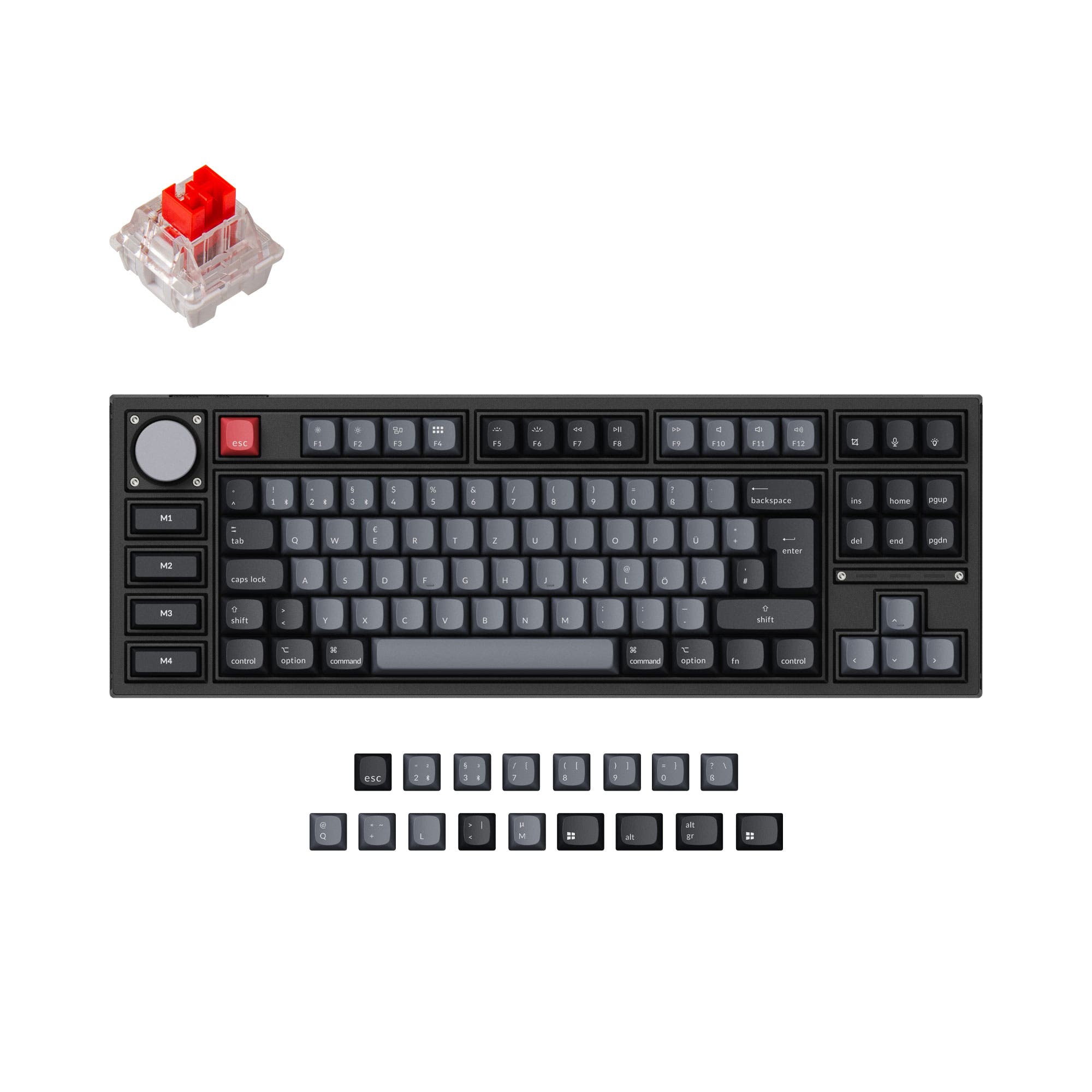
- Special Edition variant adds four programmable macro keys on the left side
- ABS backlight shine-through keycaps available on the Special Edition for vivid RGB
- South-facing LEDs. Shine-through legends stay dark, and some sculpted keycaps can clip the LED.
- Missing ISO-CH. The other board is sold in those layouts.
- No numpad.
If low-latency wireless gaming and portability matter most, choose the Keychron Q1 Max for its 2.4 GHz connection and compact size. If you need the extra navigation keys and macros of a full TKL layout for programming or content creation, the Keychron Q3 Pro is the better fit. Both deliver top-tier build quality and customization, but their core differences in connectivity and layout will decide the right match for your daily use.
The differences that matter
Skip the 40-row spec sheet. These are the specs that change how each board feels, sounds, and fits your desk.
Keychron Q1 Max
Keychron Q3 Pro
Layout size
75%
80%
Connection
Bluetooth, 2.4 GHz, Wired
Bluetooth, Wired
Wireless for several devices and wired for lower latency
Weight
1,724 g
2,300 g
Heavier boards stay planted and lighter ones travel
Layout standard
ANSI, ISO, ISO-CH, ISO-DE, ISO-Nordic, ISO-SW, ISO-UK, JIS
ANSI, ISO, ISO-DE, ISO-ES, ISO-FR, ISO-Nordic, ISO-SW, ISO-UK
ISO and JIS exist so regional layouts fit
Keycaps
PBT
ABS, PBT
- Keychron Q1 Max
- Keychron Q3 Pro
- Performance
- 8282
- Build quality
- 8989
- Productivity
- 9797
- Customizability
- 9898
- Portability
- 8176
- Hot-swappable
- Battery: 4,000 mAh
- Max polling rate: 1,000 Hz
- Case material: Aluminum
- Switch options: Clicky, Linear, Tactile
- Mount style: Gasket Mount, Plate Mount
What will you mostly use it for?
The Q1 Max wins for gaming and travel thanks to its 2.4 GHz wireless and lighter, smaller body. The Q3 Pro takes programming and content creation because its 80% layout includes dedicated navigation keys and macro keys. For office typing and modding, the two keyboards are evenly matched, both offering excellent acoustic foam, gasket mounting, and full QMK/VIA support. Your choice will depend on whether you prioritize wireless performance and portability or the convenience of a full TKL layout.
Pick the Keychron Q1 Max
- 2.4 GHz wireless connection with 1000 Hz polling rate directly from the manufacturer
- Compact 75% layout saves desk space for mouse movement
- 4000mAh battery supports extended wireless sessions
What owners say
Ratings and quotes collected from verified store reviews, including the critical ones.
Keychron Q1 Max
25 owner reviews
“As a software analyst who do a lot of coding, emailing and editing this is the one. Why would I build one when there is one ready that is better than what I could build?”
“This product is a downgrade relative to the previous version. I deeply regret not unpacking it and testing it out in the return period: (1) The keyboard is much louder -- on the Pro, keypresses were basically silent with the right switches; now, they are very…”
Keychron Q3 Pro
24 owner reviews
“I ordered this keyboard for myself and it sounds and feels amazing. I love the clacky feel over the clicky keyboard I had before!”
Keychron Q1 Max vs Q3 Pro specs
Every tracked spec, side by side. Rows marked with a dot differ between the boards.
7 of 27 specs differ
Keychron Q1 Max
Keychron Q3 Pro
Switch options
Hot-swappable
Mount style
Sound dampening
Screw-in stabilizers
Layout size
Layout standard
Ergonomics
Knob
Display
Media keys
Connection
Max polling rate
Battery
USB-C
Case material
Plate material
Keycaps
Weight
Dimensions
Typing angle
Backlight
QMK
VIA
N-key rollover
Mac & Windows
Released
ISO layouts by store
Which stores sell ISO-DE, UK, and the other regional layouts.
Keychron Q1 Max
Input Gear
ISO-DE
Out of stockShips to you
Keychron
ISO-DE, ISO-UK, ISO-Nordic, ISO-CH
Out of stockShips to you
Keychron (DE)
ISO-DE, ISO-UK, ISO-CH
In stockDoes not ship to you
Keychron Q3 Pro
Keychron
ISO-DE, ISO-UK, ISO-Nordic, ISO-FR, ISO-ES, ISO-SW
In stockShips to you
Keychron (DE)
ISO-DE, ISO-UK, ISO-Nordic, ISO-FR, ISO-ES, ISO-SW
In stockDoes not ship to you
Compare prices
Live prices from the stores we track, cheapest in-stock offer first.
Prices in USD are converted to your currency and can change at any time. KeebFinder may earn a commission when you buy through these links, at no extra cost to you.
Lowest price across stores, Amazon excluded.




Keychron Q1 Max vs Q3 Pro: your questions
The Keychron Q1 Max is a 75% keyboard with 2.4 GHz wireless, Bluetooth, and wired connectivity, while the Q3 Pro is an 80% TKL keyboard with Bluetooth and wired only. The Q1 Max is more compact and offers a gaming-friendly 2.4 GHz link, but the Q3 Pro gives you dedicated navigation keys and optional macro keys.
Yes, the Q1 Max supports a 2.4 GHz wireless connection with a 1000 Hz polling rate, as stated by Keychron. This makes it suitable for competitive gaming where low latency matters. Bluetooth mode on the Q1 Max is limited to 90 Hz polling.
No, the Q3 Pro does not have a 2.4 GHz wireless option. It connects via Bluetooth 5.1 or USB-C wired, with a 1000 Hz polling rate available only in wired mode. Bluetooth polling is capped at 90 Hz according to the manufacturer.
The Q3 Pro claims up to 300 hours of Bluetooth usage with backlight off, while the Q1 Max states up to 180 hours under the same conditions. Both have a 4000mAh battery, but the Q3 Pro's power-efficient chip may extend run time.
Yes, both the Q1 Max and Q3 Pro support QMK firmware and can be reconfigured via the Keychron Launcher web app or VIA software. You can remap keys, create macros, and adjust RGB lighting on both models.
The Q3 Pro's 80% TKL layout includes dedicated Home, End, PgUp, and PgDn keys, which can speed up code navigation without using layers. The Special Edition also adds four programmable macro keys for repeated editor commands.
Yes, both the Q1 Max and Q3 Pro have hot-swap PCBs that accept 3-pin and 5-pin MX-style switches. However, the four macro keys on the Q3 Pro Special Edition are not hot-swappable, as noted in the product listing.
The Q1 Max comes with multiple layers of acoustic foam including IXPE, PET, and Latex for a dampened, refined sound. The Q3 Pro uses a double-gasket design and sound dampening foam but lacks the specific multi-layer foam combination of the Q1 Max.
Yes, both the Q1 Max and Q3 Pro include a system toggle switch and come with extra keycaps for macOS and Windows. The vendor pages confirm they support macOS, Windows, and Linux operating systems.
The Q1 Max offers KSA double-shot PBT or OSA side-printed double-shot PBT keycaps. The Q3 Pro standard version uses OSA double-shot PBT, while the Special Edition comes with OSA backlight shine-through ABS keycaps.
The Q1 Max (fully assembled) weighs about 1724g, while the Q3 Pro Special Edition comes in at roughly 2300g. The standard Q3 Pro is listed at 1762g, making the Q1 Max the lighter option for travel.
Yes, both the Q1 Max and Q3 Pro include a programmable knob. According to the Q3 Pro listing, the knob can be set to adjust zoom, brush size, volume, or backlight hue. The Q1 Max also supports knob remapping via QMK/VIA.
Not sold on either?


Still torn?
Answer a few quick questions and the keyboard finder ranks 2,000+ boards by how you will actually use yours.