Keychron Q1 Pro vs Lemokey P3 HEGasket vs Magnetic
Choose the Q1 Pro for broad layout and OS flexibility, or the P3 HE for competitive gaming features like Rapid Trigger and analog control.
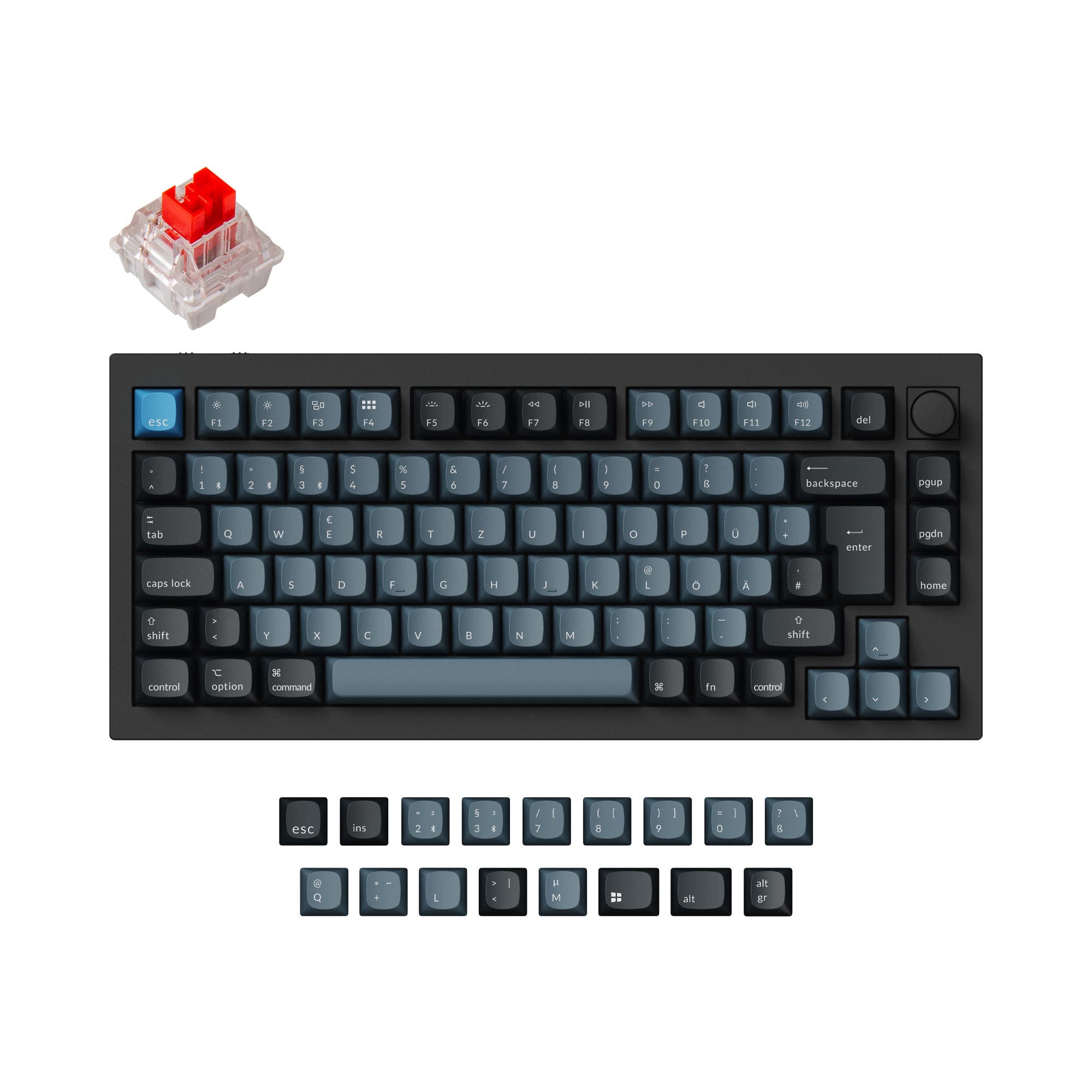

Which one should you get?
Get the
Keychron Q1 Pro
Gasket
- Double-gasket design with silicone pads reduces metallic resonance.
- PC plate provides a flexible typing feel and softer bottom-out.
- Available in ISO and ANSI variants, suiting international users.
- Wireless polling rate drops to 90 Hz in Bluetooth mode.
- No support for magnetic or Hall Effect switches.
Get the
Keychron Lemokey P3 HE
Magnetic
- Gateron double-rail magnetic switches with adjustable actuation from 0.2 to 3.8 mm.
- Rapid Trigger and Dynamic Keystrokes (4-in-1) for advanced gaming macros.
- Analog Mode enables variable input for racing and sports games.
- Only compatible with Gateron double-rail magnetic switches (not Jade or KS-20).
- Heavier at 1910g, making it less portable than the Q1 Pro.
- Only available in ANSI layout, limiting regional keyboard preferences.
For serious gamers who want the fastest response times, the Lemokey P3 HE's magnetic switches, Rapid Trigger, and analog input make it the better buy. If you need a versatile daily driver for typing, travel, and modding, the Q1 Pro's double-gasket design, PC plate, and extensive layout options offer more flexibility. Both keyboards deliver premium aluminum builds and deep QMK/VIA customization, so your choice ultimately comes down to whether magnetic gaming features or traditional switch ecosystem matters more.
The differences that matter
Skip the 40-row spec sheet. These are the specs that change how each board feels, sounds, and fits your desk.
Keychron Q1 Pro
Keychron Lemokey P3 HE
Layout size
75%
80%
Hall effect (magnetic)
No
Yes
Rapid trigger
No
Yes
Connection
Bluetooth, Wired, 2.4 GHz
Bluetooth, 2.4 GHz, Wired
Switch options
Clicky, Linear, Tactile
Clicky, Linear, Magnetic, Tactile
- Keychron Q1 Pro
- Keychron Lemokey P3 HE
- Performance
- 8293
- Build quality
- 8986
- Productivity
- 9898
- Customizability
- 9891
- Portability
- 8276
- Hot-swappable
- Battery: 4,000 mAh
- Max polling rate: 1,000 Hz
- Case material: Aluminum
- Knob
- QMK
What will you mostly use it for?
The Lemokey P3 HE dominates gaming with magnetic switches, Rapid Trigger, and analog input, making it the clear winner for competitive players. For office and travel, the Q1 Pro's lighter weight, smaller footprint, and longer Bluetooth battery life give it the edge. Programming and content creation are ties because both offer robust QMK/VIA programmability and a knob, while the P3 HE's north-facing RGB may appeal to some creators. Modders will prefer the Q1 Pro's flexible PC plate and double-gasket construction for acoustic experimentation.
Pick the Keychron Lemokey P3 HE
- Gateron double-rail magnetic switches with adjustable actuation from 0.2 to 3.8 mm.
- Rapid Trigger, Dynamic Keystrokes (4-in-1), and Last Key Priority for competitive play.
- Analog Mode for variable input like a game controller.
- 1000 Hz polling via 2.4 GHz and Type-C wired.
What owners say
Ratings and quotes collected from verified store reviews, including the critical ones.
Keychron Q1 Pro
15 owner reviews
“The Q1 Pro is the second keyboard I bought from Keychron. The basic materials are very good and she looks amazing. The only thing that is not perfect is the sound. I think she will be perfect with a simple adaption of foam and lubed switches. But the Q1 is…”
Keychron Lemokey P3 HE
2 owner reviews
“Typing feel incredible. My first HE/magnetic switch keyboard and I am completely satisfied. The board itself is heavy and solid. Love the LED lighting. One week in and I'm hooked.”
Keychron Q1 Pro vs Lemokey P3 HE specs
Every tracked spec, side by side. Rows marked with a dot differ between the boards.
15 of 29 specs differ
Keychron Q1 Pro
Keychron Lemokey P3 HE
Switch options
Hall effect (magnetic)
Rapid trigger
Hot-swappable
Mount style
Sound dampening
Screw-in stabilizers
Layout size
Layout standard
Ergonomics
Knob
Display
Media keys
Connection
Max polling rate
Battery
USB-C
Case material
Plate material
Keycaps
Weight
Dimensions
Typing angle
Backlight
QMK
VIA
N-key rollover
Mac & Windows
Released
Compare prices
Live prices from the stores we track, cheapest in-stock offer first.
Lowest price across stores, Amazon excluded.



Prices in USD are converted to your currency and can change at any time. KeebFinder may earn a commission when you buy through these links, at no extra cost to you.
Keychron Q1 Pro vs Lemokey P3 HE: your questions
The Lemokey P3 HE supports 1000 Hz polling in both wired and 2.4 GHz modes, which is ideal for gaming. The Keychron Q1 Pro only achieves 1000 Hz in wired mode, dropping to 90 Hz over Bluetooth. For competitive gaming over wireless, the P3 HE with 2.4 GHz is the better choice.
Yes, both keyboards are hot-swappable. The Q1 Pro accepts almost any 3-pin or 5-pin MX mechanical switch. The P3 HE is hot-swappable but only compatible with Gateron double-rail magnetic switches and will not work with standard mechanical or other magnetic switches.
Both keyboards come with a system toggle and include extra keycaps for macOS and Windows. They also support saving two different layouts, one for each operating system. The Q1 Pro lists Linux as a compatible system and the P3 HE also lists macOS, Windows, and Linux.
The Q1 Pro uses a double-gasket design with silicone pads and a PC plate, which provides more flex and a cushioned feel. The P3 HE uses a gasket mount with an aluminum plate for a stiffer, firmer bottom-out. The Q1 Pro is likely better for long typing sessions if you prefer a softer, more flexible feel.
Yes, both the Q1 Pro and the P3 HE support QMK firmware and the Keychron Launcher web app for VIA-style customization. This allows full key remapping, macro creation, and lighting control. The Q1 Pro uses an STM32L432 chip with 128KB flash, while the P3 HE has an MCU with 256KB flash.
The Q1 Pro is a 75% layout with a row of function keys and a knob, available in both ANSI and multiple ISO variants. The P3 HE is an 80% layout (tenkeyless) with a knob and is only available in ANSI. The Q1 Pro is shorter in length, while the P3 HE is wider.
The Q1 Pro offers up to 300 hours of battery life with backlight off and up to 100 hours with RGB on lowest brightness. The P3 HE lists up to 120 hours of wireless working time. The Q1 Pro has better Bluetooth endurance for extended use without charging.
The Q1 Pro comes with KSA double-shot PBT keycaps that are spherical and non-shine-through. The P3 HE offers Cherry profile double-shot PBT keycaps in either shine-through or non-shine-through versions. The Cherry profile is lower and more familiar to many users.
The P3 HE features a screwless design with magnetic latches for rapid tool-free disassembly of the top case. The Q1 Pro requires tools to open but offers more internal modding options such as the double-gasket silicone pads and a flex-friendly PC plate. Modders may prefer the Q1 Pro for sound tuning, while the P3 HE is easier for quick cleaning.
The P3 HE is the better choice for esports. It features Last Key Priority (LKP) for smoother directional changes, Snap Click for handling simultaneous key presses, and Rapid Trigger for instant key activation and reset. These magnetic switch features give a competitive edge in fast-paced shooters.
No, the Q1 Pro uses standard mechanical switches that only register on/off presses and does not support analog input. Only the P3 HE offers Analog Mode, which allows variable input like a game controller for racing and sports games.
Both keyboards have a full aluminum body, but the P3 HE is slightly heavier at 1910g compared to the Q1 Pro at 1825g for the fully assembled version. The P3 HE's aluminum plate and dense build may feel more solid, while the Q1 Pro's PC plate reduces weight. Both are built to last with CNC machined 6063 aluminum.
Not sold on either?


Still torn?
Answer a few quick questions and the keyboard finder ranks 2,000+ boards by how you will actually use yours.