Keychron Q12 vs Q14 ProSouthpaw 96% Wired vs Wireless
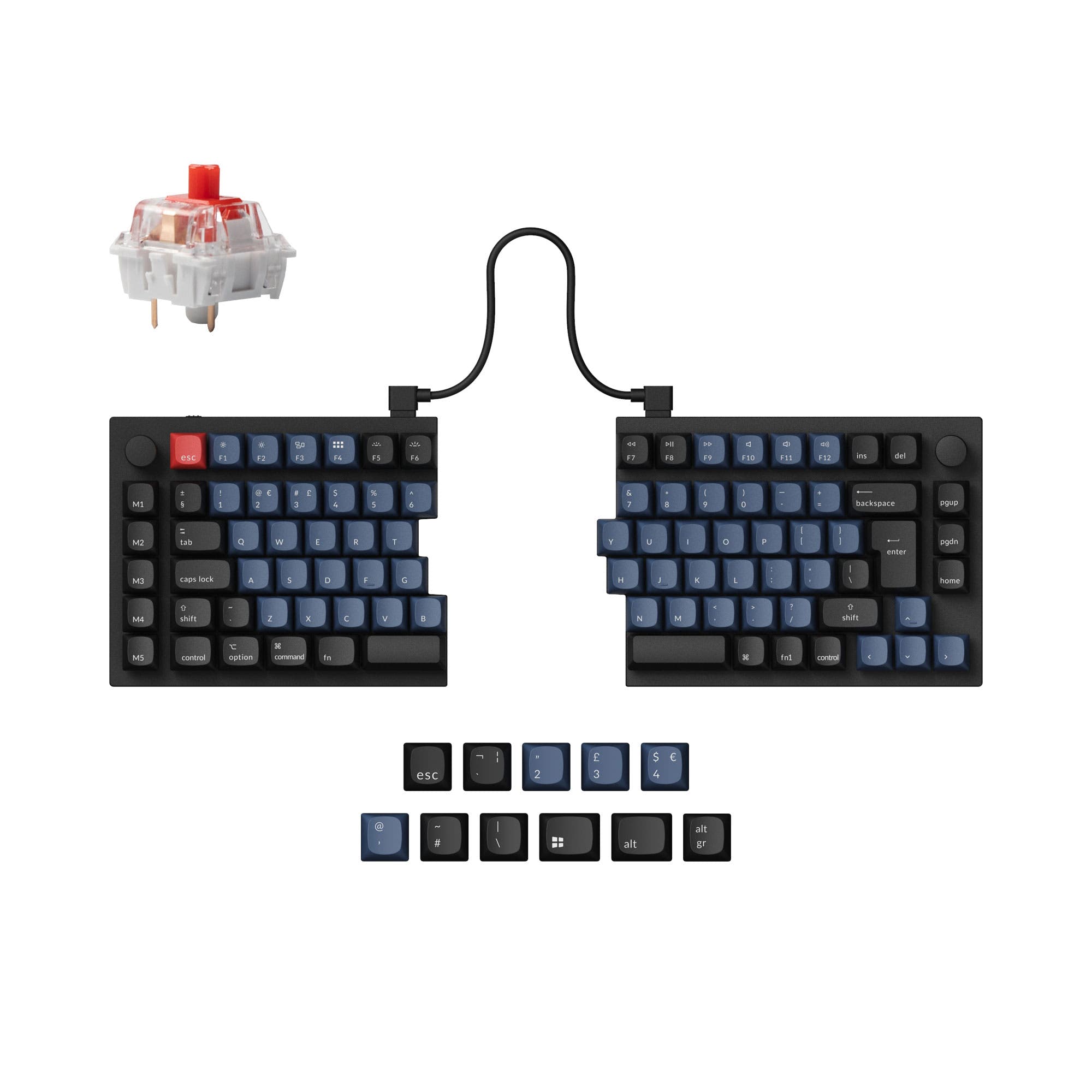
Choose the Q12 if you want a steel plate and wired-only simplicity, or the Q14 Pro if you need Bluetooth and prefer an Alice ergonomic layout.


Which one should you get?
Get the
Keychron Q12
Southpaw 96% Wired
- Steel plate provides a firmer, more rigid typing feel
- Fully assembled version uses pre-lubed Gateron G Pro switches
- Double-shot OSA PBT keycaps are oil-resistant with an SA-like shape
- Wired-only connectivity limits desk setup flexibility
- Steel plate may feel stiffer than polycarbonate alternatives
- No Bluetooth, so no multi-device pairing
Get the
Keychron Q14 Pro
Wireless
- Bluetooth 5.1 for wireless connection to up to 3 devices
- 4000mAh battery provides up to 300 hours of use (backlight off)
- Alice layout promotes a more natural wrist angle for ergonomics
- Fully assembled version uses Keychron K Pro switches instead of Gateron
- Wider and longer dimensions (157 x 445 mm) require more desk space
- Wireless mode polling rate drops to 90 Hz, affecting competitive gaming latency
If you prefer a rigid steel plate and a purely wired setup, the Keychron Q12 is a solid choice. However, the Keychron Q14 Pro justifies its higher price with Bluetooth 5.1, a larger 4000mAh battery, and the Alice layout that reduces wrist strain. Unless you are determined to avoid wireless, the Q14 Pro is the more versatile pick for most users who value ergonomics and connectivity.
The differences that matter
Skip the 40-row spec sheet. These are the specs that change how each board feels, sounds, and fits your desk.
Keychron Q12
Keychron Q14 Pro
Connection
Wired
Bluetooth, Wired
Ergonomics
Southpaw
Southpaw, Alice
Weight
2,491 g
2,395 g
Plate material
Steel
Polycarbonate
N-key rollover
No
Yes
- Keychron Q12
- Keychron Q14 Pro
- Performance
- 7382
- Build quality
- 9089
- Productivity
- 98100
- Customizability
- 9998
- Portability
- 4656
- Layout size: 96%
- Hot-swappable
- Max polling rate: 1,000 Hz
- Case material: Aluminum
- Switch options: Clicky, Linear, Tactile
- Mount style: Gasket Mount, Plate Mount
What will you mostly use it for?
For office and travel, the Q14 Pro wins on wireless freedom and ergonomic Alice layout. Gaming also favors the Q14 Pro because of N-Key Rollover support. Programming and modding are a tie since both keyboards share the same QMK/VIA firmware, hot-swap sockets, and double-gasket structure. For content creation, the Q14 Pro's Bluetooth and Alice design give it an edge for multitasking.
Pick the Keychron Q14 Pro
- 1000 Hz polling in wired mode for low latency
- N-Key Rollover in both wireless and wired modes
- Lighter polycarbonate plate may feel more responsive
What owners say
Ratings and quotes collected from verified store reviews, including the critical ones.
Keychron Q12
12 owner reviews
“I really want my numpad to be on the left, so the inter-position between my mouse, keyboard, and Numpad are more ergonomic and balanced. However, if the product has a wireless option, I will for sure buy this version!”
Keychron Q14 Pro
6 owner reviews
“This is my second Alice layout keyboard and is my daily driver. The ergonomics are great, and the build is solid. The south paw layout is exactly what I've been looking for in a keyboard. There are lots of customization options but the prebuilt straight out…”
Keychron Q12 vs Q14 Pro specs
Every tracked spec, side by side. Rows marked with a dot differ between the boards.
6 of 27 specs differ
Keychron Q12
Keychron Q14 Pro
Switch options
Hot-swappable
Mount style
Sound dampening
Screw-in stabilizers
Layout size
Layout standard
Ergonomics
Knob
Display
Media keys
Connection
Max polling rate
Battery
USB-C
Case material
Plate material
Keycaps
Weight
Dimensions
Typing angle
Backlight
QMK
VIA
N-key rollover
Mac & Windows
Released
Compare prices
Live prices from the stores we track, cheapest in-stock offer first.
Lowest price across stores, Amazon excluded.



Prices in USD are converted to your currency and can change at any time. KeebFinder may earn a commission when you buy through these links, at no extra cost to you.
Keychron Q12 vs Q14 Pro: your questions
Both keyboards use a full CNC machined 6063 aluminum case with a double-gasket design and anodized finish, so build quality is nearly identical. The primary difference is the plate material: the Q12 uses steel for a rigid feel, while the Q14 Pro uses polycarbonate for more flex.
Yes, the Q14 Pro supports Bluetooth 5.1 and can connect to up to 3 devices such as laptops, tablets, and phones. The vendor description states it is compatible with macOS, Windows, and Linux, and the Bluetooth device name is 'Keychron Q14 Pro'.
Yes, the Q12 supports QMK firmware and VIA software for full key remapping, macros, and knob customization. The vendor page notes that you can use the Keychron Launcher web app for customization when connected via wired mode.
The Q14 Pro is slightly lighter at 2395 grams compared to 2491 grams for the Q12. However, both are heavy aluminum keyboards, and the Q14 Pro is the more portable choice because it has Bluetooth and a 4000mAh battery, eliminating the need for a wired connection.
Both keyboards use screw-in PCB stabilizers for stable and smooth big key performance (space bar, shift, enter, delete). The Q14 Pro vendor description specifies PCB-mounted screw-in stabilizers, while the Q12 says 'All New Screw-in PCB Stabilizers'.
The fully assembled Q12 comes with Gateron G Pro switches available in Red (linear), Brown (tactile), or you can buy the barebone version without switches. The vendor description states these switches are factory pre-lubed (excluding clicky variants).
Yes, the vendor description for the Q14 Pro explicitly states N-Key Rollover (NKRO) is supported in both wireless and wired modes. This feature is not listed in the specifications for the Q12.
The fully assembled Q14 Pro ships with KSA (Keychron Spherical-Angle) double-shot PBT keycaps that are not shine-through. The vendor describes them as oil-resistant and durable, using a different profile than the OSA caps on the Q12.
Yes, both keyboards feature a southpaw (left-positioned) numpad design. The vendor description for both says this leaves more room for the mouse and makes it convenient to use the mouse and numpad at the same time.
The Q14 Pro is better because it combines the southpaw layout with an Alice layout, which angles the key halves inward to promote a more natural wrist position. The Q12 is a standard ortholinear 96% layout, so it does not offer the same ergonomic benefit.
Not sold on either?




Still torn?
Answer a few quick questions and the keyboard finder ranks 2,000+ boards by how you will actually use yours.