Keychron Q13 Ultra vs Q14 Max8K Gaming vs Ergonomic Layout
Choose the Q13 Ultra for its 8000Hz wireless gaming performance, or the Q14 Max Alice for its ergonomic southpaw layout and advanced firmware support.
KeebFinder may earn a commission when you buy through these links, at no extra cost to you.

5.0 (4)5.0 · 4 reviews
from$249at MK

4.6 (14)4.6 · 14 reviews
from$229at Keychron
Which one should you get?
Get the
Keychron Q13 Ultra
8K Gaming
Build quality in the top 35% of 96% boards under $300.
- 8000 Hz polling rate in both wired and 2.4 GHz wireless modes for minimal input lag.
- Uses ZMK firmware with a web-based launcher for key remapping and macros.
- Advertised battery life of up to 660 hours with RGB off.
- South-facing LEDs. Shine-through legends stay dark, and some sculpted keycaps can clip the LED.
Get the
Keychron Q14 Max
Ergonomic Layout
Build quality in the top 15% of 96% boards under $300.
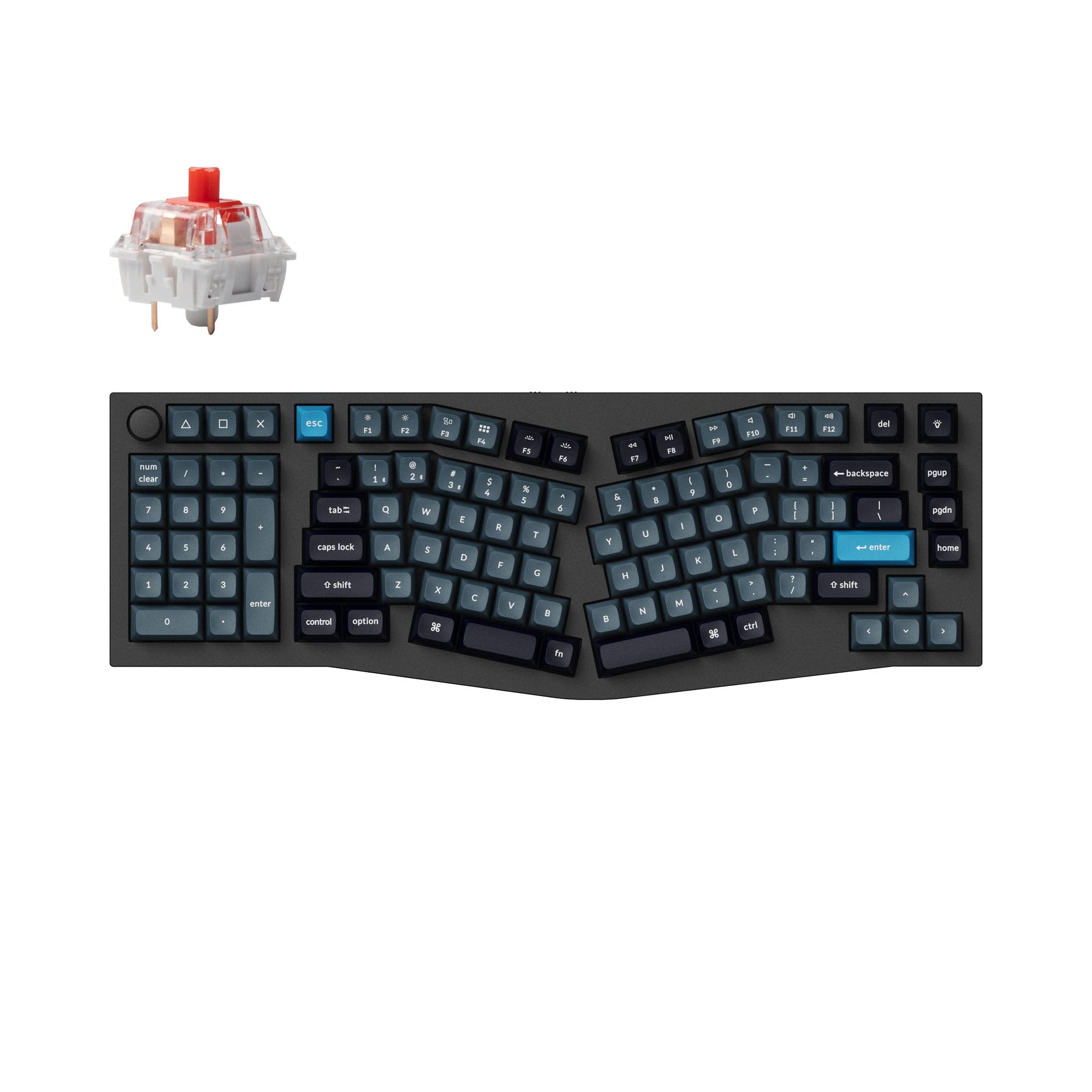
- Unique Alice ergonomic layout with a southpaw numpad for improved hand positioning.
- Supports QMK and VIA open-source firmware for extensive programmability.
- Available in both fully assembled and barebones kit configurations.
- South-facing LEDs. Shine-through legends stay dark, and some sculpted keycaps can clip the LED.
Your primary need dictates the choice. For competitive gaming where every millisecond counts, the Keychron Q13 Ultra's 8000Hz wireless performance is the decisive feature. For all other scenarios, especially long-duration typing, programming, and custom modding, the Keychron Q14 Max Alice provides greater value through its ergonomic design, open-source firmware support, and flexible barebones purchasing option.
The differences that matter
Skip the 40-row spec sheet. These are the specs that change how each board feels, sounds, and fits your desk.
Keychron Q13 Ultra
Keychron Q14 Max
Ergonomics
Alice
Southpaw, Alice
Max polling rate
8,000 Hz
1,000 Hz
Higher polling helps competitive FPS and does nothing for typing
Mount style
Gasket Mount, Plate Mount
Gasket Mount
Weight
2,440 g
2,450 g
Heavier boards stay planted and lighter ones travel
QMK
No
Yes
The deep option when you want to remap every key
- Keychron Q13 Ultra
- Keychron Q14 Max
- Performance
- 8981
- Build quality
- 7487
- Productivity
- 94100
- Customizability
- 7796
- Portability
- 5556
- Layout size: 96%
- Connection: Bluetooth, 2.4 GHz, Wired
- Hot-swappable
- Battery: 4,000 mAh
- Case material: Aluminum
- Switch options: Clicky, Linear, Tactile
What will you mostly use it for?
The Q14 Max Alice wins in most productivity-focused categories due to its unique ergonomic design and superior firmware support. It is the clear choice for office work, programming, and content creation where layout comfort and deep customization are key. The Q13 Ultra takes the lead specifically for gaming, thanks to its significantly higher 8000Hz polling rate. For travel and portability, both keyboards are equally impractical due to their substantial weight and size.
Pick the Keychron Q13 Ultra
- The Q13 Ultra offers an 8000 Hz polling rate in both wired and 2.4 GHz modes, compared to the Q14 Max's 1000 Hz.
- Keychron's product description for the Q13 Ultra highlights its 8K polling rate for ultra-responsive performance in competitive games.
- Both feature N-key rollover and hot-swappable switches, but the Q13 Ultra's higher polling rate provides a latency advantage.
What owners say
Ratings and quotes collected from verified store reviews, including the critical ones.
Keychron Q13 Ultra
4 owner reviews
“Absolutely brilliant keyboard, if your looking for a full alice keeb, with a solid frame, that looks and feels well built, this is the one for you, already pulled out all the original keycaps and switches, to truly make it a one of one”
Keychron Q14 Max
14 owner reviews
“I've a Keychron Q13 Pro that I purchased over a year ago, and I've been pleased with it, so when I started reading reviews about the Q13/14 Max, I wasn't convinced it would be noticeably better. I took a chance and purchased a Q14 Max even though I'm not…”
Keychron Q13 Ultra vs Q14 Max specs
Every tracked spec, side by side. Rows marked with a dot differ between the boards.
9 of 27 specs differ
Keychron Q13 Ultra
Keychron Q14 Max
Switch options
Hot-swappable
Mount style
Sound dampening
Screw-in stabilizers
Layout size
Layout standard
Ergonomics
Knob
Display
Media keys
Connection
Max polling rate
Battery
USB-C
Case material
Plate material
Keycaps
Weight
Dimensions
Typing angle
Backlight
QMK
VIA
N-key rollover
Mac & Windows
Released
Compare prices
Live prices from the stores we track, cheapest in-stock offer first.
Prices in USD are converted to your currency and can change at any time. KeebFinder may earn a commission when you buy through these links, at no extra cost to you.
Lowest price across stores, Amazon excluded.



Keychron Q13 Ultra vs Q14 Max: your questions
The core difference is the layout and performance focus. The Q13 Ultra has a standard 96% layout with an 8000Hz polling rate for gaming. The Q14 Max has an ergonomic Alice layout with a southpaw numpad, a 1000Hz polling rate, and supports QMK/VIA firmware for deep customization.
The Keychron Q13 Ultra is better for competitive gaming. It features an 8000 Hz polling rate in both its wired and 2.4 GHz wireless modes, which Keychron states provides ultra-responsive performance with low input lag. The Q14 Max has a 1000 Hz polling rate.
Yes, the Q14 Max Alice layout is well-suited for programming. The split design and southpaw numpad allow your mouse to sit closer to the alphanumeric keys, reducing reach. Furthermore, its support for QMK and VIA firmware allows programmers to deeply customize layers and macros.
Yes. The Keychron Q14 Max is offered in a Barebone Knob configuration, which does not include switches or keycaps. This allows you to install your own preferred components from the start. The Q13 Ultra is only sold as a fully assembled unit.
Yes. Both the Keychron Q13 Ultra and Q14 Max include dedicated Mac and Windows keycaps and have a system toggle switch. This makes them compatible with macOS, Windows, and Linux operating systems.
According to manufacturer specifications, the Q13 Ultra has a longer advertised battery life. It claims up to 660 hours with RGB off, while the Q14 Max claims up to 300 hours under the same conditions. Both use a 4000mAh battery.
Both keyboards use screw-in PCB stabilizers. Keychron states these are upgraded stabilizers with reinforced sidewalls for improved stability on large keys. Some customer reviews for the Q14 Max, however, mention that the stock stabilizers can be noisy and may require modding.
The Keychron Q13 Ultra uses ZMK firmware with a web-based Keychron Launcher for configuration. The Keychron Q14 Max uses QMK and VIA firmware, which are open-source and offer extensive, community-supported programming capabilities directly through the VIA app.
No. A common point in customer reviews is that the southpaw numpad on the Q14 Max uses a standard, non-mirrored layout. This means the number arrangement is identical to a right-side numpad, which some users find requires retraining muscle memory for left-hand use.
Yes. Both the Keychron Q13 Ultra and Q14 Max are hot-swappable. They support both 3-pin and 5-pin MX-style mechanical switches, allowing you to change switches without any soldering required.
Both keyboards are designed with sound dampening in mind. The Q13 Ultra listing mentions multiple foam layers including sound absorbing foam, IXPE foam, and a latex bottom pad. The Q14 Max description also highlights significantly enhanced acoustic foams. Customer reviews for the Q14 Max praise its satisfying stock sound.
Neither keyboard is particularly portable. Both are 96% layout keyboards with full aluminum cases, weighing approximately 2440g and 2450g (over 5 lbs). Their size and weight make them desk-bound peripherals rather than travel-friendly options.
Not sold on either?



Still torn?
Answer a few quick questions and the keyboard finder ranks 2,000+ boards by how you will actually use yours.