Not sure which keyboard to choose? Try the Keyboard Finder now!

Compare Keychron Q13 Ultra vs Q14 Pro Differences Side by Side

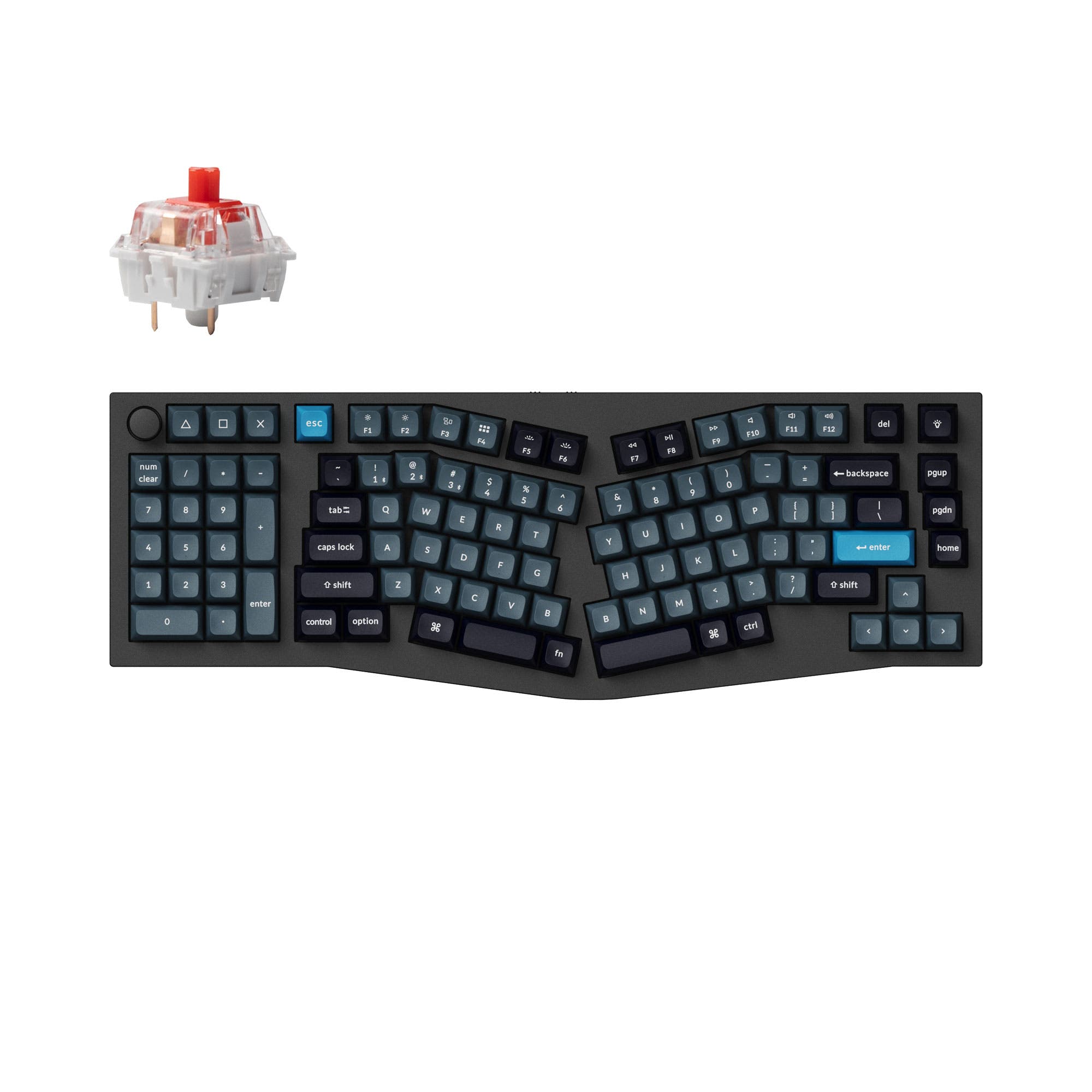
This comparison is for buyers torn between two high-end 96% Alice layout keyboards from Keychron. The Q13 Ultra is the newer model with cutting-edge 8K polling in both wired and 2.4 GHz modes, while the Q14 Pro brings a rare left-positioned numpad (southpaw) design that frees up mouse space. The decision is difficult because both share a full aluminum case, polycarbonate plate, double-gasket mount, and south-facing RGB, yet they target different priorities. The Q13 Ultra appeals to competitive gamers and latency-sensitive users, whereas the Q14 Pro is better suited for data entry professionals and ergonomics seekers who want QMK/VIA to remap every key.

81
Keychron Q13 Ultra 8K Wireless Custom Mechanical Keyboard
98
Keychron Q14 Pro (Alice Layout) QMK/VIA Wireless Custom Mechanical Keyboard

Select a keyboard to compare

5.0 (3)
4.3 (6)
  • Released in 2026
  • Built with the ANSI layout standard
  • Offers Normal ergonomics
  • Supports Bluetooth, 2.4 GHz, Wired, Wireless connectivity
  • Runs at a 8000 Hz polling rate
  • Weighs about 2440 g
  • Sized at 32 x 447 x 157 mm
  • Offers Yes, Rgb, White, South-face, Rgb South-face, White South-face RGB lighting
  • Released in 2023
  • Built with the ANSI, ISO layout standard
  • Offers Southpaw ergonomics
  • Supports QMK firmware
  • Supports VIA configuration
  • Supports Bluetooth, Wired, Wireless connectivity
  • Runs at a 1000 Hz polling rate
  • Weighs about 2395 g
  • Sized at 34 x 157 x 445 mm
  • Offers Yes, Rgb, South-face, Rgb South-face RGB lighting
Scores
  • Performance: 88.9
  • Build Quality: 74.2
  • Productivity: 94.1
  • Customizability: 77.2
  • Portability: 56.4
Scores
  • Performance: 82
  • Build Quality: 89.1
  • Productivity: 99.9
  • Customizability: 99.5
  • Portability: 55.7
Name
Keychron Q13 Ultra
Name
Keychron Q14 Pro
Release year
2026
Release year
2023
Switch Options
Linear, Tactile, Clicky
Switch Options
Linear, Tactile, Clicky
Profile
Normal Profile
Profile
Normal Profile
Hot Swappable
 
Hot Swappable
 
Layout Size
96%
Layout Size
96%
Layout Standard
ANSI
Layout Standard
ANSI, ISO
Layout Ergonomics
Normal
Layout Ergonomics
Southpaw
Knob Support
 
Knob Support
 
Display Support
 
Display Support
 
Mac/Win Support
 
Mac/Win Support
 
Multi-Media Keys
 
Multi-Media Keys
 
USB-C
 
USB-C
 
USB passthrough
 
USB passthrough
 
Connection
Bluetooth, 2.4 GHz, Wired, Wireless
Connection
Bluetooth, Wired, Wireless
Polling Rate
8000 Hz
Polling Rate
1000 Hz
Battery capacity
4000 mAh
Battery capacity
4000 mAh
Hall Effect Support
 
Hall Effect Support
 
QMK Support
 
QMK Support
 
VIA Support
 
VIA Support
 
VIAL Support
 
VIAL Support
 
N-Key Rollover
 
N-Key Rollover
 
Rapid Trigger
 
Rapid Trigger
 
Mount Style
Gasket Mount
Mount Style
Gasket Mount
Screw in Stabilizers
 
Screw in Stabilizers
 
Sound Dampening
 
Sound Dampening
 
Backlight
 
Rgb, White, South-face, White South-face
Backlight
 
Rgb, South-face
Case Colors
Case Colors
Case Material
Aluminum
Case Material
Aluminum
Keycaps Material
PBT
Keycaps Material
PBT
Dimensions
32 x 447 x 157 mm
Dimensions
34 x 157 x 445 mm
Weight
2440g
Weight
2395g
*Something incorrect or missing? Please
let me know
!

Pros and Trade-offs

Choose the Keychron Q13 Ultra if you demand the lowest possible wireless latency for gaming and need maximum battery life for travel. Its 8K polling rate and 2.4 GHz connectivity are unmatched in this comparison. Opt for the Keychron Q14 Pro if you work with numbers all day and want to keep your mouse closer to the keyboard, or if you prefer the flexibility of QMK/VIA firmware at a lower price. The southpaw layout is a genuine productivity advantage for data-heavy roles, but it comes at the cost of wireless gaming performance.

Keychron Q13 Ultra

  • +8K polling rate in wired and 2.4 GHz modes, per the manufacturer, reduces input lag for competitive gaming
  • +2.4 GHz wireless connectivity provides a stable, low-latency connection not available on the Q14 Pro
  • +660-hour battery life with backlight off, according to the vendor, is more than double the Q14 Pro's 300-hour estimate
  • +Multiple layers of acoustic foam (IXPE, PET, latex bottom pad) deliver a premium stock typing sound

  • Significantly higher price compared to the Q14 Pro, according to vendor listings
  • ZMK firmware lacks the extensive community support and direct flash capability of QMK/VIA available on the Q14 Pro
  • Heavier than the Q14 Pro at 2440g, making it less desk-movable despite similar dimensions

Keychron Q14 Pro

  • +Southpaw (left-positioned numpad) design, as described by the vendor, keeps the mouse closer for right-handed users
  • +QMK/VIA support allows full key remapping, macro creation, and layer customization without a web browser
  • +Lower price than the Q13 Ultra, with both fully assembled and barebones options available
  • +Available in ANSI and ISO layouts, giving international buyers more flexibility

  • No 2.4 GHz wireless option; limited to Bluetooth and wired connectivity per the specifications
  • Wireless polling rate drops to 90 Hz, according to the vendor, which is noticeable for fast-paced gaming
  • Short Bluetooth battery life of 300 hours with backlight off versus the Q13 Ultra's 660 hours
  • Southpaw layout may require relearning numpad finger placement, as noted in customer reviews

Which Keyboard Is Better for Your Needs?

The Q13 Ultra dominates in gaming and travel use cases, where its 8K polling rate, 2.4 GHz wireless, and longer battery life make a measurable difference. The Q14 Pro leads in office and programming thanks to its southpaw layout and QMK/VIA firmware, which allow for deep customization and ergonomic mouse placement. Modders may prefer the Q13 Ultra for its more extensive factory sound dampening, while content creators can use either board effectively given their identical 96% Alice layout with a knob. The choice largely comes down to whether you prioritize competitive latency or a unique southpaw numpad experience.

GamingKeychron Q13 Ultra
  • 8K polling rate in both wired and 2.4 GHz mode, according to the manufacturer, provides the lowest input lag for competitive gaming
  • Includes 2.4 GHz wireless connectivity for a stable low-latency connection not found on the Q14 Pro
  • ZMK firmware with a 1MB flash chip supports Snap Action and advanced macros
OfficeKeychron Q14 Pro
  • Southpaw (left-handed numpad) design lets right-handed users keep the mouse closer to the keyboard, improving desk ergonomics
  • QMK/VIA support enables deep customization of keymaps and macros without a web browser
  • 300 hours of Bluetooth battery life with backlight off is sufficient for long workdays
ProgrammingKeychron Q14 Pro
  • QMK/VIA open-source firmware offers full control over layer-based keymaps, macros, and shortcuts for coding workflows
  • The southpaw layout places navigation keys and numpad on the left, which can be intuitive for left-handed programmers or those who want a dedicated macro column
  • Available as a barebones kit, allowing programmers to hand-pick switches and keycaps
TravelKeychron Q13 Ultra
  • 2.4 GHz wireless mode provides a stable connection without Bluetooth pairing, useful in hotel or co-working spaces
  • Bluetooth 5.3 supports three devices, better suited for multi-device travel setups
  • 660 hours of battery life with backlight off reduces the need to carry a charging cable
ModdingKeychron Q13 Ultra
  • Multiple layers of acoustic foam (IXPE, PET, latex, bottom case foam) give a refined stock sound that modders can further tune
  • Pre-installed screw-in stabilizers with reinforced sidewalls reduce rattle out of the box
  • Double-gasket design with silicone pads between top and bottom cases allows flexibility tuning by removing the bottom acoustic pad
Content CreationTie
  • Both keyboards feature a 96% layout with a numpad, essential for video editing and spreadsheet work
  • Both include a rotary knob for quick timeline scrubbing or volume control
  • Both support Mac and Windows with dedicated system toggle and included keycaps for each OS

Frequently Asked Questions (FAQ)


Discover similar products

You might also like similar products in that price range:

94
$209
Keychron Q13 Max (Alice Layout) QMK Wireless Custom Mechanical Keyboard(US ANSI Layout)
Keychron Q13 Max
96%,
Hotswap,
Wireless,
Wired,
RGB,
Knob,
VIA,
QMK,
Alu case,
Gasket Mount

96
$199
Keychron Q5 Max QMK/VIA Wireless Custom Mechanical Keyboard
Keychron Q5 Max
96%,
Hotswap,
Wireless,
Wired,
RGB,
Knob,
VIA,
QMK,
Alu case,
Gasket Mount

97
$239
Keychron Q10 Max (Alice Layout) QMK/VIA Wireless Custom Mechanical Keyboard
Keychron Q10 Max
75%,
Hotswap,
Wireless,
Wired,
RGB,
Knob,
VIA,
QMK,
Alu case,
Gasket Mount

95
$159
Keychron Q10 Pro (Alice Layout) QMK/VIA Wireless Custom Mechanical Keyboard
Keychron Q10 Pro
75%,
Hotswap,
Wireless,
Wired,
RGB,
Knob,
VIA,
QMK,
Alu case,
Gasket Mount

81
$203
Keychron Q6 Ultra 8K Wireless Custom Mechanical Keyboard (ISO Layout)
Keychron Q6 Ultra
100%,
Hotswap,
Wireless,
Wired,
RGB/ White LEDs,
Knob,
Alu case,
Gasket Mount

97
$199
Keychron Q6 Max QMK/VIA Wireless Custom Mechanical Keyboard ISO Layout Collection
Keychron Q6 Max
100%,
Hotswap,
Wireless,
Wired,
RGB,
Knob,
VIA,
QMK,
Alu case,
Gasket Mount

98
$219
Keychron Q3 HE QMK Wireless Custom Keyboard ISO Layout Collection
Keychron Q3 HE
80%,
Hotswap,
Wireless,
Wired,
RGB/ White LEDs,
Knob,
VIA,
QMK,
HE,
Rapid trigger,
Metal case,
Gasket Mount

96
$149
Keychron Q3 Pro QMK/VIA Wireless Custom Mechanical Keyboard ISO Layout Collection
Keychron Q3 Pro
80%,
Hotswap,
Wireless,
Wired,
RGB,
Knob,
VIA,
QMK,
Alu case,
Gasket Mount

95
$219
Keychron Q8 Max (Alice Layout) QMK/VIA Wireless Custom Mechanical Keyboard
Keychron Q8 Max
65%,
Hotswap,
Wireless,
Wired,
RGB,
Knob,
VIA,
QMK,
Alu case,
Gasket Mount

95
$159
Keychron Q5 Pro QMK/VIA Wireless Custom Mechanical Keyboard
Keychron Q5 Pro
96%,
Hotswap,
Wireless,
Wired,
RGB,
Knob,
VIA,
QMK,
Alu case,
Gasket Mount