Keychron Q65 vs V2Aluminum vs Plastic 65% Showdown
Choose the Q65 for its premium aluminum build and quieter double-gasket design, or the V2 for a lightweight, affordable entry into the 65% form factor.
KeebFinder may earn a commission when you buy through these links, at no extra cost to you.

4.5 (4)4.5 · 4 reviews
from$79at Keychron
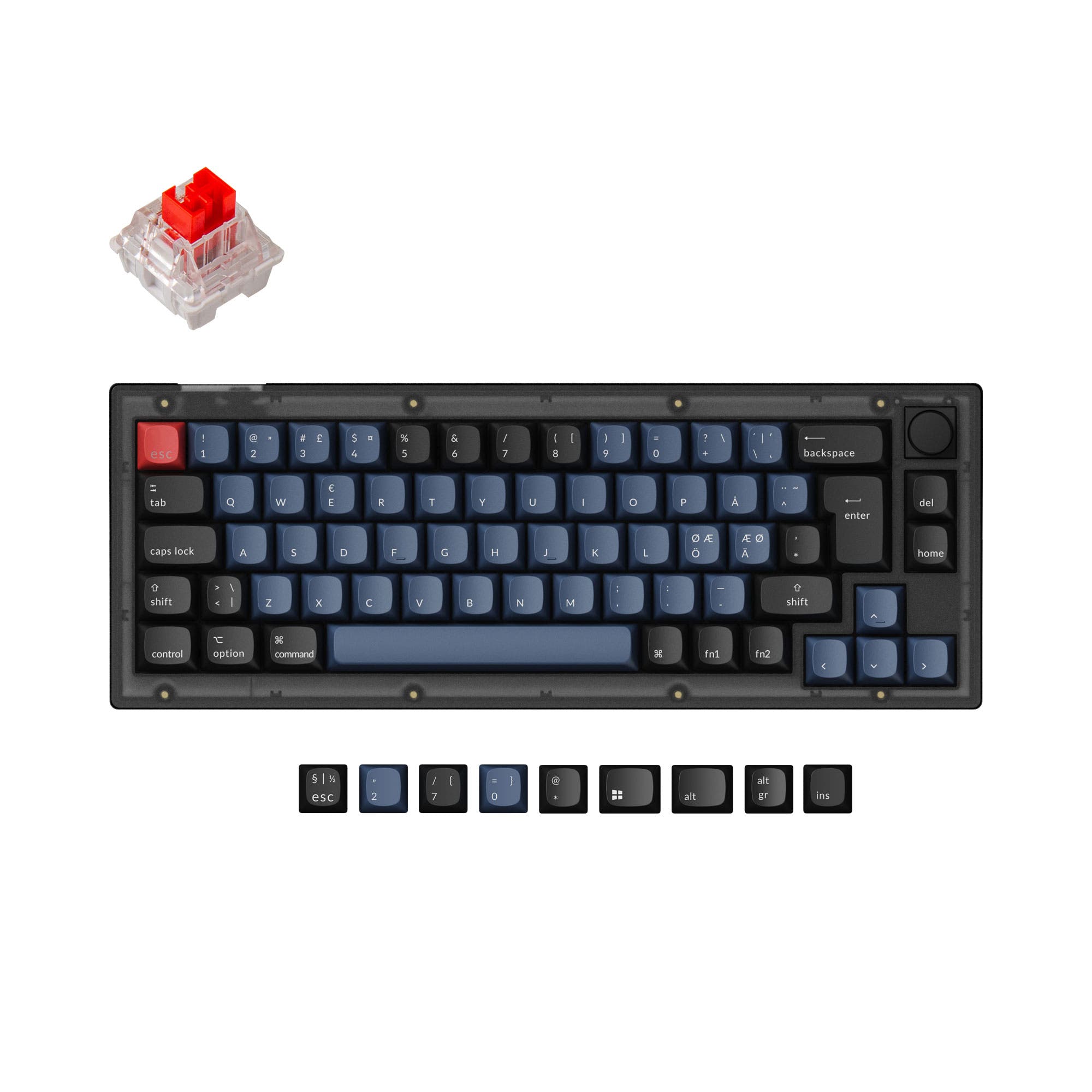
4.9 (17)4.9 · 17 reviews
from$44at Keychron
Which one should you get?
Get the
Keychron Q65
Aluminum
Build quality in the top 5% of 65% boards under $100.
- Full CNC machined 6063 aluminum body with a premium, heavy feel and aesthetic.
- Double gasket design that includes silicone pads between top and bottom cases to reduce acoustic resonance and improve typing sound.
- Extra column of macro keys and a programmable aluminum knob for enhanced productivity.
- South-facing LEDs. Shine-through legends stay dark, and some sculpted keycaps can clip the LED.
- No ISO layout. ISO-DE, UK, and other ISO variants are not offered.
Get the
Keychron V2
Plastic 65% Showdown
Build quality in the top 5% of 65% boards under $50.
- Lightweight ABS plastic case at only 855g, making it highly portable.
- Available in translucent ('Frosted Black') and solid ('Carbon Black') color options for aesthetic choice.
- Lower price point making it an affordable entry point into the QMK/VIA custom ecosystem.
- South-facing LEDs. Shine-through legends stay dark, and some sculpted keycaps can clip the LED.
For users who prioritize a premium feel, quieter typing, and a robust feature set, the Keychron Q65 is the better choice thanks to its all-aluminum build, double-gasket mount, and extra macro column. Those on a tighter budget or who need a lightweight keyboard for travel will find the Keychron V2 a capable and highly customizable 65% option. Ultimately, your decision should be based on whether you value solid, silent construction (Q65) or affordability and portability (V2).
The differences that matter
Skip the 40-row spec sheet. These are the specs that change how each board feels, sounds, and fits your desk.
Keychron Q65
Keychron V2
Case material
Aluminum
ABS, Plastic
Mount style
Gasket Mount
Plate Mount, Tray Mount
Weight
2,420 g
855 g
Heavier boards stay planted and lighter ones travel
Layout standard
ANSI
ANSI, ISO, ISO-DE, ISO-ES, ISO-FR, ISO-UK
ISO and JIS exist so regional layouts fit
Keycaps
PBT
ABS, PBT
- Keychron Q65
- Keychron V2
- Performance
- 6668
- Build quality
- 8987
- Productivity
- 9596
- Customizability
- 9699
- Portability
- 7075
- Layout size: 65%
- Connection: Wired
- Hot-swappable
- Max polling rate: 1,000 Hz
- Switch options: Clicky, Linear, Tactile
- Knob
What will you mostly use it for?
The Keychron Q65 wins in most use cases including gaming, office, modding, and content creation, thanks to its superior aluminum build and double-gasket design. The V2 takes the win for travel due to its dramatically lower weight and affordable price point. In programming, the keyboards tie, as both offer the same core QMK/VIA software support and screw-in stabilizers, leaving the choice to personal preferences on build and weight. The Q65 is consistently the more performant and feature-rich option for those who want a premium experience, while the V2 excels as a lightweight, budget-friendly alternative.
Pick the Keychron Q65
- The Q65's gasket mount provides a more cushioned and stable typing feel.
- The heavier aluminum construction reduces vibrations and noise from rapid key presses.
- Both keyboards share a 1000 Hz polling rate, so latency is not a deciding factor here.
What owners say
Ratings and quotes collected from verified store reviews, including the critical ones.
Keychron Q65
4 owner reviews
“awesome keyboard , and its best still i have. but, on VIA , cant remap rotary encoder. i need write add 4,8 4,9 and 0,0 on top of keymap. 4,8 vol- 4,9 vol+ and 0,0 mute add and 0\n,0 remove. to remap VIA .”
Keychron V2
17 owner reviews
“Was looking for a good budget board to customize and this keyboard was great! Good price and high quality materials as well as fast shipping. Love it.”
Keychron Q65 vs V2 specs
Every tracked spec, side by side. Rows marked with a dot differ between the boards.
8 of 25 specs differ
Keychron Q65
Keychron V2
Switch options
Hot-swappable
Mount style
Sound dampening
Screw-in stabilizers
Layout size
Layout standard
Ergonomics
Knob
Display
Media keys
Connection
Max polling rate
USB-C
Case material
Plate material
Keycaps
Weight
Dimensions
Typing angle
Backlight
QMK
VIA
Mac & Windows
Released
ISO layouts by store
Which stores sell ISO-DE, UK, and the other regional layouts.
Keychron Q65
No ISO layout at the stores we track.
Keychron V2
Input Gear
ISO-DE
In stockShips to you
Keychron
ISO-DE, ISO-UK, ISO-FR, ISO-ES
In stockShips to you
Keychron (DE)
ISO-DE, ISO-UK, ISO-FR, ISO-ES
In stockDoes not ship to you
Compare prices
Live prices from the stores we track, cheapest in-stock offer first.
Prices in USD are converted to your currency and can change at any time. KeebFinder may earn a commission when you buy through these links, at no extra cost to you.
Lowest price across stores, Amazon excluded.





Keychron Q65 vs V2: your questions
The Keychron Q65 is significantly heavier at 2420g, according to the vendor specifications. The Keychron V2, in contrast, weighs only 855g. This makes the V2 a much more portable option.
Yes, both the Keychron Q65 and Keychron V2 support QMK firmware and VIA software, as stated in the product descriptions from Keychron. This allows you to remap any key, create macros, and customize the rotary knob functions.
The Keychron Q65 uses a full CNC machined 6063 aluminum body, as stated on the product page. The Keychron V2 uses an ABS plastic housing. This difference heavily impacts the weight and overall feel of each keyboard.
The Keychron Q65 features a double-gasket design, which includes silicone pads between the top and bottom case to reduce metallic resonance and improve typing sound. The Keychron V2 uses a more traditional tray mount design.
Both keyboards come with double-shot PBT keycaps in an OSA profile when purchased as a fully assembled version, according to the vendor descriptions. PBT is known for its oil resistance and durability.
Yes, both the Q65 and V2 are available as barebone kits, as listed in their respective product pages. This allows you to select your own switches and keycaps without paying for components you do not need.
Both the Keychron Q65 and the Keychron V2 have a 1000 Hz polling rate out of the box, as stated by the manufacturer. This indicates that latency is not a differentiator between the two for competitive gaming.
Yes, both the Q65 and V2 offer versions with a programmable aluminum rotary encoder knob. Through VIA or the Keychron Launcher, you can assign functions like volume, zoom, or screen brightness to the knob.
The Keychron Q65 is designed for a minimal desk setup according to its product description, with a complete aluminum body and a 65% layout. However, the Keychron V2 is smaller in overall dimensions (330mm vs 363mm length) and lighter, which may suit some minimalists better.
Yes, both the Keychron Q65 and V2 include a system toggle and a separate set of keycaps for macOS and Windows. The product descriptions for both keyboards confirm this dual-platform support.
Both keyboards use screw-in PCB stabilizers, according to the vendor specifications. This design provides more stability for large keys like the space bar and shift keys, and both support third-party screw-in stabilizers as well.
The Keychron V2 is frequently praised in customer reviews as a great budget board for customization, with one review calling it 'phenomical for the price'. Its lower price point and hot-swappable PCB make it an accessible entry point into custom mechanical keyboards.
Not sold on either?


Still torn?
Answer a few quick questions and the keyboard finder ranks 2,000+ boards by how you will actually use yours.