Not sure which keyboard to choose? Try the Keyboard Finder now!

Compare Keychron Q7 vs Q8 Differences Side by Side

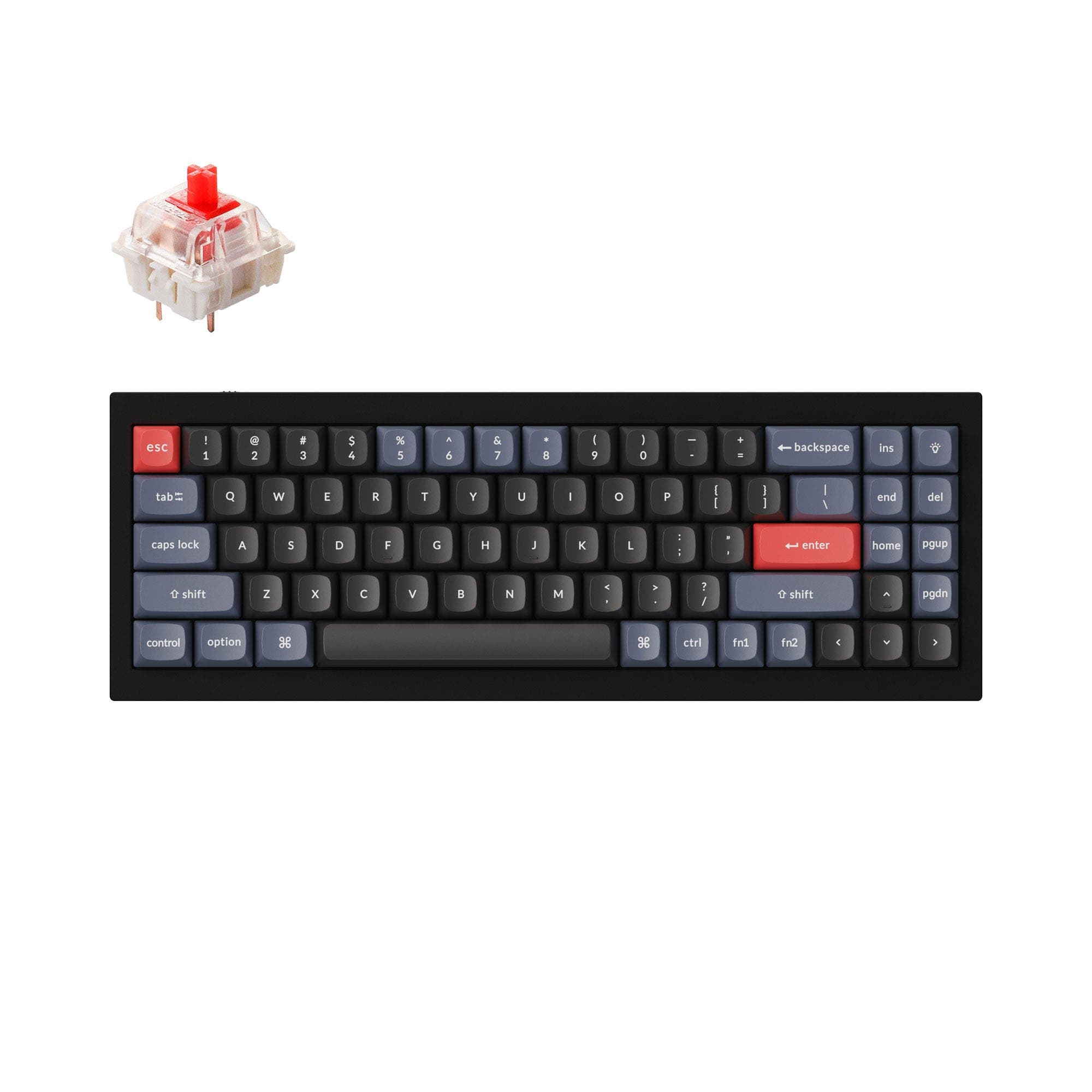
This comparison is for anyone torn between a straightforward compact 70% keyboard and an ergonomic Alice layout board. Both keyboards share the same all-metal 6063 aluminum construction, double-gasket design, QMK/VIA programmability, and south-facing RGB. The decision is hard because they offer nearly identical build quality and features for a similar price, yet their layouts cater to very different typing ergonomics and use cases. The Q7 provides a more traditional key arrangement that many find intuitive, while the Q8's angled, split-like Alice layout aims to promote a more natural hand position for longer typing sessions.

92
Keychron Q7 QMK Custom Mechanical Keyboard
93
Keychron Q8 (Alice Layout) QMK Custom Mechanical Keyboard

Select a keyboard to compare

1.7 (1)
4.7 (34)
  • Available in a 70% layout
  • Built with the ANSI, ISO, JIS, ISO-DE, ISO-UK, ISO-Nordic, ISO-FR, ISO-ES, ISO-SW layout standard
  • Offers Normal ergonomics
  • Sized at 20 x 121 x 341 mm
  • Available in a 65% layout
  • Built with the ANSI, ISO, JIS, ISO-DE, ISO-UK, ISO-FR, ISO-ES, ISO-SW, ISO-Nordic layout standard
  • Offers Alice ergonomics
  • Sized at 20 x 136 x 358 mm
Scores
  • Performance: 67
  • Build Quality: 89.6
  • Productivity: 95.2
  • Customizability: 97.8
  • Portability: 63.7
Scores
  • Performance: 65.9
  • Build Quality: 89.5
  • Productivity: 97.7
  • Customizability: 97.5
  • Portability: 70.4
Name
Keychron Q7
Name
Keychron Q8
Release year
2022
Release year
2022
Switch Options
Linear, Tactile, Clicky
Switch Options
Linear, Tactile, Clicky
Profile
Normal Profile
Profile
Normal Profile
Hot Swappable
 
Hot Swappable
 
Layout Size
70%
Layout Size
65%
Layout Standard
ANSI, ISO, JIS, ISO-DE, ISO-UK, ISO-Nordic, ISO-FR, ISO-ES, ISO-SW
Layout Standard
ANSI, ISO, JIS, ISO-DE, ISO-UK, ISO-FR, ISO-ES, ISO-SW, ISO-Nordic
Layout Ergonomics
Normal
Layout Ergonomics
Alice
Knob Support
 
Knob Support
 
Display Support
 
Display Support
 
Mac/Win Support
 
Mac/Win Support
 
Multi-Media Keys
 
Multi-Media Keys
 
USB-C
 
USB-C
 
USB passthrough
 
USB passthrough
 
Connection
Wired, Wired only
Connection
Wired, Wired only
Polling Rate
1000 Hz
Polling Rate
1000 Hz
Battery capacity
-
Battery capacity
-
Hall Effect Support
 
Hall Effect Support
 
QMK Support
 
QMK Support
 
VIA Support
 
VIA Support
 
VIAL Support
 
VIAL Support
 
N-Key Rollover
 
N-Key Rollover
 
Rapid Trigger
 
Rapid Trigger
 
Mount Style
Gasket Mount
Mount Style
Gasket Mount
Screw in Stabilizers
 
Screw in Stabilizers
 
Sound Dampening
 
Sound Dampening
 
Backlight
 
Rgb, South-face
Backlight
 
Rgb, South-face
Case Colors
Case Colors
Case Material
Aluminum
Case Material
Aluminum
Keycaps Material
PBT, ABS
Keycaps Material
PBT, ABS
Dimensions
20 x 121 x 341 mm
Dimensions
20 x 136 x 358 mm
Weight
1820g
Weight
1820g
*Something incorrect or missing? Please
let me know
!

Pros and Trade-offs

Your decision should be driven by layout preference above all else. Choose the Keychron Q7 for a straightforward, compact layout that will feel familiar to any typist and is better suited for gaming. Choose the Keychron Q8 if you are willing to adapt to the ergonomic Alice layout for the potential of reduced wrist strain during long work or coding sessions, and if the programmable knob is a feature you value.

Keychron Q7

  • +Standard 70% layout with a typical right shift key is immediately familiar and easier to adapt to.
  • +Includes a dedicated navigation cluster (Page Up, Page Down, Home, End) for efficient document and code editing.
  • +Available in a wide range of ISO layout options including Nordic and Swiss.

  • No knob version available, losing a popular tool for quick volume or macro adjustments.
  • The compact 70% layout without dedicated F-row keys may require using an FN layer for some commands.

Keychron Q8

  • +The Alice layout is ergonomically designed to reduce hand and wrist fatigue during long typing sessions.
  • +A knob version is available, programmable via VIA for creative workflow shortcuts.
  • +Based on 14 reviews, it has a high user rating of 4.7/5 with many praising its premium feel and comfort.
  • +Special Edition available with pre-installed Gateron Baby Raccoon switches.

  • The non-standard Alice layout has a steep learning curve and may not suit all users.
  • The split spacebar design of the Alice layout can limit compatibility with standard keycap sets.

Which Keyboard Is Better for Your Needs?

The Keychron Q8 wins the majority of use cases, particularly for office, programming, and content creation, driven by its ergonomic Alice layout and available knob. The Keychron Q7 is the better choice for gaming due to its more standard key layout and dedicated arrow cluster. The two are tied for modding purposes because they share nearly identical internal construction and customizability features. Portability is a near tie, with the Q7 having a slightly smaller footprint but both being equally heavy.

GamingKeychron Q7
  • Standard 70% layout with a 1.0u right shift key is more familiar for standard WASD-based gaming.
  • 70% layout retains a dedicated arrow cluster which is critical for many genres.
OfficeKeychron Q8
  • The Alice layout is designed to reduce wrist strain during long typing sessions.
  • 65% size saves a small amount of desk space compared to the Q7's 70% layout.
  • A knob version is available, offering convenient volume or macro control on the fly.
ProgrammingKeychron Q8
  • The Alice layout can promote a more comfortable and natural hand position for extended coding.
  • The programmable layers, especially FN1 and FN2, make navigation keys easily reachable without moving palms.
  • User reviews specifically highlight the Q8 as excellent for programmers due to its layer functionality.
TravelKeychron Q7
  • The Q7 has a slightly smaller footprint (20 x 121 x 341 mm) than the Q8.
  • Both are equally heavy at 1820g, so weight is not a differentiator.
ModdingTie
  • Both share the same all-aluminum double-gasket construction and are designed for easy disassembly.
  • Both feature hot-swappable PCBs supporting 3-pin and 5-pin switches and screw-in PCB stabilizers.
  • Both have QMK/VIA support and south-facing RGB for full customization.
Content CreationKeychron Q8
  • The knob version enables quick brush size, zoom, or volume adjustments via VIA macros.
  • The ergonomic layout may help avoid hand fatigue during long editing sessions.

Frequently Asked Questions (FAQ)


Discover similar products

You might also like similar products in that price range:

92
$59
Keychron V10 (Alice Layout) QMK Custom Mechanical Keyboard ISO Layout Collection
Keychron V10
75%,
Hotswap,
Wired,
RGB,
Knob,
VIA,
QMK,
Tray Mount

92
$59
Keychron Q4 QMK Custom Mechanical Keyboard
Keychron Q4
60%,
Hotswap,
Wired,
RGB,
Knob,
VIA,
QMK,
Alu case,
Gasket Mount

93
$59
Keychron Q2 QMK Custom Mechanical Keyboard
Keychron Q2
65%,
Hotswap,
Wired,
RGB,
Knob,
VIA,
QMK,
Alu case,
Gasket Mount

94
$59
Keychron K8 Pro QMK/VIA Wireless Mechanical Keyboard
Keychron K8 Pro
80%,
Hotswap,
Wireless,
Wired,
RGB/ White LEDs,
VIA,
QMK,
Alu case,
Tray Mount

97
$59
Keychron Q3 QMK Custom Mechanical Keyboard
Keychron Q3
80%,
Hotswap,
Wired,
RGB,
Knob,
VIA,
QMK,
Alu case,
Gasket Mount

97
$54
Keychron V3 QMK Custom Mechanical Keyboard ISO Layout Collection
Keychron V3
80%,
Hotswap,
Wired,
RGB/ White LEDs,
Knob,
VIA,
QMK,
Tray Mount

95
$79
Keychron Q10 (Alice Layout) QMK Custom Mechanical Keyboard
Keychron Q10
75%,
Hotswap,
Wired,
RGB,
Knob,
VIA,
QMK,
Alu case,
Gasket Mount

86
$67
Keychron K1 Pro QMK/VIA Wireless Custom Mechanical Keyboard ISO Layout Collection
Keychron K1 Pro
80%,
Hotswap,
Wireless,
Wired,
RGB/ White LEDs,
VIA,
QMK,
Alu case,
Tray Mount

94
$67
Keychron K2 Pro QMK/VIA Wireless Mechanical Keyboard
Keychron K2 Pro
75%,
Hotswap,
Wireless,
Wired,
RGB/ White LEDs,
VIA,
QMK,
Alu case,
Tray Mount

92
$69
Keychron K4 Pro QMK/VIA Wireless Mechanical Keyboard
Keychron K4 Pro
96%,
Hotswap,
Wireless,
Wired,
RGB/ White LEDs,
VIA,
QMK,
Tray Mount