Keychron Q8 Max vs Weikav Stars80Alice Layout vs TKL Showdown
Choose the Keychron Q8 Max for its ergonomic Alice layout and extensive software support, or the Weikav Stars80 for a more traditional TKL form factor.
KeebFinder may earn a commission when you buy through these links, at no extra cost to you.

5.0 (8)5.0 · 8 reviews
from$219at Keychron

No reviews
from$155at WhatGeek
Which one should you get?
Get the
Keychron Q8 Max
Alice Layout
Build quality in the top 5% of 65% boards under $300.
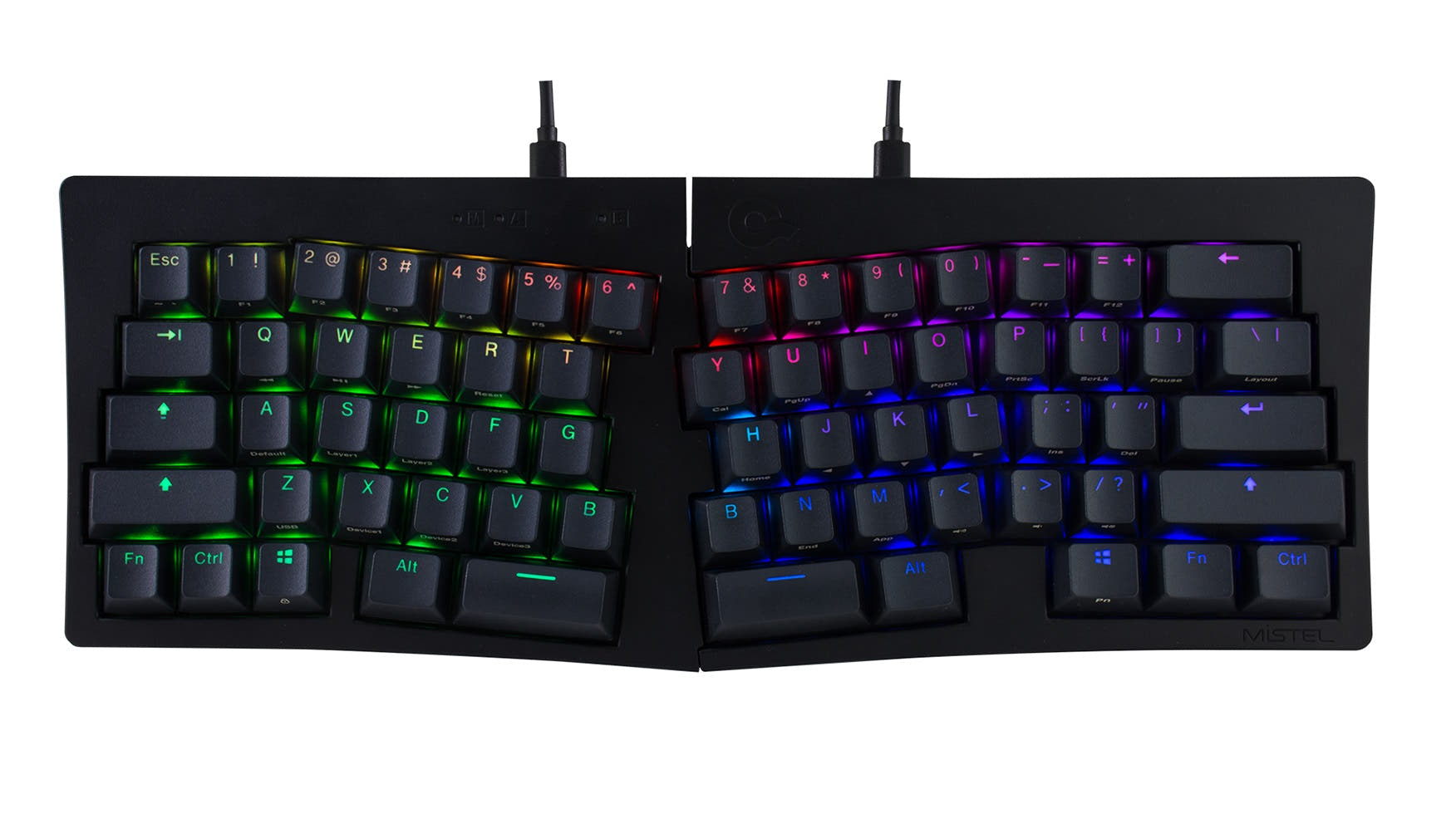
- Ergonomic Alice layout with a 5-degree typing angle for potentially more comfortable typing.
- Extensive software support with QMK and VIA firmware for deep customization.
- Includes multiple layers of acoustic foam (IXPE, PET, Latex) and a double-gasket mount for sound tuning.
- South-facing LEDs. Shine-through legends stay dark, and some sculpted keycaps can clip the LED.
- 65% layout. No function row and no numpad.
Get the
Weikav Stars80
TKL Showdown
Build quality in the top 35% of 80% boards under $200.
- Traditional TKL (80%) layout is widely compatible with aftermarket keycaps.
- Features a unique 'Emergence Design' with corner RGB light strips for aesthetic appeal.
- Includes a press magnetic storage compartment for the 2.4 GHz wireless receiver.
- No numpad.
Your choice fundamentally depends on layout preference and desired feature completeness. The Keychron Q8 Max is the recommendation for users who value ergonomics, extensive software customization, and a premium out-of-box experience with detailed specs. Opt for the Weikav Stars80 if you prefer a standard TKL layout, want a DIY project starting point, and are drawn to its specific aesthetic design, accepting less documented technical details.
The differences that matter
Skip the 40-row spec sheet. These are the specs that change how each board feels, sounds, and fits your desk.
Keychron Q8 Max
Weikav Stars80
Layout size
65%
80%
Ergonomics
Alice
Standard
Mount style
Gasket Mount, Plate Mount
Plate Mount
Knob
Yes
No
Weight
1,745 g
1,850 g
Heavier boards stay planted and lighter ones travel
- Keychron Q8 Max
- Weikav Stars80
- Performance
- 7876
- Build quality
- 8966
- Productivity
- 9767
- Customizability
- 9877
- Portability
- 8975
- Connection: Bluetooth, 2.4 GHz, Wired
- Hot-swappable
- Case material: Aluminum
What will you mostly use it for?
The Keychron Q8 Max is the more versatile choice for most productivity-focused tasks, winning in gaming, office, programming, and modding due to its specified high polling rate, software support, and ergonomic design. The Weikav Stars80 takes a narrow lead for travel due to its slimmer profile and built-in receiver storage. For content creation, both are equally capable based on their shared core features of hot-swap sockets and RGB lighting.
Pick the Keychron Q8 Max
- The Keychron Q8 Max specifies a 1000 Hz polling rate for its 2.4 GHz and wired modes.
- Its Alice layout may provide more comfortable wrist positioning during long sessions.
- It includes N-key rollover for simultaneous key presses.
Keychron Q8 Max vs Weikav Stars80 specs
Every tracked spec, side by side. Rows marked with a dot differ between the boards.
13 of 27 specs differ
Keychron Q8 Max
Weikav Stars80
Switch options
Hot-swappable
Mount style
Sound dampening
Screw-in stabilizers
Layout size
Layout standard
Ergonomics
Knob
Display
Media keys
Connection
Max polling rate
Battery
USB-C
Case material
Plate material
Keycaps
Weight
Dimensions
Typing angle
Backlight
QMK
VIA
N-key rollover
Mac & Windows
Released
Compare prices
Live prices from the stores we track, cheapest in-stock offer first.
Prices in USD are converted to your currency and can change at any time. KeebFinder may earn a commission when you buy through these links, at no extra cost to you.
Lowest price across stores, Amazon excluded.



- Check on Amazon
Amazon
Check price

Keychron Q8 Max vs Weikav Stars80: your questions
The core difference is the layout and form factor. The Keychron Q8 Max uses an ergonomic 65% Alice split layout, while the Weikav Stars80 is a standard 80% Tenkeyless (TKL) keyboard. Furthermore, the Q8 Max is sold as a fully-featured pre-built or barebone kit with extensive software support, whereas the Stars80 is marketed primarily as a DIY kit.
The Keychron Q8 Max provides specific performance metrics. Its vendor page states it has a 1000 Hz polling rate in its 2.4 GHz and wired modes, and Bluetooth 5.1 for connecting to three devices. The Weikav Stars80 listing confirms 2.4 GHz and Bluetooth connectivity but does not specify polling rates or Bluetooth version.
The Keychron Q8 Max explicitly supports QMK and VIA firmware, allowing for extensive key remapping, macro creation, and lighting control via a web app. The Weikav Stars80 vendor description lists VIA compatibility, confirming it also supports key reprogramming, though the extent of its firmware features is not detailed.
Yes, both the Keychron Q8 Max and the Weikav Stars80 are confirmed to have hot-swappable sockets. The Q8 Max vendor page notes compatibility with 3-pin and 5-pin MX-style switches. The Stars80 listing also confirms hot-swap support.
The Keychron Q8 Max is likely better for first-time builders seeking a guided experience. It is available as a fully assembled version, and its vendor page thoroughly documents components like screw-in stabilizers and acoustic foams. The Weikav Stars80, as a DIY kit, may require more independent sourcing of parts and research.
Yes, both keyboards are listed as compatible with Mac and Windows systems. The Keychron Q8 Max includes specific Mac and Windows keycaps and a physical toggle switch for changing between operating systems. The Weikav Stars80 vendor page also lists compatibility with Windows, Mac, Linux, iOS, and Android.
The fully assembled Keychron Q8 Max comes with KSA profile double-shot PBT keycaps. The vendor description states these keycaps are oil-resistant and have legends that won't fade. It includes an extra set of modifier keys for both macOS and Windows layouts.
According to its vendor description, the Weikav Stars80 uses a spring-leaf gasket structure. This design is intended to create a balanced, responsive typing feel and allow for slight flex to absorb vibrations and minimize typing noise.
The Keychron Q8 Max vendor description details multiple acoustic layers, including IXPE foam, PET film, a latex bottom pad, and a double-gasket design. The Weikav Stars80 listing mentions layers of Poron, IXPE, PET, and EPDM foams but does not specify their arrangement or mounting style as comprehensively.
Only the Keychron Q8 Max provides battery specifications. It is equipped with a 4000mAh battery, with the vendor claiming up to 180 hours of wireless use with backlighting off. The Weikav Stars80 does not have a listed battery capacity or estimated runtime in the provided information.
The Weikav Stars80 has N-key rollover and wireless connectivity, which are beneficial for gaming. However, its product listing does not specify a polling rate, which is a key metric for gaming responsiveness. The Keychron Q8 Max explicitly advertises a 1000 Hz polling rate for low-latency gaming.
The Weikav Stars80 features a press magnetic 2.4 GHz receiver storage compartment. The vendor description explains that you press the back cover of the keyboard to store and access the wireless receiver, helping to keep it from being lost.
Not sold on either?






Still torn?
Answer a few quick questions and the keyboard finder ranks 2,000+ boards by how you will actually use yours.