Keychron Q8 Pro vs Q9Alice vs Ultra-Compact Layout
Choose the Q8 Pro for a comfortable ergonomic layout with wireless freedom, or the Q9 if extreme desk space savings and a wired-only setup suit your workflow.
KeebFinder may earn a commission when you buy through these links, at no extra cost to you.

5.0 (1)5.0 · 1 reviews
from$159at Keychron

4.7 (6)4.7 · 6 reviews
from$59at Keychron
Which one should you get?
Get the
Keychron Q8 Pro
Alice
Build quality in the top 5% of 65% boards under $200.
- Wireless Bluetooth 5.1 with 4000mAh battery supports multi-device pairing across laptop, phone, and tablet
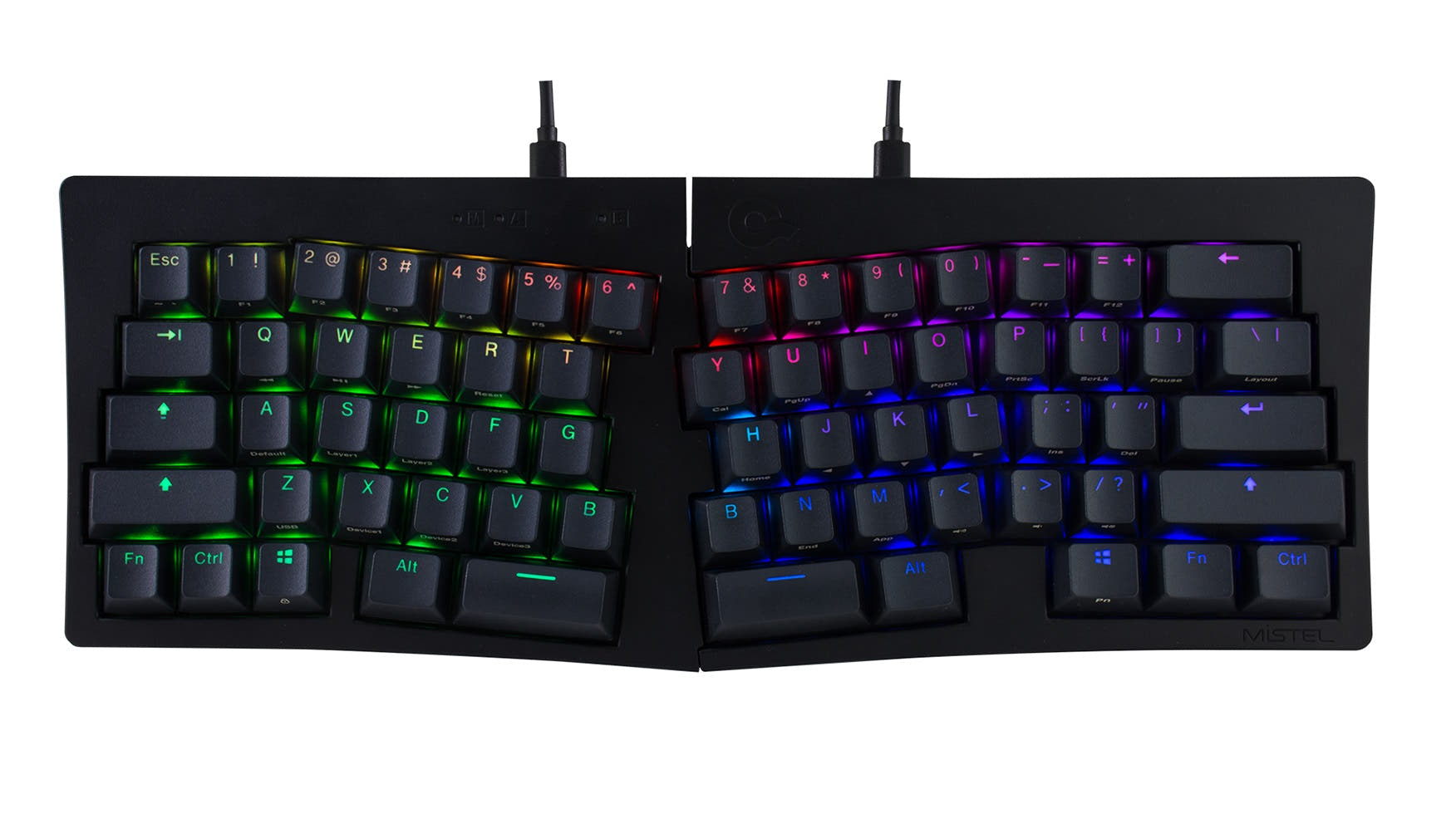
- 65% Alice layout provides an ergonomic left-hand stagger while retaining a number row
- Double-gasket design with PC plate delivers a flexible, quieter typing feel
- South-facing LEDs. Shine-through legends stay dark, and some sculpted keycaps can clip the LED.
- 65% layout. No function row and no numpad.
Get the
Keychron Q9
Ultra-Compact Layout
Build quality in the top 5% of 40% boards under $150.
- Ultra-compact 40% layout (326x94mm) frees up maximum desk space for mouse movement or tablet
- Steel plate with double-gasket design creates a stiff, solid bottom-out feel
- Lighter weight at 1050g makes it easier to move between workstations
- South-facing LEDs. Shine-through legends stay dark, and some sculpted keycaps can clip the LED.
- Compact layout only. No function row, dedicated arrow keys, or numpad.
If you need an ergonomic keyboard that still provides a full set of keys and wireless freedom for a tidy desk, the Q8 Pro is the clear choice. If your primary goal is to minimize your keyboard footprint to the absolute minimum and you are comfortable programming layers in VIA, the Q9 delivers that in a wired-only, dense package. Buy the Q8 Pro for typing comfort and flexibility, or the Q9 for extreme space savings and a stiff typing feel.
The differences that matter
Skip the 40-row spec sheet. These are the specs that change how each board feels, sounds, and fits your desk.
Keychron Q8 Pro
Keychron Q9
Layout size
65%
40%
Connection
Bluetooth, Wired
Wired
Wireless for several devices and wired for lower latency
Ergonomics
Alice
Split Spacebar
Mount style
Gasket Mount
Gasket Mount, PCB Mount, Plate Mount
Weight
1,657 g
1,050 g
Heavier boards stay planted and lighter ones travel
- Keychron Q8 Pro
- Keychron Q9
- Performance
- 7865
- Build quality
- 8891
- Productivity
- 9894
- Customizability
- 9696
- Portability
- 8970
- Hot-swappable
- Max polling rate: 1,000 Hz
- Case material: Aluminum
- Switch options: Clicky, Linear, Tactile
- Knob
- QMK
What will you mostly use it for?
The Q8 Pro takes the lead in gaming, office, programming, and content creation thanks to its more accessible layout and wireless flexibility. The Q9 ties in travel because while it is lighter and more compact, its wired-only constraint offsets that advantage. Both keyboards tie for modding because each offers a nearly identical set of customization features, differing mainly in plate material and layout complexity. The 40% layout of the Q9 will appeal most to users who prioritize desk space and are comfortable with layers, while the Q8 Pro wins for anyone needing a balance of ergonomics, keys, and wireless convenience.
Pick the Keychron Q8 Pro
- 1000 Hz wired polling rate plus 90 Hz wireless for low-latency options
- 65% layout retains a number row and navigation keys needed for many games
- Alice layout can reduce wrist strain during long gaming sessions
- Broadcom Bluetooth 5.1 allows use as a secondary gaming pad wirelessly
What owners say
Ratings and quotes collected from verified store reviews, including the critical ones.
Keychron Q8 Pro
1 owner reviews
“I'm a creative writer and college professor, so this keyboard is probably overkill, but it was a nice Christmas present for myself. Plus, I don't want to get carpal tunnel or wrist strain bc I type A LOT. My other Keychron (c1k1z) was super-loud, but the Q8…”
Keychron Q9
6 owner reviews
“Love the keyboard and goes well with the switches i got. Size was bigger than expected but weight is truly high quality Could do with a force break mod though as it is a little pingy”
Keychron Q8 Pro vs Q9 specs
Every tracked spec, side by side. Rows marked with a dot differ between the boards.
9 of 26 specs differ
Keychron Q8 Pro
Keychron Q9
Switch options
Hot-swappable
Mount style
Sound dampening
Screw-in stabilizers
Layout size
Layout standard
Ergonomics
Knob
Display
Connection
Max polling rate
Battery
USB-C
Case material
Plate material
Keycaps
Weight
Dimensions
Typing angle
Backlight
QMK
VIA
N-key rollover
Mac & Windows
Released
ISO layouts by store
Which stores sell ISO-DE, UK, and the other regional layouts.
Keychron Q8 Pro
Keychron
ISO
In stockShips to you
Keychron (DE)
ISO
In stockDoes not ship to you
Keychron Q9
Input Gear
ISO
In stockShips to you
Input Gear
ISO
In stockShips to you
Keychron
ISO
In stockShips to you
Keychron (DE)
ISO
Out of stockDoes not ship to you
Compare prices
Live prices from the stores we track, cheapest in-stock offer first.
Prices in USD are converted to your currency and can change at any time. KeebFinder may earn a commission when you buy through these links, at no extra cost to you.
Lowest price across stores, Amazon excluded.




Keychron Q8 Pro vs Q9: your questions
The Q8 Pro's Alice layout features an ergonomic left-hand stagger that positions the keys to follow your fingers' natural angle, which can reduce wrist pronation. The Q9 uses a standard linear layout in a 40% form factor, so it does not offer the same ergonomic wrist benefit.
Yes, the Q8 Pro supports both Mac and Windows with a system toggle switch, and it comes with additional keycaps for both operating systems. You can connect up to 3 devices wirelessly via Bluetooth 5.1 and switch between them quickly.
Yes, both the Q8 Pro and Q9 support QMK firmware and VIA software for full key remapping, macros, and layer customization. You can use the Keychron Launcher web app to remap keys on either board.
The Q8 Pro is more beginner-friendly because its 65% layout includes a number row, arrow keys, and navigation keys, reducing the need for layers. The Q9's 40% layout requires setting up custom layers for basic input like numbers and arrows, which may be overwhelming for new users.
Yes, the fully assembled versions of both keyboards include PBT keycaps and switches. The Q8 Pro comes with Keychron K Pro switches and KSA profile PBT keycaps. The Q9 standard version uses Gateron G Pro switches and OSA profile PBT keycaps, while the Q9 Plus version uses Keychron K Pro switches.
Yes, both keyboards use standard MX-style switch stems and are compatible with most third-party keycap sets. The Q9's top case has sharper corners to improve compatibility with aftermarket keycaps, as noted in the vendor description.
The Q9 is lighter at 1050 grams compared to the Q8 Pro's 1657 grams. However, the Q8 Pro has built-in wireless and a battery, so you can use it without a cable on the go, while the Q9 requires a Type-C cable and adapter.
Yes, both the Q8 Pro and Q9 offer a knob option that can be programmed via VIA software for actions like volume, zoom, brush size, or screen brightness. The knob is available on certain SKUs for each model.
The Q8 Pro uses a polycarbonate (PC) plate that provides more flex and a quieter, softer bottom-out feel. The Q9 uses a steel plate that delivers a much stiffer, more rigid typing response with a higher-pitched sound.
No, the Q9 is a wired-only keyboard. It connects via a Type-C cable and does not have Bluetooth or any wireless capability. The Q8 Pro supports both Bluetooth 5.1 and Type-C wired connectivity.
Both the Q8 Pro and Q9 use screw-in PCB stabilizers, which reduce wobble on large keys like space bar, shift, and enter. The vendor notes that these stabilizers support third-party replacements such as Cherry or Durock stabilizers.
The Q8 Pro has a 4000mAh rechargeable lithium-polymer battery that offers up to 300 hours of use with backlighting off. The Q9 does not have a battery because it is wired-only.
Not sold on either?





Still torn?
Answer a few quick questions and the keyboard finder ranks 2,000+ boards by how you will actually use yours.