Keychron V1 Max vs V4 Max75% vs 60% Layout Comparison
Choose the V1 Max for dedicated arrow and function keys, or the V4 Max for maximum desk space savings.
KeebFinder may earn a commission when you buy through these links, at no extra cost to you.

4.1 (18)4.1 · 18 reviews
from$94at MK

Which one should you get?
Get the
Keychron V1 Max
75%
Build quality in the top 5% of 75% boards under $100.
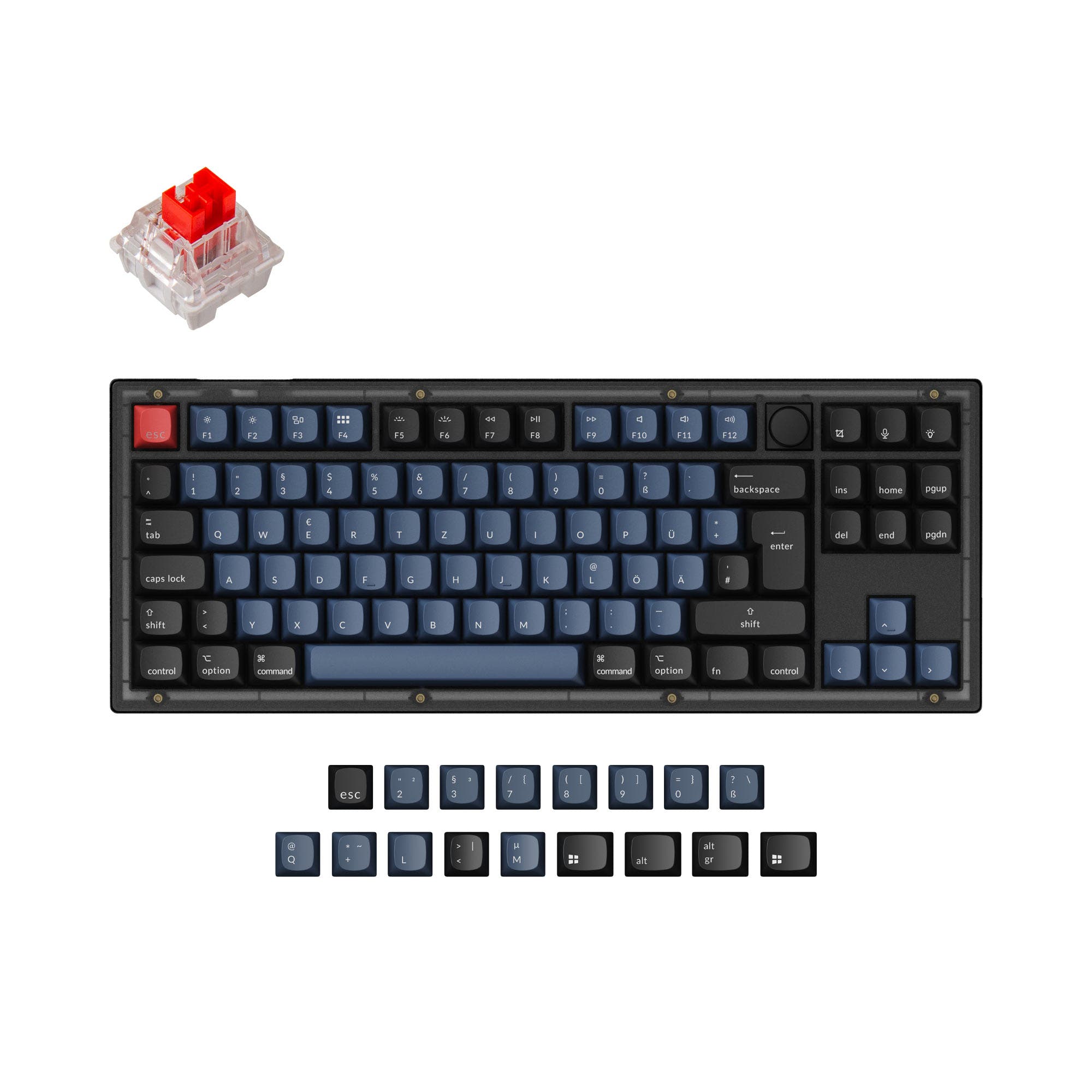
- 75% layout includes arrow keys, function row, and navigation cluster without a numpad.
- Wide ISO layout support for UK, German, Nordic, Spanish, French, Italian, and Portuguese regions.
- Knob support is available in certain pre-built configurations for media control.
- South-facing LEDs. Shine-through legends stay dark, and some sculpted keycaps can clip the LED.
- No numpad.
Get the
Keychron V4 Max
60% Layout Comparison
Build quality in the top 10% of 60% boards under $100.
- Extremely compact 60% layout (305mm long) saves significant desk space.
- Lighter weight (645g) enhances portability.
- Includes dual 2.4 GHz receivers (Type-C and Type-A) with magnetic storage in the case.
- South-facing LEDs. Shine-through legends stay dark, and some sculpted keycaps can clip the LED.
- No ISO layout. ISO-DE, UK, and other ISO variants are not offered.
- Compact layout only. No function row, dedicated arrow keys, or numpad.
Select the Keychron V1 Max if your workflow relies on dedicated arrow keys, a function row, or you need specific ISO language layouts. Opt for the Keychron V4 Max if minimizing your desk footprint is the top priority and you are comfortable using keyboard layers to access missing keys. Both are excellent, highly customizable wireless boards at a similar price point.
The differences that matter
Skip the 40-row spec sheet. These are the specs that change how each board feels, sounds, and fits your desk.
Keychron V1 Max
Keychron V4 Max
Layout size
75%
60%
Mount style
Gasket Mount, Plate Mount
Gasket Mount
Weight
770 g
645 g
Heavier boards stay planted and lighter ones travel
Layout standard
ANSI, ISO, ISO-DE, ISO-ES, ISO-FR, ISO-IT, ISO-Nordic, ISO-PT, ISO-SW, ISO-UK
ANSI
ISO and JIS exist so regional layouts fit
Plate material
Polycarbonate
Polycarbonate, Steel
- Keychron V1 Max
- Keychron V4 Max
- Performance
- 8379
- Build quality
- 8686
- Productivity
- 9795
- Customizability
- 9896
- Portability
- 7988
- Connection: Bluetooth, 2.4 GHz, Wired
- Hot-swappable
- Battery: 4,000 mAh
- Max polling rate: 1,000 Hz
- Case material: ABS, Plastic
- Switch options: Clicky, Linear, Tactile
What will you mostly use it for?
The V1 Max is the more versatile choice for productivity-focused tasks like office work, programming, and content creation, thanks to its larger 75% layout with dedicated keys. The V4 Max excels in portability for travel due to its smaller 60% form factor. For gaming and general use, the V1 Max has a slight edge with its navigation cluster, while both keyboards are equally capable for modding enthusiasts.
Pick the Keychron V1 Max
- The 75% layout includes dedicated arrow keys, useful for in-game menus or macros.
- Both offer a 1000 Hz polling rate in 2.4 GHz and wired modes for low latency.
- The V1 Max's slightly larger form may provide more stability during intense use.
Keychron V1 Max vs V4 Max specs
Every tracked spec, side by side. Rows marked with a dot differ between the boards.
9 of 27 specs differ
Keychron V1 Max
Keychron V4 Max
Switch options
Hot-swappable
Mount style
Sound dampening
Screw-in stabilizers
Layout size
Layout standard
Ergonomics
Knob
Display
Media keys
Connection
Max polling rate
Battery
USB-C
Case material
Plate material
Keycaps
Weight
Dimensions
Typing angle
Backlight
QMK
VIA
N-key rollover
Mac & Windows
Released
ISO layouts by store
Which stores sell ISO-DE, UK, and the other regional layouts.
Keychron V1 Max
Keychron
ISO-DE, ISO-UK, ISO-Nordic, ISO-SW
Out of stockShips to you
Keychron (DE)
ISO-DE, ISO-UK, ISO-FR, ISO-ES, ISO-IT, ISO-SW, ISO-PT
In stockDoes not ship to you
Keychron V4 Max
No ISO layout at the stores we track.
Compare prices
Live prices from the stores we track, cheapest in-stock offer first.
Prices in USD are converted to your currency and can change at any time. KeebFinder may earn a commission when you buy through these links, at no extra cost to you.
Lowest price across stores, Amazon excluded.



Keychron V1 Max vs V4 Max: your questions
The core difference is the layout size. The V1 Max uses a 75% layout which includes arrow keys, a function row, and a navigation cluster. The V4 Max uses a 60% layout which removes those dedicated keys for a more compact footprint, requiring the use of function layers to access them.
Yes. Both the V1 Max and V4 Max offer triple-mode connectivity: 2.4 GHz wireless via a USB receiver, Bluetooth 5.1, and wired USB-C. Keychron states both have a 1000 Hz polling rate in 2.4 GHz and wired modes for responsive gaming.
Yes, both models are hot-swappable. Their PCBs support both 3-pin and 5-pin MX-style mechanical switches, allowing you to install switches from brands like Gateron, Cherry MX, or Kailh without soldering.
The V1 Max is generally better suited for programming. Its 75% layout provides dedicated arrow keys for navigating code and a function row that can be mapped to IDE shortcuts without relying on a secondary layer, which streamlines the workflow.
Yes. Both keyboards come with double-shot PBT keycaps that use a standard MX stem, making them compatible with most aftermarket keycap sets. The south-facing RGB LEDs also prevent interference with Cherry or OEM profile keycaps.
The Keychron V4 Max is more portable. It is significantly smaller (305mm long vs 329mm) and lighter (645g vs 770g) than the V1 Max. Its 60% layout is designed to save space, making it easier to fit in a backpack or laptop bag.
Yes. Both keyboards are listed as compatible with Windows, macOS, and Linux. They include a physical system toggle switch and an extra set of keycaps with Mac-specific legends (Command, Option) in the fully assembled versions.
Both keyboards feature the same 4000mAh rechargeable battery. According to Keychron's lab tests, they can last up to 190 hours with the backlight off and up to 100 hours with RGB lighting at its lowest brightness, though actual use may vary.
Yes, extensively. Both keyboards support the open-source QMK firmware and the VIA configurator. You can also use the web-based Keychron Launcher to remap keys, create macros, and adjust lighting without installing software.
Based on the available configurations from the vendor description, the V4 Max is not listed with a knob option. It is offered as 'Fully Assembled' or 'Barebone'. The V1 Max, however, has specific 'Fully Assembled Knob' and 'Barebone Knob' variants.
Both the Keychron V1 Max and V4 Max use a gasket mount design. This involves mounting the plate and PCB on soft gaskets to reduce acoustic resonance and provide a softer, more flexible typing feel compared to tray-mounted boards.
A customer review for the V1 Max mentions a key chatter issue (keys repeating) developing after less than a year of use. This is not a widespread reported issue for the V4 Max, but it has no available customer reviews at this time. Both share similar internal components and build quality.
Not sold on either?




Still torn?
Answer a few quick questions and the keyboard finder ranks 2,000+ boards by how you will actually use yours.