Keychron Lemokey P1 vs Nuphy Kick75Aluminum vs Polycarbonate 75% Boards
Choose the Keychron P1 for a premium aluminum build and extensive layout support, or the Nuphy Kick75 for a lighter, convertible design with a lower starting price.

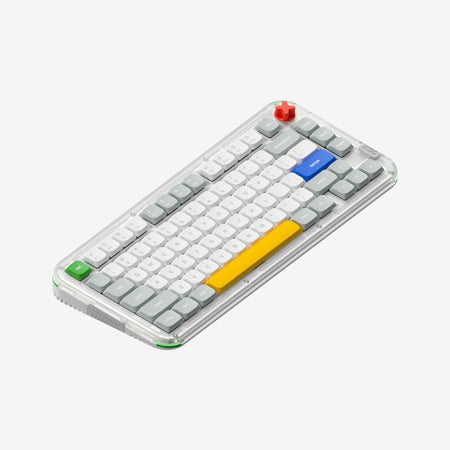
Which one should you get?
Get the
Keychron Lemokey P1
Aluminum
- CNC machined aluminum case for a premium, solid feel.
- Supports ANSI and multiple ISO layouts (UK, German, Nordic, Swiss).
- Larger 4000mAh battery capacity.
- Heavier at 1650g, less portable.
- Vendor listings indicate frequent stock shortages.
- Only available in a standard high-profile configuration.
Get the
Nuphy Kick75
Polycarbonate 75% Boards
- Convertible between high and low profile configurations with a kit.
- Lighter polycarbonate construction (1009g for high-profile).
- Lower starting price point.
- Smaller 2500mAh battery (for the NuPhyIO version).
- Only supports ANSI layout.
- Uses plate-mounted stabilizers instead of screw-in.
Your priority should guide your choice. Opt for the Keychron P1 if you require a specific ISO layout, want the heft and premium feel of an aluminum chassis, or plan to build from a barebones kit. Choose the Nuphy Kick75 if you prefer a lighter keyboard, value the flexibility to switch between high and low profiles, or are looking for a more budget-friendly entry point into the 75% form factor. Both deliver excellent core features for typing and gaming.
The differences that matter
Skip the 40-row spec sheet. These are the specs that change how each board feels, sounds, and fits your desk.
Keychron Lemokey P1
Nuphy Kick75
Case material
Aluminum
Plastic
Switch options
Clicky, Linear, Tactile
Mechanical
Weight
1,650 g
1,009 g
Layout standard
ANSI, ISO, ISO-DE, ISO-ES, ISO-FR, ISO-Nordic, ISO-SW, ISO-UK
ANSI
Screw-in stabilizers
Yes
No
- Keychron Lemokey P1
- Nuphy Kick75
- Performance
- 8282
- Build quality
- 8878
- Productivity
- 9793
- Customizability
- 9692
- Portability
- 8182
- Layout size: 75%
- Connection: Bluetooth, 2.4 GHz, Wired
- Hot-swappable
- Battery: 4,000 mAh
- Max polling rate: 1,000 Hz
- Mount style: Gasket Mount
What will you mostly use it for?
The Keychron P1 takes the lead for office and programming use due to its international layout support and for modders seeking a barebones option with screw-in stabilizers. The Nuphy Kick75 is the clear choice for travel thanks to its lighter polycarbonate construction and convertible profiles. For gaming and content creation, both keyboards are evenly matched on core performance specs, making the choice more about material feel and aesthetics.
It's a tie
- Both offer a 1000 Hz polling rate in 2.4GHz and wired modes for low latency.
- Both feature N-key rollover and south-facing RGB.
- Both have programmable knobs for macro control.
What owners say
Ratings and quotes collected from verified store reviews, including the critical ones.
Keychron Lemokey P1
10 owner reviews
“Love the keyboard, i got the red switches, i also got a silicon palm rest, feels super nice, super high quality, super heavy. No complaints It looks great with any setup, my friends were shocked when they found out the price.”
Nuphy Kick75
No owner reviews collected yet.
Keychron Lemokey P1 vs Nuphy Kick75 specs
Every tracked spec, side by side. Rows marked with a dot differ between the boards.
7 of 27 specs differ
Keychron Lemokey P1
Nuphy Kick75
Switch options
Hot-swappable
Mount style
Sound dampening
Screw-in stabilizers
Layout size
Layout standard
Ergonomics
Knob
Display
Media keys
Connection
Max polling rate
Battery
USB-C
Case material
Plate material
Keycaps
Weight
Dimensions
Typing angle
Backlight
QMK
VIA
N-key rollover
Mac & Windows
Released
Compare prices
Live prices from the stores we track, cheapest in-stock offer first.
Lowest price across stores, Amazon excluded.



Prices in USD are converted to your currency and can change at any time. KeebFinder may earn a commission when you buy through these links, at no extra cost to you.
Keychron Lemokey P1 vs Nuphy Kick75: your questions
The Keychron P1 has a larger 4000mAh battery. The Nuphy Kick75's QMK version also lists a 4000mAh battery, but its standard NuPhyIO version uses a 2500mAh cell. For models with equivalent firmware, battery capacity is similar, but the P1's specification is consistently 4000mAh.
Yes, but only the Keychron P1 natively supports ISO physical layouts. It is offered in fully assembled UK, German, Nordic, and Swiss ISO layouts, and its barebone ISO PCB supports other European languages. The Nuphy Kick75 is ANSI-only, so ISO keycaps would not fit correctly on its enter and shift keys.
Yes, both keyboards are hot-swappable. They support most 3-pin and 5-pin MX-style mechanical switches, allowing you to change switches without soldering.
The Keychron P1 has an edge for hardcore modders. It is available as a barebones kit, includes screw-in stabilizers for easier tuning, and its vendor description lists specific acoustic foams like IXPE and PET. The Nuphy Kick75 offers unique customization via open-source 3D printing files for case accessories.
Yes, the Nuphy Kick75 is well-suited for travel. Its polycarbonate high-profile version weighs 1009g, which is over 600g lighter than the aluminum P1. It can also be converted to an even lighter and slimmer low-profile configuration using an optional kit.
Yes, both the Keychron P1 and Nuphy Kick75 are listed as compatible with macOS, Windows, and Linux systems. They include keycaps for both Mac and Windows layouts.
The Keychron P1 features a full CNC machined aluminum case, making it heavier and very solid. The Nuphy Kick75 uses a polycarbonate (PC) case for both the top and bottom, resulting in a lighter and potentially more vibrant, translucent look.
No. The Keychron P1 is only available in a standard high-profile configuration. The Nuphy Kick75 is uniquely designed to be convertible between high and low profiles using a separate conversion kit you must purchase.
Both keyboards offer robust software support. The Keychron P1 uses the Lemokey Launcher web app and is compatible with QMK and VIA. The Nuphy Kick75 offers a choice between the NuPhyIO web app or QMK/VIA firmware versions at purchase. Both provide deep programmability.
The vendor descriptions do not specify if the stabilizers are pre-lubricated. The Keychron P1 uses screw-in PCB stabilizers, while the Nuphy Kick75 uses plate-mounted stabilizers. Modders often lubricate stabilizers themselves for a better sound and feel.
For gaming, both keyboards offer a 1000 Hz polling rate in their 2.4GHz wireless mode and in wired USB-C mode. This provides fast response times suitable for competitive play.
Not sold on either?






Still torn?
Answer a few quick questions and the keyboard finder ranks 2,000+ boards by how you will actually use yours.