Not sure which keyboard to choose? Try the Keyboard Finder now!

Compare Leopold FC630MBT V2 vs FC660MBT Differences Side by Side

This comparison is for buyers deciding between two compact, wireless Leopold keyboards. The choice hinges on whether you prioritize the ultra-portable 60% form factor of the FC630MBT V2 or the added utility of the 65% layout with dedicated arrow keys on the FC660MBT. Both share core Leopold qualities like PBT keycaps and multi-device Bluetooth, making the layout the primary differentiator. The FC630MBT V2 also features newer internal components, adding another layer to the decision.
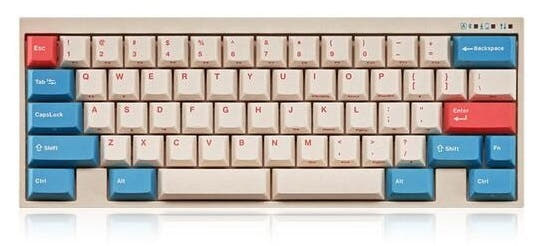
Leopold FC630MBT Coral / Blue 60% Bluetooth Mechanical Keyboard
Leopold FC660MBT Two Tone White 65% Bluetooth Double Shot PBT Mechanical Keyboard

Select a keyboard to compare

0.0 (0)
0.0 (0)
  • Released in 2024
  • Available in a 60% layout
  • Supports Bluetooth, Wired, Wireless connectivity
  • Made with a ABS case
  • Offers Yes, North-face RGB lighting
  • Released in 2023
  • Available in a 65% layout
  • Compatible with both Mac and Windows
  • Supports Bluetooth, Wireless, Wired connectivity
  • Made with a Plastic, ABS case
  • Offers No RGB lighting
Scores
  • Performance: 59.1
  • Build Quality: 49
  • Productivity: 51.7
  • Customizability: 47.1
  • Portability: 80.3
Scores
  • Performance: 52.7
  • Build Quality: 49
  • Productivity: 63.5
  • Customizability: 47.2
  • Portability: 84.7
Name
Leopold FC630MBT V2
Name
Leopold FC660MBT
Release year
2024
Release year
2023
Switch Options
Clicky, Tactile, Linear, Silent
Switch Options
Clicky, Tactile, Linear, Silent
Profile
Normal Profile
Profile
Normal Profile
Hot Swappable
 
Hot Swappable
 
Layout Size
60%
Layout Size
65%
Layout Standard
ANSI
Layout Standard
ANSI
Layout Ergonomics
Normal
Layout Ergonomics
Normal
Knob Support
 
Knob Support
 
Display Support
 
Display Support
 
Mac/Win Support
 
Mac/Win Support
 
Multi-Media Keys
 
Multi-Media Keys
 
USB-C
 
USB-C
 
USB passthrough
 
USB passthrough
 
Connection
Bluetooth, Wired, Wireless
Connection
Bluetooth, Wireless, Wired
Polling Rate
-
Polling Rate
-
Battery capacity
-
Battery capacity
-
Hall Effect Support
 
Hall Effect Support
 
QMK Support
 
QMK Support
 
VIA Support
 
VIA Support
 
VIAL Support
 
VIAL Support
 
N-Key Rollover
 
N-Key Rollover
 
Rapid Trigger
 
Rapid Trigger
 
Mount Style
Plate Mount
Mount Style
Plate Mount
Screw in Stabilizers
 
Screw in Stabilizers
 
Sound Dampening
 
Sound Dampening
 
Backlight
 
North-face
Backlight
 
Case Colors
Case Colors
Case Material
ABS
Case Material
Plastic, ABS
Keycaps Material
PBT
Keycaps Material
PBT
Dimensions
-
Dimensions
-
Weight
-
Weight
-
*Something incorrect or missing? Please
let me know
!

Pros and Trade-offs

Your priority should dictate the choice. If you need dedicated arrow keys for office work or programming and use Windows, the FC660MBT is the clear selection. If maximum portability, a newer switch generation, and internal build details like an FR4 plate are more important, the FC630MBT V2 is the better pick, but be sure to verify its compatibility with your operating system.

Leopold FC630MBT V2

  • +More compact 60% layout maximizes desk space and portability.
  • +Includes newer Cherry MX2A switches according to the vendor.
  • +Features an FR4 plate and a flex cut PCB for a specific typing feel.
  • +Comes with sound absorbing pad and foam pre-installed.
  • +Has north-facing RGB lighting.

  • Lacks dedicated arrow keys, requiring a function layer for navigation.
  • The vendor product page states it is not Windows, Mac, or Linux compatible.
  • Requires three AAA batteries for wireless, one more than the FC660MBT.

Leopold FC660MBT

  • +65% layout includes dedicated arrow and navigation keys.
  • +Vendor listing confirms Windows compatibility.
  • +Can connect to up to 4 devices via Bluetooth.
  • +Uses only two AAA batteries for wireless operation.
  • +Offers Cherry MX Clear switches as an optional variant.

  • Lacks any form of backlighting or RGB.
  • Uses a plastic plate instead of FR4.
  • Slightly larger and less portable than the 60% model.

Which Keyboard Is Better for Your Needs?

The FC660MBT is the more pragmatic choice for work and coding due to its dedicated arrow keys and explicit Windows support. The FC630MBT V2 wins for travel and offers more internal features appealing to modders, like its FR4 plate and foam. For gaming and content creation, the decision is less clear-cut and leans on personal preference for size versus navigation convenience.

GamingLeopold FC630MBT V2
  • The FC630MBT V2 is listed with north-facing RGB LEDs, which can be relevant for certain aftermarket keycap compatibility.
  • Its slightly more compact 60% form factor can free up more desk space for mouse movement.
  • The vendor description mentions it uses the newer Cherry MX2A line of switches.
OfficeLeopold FC660MBT
  • The FC660MBT's 65% layout includes dedicated arrow keys, which are frequently used in spreadsheet navigation.
  • Its vendor listing explicitly states Windows compatibility, while the FC630MBT V2's listing says it is not Windows compatible.
  • The ability to connect up to 4 devices via Bluetooth, as stated in its description, aids in multitasking between a computer and phone.
ProgrammingLeopold FC660MBT
  • The dedicated arrow keys on the FC660MBT are crucial for precise code navigation without using function layers.
  • Both keyboards have DIP switches for customizing key functions, but the FC660MBT's layout reduces reliance on layers for common navigation.
  • The inclusion of Cherry MX Clear switches as an option, per its vendor list, provides a high-actuation force tactile option preferred by some typists.
TravelLeopold FC630MBT V2
  • The FC630MBT V2 has a 60% layout, which is more compact than the 65% FC660MBT.
  • Both use AAA batteries for wireless, but the smaller size of the FC630MBT V2 makes it easier to pack.
  • Its lighter weight, implied by the smaller size and ABS case construction, is beneficial for portability.
ModdingLeopold FC630MBT V2
  • The FC630MBT V2 features an FR4 plate and a flex cut PCB, as per its vendor description, which can influence typing feel.
  • It includes a sound absorbing pad and foam from the factory, providing a modded-like acoustic profile out of the box.
  • North-facing RGB LEDs offer potential for shine-through keycap effects, though both keyboards have non-hotswap soldered switches.
Content CreationTie
  • Both keyboards offer multimedia keys for controlling media playback.
  • Both have N-key rollover for reliable simultaneous key presses.
  • The choice depends on personal layout preference: the FC630MBT V2 saves space, while the FC660MBT offers quicker arrow key access for timeline scrubbing.

Frequently Asked Questions (FAQ)


Discover similar products

You might also like similar products in that price range:

99
$129
Keychron K2 HE Wireless Magnetic Switch Custom Keyboard
Keychron K2 HE
75%,
Hotswap,
Wireless,
Wired,
RGB/ White LEDs,
Knob,
VIA,
QMK,
HE,
Rapid trigger,
Alu case,
Tray Mount

81
$100
NuPhy Halo65 HE - Magnetic Coral
Nuphy Halo65 HE
65%,
Hotswap,
Wired,
RGB,
HE,
Rapid trigger,
Alu case,
Gasket Mount

93
$97
Keychron V1 Ultra 8K Wireless Custom Mechanical Keyboard ISO Layout Collection
Keychron V1 Ultra
75%,
Hotswap,
Wireless,
Wired,
RGB/ White LEDs,
Knob,
VIA,
QMK,
Gasket Mount

76
$110
Qwertykeys Neo65 Cu Keyboard
Qwertykeys Neo65
65%,
Hotswap,
Wireless,
Wired,
VIA,
Alu case,
PCB Mount

89
$109
Keychron K2 QMK Wireless Mechanical Keyboard (ISO Layout) - Version 3
Keychron K2 V3
75%,
Hotswap,
Wireless,
Wired,
RGB/ White LEDs,
VIA,
QMK,
Alu case,
PCB Mount

75
$110
Qwertykeys Neo60 Cu Keyboard
Qwertykeys Neo60
60%,
Hotswap,
Wireless,
Wired,
VIA,
Alu case,
PCB Mount

83
$100
Keychron K2 QMK Wireless Mechanical Keyboard (ISO Layout) - Version 3
Keychron K2 QMK V3
75%,
Hotswap,
Wireless,
Wired,
RGB/ White LEDs,
VIA,
QMK,
Alu case,
PCB Mount

98
$94
Keychron V1 Max QMK Wireless Custom Mechanical Keyboard ISO Layout Collection
Keychron V1 Max
75%,
Hotswap,
Wireless,
Wired,
RGB,
Knob,
VIA,
QMK,
Gasket Mount