Leopold FC750R vs FC750RBT V2
Wired or Wireless
Choose the FC750R for wired use with explicit Mac and Windows support and layout dip switches, or the FC750RBT V2 for Bluetooth, USB-C, RGB, and its aluminum or FR4 plate options.
Prices checked Nov 28, 2026. KeebFinder may earn a commission when you buy through these links, at no extra cost to you.

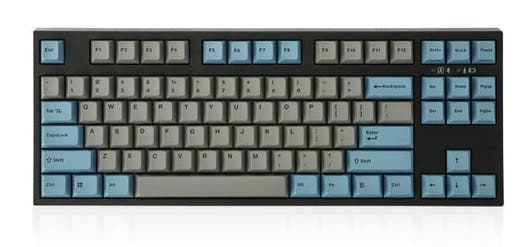
Which one should you get?
Get the
Leopold FC750R
Mac & Windows
Build quality in the bottom 20% of 80% boards under $150.
If you want
- Dip switches for customizing the layout.
- Explicit Mac and Windows support, with Linux compatibility also listed by the vendor.
Rules this board out
- Switches are soldered. Swapping them means soldering.
Get the
Leopold FC750RBT V2
Build quality in the bottom 20% of 80% boards under $150.
If you want
- Bluetooth and wired USB-C connectivity.
- RGB lighting.
- Aluminum or FR4 plate options and an FR4 dual-layer PCB design.
Rules this board out
- Switches are soldered. Swapping them means soldering.
- North-facing LEDs. Cherry-profile keycaps can hit the switch housing.
Bottom line
Get the FC750R for its dip-switch layout customization and explicitly listed Mac, Windows, and Linux support. Choose the FC750RBT V2 for Bluetooth, USB-C, RGB lighting, and its aluminum or FR4 plate options, while keeping its north-facing LED keycap limitation in mind.
The differences that matter
- Connection
Wired
Bluetooth, Wired
Wireless for several devices and wired for lower latency - Case material
Plastic
ABS
- Plate material
Plastic
Aluminum, FR4
- Backlight
None
Yes, north-facing
RGB for looks and low light rather than speed - Mac & Windows
Yes
No
KeebFinder scores
How we score- Leopold FC750R
- Leopold FC750RBT V2
- Performance
- 5965
- Build quality
- 4848
- Productivity
- 6157
- Customizability
- 4746
- Portability
- 5367
What they share
- Layout size: 80%
- Switch options: Clicky, Linear, Silent, Tactile
- Mount style: Plate Mount
- Sound dampening
- Keycaps: PBT
What will you mostly use it for?
For gaming, it’s a tie
- Both list N-key rollover and clicky, tactile, linear, and silent switch options.
- The FC750R is wired-only, while the FC750RBT V2 can connect by USB-C or Bluetooth.
Leopold FC750R vs FC750RBT V2 specs
6 of 17 specs differ
 |  | |
| Leopold FC750R$104 | Leopold FC750RBT V2$140 | |
|---|---|---|
| Typing & switches | ||
| Switch options | Clicky, Linear, Silent, Tactile | Clicky, Linear, Silent, Tactile |
| Mount style | Plate Mount | Plate Mount |
| Sound dampening | Yes | Yes |
| Layout | ||
| Layout size | 80% | 80% |
| Layout standard | ANSI | ANSI |
| Ergonomics | Standard | Standard |
| Display | None | None |
| Media keys | Yes | Yes |
| Connectivity & battery | ||
| Connection (differs) | Wired | Bluetooth, Wired |
| USB-C (differs) | No | Yes |
| Build & materials | ||
| Case material (differs) | Plastic | ABS |
| Plate material (differs) | Plastic | Aluminum, FR4 |
| Keycaps | PBT | PBT |
| Backlight (differs) | None | Yes, north-facing |
| Firmware & software | ||
| N-key rollover | Yes | Yes |
| Mac & Windows (differs) | Yes | No |
| Extras | ||
| Released | 2024 | 2024 |
Compare prices
Prices in USD are converted to your currency and can change at any time. KeebFinder may earn a commission when you buy through these links, at no extra cost to you.
Lowest price across stores, Amazon excluded.
- Price now
- $140
- Lowest in range
- $140Aug 29
- Highest in range
- $140Aug 29
Price in USD
- Check on Amazon
AmazonGlobal
Check price


- Check on Amazon
AmazonGlobal
Check price


