Leopold FC750R PD vs FC750R
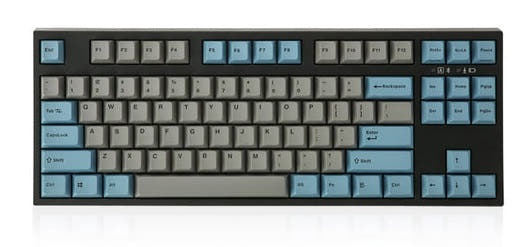
Choose the FC750R PD if you prefer the Grey/Blue keycap colorway with the same underlying quality as the standard FC750R.
KeebFinder may earn a commission when you buy through these links, at no extra cost to you.

from$119at MK
90-day lowLowest price in 90 days

from$104at MK
90-day lowLowest price in 90 days
Which one should you get?
Get the
Leopold FC750R PD
Build quality in the bottom 25% of 80% boards under $150.
- Grey and Blue doubleshot PBT keycaps offer a uniquely styled aesthetic
- Includes a sound absorbing pad for dampened acoustics
- Prebuilt with dip switches for customizing the layout without soldering
- Switches are soldered. Swapping them means soldering.
Get the
Leopold FC750R
Build quality in the bottom 25% of 80% boards under $150.
- Charcoal Blue doubleshot PBT keycaps provide a darker, subdued color scheme
- Includes a sound absorbing pad and N-Key Rollover as standard
- Prebuilt with Mac, Windows, and Linux compatibility according to vendor
- Switches are soldered. Swapping them means soldering.
Choose the FC750R PD if you want the Grey/Blue keycap color scheme, or pick the standard FC750R for the Charcoal Blue look. Since both keyboards deliver identical specifications, performance, and build quality, your choice should be based purely on aesthetic preference. Neither model outpaces the other in any functional way.
The differences that matter
Skip the 40-row spec sheet. These are the specs that change how each board feels, sounds, and fits your desk.
Leopold FC750R PD
Leopold FC750R
Released
2023
2024
- Leopold FC750R PD
- Leopold FC750R
- Performance
- 5959
- Build quality
- 4949
- Productivity
- 6160
- Customizability
- 4847
- Portability
- 5454
- Layout size: 80%
- Connection: Wired
- Case material: Plastic
- Switch options: Clicky, Linear, Silent, Tactile
- Mount style: Plate Mount
- Sound dampening
What will you mostly use it for?
In all six use cases the decision is a tie. The FC750R PD and standard FC750R are functionally identical keyboards built around the same plastic case, plate mount, and Cherry MX switch options. Neither offers wireless connectivity, RGB lighting, or hotswap capabilities that would create a meaningful advantage in any scenario. The only differentiating factor is cosmetic: the keycap colorway and model suffix.
It's a tie
- Both share the same Cherry MX switch options and plate mount construction
- Both have N-Key Rollover for full USB key rollover
- Neither offer wireless or RGB features that would differentiate gaming performance
Leopold FC750R PD vs FC750R specs
Every tracked spec, side by side. Rows marked with a dot differ between the boards.
1 of 16 specs differ
Leopold FC750R PD
Leopold FC750R
Switch options
Mount style
Sound dampening
Layout size
Layout standard
Ergonomics
Display
Media keys
Connection
Case material
Plate material
Keycaps
Backlight
N-key rollover
Mac & Windows
Released
Compare prices
Live prices from the stores we track, cheapest in-stock offer first.
Prices in USD are converted to your currency and can change at any time. KeebFinder may earn a commission when you buy through these links, at no extra cost to you.
Lowest price across stores, Amazon excluded.


Leopold FC750R PD vs FC750R: your questions
No, the FC750R PD is not hotswap compatible. According to the vendor specifications, hotswap is listed as 'No', meaning you would need to desolder switches to change them.
The standard FC750R is available with Cherry MX Black, Brown, Blue, Red, Silent Red, Clear, and Silver switches. The vendor lists these variants with specific SKUs for each switch type.
No, the FC750R PD does not have RGB backlighting. Both the PD and standard models lack any form of backlighting, and the doubleshot PBT keycaps are not designed for light transmission.
Yes, the standard FC750R uses 1.5mm thick PBT Double Shot keycaps. The vendor description confirms this, and the 'DS' in the SKU likely references the doubleshot printing method.
The standard FC750R supports Windows, Mac, and Linux according to the vendor. Both models also explicitly list Mac/Win support in their extra features, though Linux is only mentioned for the standard version.
The FC750R PD has a 60 inch cord according to the vendor specifications. The standard FC750R also lists a 60 inch cord, making them identical in this regard.
Yes, the standard FC750R is available with Cherry MX Silent Red switches. The vendor lists a specific SKU for the Silent Red variant alongside other Cherry MX options.
Yes, the FC750R PD includes multi-media keys. Both the PD and standard models list multi-media keys in their extra features, allowing for quick audio and media controls.
Both the case and plate are made of plastic. The metadata for the standard FC750R specifies plastic for both the top material and bottom material, and the plate material is listed as plastic for both models.
Yes, the standard FC750R has N-Key Rollover, also described as 'Full' USB key rollover by the vendor. This ensures that every key press is registered simultaneously, which can be important for fast typing or gaming.
Not sold on either?



Still torn?
Answer a few quick questions and the keyboard finder ranks 2,000+ boards by how you will actually use yours.