Leopold FC750RBT vs FC750RBT V2Wireless TKL with Classic vs Updated Build
Choose the V2 for its updated acoustic design and newer switches, or the original for simpler battery replacement and a lower price point.

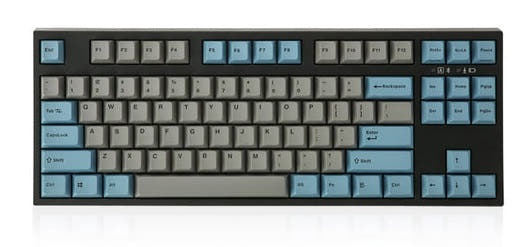
Which one should you get?
Get the
Leopold FC750RBT
Wireless TKL with Classic
- Uses two standard AAA batteries for wireless power, included.
- Features a 3-way cord channel for left, right, or center cable exit.
- Product listing explicitly confirms Mac, Windows, and Linux compatibility.
- Lacks the additional acoustic foam and updated internal design of the V2.
- Comes with the previous generation of Cherry MX switches, not the newer MX2A line.
- Plate material is plastic, not aluminum.
Get the
Leopold FC750RBT V2
Updated Build
- Features an aluminum plate and an FR4 dual-layer PCB design.
- Includes both a sound absorbing pad and foam for enhanced acoustics.
- Comes installed with the newer Cherry MX2A line of switches.
- Wireless mode requires three AAA batteries, which is less common than two.
- The product listing does not explicitly mention Mac or Linux compatibility, only Windows.
- Typically carries a higher price than the original model.
Your choice hinges on what you value more in an update. The FC750RBT V2 justifies its cost with tangible hardware upgrades: a metal plate, extra foam, and newer switches for a potentially refined typing experience. The original FC750RBT remains a compelling, slightly more affordable option with a pragmatic battery system and proven cross-platform support. Prioritize internal construction and switch feel for the V2, or battery convenience and cost for the original.
The differences that matter
Skip the 40-row spec sheet. These are the specs that change how each board feels, sounds, and fits your desk.
Leopold FC750RBT
Leopold FC750RBT V2
Case material
ABS, Plastic
ABS
Plate material
Plastic
Aluminum, FR4
Backlight
None
Yes, north-facing
Mac & Windows
Yes
No
Released
2023
2024
- Leopold FC750RBT
- Leopold FC750RBT V2
- Performance
- 5765
- Build quality
- 4849
- Productivity
- 6957
- Customizability
- 4647
- Portability
- 7267
- Layout size: 80%
- Connection: Bluetooth, Wired
- Switch options: Clicky, Linear, Silent, Tactile
- Mount style: Plate Mount
- Sound dampening
- Keycaps: PBT
What will you mostly use it for?
The V2 pulls ahead for gaming and modding due to its updated internal construction and switches. The original FC750RBT is more practical for office and travel, thanks to its simpler two-battery design and explicit Mac support. For programming and content creation, the keyboards are evenly matched on core layout and features, making switch preference the deciding factor.
Pick the Leopold FC750RBT V2
- The V2's aluminum plate may offer a more consistent typing feel.
- It features the newer Cherry MX2A switch generation, which a reviewer noted for more precise feedback.
- North-facing RGB, while not backlit keycaps, is present for underglow effects.
Leopold FC750RBT vs FC750RBT V2 specs
Every tracked spec, side by side. Rows marked with a dot differ between the boards.
5 of 18 specs differ
Leopold FC750RBT
Leopold FC750RBT V2
Switch options
Mount style
Sound dampening
Layout size
Layout standard
Ergonomics
Display
Media keys
Connection
Battery
USB-C
Case material
Plate material
Keycaps
Backlight
N-key rollover
Mac & Windows
Released
Compare prices
Live prices from the stores we track, cheapest in-stock offer first.
Lowest price across stores, Amazon excluded.


Prices in USD are converted to your currency and can change at any time. KeebFinder may earn a commission when you buy through these links, at no extra cost to you.
Leopold FC750RBT vs FC750RBT V2: your questions
The V2 updates the internal design with an aluminum plate, an FR4 dual-layer PCB, and additional sound foam. It also uses the newer Cherry MX2A switches and requires three AAA batteries for wireless, compared to the original's two AAA batteries and classic Cherry MX switches.
No. The vendor listing for the V2 specifies the backlighting as 'Blank / None LED'. It has north-facing RGB, but this provides underglow lighting, not illumination through the keycap legends.
No. Both the Leopold FC750RBT and the V2 are not hot-swappable according to their vendor characteristics. The switches are soldered onto the PCB.
The original FC750RBT is the safer choice for Mac users. Its vendor description explicitly states Mac compatibility. The V2's listing only explicitly confirms Windows compatibility, though it may still function with Mac systems.
The original FC750RBT uses two included AAA batteries for wireless mode. The FC750RBT V2 uses three included AAA batteries for its Bluetooth connection.
Yes. Both models feature double-shot PBT keycaps. The original FC750RBT specifically mentions its keycaps are 1.5mm thick.
The V2 comes with Cherry MX2A switches. Available options include Brown, Blue, Red, Black, Silent Red, and Speed Silver, according to the vendor listing.
Yes, both models offer some level of customization. The vendor description for the original FC750RBT mentions that dip switches allow for customizing certain key functions.
The V2 is likely to have a more dampened sound profile. Its manufacturer description states it includes both a sound absorbing pad and foam, whereas the original mentions only a pad. Both offer silent switch options (Silent Red).
Both are well-regarded for typing due to their sturdy pre-built construction, PBT keycaps, and choice of genuine Cherry switches. The V2's aluminum plate and extra foam may offer a more solid and muted typing feel, while a reviewer noted the MX2A Blues provide precise feedback.
Both keyboards offer two connectivity methods. They can be used wired via the included USB-C to USB-A cable, or wirelessly via Bluetooth 5.1.
The FC750RBT V2 typically carries a slightly higher price than the original FC750RBT. The difference reflects the V2's updated internal components, such as the aluminum plate, FR4 PCB, and newer switches.
Not sold on either?


Still torn?
Answer a few quick questions and the keyboard finder ranks 2,000+ boards by how you will actually use yours.