LUMINKEY LuminKey80 vs Pulsar Xboard QSWireless vs Wired Hub TKL
Choose the LuminKey80 for wireless flexibility or the Pulsar Xboard QS for wired-only productivity features like a USB hub and dedicated OS switching.
KeebFinder may earn a commission when you buy through these links, at no extra cost to you.


Which one should you get?
Get the
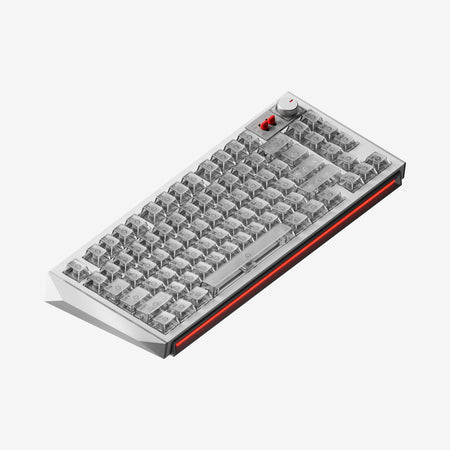
LUMINKEY LuminKey80
Wireless
Build quality in the top 20% of 80% boards under $300.
- Triple connectivity with Bluetooth, 2.4 GHz, and wired modes.
- Gasket mount design with a polycarbonate plate for a softer typing feel.
- Includes a red copper weight and badge for added heft and premium aesthetics.
Get the
Pulsar Xboard QS
Wired Hub TKL
Build quality in the top 25% of 80% boards under $300.
- Features a 2-port USB-A pass-through hub for peripheral connectivity.
- Includes a dedicated volume and LED control knob.
- Has south-facing RGB backlighting with numerous customization options.
- South-facing LEDs. Shine-through legends stay dark, and some sculpted keycaps can clip the LED.
- No ISO layout. ISO-DE, UK, and other ISO variants are not offered.
Your primary need dictates the choice. If you require a single keyboard to work wirelessly across multiple devices or value a specific gasket-mounted typing feel, the LuminKey80 is the appropriate tool. If your setup is permanently wired and you would benefit from integrated features like a USB hub, control knob, and dedicated OS switching, the Pulsar Xboard QS offers more utility on the desk. Both are well-built, customizable starting points.
The differences that matter
Skip the 40-row spec sheet. These are the specs that change how each board feels, sounds, and fits your desk.
LUMINKEY LuminKey80
Pulsar Xboard QS
Connection
Bluetooth, 2.4 GHz, Wired
Wired
Wireless for several devices and wired for lower latency
Mount style
Gasket Mount
Plate Mount
Knob
No
Yes
Layout standard
ANSI, ISO
ANSI
ISO and JIS exist so regional layouts fit
Plate material
Polycarbonate
Plastic
- LUMINKEY LuminKey80
- Pulsar Xboard QS
- Performance
- 6074
- Build quality
- 7672
- Productivity
- 8387
- Customizability
- 7988
- Portability
- 7660
- Layout size: 80%
- Hot-swappable
- Case material: Aluminum
- QMK
- VIA
- Keycaps: PBT
What will you mostly use it for?
The Pulsar Xboard QS wins in scenarios where the desk is stationary and productivity features are paramount, such as office work, programming, and content creation. The LuminKey80 is the clear choice for mobile users and gamers who value wireless freedom. For modding enthusiasts, both keyboards offer an equally strong foundation with hot-swap sockets and robust firmware support.
Pick the LUMINKEY LuminKey80
- Offers wireless 2.4 GHz connectivity with a 1000Hz polling rate for low-latency gaming away from the desk.
- The vendor lists specific low-latency figures: 8ms wired, 9ms on 2.4G.
- Its gasket mount design may provide a softer, more cushioned feel during long sessions.
LUMINKEY LuminKey80 vs Pulsar Xboard QS specs
Every tracked spec, side by side. Rows marked with a dot differ between the boards.
7 of 20 specs differ
LUMINKEY LuminKey80
Pulsar Xboard QS
Hot-swappable
Mount style
Layout size
Layout standard
Ergonomics
Knob
Display
Connection
Max polling rate
USB passthrough
USB-C
Case material
Plate material
Keycaps
Dimensions
Backlight
QMK
VIA
Mac & Windows
Released
ISO layouts by store
Which stores sell ISO-DE, UK, and the other regional layouts.
LUMINKEY LuminKey80
Listed on the product, not split by store: ISO.
Pulsar Xboard QS
No ISO layout at the stores we track.
Compare prices
Live prices from the stores we track, cheapest in-stock offer first.
Prices in USD are converted to your currency and can change at any time. KeebFinder may earn a commission when you buy through these links, at no extra cost to you.
Lowest price across stores, Amazon excluded.



LUMINKEY LuminKey80 vs Pulsar Xboard QS: your questions
Only the LuminKey80 offers wireless connectivity. It supports Bluetooth and a 2.4 GHz wireless connection in addition to a wired USB-C mode. The Pulsar Xboard QS is a wired-only keyboard.
Yes. According to the product listing, the Pulsar Xboard QS includes a 2-port USB-A pass-through hub. This allows you to connect other devices directly to the keyboard. The LuminKey80 does not have this feature.
Yes, both keyboards support full programmability. They are compatible with both QMK and VIA firmware, allowing for deep key remapping, layer creation, and macro programming directly from your computer.
They use different mounting styles which affect feel. The LuminKey80 uses a gasket mount with a polycarbonate plate, which the vendor states provides a soft, cushioned typing experience. The Pulsar Xboard QS uses a traditional plate mount system, which typically offers a more direct and rigid feedback.
Yes, both are sold as pre-built units. The LuminKey80 comes with LuminKey Sylva switches and dye-sublimated PBT keycaps. The Pulsar Xboard QS comes with Kailh Box Ice Mint V2 switches and double-shot PBT keycaps.
The vendor specifies the LuminKey80 has a 1000Hz polling rate in both its wired and 2.4 GHz wireless modes. Its Bluetooth mode operates at a 125Hz polling rate.
Yes. The Pulsar Xboard QS lists macOS compatibility and includes a dedicated key for switching between Windows and macOS operating system layouts, making it easy to adapt between the two.
The Pulsar Xboard QS includes a more comprehensive accessory kit. According to the listing, it comes with two USB-C cables, a switch puller, a keycap puller, five extra switches, and a dust bag. The LuminKey80 includes a single Type-C data cable and a user manual.
The Pulsar Xboard QS uses south-facing RGB LEDs, which prevents interference with Cherry-profile and other low-profile keycaps. The LuminKey80 does not have RGB backlighting, so keycap compatibility is not limited by LED placement.
Both keyboards feature aluminum cases. The LuminKey80's vendor specifies it uses a 6063 CNC aluminum case with a red copper weight. The Pulsar Xboard QS listing describes it as having a CNC machined aluminum case.
The LuminKey80's vendor claims low latency figures suitable for gaming: 8ms in wired mode and 9ms in its 2.4 GHz wireless mode, both at a 1000Hz polling rate. This makes its wireless performance a viable option for many gamers.
Not sold on either?



Still torn?
Answer a few quick questions and the keyboard finder ranks 2,000+ boards by how you will actually use yours.