Not sure which keyboard to choose? Try the Keyboard Finder now!

Compare Mek Studio Geometry70 vs Pulsar Xboard QS Differences Side by Side

This comparison is for buyers deciding between a compact, wireless DIY kit and a larger, feature-rich pre-built keyboard. The Mek Studio Geometry70 offers a 70% layout with Bluetooth and a dual-mount kit, while the Pulsar Xboard QS is an 80% TKL with a USB hub, knob, and pre-installed switches. The decision hinges on whether you prioritize portability and customization or immediate productivity features and a full function row.

77
[In Stock] Geometry70 70% Mechanical Keyboard
83
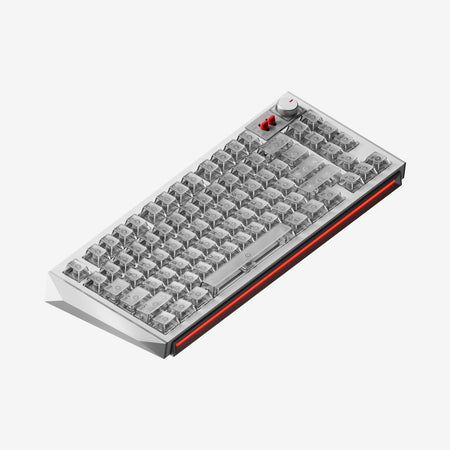
Pulsar Xboard QS Aluminum TKL Hotswap RGB Mechanical Keyboard

Select a keyboard to compare

0.0 (0)
0.0 (0)
  • Available in a 70% layout
  • Built with the ANSI, ISO layout standard
  • Features N-key rollover
  • Uses a Top Mount mounting style
  • Supports Bluetooth, Wired, Wireless connectivity
  • Runs at a 1000 Hz polling rate
  • Equipped with a 4000 mAh battery
  • Weighs about 1500 g
  • Sized at 32 x 373 x 115 mm
  • Offers No RGB lighting
  • Available in a 80% layout
  • Built with the ANSI layout standard
  • Comes with a knob
  • Connects via USB-C
  • Offers a USB passthrough port
  • Uses a Plate Mount mounting style
  • Supports Wired, Wired only connectivity
  • Features PBT keycaps
  • Offers Yes, Rgb, South-face, Rgb South-face RGB lighting
Scores
  • Performance: 65.2
  • Build Quality: 75.9
  • Productivity: 68.3
  • Customizability: 85.2
  • Portability: 81
Scores
  • Performance: 74.2
  • Build Quality: 71.2
  • Productivity: 86.6
  • Customizability: 88.9
  • Portability: 60.6
Name
Mek Studio Geometry70
Name
Pulsar Xboard QS
Release year
2024
Release year
2024
Switch Options
-
Switch Options
-
Profile
Normal Profile
Profile
Normal Profile
Hot Swappable
 
Hot Swappable
 
Layout Size
70%
Layout Size
80%
Layout Standard
ANSI, ISO
Layout Standard
ANSI
Layout Ergonomics
Normal
Layout Ergonomics
Normal
Knob Support
 
Knob Support
 
Display Support
 
Display Support
 
Mac/Win Support
 
Mac/Win Support
 
Multi-Media Keys
 
Multi-Media Keys
 
USB-C
 
USB-C
 
USB passthrough
 
USB passthrough
 
Connection
Bluetooth, Wired, Wireless
Connection
Wired, Wired only
Polling Rate
1000 Hz
Polling Rate
-
Battery capacity
4000 mAh
Battery capacity
-
Hall Effect Support
 
Hall Effect Support
 
QMK Support
 
QMK Support
 
VIA Support
 
VIA Support
 
VIAL Support
 
VIAL Support
 
N-Key Rollover
 
N-Key Rollover
 
Rapid Trigger
 
Rapid Trigger
 
Mount Style
Top Mount
Mount Style
Plate Mount
Screw in Stabilizers
 
Screw in Stabilizers
 
Sound Dampening
 
Sound Dampening
 
Backlight
 
Backlight
 
Rgb, South-face
Case Colors
Case Colors
Case Material
Aluminum
Case Material
Aluminum
Keycaps Material
-
Keycaps Material
PBT
Dimensions
32 x 373 x 115 mm
Dimensions
-
Weight
1500g
Weight
-
*Something incorrect or missing? Please
let me know
!

Pros and Trade-offs

Select the Mek Studio Geometry70 if you value wireless freedom, enjoy building keyboards, and prefer a compact layout. Opt for the Pulsar Xboard QS if you need a ready-to-use TKL with practical office features like a USB hub, volume knob, and computer switching. The core trade-off is between the Geometry70's portable, customizable foundation and the Xboard QS's immediate, feature-complete desktop utility.

Mek Studio Geometry70

  • +Offers both Bluetooth and wired connectivity with a 4000mAh battery.
  • +Sold as a DIY kit supporting dual mount styles (top and gasket).
  • +Includes multiple acoustic foam pads (IXPE, Poron) for customization.
  • +Supports both ANSI and ISO layouts for broader compatibility.
  • +More compact 70% form factor.

  • Lacks any form of RGB lighting.
  • Requires assembly as it is a barebones kit.
  • Bluetooth mode operates at a lower 125Hz polling rate.

Pulsar Xboard QS

  • +Pre-built with Kailh Box Ice Mint V2 switches and double-shot PBT keycaps.
  • +Features a 2-port USB-A hub and a volume/LED control knob.
  • +Includes south-facing RGB lighting with multiple settings.
  • +Has dedicated buttons for switching between two computers and operating systems.
  • +TKL layout provides arrow keys and a function row.

  • Wired-only connectivity with no wireless option.
  • Larger 80% form factor is less portable.
  • Uses a plate mount system instead of gasket mount.

Which Keyboard Is Better for Your Needs?

The Pulsar Xboard QS is the more versatile choice for most stationary use cases, winning in Gaming, Office, Programming, and Content Creation due to its TKL layout, USB hub, knob, and pre-built convenience. The Mek Studio Geometry70 excels specifically for Travel due to its wireless capability and smaller size, and for Modding as it is fundamentally a customizable DIY kit. Your primary workspace and willingness to build will dictate the winner.

GamingPulsar Xboard QS
  • The Pulsar Xboard QS includes south-facing RGB lighting, which the Geometry70 lacks.
  • The Xboard QS's 1000Hz wired polling rate matches the Geometry70's wired performance.
  • The TKL layout provides dedicated arrow and navigation keys without layers.
OfficePulsar Xboard QS
  • The Pulsar Xboard QS has a 2-port USB-A hub for connecting peripherals.
  • It includes dedicated buttons for fast switching between two computers.
  • The pre-built nature with included PBT keycaps offers a ready-to-use experience.
ProgrammingPulsar Xboard QS
  • The Pulsar Xboard QS's TKL layout provides a full function row and navigation cluster.
  • It includes a volume and LED control knob for quick adjustments.
  • Both keyboards support QMK and VIA for key remapping.
TravelMek Studio Geometry70
  • The Mek Studio Geometry70 is a smaller 70% layout, making it more compact.
  • It offers Bluetooth connectivity for cable-free use.
  • It includes a 4000mAh battery for wireless operation.
ModdingMek Studio Geometry70
  • The Mek Studio Geometry70 is sold as a DIY kit, requiring assembly.
  • It supports switching between top mount and gasket mount structures.
  • The kit includes multiple foam pads (IXPE, Poron) for acoustic tuning.
Content CreationPulsar Xboard QS
  • The Pulsar Xboard QS includes a dedicated volume knob for media control.
  • The USB hub allows for easy connection of a mouse or audio interface.
  • South-facing RGB lighting is listed as a feature for aesthetic setups.

Frequently Asked Questions (FAQ)


Discover similar products

You might also like similar products in that price range:

97
$239
Keychron Q10 Max (Alice Layout) QMK/VIA Wireless Custom Mechanical Keyboard
Keychron Q10 Max
75%,
Hotswap,
Wireless,
Wired,
RGB,
Knob,
VIA,
QMK,
Alu case,
Gasket Mount

98
$219
Keychron Q3 HE QMK Wireless Custom Keyboard ISO Layout Collection
Keychron Q3 HE
80%,
Hotswap,
Wireless,
Wired,
RGB/ White LEDs,
Knob,
VIA,
QMK,
HE,
Rapid trigger,
Metal case,
Gasket Mount

84
$259
Qwertykeys QK65 Mk3 CNC Aluminum Barebones DIY Keyboard Kit
Qwertykeys QK65 Mk3
65%,
Hotswap,
Wireless,
Screen,
RGB,
Knob,
VIA,
Alu case,
Gasket Mount

95
$205
Keychron Q2 Max QMK/VIA Wireless Custom Mechanical Keyboard ISO Layout Collection
Keychron Q2 Max
65%,
Hotswap,
Wireless,
Wired,
RGB,
Knob,
VIA,
QMK,
Alu case,
Gasket Mount

-10% off
80
$299$269
[GB-EXTRA IN STOCK] EPOMAKER GLOW75 DIY Kit
Epomaker GLOW75
75%,
Hotswap,
Wireless,
Screen,
RGB,
Knob,
Alu case,
Gasket Mount

91
$200
Neo65 Cu Barebones Kit
Neo Neo65
65%,
Hotswap,
Wireless,
Wired,
RGB,
VIA,
QMK,
Alu case,
Gasket Mount

90
$199
Keychron Q16 HE 8K Magnetic Switch Keyboard
Keychron Q16 HE
65%,
Hotswap,
Wireless,
Wired,
RGB,
VIA,
QMK,
HE,
Rapid trigger,
Metal case,
Gasket Mount

94
$250
Keychron Q13 Max (Alice Layout) QMK Wireless Custom Mechanical Keyboard(US ANSI Layout)
Keychron Q13 Max
96%,
Hotswap,
Wireless,
Wired,
RGB,
Knob,
VIA,
QMK,
Alu case,
Gasket Mount

80
$254
Ducky Outlaw 65 Aluminum 65% DIY Kit Hotswap RGB DIY Keyboard Kit
Ducky Outlaw 65
65%,
Hotswap,
Wired,
RGB,
VIA,
QMK,
Alu case,
Plate Mount

100
$199
Chilkey ND104 CNC Aluminum Hotswap Wireless RGB Keyboard
Chilkey ND104
100%,
Hotswap,
Wireless,
Screen,
RGB,
Knob,
VIA,
QMK,
Alu case,
Plate Mount