Meko Blink vs Push60% vs 65% Layout Showdown
Choose the Meko Blink for maximum portability, or the Meko Push if you need dedicated arrow keys and more Bluetooth connections.

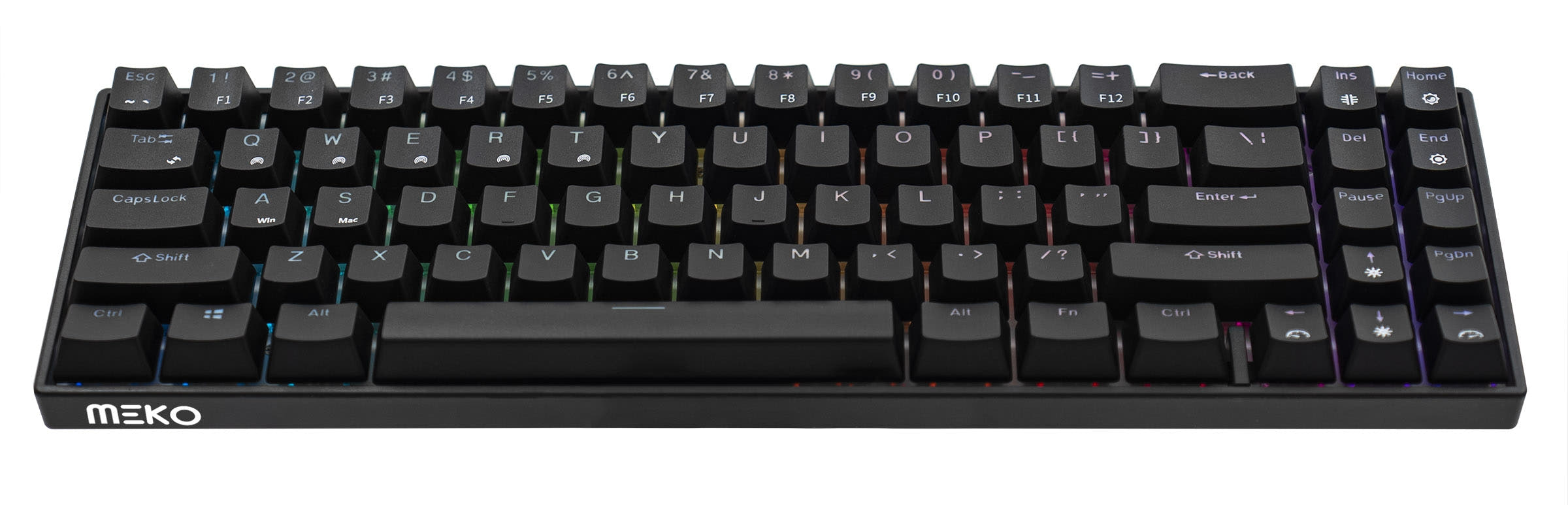
Which one should you get?
Get the
Meko Blink
60%
- More compact 60% layout for maximum desk space savings.
- North-facing RGB LEDs, which can be preferable for certain aftermarket keycap sets.
- Includes a switch puller and a braided USB-C cable.
- Lacks dedicated arrow keys, requiring a function layer.
- Can store connections for only 3 Bluetooth devices.
- Uses plate-mount clip-in stabilizers which some users may wish to upgrade.
Get the
Meko Push
65% Layout Showdown
- 65% layout includes dedicated arrow keys and a few extra navigation keys.
- Can store connections for up to 5 Bluetooth devices.
- Available in a barebones version for custom builds.
- Slightly larger footprint than a 60% keyboard.
- Uses plate-mount clip-in stabilizers which some users may wish to upgrade.
- No support for QMK or VIA firmware for advanced customization.
Your primary need dictates the choice. If the smallest size is paramount for a backpack or a minimalist desk, the Meko Blink is the logical pick. If you regularly use arrow keys for navigation, text editing, or spreadsheets and value connecting to more devices wirelessly, the Meko Push's 65% layout and extra Bluetooth slots offer meaningful daily utility for a minor size increase.
The differences that matter
Skip the 40-row spec sheet. These are the specs that change how each board feels, sounds, and fits your desk.
Meko Blink
Meko Push
Layout size
60%
65%
Backlight
RGB, north-facing
RGB
- Meko Blink
- Meko Push
- Performance
- 7172
- Build quality
- 5657
- Productivity
- 6869
- Customizability
- 7475
- Portability
- 8888
- Connection: Bluetooth, Wired
- Hot-swappable
- Case material: Plastic
- Switch options: Clicky, Linear, Silent, Tactile
- Mount style: Plate Mount
- Plate material: Plastic
What will you mostly use it for?
The Meko Push holds a slight edge for productivity-focused tasks like office work, programming, and content creation due to its more functional 65% layout. The Meko Blink is the clearer choice for travel due to its smaller 60% size. For gaming and modding, the keyboards are effectively tied, sharing their most important features like hot-swap capability and versatile connectivity.
It's a tie
- Both offer full N-key rollover for simultaneous key presses.
- Both have hot-swappable sockets for customizing switch feel.
- Both support wired and wireless connectivity for flexibility.
Meko Blink vs Push specs
Every tracked spec, side by side. Rows marked with a dot differ between the boards.
2 of 17 specs differ
Meko Blink
Meko Push
Switch options
Hot-swappable
Mount style
Layout size
Layout standard
Ergonomics
Display
Media keys
Connection
USB-C
Case material
Plate material
Keycaps
Backlight
N-key rollover
Mac & Windows
Released
Compare prices
Live prices from the stores we track, cheapest in-stock offer first.
Lowest price across stores, Amazon excluded.


Prices in USD are converted to your currency and can change at any time. KeebFinder may earn a commission when you buy through these links, at no extra cost to you.
Meko Blink vs Push: your questions
The core difference is the layout size. The Blink is a 60% keyboard with 61 keys, omitting the arrow cluster and navigation keys. The Push is a 65% keyboard, which retains dedicated arrow keys and a few additional keys in a slightly larger frame.
Yes. Both the Meko Blink and Meko Push feature hot-swappable sockets. This allows you to change the mechanical switches without soldering. Both keyboards include a switch puller in the box.
According to the manufacturer, the Meko Blink can store connections for 3 unique Bluetooth devices. The Meko Push can store connections for up to 5 Bluetooth devices.
Yes. Both keyboards are listed as compatible with Windows, Mac, and Linux operating systems. The Meko Blink's product page notes it has a specific Mac mode.
Both keyboards use ABS plastic keycaps. The Meko Push's vendor description specifies they are double-shot ABS keycaps with a Cherry profile.
Both are available as pre-built keyboards with switches and keycaps installed. Both models are also offered in a barebones configuration, which includes the case, PCB, and plate without switches or keycaps.
Both keyboards use plate-mount stabilizers. User reviews for the Blink specify they are clip-in style stabilizers, which are common at this price point and can be modified or replaced.
No. The product specifications for both keyboards list QMK and VIA compatibility as 'No'. This means advanced key remapping and macro programming through those popular community tools is not supported.
Based on the vendor descriptions and user reviews, both keyboards include the keyboard itself, a USB-C cable (72 inches long), and a switch puller. A keycap puller is also mentioned for the Blink.
The Meko Push is generally better suited for programming. Its 65% layout provides dedicated arrow keys, and user reviews mention the presence of Home, End, Page Up, and Page Down keys via function layers, which are frequently used in coding and text editing.
Yes. Both the Blink and Push are offered with pre-installed Cherry MX switches (like Red and Brown) as purchase options, confirming compatibility. Their hot-swappable sockets also support aftermarket Cherry MX switches.
The Meko Blink's specifications list 'North-face' RGB LEDs. The vendor description for the Meko Push does not specify the LED orientation, so it cannot be confirmed for that model.

![[In Stock] Zerodate K61 60% Wired Full RGB Mechanical Keyboard](https://cdn.shopify.com/s/files/1/0549/0262/0278/files/K61_14.jpg?v=1745397898&width=3840&quality=75)


Still torn?
Answer a few quick questions and the keyboard finder ranks 2,000+ boards by how you will actually use yours.