Not sure which keyboard to choose? Try the Keyboard Finder now!

Compare WOBKEY Rainy Pro vs Shortcut Studio Bridge75 Plus Differences Side by Side

This comparison is for buyers deciding between two similarly priced, feature-rich 75% aluminum wireless keyboards. The decision is difficult because both offer triple-mode connectivity, gasket mounts, hotswap PCBs, VIA support, and extensive sound dampening. The key differences lie in their approach to flex, plate material, and specific performance specs, making the choice one of typing feel preference and feature priority.

73
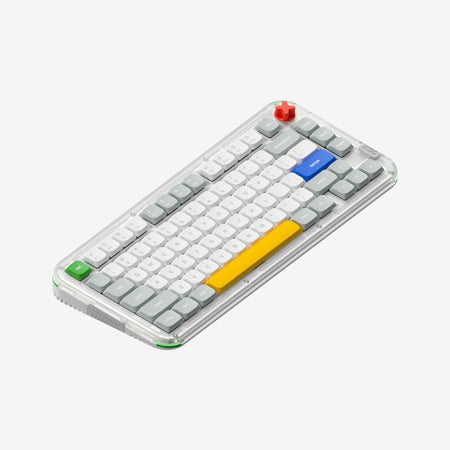
MK x WOBKEY Rainy 75 Pro Aluminum 75% Hotswap Wireless A-RGB Non-flex Cut Keyboard
81
Shortcut Studio Bridge75 Plus Keyboard

Select a keyboard to compare

0.0 (0)
0.0 (0)
  • Released in 2025
  • Equipped with a 7000 mAh battery
  • Released in 2024
  • Compatible with both Mac and Windows
  • Features N-key rollover
  • Runs at a 1000 Hz polling rate
  • Equipped with a 8000 mAh battery
Scores
  • Performance: 68.7
  • Build Quality: 75.6
  • Productivity: 68.7
  • Customizability: 69
  • Portability: 90.7
Scores
  • Performance: 77.8
  • Build Quality: 76.9
  • Productivity: 82.4
  • Customizability: 72.7
  • Portability: 91.4
Name
WOBKEY Rainy Pro
Name
Shortcut Studio Bridge75 Plus
Release year
2025
Release year
2024
Switch Options
-
Switch Options
-
Profile
Normal Profile
Profile
Normal Profile
Hot Swappable
 
Hot Swappable
 
Layout Size
75%
Layout Size
75%
Layout Standard
ANSI
Layout Standard
ANSI
Layout Ergonomics
Normal
Layout Ergonomics
Normal
Knob Support
 
Knob Support
 
Display Support
 
Display Support
 
Mac/Win Support
 
Mac/Win Support
 
Multi-Media Keys
 
Multi-Media Keys
 
USB-C
 
USB-C
 
USB passthrough
 
USB passthrough
 
Connection
Bluetooth, 2.4 GHz, Wired, Wireless
Connection
Bluetooth, 2.4 GHz, Wired, Wireless
Polling Rate
-
Polling Rate
1000 Hz
Battery capacity
7000 mAh
Battery capacity
8000 mAh
Hall Effect Support
 
Hall Effect Support
 
QMK Support
 
QMK Support
 
VIA Support
 
VIA Support
 
VIAL Support
 
VIAL Support
 
N-Key Rollover
 
N-Key Rollover
 
Rapid Trigger
 
Rapid Trigger
 
Mount Style
Gasket Mount
Mount Style
Gasket Mount
Screw in Stabilizers
 
Screw in Stabilizers
 
Sound Dampening
 
Sound Dampening
 
Backlight
 
Rgb, South-face
Backlight
 
Rgb, South-face
Case Colors
Case Colors
Case Material
Aluminum
Case Material
Aluminum
Keycaps Material
PBT
Keycaps Material
PBT
Dimensions
-
Dimensions
-
Weight
-
Weight
-
*Something incorrect or missing? Please
let me know
!

Pros and Trade-offs

The Shortcut Studio Bridge75 Plus is the more compelling package for most users, offering a confirmed high polling rate, broader compatibility, and a modern flex-cut design at a potentially lower price point. Choose the WOBKEY Rainy Pro if you specifically want a rigid, non-flex typing experience with a solid aluminum plate, and the lack of a specified polling rate is not a concern for your use case.

WOBKEY Rainy Pro

  • +Features a non-flex cut PCB and a non-flex cut aluminum plate for a rigid, consistent typing feel.
  • +Includes several named sound dampening layers: poron, EPMD, and a PET insulation sheet.
  • +Comes with a silver steel external weight according to the vendor description.
  • +Offers triple-mode connectivity (Bluetooth 5.0, 2.4 GHz, wired) and VIA programmability.

  • Does not have a specified polling rate in its provided specifications.
  • The vendor listing only explicitly confirms Windows compatibility, not Mac or Linux.
  • Uses a non-flex cut design, which may be less appealing to users seeking a bouncy, soft typing feel.

Shortcut Studio Bridge75 Plus

  • +Explicitly lists a 1000 Hz polling rate for both wired and 2.4 GHz wireless modes.
  • +Uses a flex-cut PCB and a flex-cut FR4 plate for a softer, more flexible typing experience.
  • +Has a larger 8000mAh battery and explicitly supports Windows, Mac, and Linux.
  • +Includes named sound absorption foams: INOAC Poron foam, IPXE sheet, and EPDM case foam.

  • The flex-cut plate and PCB may feel too soft or unstable for users who prefer a firm typing platform.
  • Some user reviews mention minor issues like stabilizer rattle out of the box and easily detached gasket nubs.
  • The vendor description notes shipping restrictions within the US only.

Which Keyboard Is Better for Your Needs?

The Shortcut Studio Bridge75 Plus holds slight advantages for gaming and office use due to its specified polling rate and broader OS compatibility. For modding, its flex-cut design is a clear differentiator. Programming, travel, and content creation are effectively ties, with the decision boiling down to whether you prefer the rigid, non-flex construction of the Rainy Pro or the softer, more flexible feel of the Bridge75 Plus.

GamingShortcut Studio Bridge75 Plus
  • The Bridge75 Plus lists a 1000 Hz polling rate for wired and 2.4 GHz modes, which the Rainy Pro's listing does not specify.
  • The Bridge75 Plus explicitly includes N-Key Rollover (NKRO) in its features.
  • Both have low-latency 2.4 GHz wireless connectivity.
OfficeShortcut Studio Bridge75 Plus
  • The Bridge75 Plus listing explicitly states Mac, Windows, and Linux compatibility, while the Rainy Pro only confirms Windows.
  • Both offer long battery life with 7000mAh and 8000mAh batteries respectively.
  • Both have quiet, pre-lubed switches and multiple sound dampening layers for a quieter environment.
ProgrammingTie
  • Both use a 75% layout with arrow keys and function row, preserving most keys.
  • Both are fully programmable via VIA software for key remapping and macros.
  • Both feature south-facing RGB, which avoids interference with Cherry-profile keycaps.
TravelTie
  • Both share the same 75% form factor and weight from their aluminum cases.
  • Both offer wireless operation via Bluetooth and 2.4 GHz with large batteries.
  • Both include a USB-C cable for wired use.
ModdingShortcut Studio Bridge75 Plus
  • The Bridge75 Plus uses a flex-cut PCB and a flex-cut FR4 plate, designed for a softer typing experience.
  • The vendor page mentions available Bridge75 accessories, suggesting aftermarket support.
  • Both are hot-swappable and VIA compatible, offering a solid base for modifications.
Content CreationTie
  • Both keyboards offer programmable layers via VIA for assigning shortcuts.
  • Both have per-key RGB backlighting for visual customization.
  • The choice depends on preferred typing feel: the rigid Rainy Pro or the flexier Bridge75 Plus.

Frequently Asked Questions (FAQ)


Discover similar products

You might also like similar products in that price range:

New
$149
Pixtendo x Keykobo Pixel67 Keyboard - Barebone
Keykobo Pixel67
65%,
Hotswap,
Wireless,
Wired,
RGB,
VIA,
QMK,
Alu case,
Gasket Mount

89
$85
Shortcut Studio Bridge75 Keyboard
Shortcut Studio Bridge75
75%,
Hotswap,
Wireless,
Wired,
RGB,
VIA,
QMK,
Alu case,
PCB Mount

76
$110
Qwertykeys Neo65 Cu Keyboard
Qwertykeys Neo65
65%,
Hotswap,
Wireless,
Wired,
VIA,
Alu case,
PCB Mount

98
$94
Keychron V1 Max QMK Wireless Custom Mechanical Keyboard ISO Layout Collection
Keychron V1 Max
75%,
Hotswap,
Wireless,
Wired,
RGB,
Knob,
VIA,
QMK,
Gasket Mount

94
$129
WOBKEY Rainy 75 Pro Keyboard
WOBKEY Rainy75 Pro
75%,
Hotswap,
Wireless,
Wired,
RGB,
VIA,
QMK,
Alu case,
Gasket Mount

94
$84
Keychron K3 Max QMK/VIA Wireless Custom Mechanical Keyboard ISO Layout Collection
Keychron K3 Max
75%,
Hotswap,
Wireless,
Wired,
RGB/ White LEDs,
VIA,
QMK,
Alu case,
Plate Mount

93
$119
Rainy 75 WOBKey Keyboard Kit
WOBKEY Rainy75
75%,
Hotswap,
Wireless,
Wired,
RGB,
VIA,
QMK,
Alu case,
Gasket Mount

90
$73
Qwertykeys Neo75 Keyboard
Qwertykeys Neo75
75%,
Hotswap,
Wireless,
Wired,
VIA,
QMK,
Alu case,
Gasket Mount

75
$110
Qwertykeys Neo60 Cu Keyboard
Qwertykeys Neo60
60%,
Hotswap,
Wireless,
Wired,
VIA,
Alu case,
PCB Mount

92
$95
Keychron K2 Max QMK Wireless Mechanical Keyboard ISO Layout Collection
Keychron K2 Max
75%,
Hotswap,
Wireless,
Wired,
RGB/ White LEDs,
VIA,
QMK,
Alu case,
PCB Mount