Nuphy Air75 HE vs Shortcut Studio Bridge75 HELow-Profile vs Gasket Mount
Choose the Nuphy Air75 HE for a low-profile, ultra-fast gaming experience, or the Shortcut Studio Bridge75 HE for a more customizable, traditionally mounted typing feel.
KeebFinder may earn a commission when you buy through these links, at no extra cost to you.

Which one should you get?
Get the
Nuphy Air75 HE
Low-Profile
Build quality in the bottom 45% of 75% boards under $150.
- Claims ultra-low 0.1ms latency and 0.01mm rapid trigger sensitivity for competitive gaming.
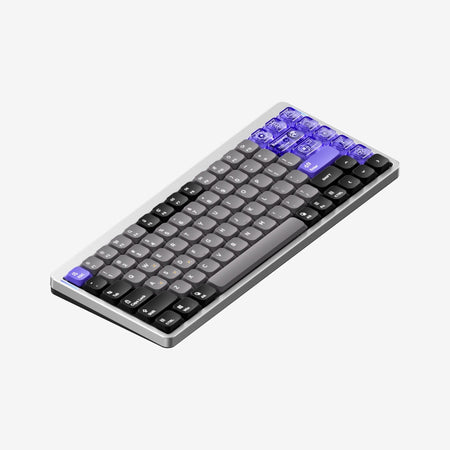
- Unique low-profile design with a 3° typing angle and thin 18.4mm body.
- Includes a web-based driver (NuPhyIO) with visualized settings for adjusting actuation and rapid trigger.
- Magnetic switches only. Standard MX switches will not fit.
- Low-profile switches and keycaps only. Standard MX keycaps will not fit.
- South-facing LEDs. Shine-through legends stay dark, and some sculpted keycaps can clip the LED.
Get the
Shortcut Studio Bridge75 HE
Gasket Mount
Build quality in the top 20% of 75% boards under $150.
- Features a ball-catch gasket mount design for a potentially more flexible typing feel.
- Includes multiple sound dampening layers: INOAC Poron foam, EPDM case foam, and an anti-static pad.
- Offers extensive programmability with native QMK and VIA firmware support.
- Magnetic switches only. Standard MX switches will not fit.
- South-facing LEDs. Shine-through legends stay dark, and some sculpted keycaps can clip the LED.
Your primary need dictates the choice. If your priority is the lowest possible latency for gaming in a sleek, low-profile form, the Nuphy Air75 HE is the specialized tool. If you value a customizable, acoustically tuned typing experience with open-source firmware for work or hobbyist modding, the Shortcut Studio Bridge75 HE offers greater flexibility and a traditional build.
The differences that matter
Skip the 40-row spec sheet. These are the specs that change how each board feels, sounds, and fits your desk.
Nuphy Air75 HE
Shortcut Studio Bridge75 HE
Rapid trigger
Yes
No
Faster resets help in games and not in normal typing
Low profile
Yes
No
Case material
Aluminum, Plastic
Aluminum
QMK
No
Yes
The deep option when you want to remap every key
VIA
No
Yes
GUI remapping without compiling firmware
- Nuphy Air75 HE
- Shortcut Studio Bridge75 HE
- Performance
- 9890
- Build quality
- 6378
- Productivity
- 7689
- Customizability
- 6884
- Portability
- 6580
- Layout size: 75%
- Hall effect (magnetic)
- Connection: Wired
- Hot-swappable
- Max polling rate: 8,000 Hz
- Switch options: Magnetic
What will you mostly use it for?
The Nuphy Air75 HE is the clear choice for dedicated gaming and travel due to its low-latency focus and slim form factor. The Shortcut Studio Bridge75 HE wins for office use, programming, and modding, thanks to its quieter, customizable build and open firmware. For content creation, both are capable, leaving the decision to personal preference for typing feel.
Pick the Nuphy Air75 HE
- The Nuphy Air75 HE is marketed with advanced gaming features like Rapid Trigger, Rapid Shift, and Hyper Tap.
- Its vendor description claims an ultra-low latency of 0.1ms and a 0.01mm rapid trigger sensitivity.
- The low-profile design and 3° typing angle may suit gamers accustomed to flat keyboards.
Nuphy Air75 HE vs Shortcut Studio Bridge75 HE specs
Every tracked spec, side by side. Rows marked with a dot differ between the boards.
9 of 27 specs differ
Nuphy Air75 HE
Shortcut Studio Bridge75 HE
Switch options
Hall effect (magnetic)
Rapid trigger
Hot-swappable
Mount style
Low profile
Sound dampening
Layout size
Layout standard
Ergonomics
Display
Media keys
Connection
Max polling rate
USB-C
Case material
Plate material
Keycaps
Weight
Dimensions
Typing angle
Backlight
QMK
VIA
N-key rollover
Mac & Windows
Released
Compare prices
Live prices from the stores we track, cheapest in-stock offer first.
Prices in USD are converted to your currency and can change at any time. KeebFinder may earn a commission when you buy through these links, at no extra cost to you.
Lowest price across stores, Amazon excluded.

- Check on Amazon
Amazon
Check price

Nuphy Air75 HE vs Shortcut Studio Bridge75 HE: your questions
The Shortcut Studio Bridge75 HE is likely better for extended typing sessions. It uses a gasket mount design, an FR4 plate, and includes multiple foam layers like INOAC Poron and EPDM for sound absorption, which typically creates a more comfortable and quieter typing experience. Its Cherry profile PBT keycaps are also a standard choice for typists.
Yes, but with different methods. The Shortcut Studio Bridge75 HE has a hot-swappable PCB, allowing for tool-free switch changes. The Nuphy Air75 HE supports 'Power-Off Replaceable Switches,' but its vendor description advises ensuring the keyboard is powered off first, suggesting a more careful process that may not be as convenient as standard hot-swap sockets.
The Nuphy Air75 HE features south-facing RGB lighting with 20 backlight modes. The Shortcut Studio Bridge75 HE, according to its vendor listing, has 'Blank / None LED,' indicating it does not have per-key RGB backlighting.
The core difference is the mounting style. The Nuphy Air75 HE uses a top mount design in a low-profile aluminum and plastic case. The Shortcut Studio Bridge75 HE uses a ball-catch gasket mount within a full aluminum case, which is generally associated with a more flexible and softer typing feel.
Based on vendor claims, the Nuphy Air75 HE is marketed with a stronger focus on ultra-low latency. Its description specifically claims an 'ultra-low latency of 0.125ms' and '0.1ms response.' While both have an 8000Hz polling rate, the Nuphy's promotional material emphasizes these latency figures for gaming performance.
Yes. The Nuphy Air75 HE uses low-profile nSA keycaps made of PBT and PC, including some transparent options. The Shortcut Studio Bridge75 HE uses Cherry profile Double Shot PBT keycaps, which are a taller, traditional profile known for durability and a specific typing angle.
Yes, both offer reprogramming. The Shortcut Studio Bridge75 HE supports QMK and VIA, which are standard, open-source firmware for deep customization. The Nuphy Air75 HE uses its own web-based driver, NuPhyIO, for remapping keys, adjusting actuation points, and creating macros.
Yes, the vendor listing for the Shortcut Studio Bridge75 HE explicitly states compatibility with Windows, Mac, and Linux. The Nuphy Air75 HE listing also confirms compatibility with macOS, Windows, Linux, Android, and iOS.
The Nuphy Air75 HE's vendor description lists several items in the box: the keyboard, a USB-C cable, a keycap/switch puller, extra PBT and PC keycaps, and a quick guide. The provided data for the Shortcut Studio Bridge75 HE does not detail what accessories are included.
Both keyboards use linear magnetic (Hall Effect) switches. The Nuphy Air75 HE uses low-profile Gateron Magnetic Jade switches. The Shortcut Studio Bridge75 HE uses Shortcut Studio Magnetic HE Linear switches with a 45g actuation force and 3.6mm total travel.
The Nuphy Air75 HE is more portable due to its low-profile design. It has a thinner body (18.4mm back height) and weighs 702g. The Shortcut Studio Bridge75 HE includes a brass weight and a traditional case height, likely making it thicker and heavier, though an exact weight is not provided for comparison.
Not sold on either?


Still torn?
Answer a few quick questions and the keyboard finder ranks 2,000+ boards by how you will actually use yours.