Nuphy Air75 V2 vs Air75 HEWireless Versatility vs Wired Gaming Speed
Choose the Air75 V2 for wireless flexibility and customization, or the Air75 HE for its maximum wired gaming performance with magnetic switches.

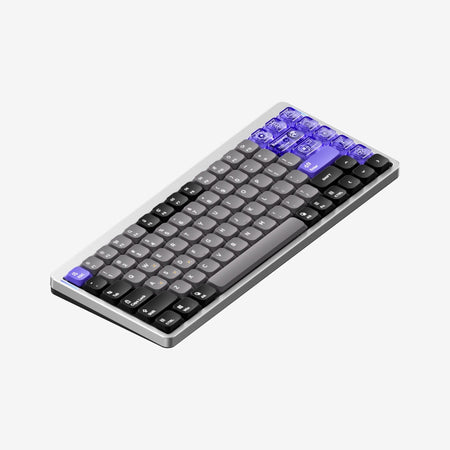
Which one should you get?
Get the
Nuphy Air75 V2
Wireless Versatility
- Tri-mode wireless connectivity (Bluetooth 5.1, 2.4GHz, USB-C).
- Hot-swappable PCB supports a wide variety of low-profile mechanical switches.
- Full QMK and VIA firmware support for deep customization.
- Maximum wireless polling rate is 1000Hz, lower than dedicated gaming boards.
- Sound tuning relies on pre-installed foams; mounting style is not gasket.
- Wired-only operation required for the highest 1000Hz polling rate.
Get the
Nuphy Air75 HE
Wired Gaming Speed
- High-performance 8000Hz polling rate and 0.125ms latency for gaming.
- Magnetic (Hall effect) switches with adjustable actuation from 0.1mm to 3.3mm.
- Features gaming-specific functions like Rapid Trigger and Hyper Tap.
- Wired-only connection, lacking Bluetooth or 2.4GHz wireless.
- Switches are not hot-swappable in the traditional sense; they are power-off replaceable magnetic switches.
- Heavier at 702g and lacks an internal battery.
Your primary need dictates the choice. For a do-it-all keyboard that can move between a laptop, desktop, and tablet wirelessly, the Air75 V2 is the versatile option. If your keyboard never leaves your gaming desk and you want the absolute lowest latency and advanced magnetic switch features, the Air75 HE is the performance-focused tool. Consider the Air75 V2 if you value flexibility, and the Air75 HE if you prioritize pure speed.
The differences that matter
Skip the 40-row spec sheet. These are the specs that change how each board feels, sounds, and fits your desk.
Nuphy Air75 V2
Nuphy Air75 HE
Hall effect (magnetic)
No
Yes
Rapid trigger
No
Yes
Connection
Bluetooth, 2.4 GHz, Wired
Wired
Max polling rate
1,000 Hz
8,000 Hz
Case material
ABS, Aluminum
Aluminum, Plastic
- Nuphy Air75 V2
- Nuphy Air75 HE
- Performance
- 8198
- Build quality
- 8063
- Productivity
- 8976
- Customizability
- 9468
- Portability
- 7966
- Layout size: 75%
- Hot-swappable
- Low profile
- Sound dampening
- Plate material: Aluminum
What will you mostly use it for?
The Air75 V2 is the clear choice for mobile professionals, typists, and tinkerers due to its wireless freedom, battery life, and open-ended customizability. The Air75 HE dominates for competitive gaming where its ultra-high polling rate, magnetic switches, and rapid trigger are critical. For stationary office or content work, the choice depends on whether you value wireless convenience or the unique feel of magnetic switches.
Pick the Nuphy Air75 HE
- The Air75 HE has an 8000Hz polling rate and 0.125ms latency, per its product listing.
- It features magnetic switches with adjustable actuation and Rapid Trigger functionality.
- The Air75 V2 offers a 1000Hz wireless polling rate, which is lower.
Nuphy Air75 V2 vs Air75 HE specs
Every tracked spec, side by side. Rows marked with a dot differ between the boards.
13 of 28 specs differ
Nuphy Air75 V2
Nuphy Air75 HE
Switch options
Hall effect (magnetic)
Rapid trigger
Hot-swappable
Mount style
Low profile
Sound dampening
Layout size
Layout standard
Ergonomics
Display
Media keys
Connection
Max polling rate
Battery
USB-C
Case material
Plate material
Keycaps
Weight
Dimensions
Typing angle
Backlight
QMK
VIA
N-key rollover
Mac & Windows
Released
Compare prices
Live prices from the stores we track, cheapest in-stock offer first.
Lowest price across stores, Amazon excluded.



Prices in USD are converted to your currency and can change at any time. KeebFinder may earn a commission when you buy through these links, at no extra cost to you.
Nuphy Air75 V2 vs Air75 HE: your questions
No, the Air75 HE is a wired-only keyboard. It connects via a USB-C cable and does not have Bluetooth or a 2.4GHz wireless receiver, according to its specifications and product description.
Yes, but the process is specific to magnetic switches. The manufacturer states the switches are 'power-off replaceable.' This means you can pull and replace them without soldering, but you are limited to compatible low-profile magnetic switches, not standard mechanical switches.
The Air75 V2 is likely more convenient for Mac users due to its wireless connectivity, making it easy to pair with a MacBook. Both keyboards list macOS compatibility, but the V2's tri-mode support offers more flexibility for a mobile setup.
Yes. The Air75 V2 uses the open-source VIA configurator and QMK firmware for customization. This allows for key remapping, macro creation, and lighting control without proprietary software, as confirmed on its product page.
Rapid Trigger is a feature of magnetic switches that allows for rapid, repeated keystrokes by resetting the actuation point after a very small upward movement (0.01mm on the HE). This is designed for faster key cycling in games, as described in the vendor's details.
The typing sound will depend on the chosen switches. The Air75 V2 offers clicky, tactile, and linear mechanical switches, some of which can be loud. The Air75 HE uses linear magnetic switches. The V2's product page also mentions internal sound-dampening foam, which may affect the acoustics.
Yes. Since the Air75 V2 has a USB-C wired mode, it can be used while charging its 4000mAh battery. This effectively turns it into a wired keyboard when needed.
Both keyboards use a low-profile keycap design. The Air75 V2 comes with double-shot PBT keycaps, while the Air75 HE comes with five-sided dye-sub PBT keycaps and includes some extra PC (polycarbonate) keycaps, according to their respective listings.
Yes. The Air75 HE uses a web-based driver called NuPhyIO for configuration. This allows adjustment of actuation points, rapid trigger settings, and key remapping from a browser, as stated in its product description.
The Air75 V2 is generally more beginner-friendly. It works wirelessly out of the box, includes a variety of familiar mechanical switch types, and its hot-swap feature makes initial switch experimentation easy and low-risk compared to the more specialized magnetic switches of the HE.
Yes, both keyboards feature RGB backlighting. The Air75 V2 has RGB LEDs with 40 modes and side light bars. The Air75 HE has south-facing RGB LEDs with 20 modes, which can help reduce interference with certain keycap legends.
Not sold on either?


Still torn?
Answer a few quick questions and the keyboard finder ranks 2,000+ boards by how you will actually use yours.