Nuphy Halo IO Series vs Kick75
Choose the Kick75 for its superior firmware support and flexible profile design, or the Halo V2 IO if you require a full-size layout with a larger battery.
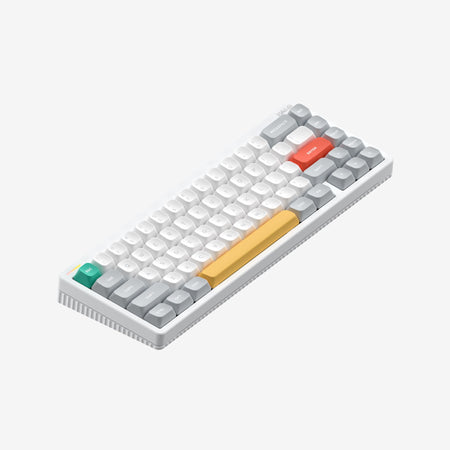
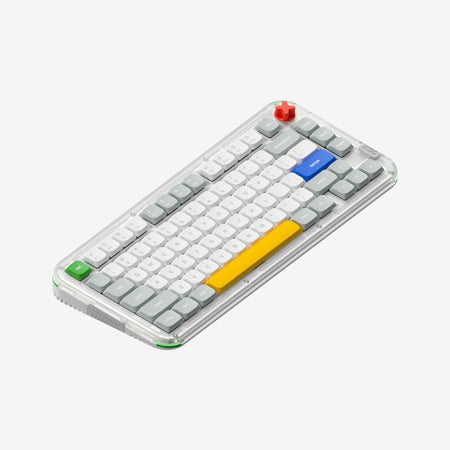
Which one should you get?
Get the
Nuphy Halo IO Series
- Full-size layout with dedicated numpad for efficient data entry.
- Larger 4000mAh battery capacity for extended wireless use.
- Unique illuminated light band with multiple themes for desktop aesthetics.
- Lacks Bluetooth connectivity, offering only 2.4GHz wireless and wired modes.
- Heavier weight (1000g) compared to the Kick75's low-profile configuration.
- No mention of QMK or VIA firmware support, limiting deep customization.
Get the
Nuphy Kick75
QMK
- Offers both QMK/VIA and NuPhyIO firmware versions for extensive programmability.
- Convertible design with kits to switch between high and low-profile configurations.
- Compact 75% layout saves desk space while retaining essential keys.
- Smaller 2500mAh battery (in the NuPhyIO version) compared to the Halo V2 IO.
- No dedicated numpad, which may be a drawback for frequent number entry.
- Profile conversion requires purchasing a separate kit.
For most users, the Nuphy Kick75 is the recommended choice due to its superior customizability through QMK/VIA, flexible profile design, and more portable form factor. Opt for the Nuphy Halo V2 IO only if your workflow is heavily dependent on a full-size numpad and you prioritize its distinctive light band aesthetics over advanced firmware features.
The differences that matter
Skip the 40-row spec sheet. These are the specs that change how each board feels, sounds, and fits your desk.
Nuphy Halo IO Series
Nuphy Kick75
Layout size
65%
75%
Case material
Aluminum, Plastic
Plastic
Weight
1,028 g
1,009 g
QMK
No
Yes
VIA
No
Yes
- Nuphy Halo IO Series
- Nuphy Kick75
- Performance
- 7882
- Build quality
- 7878
- Productivity
- 9193
- Customizability
- 7992
- Portability
- 9882
- Connection: Bluetooth, 2.4 GHz, Wired
- Hot-swappable
- Battery: 4,000 mAh
- Max polling rate: 1,000 Hz
- Switch options: Mechanical
- Mount style: Gasket Mount
What will you mostly use it for?
The Kick75 is the more versatile choice, winning for programming, travel, and modding due to its firmware support, convertible design, and compact size. The Halo V2 IO is better suited for office work where a numpad is essential. For gaming, the Kick75's space-saving design gives it an edge, while content creation needs are well-served by both, depending on whether you prioritize a knob or a larger layout.
Pick the Nuphy Kick75
- Both offer a 1000Hz polling rate in 2.4GHz mode for low latency.
- The Kick75's 75% layout frees up more desk space for mouse movement.
- The Kick75's vendor page specifically mentions macro recording for gaming actions.
Nuphy Halo IO Series vs Kick75 specs
Every tracked spec, side by side. Rows marked with a dot differ between the boards.
10 of 27 specs differ
Nuphy Halo IO Series
Nuphy Kick75
Switch options
Hot-swappable
Mount style
Sound dampening
Screw-in stabilizers
Layout size
Layout standard
Ergonomics
Knob
Display
Media keys
Connection
Max polling rate
Battery
USB-C
Case material
Plate material
Keycaps
Weight
Dimensions
Typing angle
Backlight
QMK
VIA
N-key rollover
Mac & Windows
Released
Compare prices
Live prices from the stores we track, cheapest in-stock offer first.
Lowest price across stores, Amazon excluded.


Prices in USD are converted to your currency and can change at any time. KeebFinder may earn a commission when you buy through these links, at no extra cost to you.
Nuphy Halo IO Series vs Kick75: your questions
The Nuphy Halo V2 IO has a larger 4000mAh battery. The Kick75's NuPhyIO version has a 2500mAh battery, though its QMK version is listed with a 4000mAh capacity. Manufacturer estimates suggest the Halo V2 IO may last longer under similar conditions.
Yes, the Nuphy Kick75 supports tri-mode connectivity, which includes Bluetooth, 2.4GHz wireless, and a wired USB-C connection. The Halo V2 IO, according to its specifications, only supports 2.4GHz wireless and wired modes.
Yes. The Kick75 is available in a version that supports QMK and VIA firmware, allowing for deep, open-source key remapping and macro programming. The Halo V2 IO uses Nuphy's proprietary web-based NuPhyIO software.
The Halo V2 IO is a full-size keyboard, which includes a full numpad, function row, and navigation cluster. The Kick75 is a 75% layout, which omits the numpad but retains the function row and a compact navigation cluster to save desk space.
Yes, but not instantly. The Kick75 is sold as either a high or low-profile configuration. To switch between them, you must purchase a separate conversion kit which includes the alternate top case, plate foam, and switch pad.
Both feature gasket mounts and sound-dampening materials for a comfortable typing feel. The Halo V2 IO includes a two-stage foot stand and its proprietary mSA keycaps. The Kick75 offers the option for a lower typing height with its low-profile kit, which may suit some users better.
Yes, both the Nuphy Halo V2 IO and the Kick75 feature hot-swappable sockets. This allows you to easily change switches without soldering, supporting standard 3-pin and 5-pin MX-style switches.
The Kick75's specifications list south-facing RGB LEDs. The Halo V2 IO's vendor description mentions RGB and shine-through keycaps but does not specify the LED orientation. South-facing LEDs are often preferred for compatibility with Cherry-profile keycaps.
According to its vendor page, the Kick75 comes with a USB-C cable, a 2.4G receiver, a keycap/switch puller, extra keycaps, a sticker set, and a quick guide. If you purchase the extra swappable kit, it includes additional cases, foams, and tools for profile conversion.
The Kick75 has more advanced software potential due to its optional QMK and VIA support, which is a standard for powerful, layer-based customization. The Halo V2 IO uses NuPhyIO, which is a web-based tool for configuring keys, lighting, and macros.
The Kick75's specifications list PBT keycaps. The Halo V2 IO's vendor description discusses its mSA profile keycaps but does not explicitly state the material. PBT is generally considered more durable and resistant to shine than ABS plastic.
The Kick75 is more portable. Its 75% layout is smaller than a full-size keyboard, and its low-profile configuration weighs 877 grams, which is lighter than the Halo V2 IO's 1000 grams. The Kick75 also adds Bluetooth for easier pairing with mobile devices on the go.
Not sold on either?





Still torn?
Answer a few quick questions and the keyboard finder ranks 2,000+ boards by how you will actually use yours.