Not sure which keyboard to choose? Try the Keyboard Finder now!

Compare Redragon K683 vs M68 Differences Side by Side

This comparison is for buyers deciding between two compact, wired Redragon keyboards with advanced magnetic Hall Effect switches. The choice is difficult because both share core specs like 8000Hz polling, hot-swappable magnetic switches, PBT keycaps, and metal cases. The decision hinges on layout preference, specific gaming features, and subtle build differences. This guide breaks down where each model excels.

65
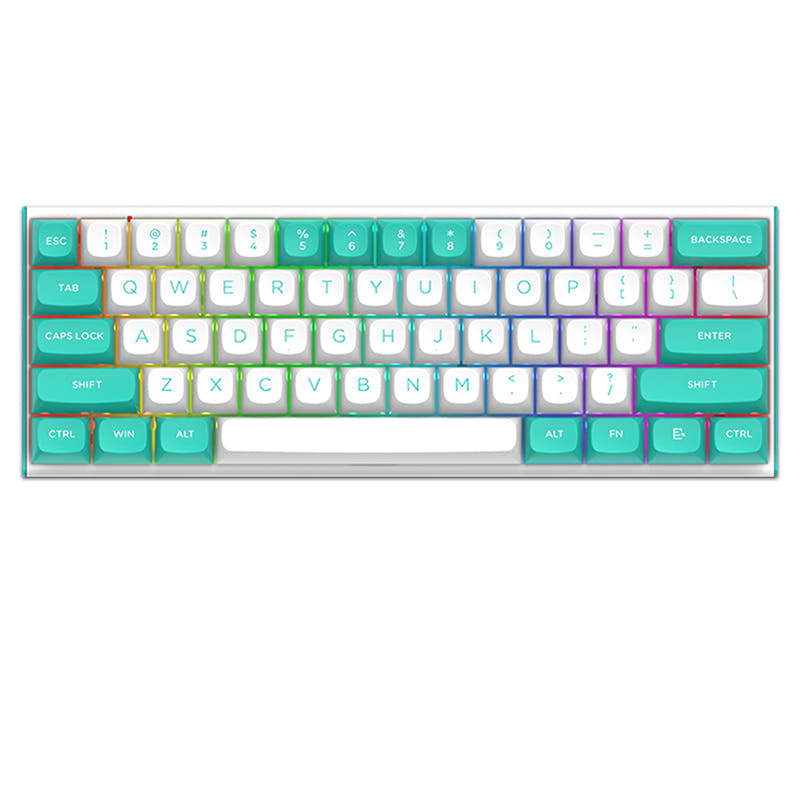
Redragon K683-WB RGB Wired Mechanical Keyboard Magnetic Switches
REDRAGON M68 Wired 8K Magnetic Switch Mechanical Keyboard

Select a keyboard to compare

0.0 (0)
0.0 (0)
  • Released in 2023
  • Available in a 60% layout
  • Compatible with both Mac and Windows
  • Features N-key rollover
  • Enables rapid trigger functionality
  • Weighs about 900 g
  • Sized at 33 x 104 x 291 mm
  • Made with a Aluminum case
  • Released in 2024
  • Available in a 65% layout
  • Has built-in sound dampening
  • Weighs about 550 g
  • Sized at 36 x 101 x 310 mm
  • Made with a Metal case
Scores
  • Performance: 96.2
  • Build Quality: 59.2
  • Productivity: 60.9
  • Customizability: 64
  • Portability: 72.1
Scores
  • Performance: 75.3
  • Build Quality: 40.5
  • Productivity: 56.7
  • Customizability: 53.8
  • Portability: 67.4
Name
Redragon K683
Name
Redragon M68
Release year
2023
Release year
2024
Switch Options
Linear, Magnetic
Switch Options
Linear, Magnetic
Profile
Normal Profile
Profile
Normal Profile
Hot Swappable
 
Hot Swappable
 
Layout Size
60%
Layout Size
65%
Layout Standard
ANSI
Layout Standard
ANSI
Layout Ergonomics
Normal
Layout Ergonomics
Normal
Knob Support
 
Knob Support
 
Display Support
 
Display Support
 
Mac/Win Support
 
Mac/Win Support
 
Multi-Media Keys
 
Multi-Media Keys
 
USB-C
 
USB-C
 
USB passthrough
 
USB passthrough
 
Connection
Wired, Wired only
Connection
Wired, Wired only
Polling Rate
8000 Hz
Polling Rate
8000 Hz
Battery capacity
-
Battery capacity
-
Hall Effect Support
 
Hall Effect Support
 
QMK Support
 
QMK Support
 
VIA Support
 
VIA Support
 
VIAL Support
 
VIAL Support
 
N-Key Rollover
 
N-Key Rollover
 
Rapid Trigger
 
Rapid Trigger
 
Mount Style
-
Mount Style
-
Screw in Stabilizers
 
Screw in Stabilizers
 
Sound Dampening
 
Sound Dampening
 
Backlight
 
Rgb
Backlight
 
Rgb
Case Colors
Case Colors
Case Material
Aluminum
Case Material
Metal
Keycaps Material
PBT
Keycaps Material
PBT
Dimensions
33 x 104 x 291 mm
Dimensions
36 x 101 x 310 mm
Weight
900g
Weight
550g
*Something incorrect or missing? Please
let me know
!

Pros and Trade-offs

Your primary layout need dictates the choice here. Gamers who prioritize desk space and advanced trigger features should lean toward the Redragon K683. If you require arrow keys for work or programming and value a quieter typing experience, the Redragon M68 is the more practical option. Both are competent entry points into magnetic switch keyboards.

Redragon K683

  • +Includes a dedicated Rapid Trigger function for gaming, as per the vendor description.
  • +More compact 60% layout (291mm length) for maximum desk space.
  • +Comes with a dust cover for protection.
  • +Allows individual switch actuation adjustment from 0.1mm to 4.0mm.
  • +Heavier 900g build may feel more substantial.

  • 60% layout lacks dedicated arrow keys, requiring a function layer.
  • No mention of internal sound dampening materials.
  • Potentially higher price point based on listed vendor prices.

Redragon M68

  • +65% layout includes dedicated arrow keys for better productivity.
  • +Features sound absorbing internal filling, according to the vendor.
  • +Lighter weight (550g) may be preferable for some users.
  • +Can be found at a lower price point from some vendors.

  • Lacks the specific Rapid Trigger gaming feature mentioned for the K683.
  • Larger footprint (310mm length) than the K683.
  • No dust cover is mentioned in the provided description.

Which Keyboard Is Better for Your Needs?

The K683 takes a clear lead for dedicated gaming due to its Rapid Trigger feature and ultra-compact form. The M68 is better suited for office and programming work, thanks to its included arrow keys and sound-dampening foam. For travel, the K683's smaller dimensions give it an edge, while modders and content creators will find capable platforms in either model, with the core hot-swap and RGB features being shared.

GamingRedragon K683
  • The K683 vendor description explicitly mentions a 'Rapid-Trigger' function for gaming.
  • It has a slightly higher weight (900g vs 550g), which may provide more stability during intense use.
  • Its 60% layout maximizes desk space for large mouse movements.
OfficeRedragon M68
  • The M68's 65% layout includes dedicated arrow keys, which are often more convenient for spreadsheet navigation.
  • Its vendor description lists 'sound absorbing internal filling', which can reduce noise in shared spaces.
  • It maintains a compact footprint suitable for smaller desks.
ProgrammingRedragon M68
  • The M68's 65% layout with arrow keys is generally preferred for code editing over a 60% layout that requires layer adjustments.
  • The sound dampening foam can make long typing sessions less intrusive to others.
  • Both keyboards use durable PBT keycaps, which resist shine from frequent use.
TravelRedragon K683
  • The K683 is more compact in length (291mm vs 310mm) and slightly slimmer in profile (33mm vs 36mm).
  • Its included dust cover, mentioned in the vendor description, provides protection during transport.
  • The 60% layout is the smallest standard form factor, making it easier to pack.
ModdingTie
  • Both keyboards are confirmed to be hot-swappable for magnetic switches.
  • Both use PBT keycaps, allowing for easy keycap replacement.
  • The K683 mentions adjustable switch actuation via software, while the M68 mentions sound dampening foam, offering different modding starting points.
Content CreationTie
  • Both offer full RGB backlighting for aesthetic setups.
  • Both have wired USB-C connections for reliable, lag-free input.
  • The choice depends on personal preference for the 60% (K683) or 65% (M68) layout when using keyboard shortcuts.

Frequently Asked Questions (FAQ)


Discover similar products

You might also like similar products in that price range:

77
$90
Keychron K3 QMK Wireless Mechanical Keyboard (ISO Layout) - Version 3
Keychron K3 QMK V3
75%,
Hotswap,
Wireless,
Wired,
RGB,
QMK,
HE,
Alu case,
Plate Mount

-10% off
76
$86$77
Gamakay TK75HE V2 Hall Effect keyboard 8K Polling Rate 0.005mm RT Accuracy
Gamakay TK75HE V2
75%,
Hotswap,
Wireless,
Screen,
RGB,
Knob,
HE,
Rapid trigger,
Top Mount

81
$100
NuPhy Halo65 HE - Magnetic Coral
Nuphy Halo65 HE
65%,
Hotswap,
Wired,
RGB,
HE,
Rapid trigger,
Alu case,
Gasket Mount

94
$85
Keychron Q8 Pro (Alice Layout) QMK/VIA Wireless Custom Mechanical Keyboard
Keychron Q8 Pro
65%,
Hotswap,
Wireless,
Wired,
RGB,
Knob,
VIA,
QMK,
Alu case,
Gasket Mount

87
$85
Nut65 Keyboard Kit
Weikav Nut65
65%,
Hotswap,
Wireless,
Wired,
RGB,
VIA,
QMK,
HE,
Alu case,
Gasket Mount

84
$94
Keychron K1 QMK Wireless Mechanical Keyboard (ISO Layout) - Version 6
Keychron K1 V6
80%,
Hotswap,
Wireless,
Wired,
RGB/ White LEDs,
VIA,
QMK,
HE,
Alu case,
Top Mount

84
$83
Keychron K7 Pro QMK/VIA Wireless Custom Mechanical Keyboard ISO Layout Collection
Keychron K7 Pro
65%,
Hotswap,
Wireless,
Wired,
RGB/ White LEDs,
VIA,
QMK,
Alu case,
Tray Mount

70
$89
JAMESDONKEY A3 HE Magnetic Switch Rapid Trigger Gaming Keyboard
Jamesdonkey James Donkey A3 HE
75%,
Hotswap,
Wired,
RGB,
Knob,
HE,
Rapid trigger,
Alu case

81
$79
[In Stock] Lucky65 V2 65% Mechanical Keyboard
Weikav Lucky65 V2
65%,
Hotswap,
Wireless,
Wired,
RGB,
VIA,
QMK,
Alu case,
Gasket Mount