Skyloong GK61 Lite vs GK68 Lite60% vs 68% Layout Comparison
Choose the GK61 Lite for maximum portability, or the GK68 Lite if you need dedicated arrow and navigation keys.
KeebFinder may earn a commission when you buy through these links, at no extra cost to you.

Which one should you get?
Get the
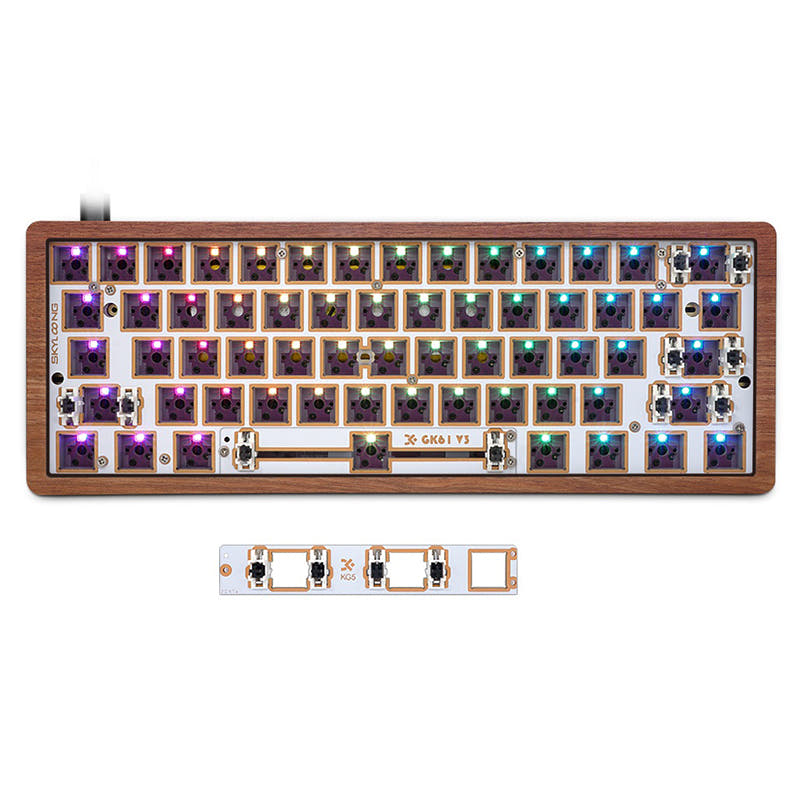
Skyloong GK61 Lite
60%
Build quality in the top 20% of 60% boards under $100.
- More compact 60% layout for a smaller desk footprint.
- Same high level of customizability as the GK68 with hot-swap sockets and multiple case/plate options.
- Includes split spacebar module for ergonomic customization.
- Compact layout only. No function row, dedicated arrow keys, or numpad.
Get the
Skyloong GK68 Lite
68% Layout Comparison
- 68% layout includes dedicated arrow keys and essential navigation keys.
- Offers three programmable onboard layers for extensive key remapping.
- Includes a split spacebar module for ergonomic customization.
Your choice boils down to a trade-off between size and functionality. Opt for the Skyloong GK61 Lite if your priority is a minimalist, ultra-portable board and you are comfortable using layers for arrows. Choose the Skyloong GK68 Lite if you regularly use arrow and navigation keys for work or creativity and value the convenience of having them dedicated. Both are equally capable as modding platforms.
The differences that matter
Skip the 40-row spec sheet. These are the specs that change how each board feels, sounds, and fits your desk.
Skyloong GK61 Lite
Skyloong GK68 Lite
Layout size
60%
68%
Dimensions
30 x 292 x 104 mm
30 x 104 x 292 mm
- Skyloong GK61 Lite
- Skyloong GK68 Lite
- Performance
- 7071
- Build quality
- 7573
- Productivity
- 7270
- Customizability
- 7576
- Portability
- 8690
- Connection: Bluetooth, Wired
- Hot-swappable
- Ergonomics: Split Spacebar
- Case material: Aluminum, Plastic
- Mount style: Gasket Mount
- Weight: 600 g
What will you mostly use it for?
The GK68 Lite is the clear choice for productivity-focused tasks like office work, programming, and content creation due to its dedicated arrow and navigation keys. For travel or where desk space is at a premium, the more compact GK61 Lite has the edge. For gaming and modding, the keyboards are functionally identical, offering the same core build and customization features, making the choice purely aesthetic or based on layout preference.
It's a tie
- Both offer N-key rollover for simultaneous key presses.
- Both have hot-swap sockets for customizing switch feel.
- Both share the same gasket mount and sound dampening foam design.
Skyloong GK61 Lite vs GK68 Lite specs
Every tracked spec, side by side. Rows marked with a dot differ between the boards.
2 of 18 specs differ
Skyloong GK61 Lite
Skyloong GK68 Lite
Hot-swappable
Mount style
Sound dampening
Layout size
Layout standard
Ergonomics
Display
Connection
Battery
USB-C
Case material
Plate material
Weight
Dimensions
Backlight
N-key rollover
Mac & Windows
Released
Compare prices
Live prices from the stores we track, cheapest in-stock offer first.
Prices in USD are converted to your currency and can change at any time. KeebFinder may earn a commission when you buy through these links, at no extra cost to you.
Lowest price across stores, Amazon excluded.


Skyloong GK61 Lite vs GK68 Lite: your questions
The main difference is the layout size. The GK61 Lite is a 60% keyboard, which lacks dedicated arrow and navigation keys. The GK68 Lite is a 68% keyboard, which includes dedicated arrow keys, Delete, and Page Up/Down keys while maintaining a relatively compact form factor.
Yes, both the Skyloong GK61 Lite and GK68 Lite feature hot-swappable sockets. According to the vendor descriptions, they support both 3-pin and 5-pin mechanical switches from brands like Cherry MX, Kailh, Gateron, and TTC.
No, both products are sold as DIY kits or barebones kits. The package contents listed by the vendor include the keyboard kit, a USB-C cable, a keycap puller, a switch puller, and a manual. You must supply your own switches and keycaps.
Both keyboards use a gasket mount system. The vendor describes it as a creative shallow gasket design that includes an all-in-one silicone pad inserted between the PCB and plate, along with bottom foam to dampen sound and improve typing feel.
Yes, but you must select the correct model. For both keyboards, there is a 'Lite' wired-only model and an 'S Lite' model that offers both wired and Bluetooth wireless connectivity, as indicated in the vendor's model options.
For the GK61 Lite, the vendor lists options for aluminum, plastic, and wooden cases. For the GK68 Lite, options include aluminum, plastic, wooden, and a PC shine-through case. Both offer a choice of PC or FR4 plates.
Yes, both are fully programmable. The vendor states you can download software for Windows and Mac to program backlighting and macro settings. The GK68 Lite's description specifically mentions three programmable onboard layers accessible via function key combinations.
Both DIY kits include an extra split spacebar module. This allows you to split the standard spacebar into separate keys (2.75U, 2.25U, and 1.25U sizes) which can be programmed independently, often used for ergonomic layouts or adding more function keys.
The specifications for the GK68 Lite list a 4000mAh battery. The GK61 Lite specifications do not list a battery capacity, but a wireless version exists. A user review for the GK68 Lite noted that the battery life with RGB on was shorter than expected for a 4000mAh cell.
Both are equally suitable for a first build. They come with the necessary tools (pullers) and share the same straightforward hot-swap design. The choice depends on which layout you prefer. The 68% might be easier for beginners due to the familiar arrow keys.
Yes, both the GK61 Lite and GK68 Lite list Mac support as a feature. The vendor also provides separate software driver downloads for Mac OS to enable full programmability.
Not sold on either?


Still torn?
Answer a few quick questions and the keyboard finder ranks 2,000+ boards by how you will actually use yours.