Skyloong GK68 vs GK68 LiteSplit Spacebar vs Triple Connectivity
Choose the GK68 for its 2.4GHz wireless connectivity, or the GK68 Lite for its split spacebar layout and aluminum case options.
KeebFinder may earn a commission when you buy through these links, at no extra cost to you.


Which one should you get?
Get the
Skyloong GK68
Split Spacebar
- Includes 2.4 GHz wireless connectivity in addition to Bluetooth and wired.
- Features a replaceable spacebar that can be split into three keys via software.
- Comes with a steel plate and Skyloong's proprietary O-Ring Mount Gasket system.
Get the
Skyloong GK68 Lite
Triple Connectivity
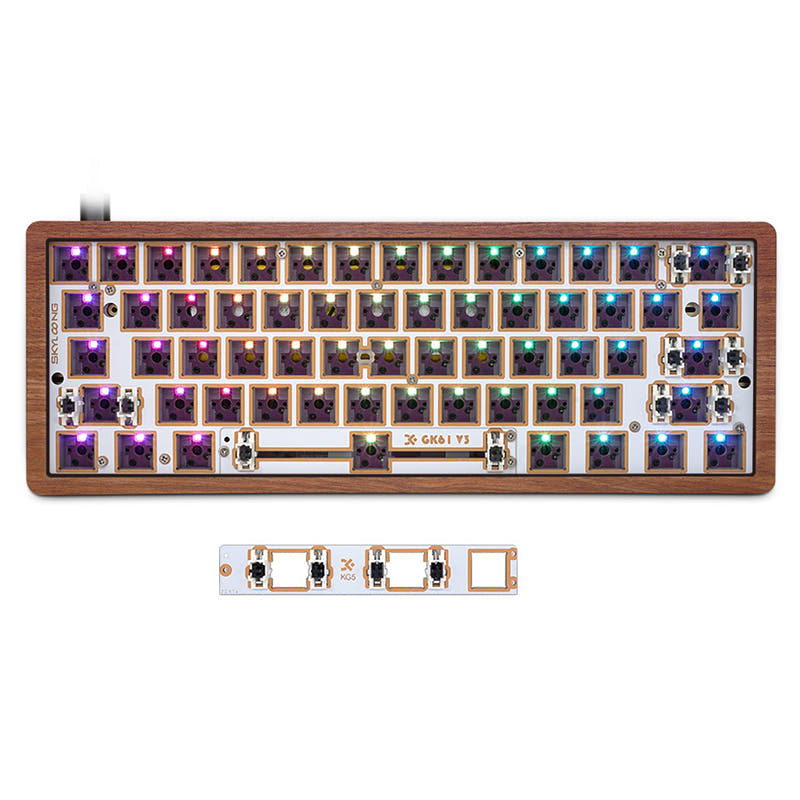
- Offers a split spacebar module (2.75U/2.25U/1.25U) for ergonomic customization.
- Available with aluminum, wooden, or PC shine-through bottom cases.
- Includes a choice of FR4 or PC plates.
Your primary need dictates the choice. If reliable 2.4GHz wireless for gaming or a standard layout is critical, the GK68 is the clear pick. If you value ergonomic customization with a split spacebar, want to experiment with different case materials like aluminum or wood, and can forgo 2.4GHz, the GK68 Lite offers greater physical modding potential. Check current availability, as the Lite model may be harder to find.
The differences that matter
Skip the 40-row spec sheet. These are the specs that change how each board feels, sounds, and fits your desk.
Skyloong GK68
Skyloong GK68 Lite
Connection
Bluetooth, 2.4 GHz, Wired
Bluetooth, Wired
Wireless for several devices and wired for lower latency
Ergonomics
Standard
Split Spacebar
Case material
ABS, PBT, Plastic
Aluminum, Plastic
Plate material
Steel
FR4, Plastic
N-key rollover
No
Yes
- Skyloong GK68
- Skyloong GK68 Lite
- Performance
- 5671
- Build quality
- 6773
- Productivity
- 7170
- Customizability
- 7476
- Portability
- 8990
- Layout size: 68%
- Hot-swappable
- Battery: 4,000 mAh
- Mount style: Gasket Mount
- Weight: 600 g
- Sound dampening
What will you mostly use it for?
The GK68 takes the lead for gaming and content creation due to its 2.4GHz wireless and macro software. The GK68 Lite is the stronger choice for programming and modding, thanks to its split spacebar and wider selection of case and plate materials. For office use and travel, the keyboards are evenly matched, sharing core wireless features and portability.
Pick the Skyloong GK68
- The GK68 includes a 2.4 GHz wireless mode for a potentially more stable, low-latency connection, which is not listed for the GK68 Lite.
- Its standard layout may be more familiar for gaming keybinds.
- The vendor description mentions the GK68's driver allows for macro setting and saving.
Skyloong GK68 vs GK68 Lite specs
Every tracked spec, side by side. Rows marked with a dot differ between the boards.
5 of 20 specs differ
Skyloong GK68
Skyloong GK68 Lite
Switch options
Hot-swappable
Mount style
Sound dampening
Layout size
Layout standard
Ergonomics
Display
Connection
Battery
USB-C
Case material
Plate material
Keycaps
Weight
Dimensions
Backlight
N-key rollover
Mac & Windows
Released
Compare prices
Live prices from the stores we track, cheapest in-stock offer first.
Prices in USD are converted to your currency and can change at any time. KeebFinder may earn a commission when you buy through these links, at no extra cost to you.
Lowest price across stores, Amazon excluded.



Skyloong GK68 vs GK68 Lite: your questions
The main differences are in connectivity and layout. The GK68 offers 2.4 GHz, Bluetooth, and wired connectivity with a standard spacebar that can be split virtually via software. The GK68 Lite offers Bluetooth and wired connectivity but includes a physical split spacebar module and more premium case material options like aluminum and wood.
Yes, both the Skyloong GK68 and GK68 Lite feature hot-swappable sockets. Their vendor descriptions confirm compatibility with both 3-pin and 5-pin mechanical switches, allowing for easy switch changes without soldering.
Yes, both keyboards feature RGB backlighting. The manufacturer states they support 16.8 million colors. However, a customer review for the GK68 Lite notes the RGB lights can be dim, even with shine-through keycaps.
Both models are listed with a 4000mAh battery. A review for the GK68 Lite mentioned the battery did not last more than a day with RGB lights on, suggesting actual battery life may vary significantly with usage and lighting settings.
No, the split spacebar is a physical module included with the GK68 Lite kit. The regular GK68 has a standard spacebar key, though its software allows you to reprogram the single large key to function as three separate keys logically.
Both the Skyloong GK68 and GK68 Lite use a gasket mount style. The GK68 uses Skyloong's proprietary O-Ring Mount Gasket, while the GK68 Lite uses a described shallow gasket design with an integrated silicone pad.
According to the vendor page, the GK68 Lite DIY kit offers a choice between an FR4 plate and a PC (polycarbonate) plate. The regular GK68, based on its metadata, comes with a steel plate.
Yes, Skyloong provides driver software for both models. The software allows for key remapping, macro creation, and RGB lighting customization. The GK68 Lite's description specifically mentions three programmable onboard layers.
The GK68 kit includes the case, PCB, plate, stabilizers, a Type-C cable, a keycap puller, a switch puller, and a manual. The GK68 Lite kit includes the keyboard kit (case, PCB, plate), a Type-C cable, a keycap puller, a switch puller, and a user manual. Stabilizers are not explicitly listed for the Lite kit.
The GK68 might be slightly more straightforward for a first build due to its standard layout and included stabilizers. However, the GK68 Lite offers more material choices (like wood or aluminum cases) which can be appealing, but may require more decision-making. Both are hot-swappable, eliminating the need for soldering.
Yes, both the GK68 and GK68 Lite list Mac and Windows support in their extra features. The GK68 Lite's description also includes a dedicated Mac OS mode accessible via a function key combination.
Not sold on either?




Still torn?
Answer a few quick questions and the keyboard finder ranks 2,000+ boards by how you will actually use yours.