KBDFans Tofu vs TOFU60 V3TKL or compact 60%
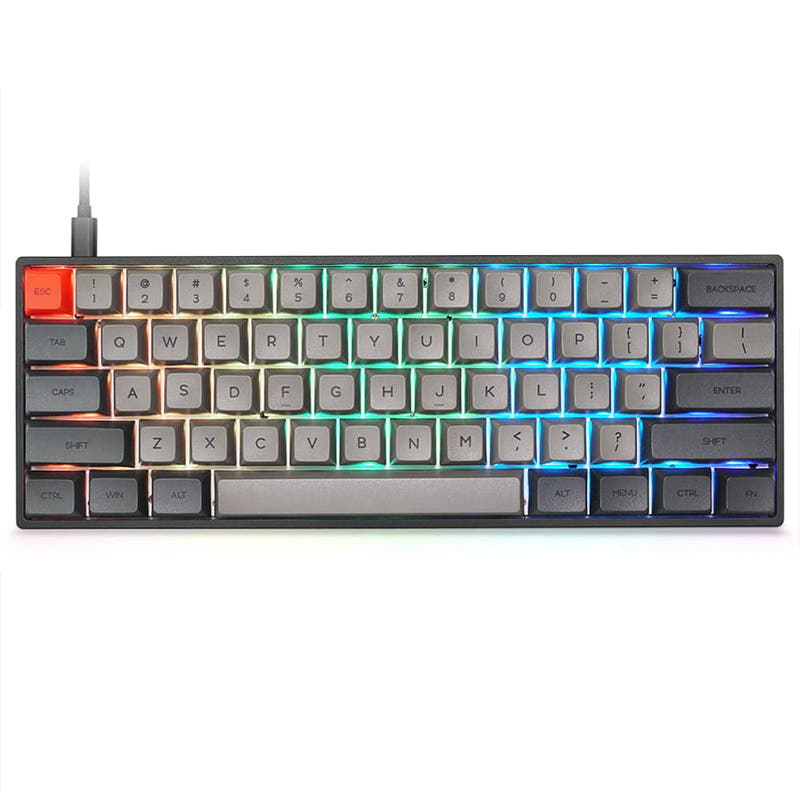
Choose the KBDFans TOFU for its TKL layout and screen, or the TOFU60 V3 for a more compact 60% layout and gasket mount.
KeebFinder may earn a commission when you buy through these links, at no extra cost to you.

5.0 (2)5.0 · 2 reviews
from$10at MonacoKeys
90-day lowLowest price in 90 days

5.0 (3)5.0 · 3 reviews
from$53at KBDfans
90-day lowLowest price in 90 days
Which one should you get?
Get the
KBDFans Tofu
Build quality in the top 10% of 80% boards under $100.
- 80% ANSI layout with more keys than the TOFU60 V3's 60% layout.
- Integrated wrist rest and screen are listed features.
- Aluminum case with a top-mount style listed in its specifications.
- Magnetic switches only. Standard MX switches will not fit.
- No numpad.
Get the
KBDFans TOFU60 V3
polling rate
Build quality in the top 5% of 60% boards under $100.
- 60% ANSI layout in an aluminum case, with aluminum, copper, and steel listed as case-material options.
- 8000 Hz polling rate is listed.
- Gasket mount, hot-swap, and Hall Effect features are listed.
- Magnetic switches only. Standard MX switches will not fit.
- Compact layout only. No function row, dedicated arrow keys, or numpad.
Choose the KBDFans TOFU if you want an 80% layout, a screen, and an integrated wrist rest. Choose the TOFU60 V3 if a 60% footprint, gasket mount, VIA/VIAL support, or its listed 8000 Hz polling rate matters more. Both are magnetic-switch-only boards, so neither accepts standard MX switches.
The differences that matter
Skip the 40-row spec sheet. These are the specs that change how each board feels, sounds, and fits your desk.
KBDFans Tofu
KBDFans TOFU60 V3
Layout size
80%
60%
Connection
Bluetooth, 2.4 GHz, Wired
Wired, Bluetooth
Wireless for several devices and wired for lower latency
Max polling rate
1,000 Hz
8,000 Hz
Higher polling helps competitive FPS and does nothing for typing
Case material
Aluminum
Aluminum, Copper, Steel
Mount style
Top Mount
Gasket Mount
- KBDFans Tofu
- KBDFans TOFU60 V3
- Performance
- 8687
- Build quality
- 8690
- Productivity
- 8664
- Customizability
- 9284
- Portability
- 7377
- Hall effect (magnetic)
- Hot-swappable
- Battery: 1,000 mAh
- VIA
- Sound dampening
What will you mostly use it for?
The TOFU60 V3 has the clearer gaming distinction on listed polling rate, and its smaller layout is the more travel-oriented option. For office work, programming, and content creation, the TOFU's larger layout and screen are useful differentiators, although the TOFU60 V3 specifically lists VIA and VIAL support. Modding leans toward the TOFU60 V3 on those named configuration options, while both share hot-swap and magnetic-switch constraints.
Pick the KBDFans TOFU60 V3
- The TOFU60 V3 lists an 8000 Hz polling rate, compared with 1000 Hz for the TOFU.
- Both models are Hall Effect keyboards and specify magnetic-switch-only sockets.
What owners say
Ratings and quotes collected from verified store reviews, including the critical ones.
KBDFans Tofu
2 owner reviews
“This is the first custom mechanical keyboard I've bought, and I could not be happier!”
KBDFans TOFU60 V3
3 owner reviews
“Fantastic update to a classic board! I ordered a silver top & textured red bottom and accidentally received a raw textured bottom! Thankfully they took care of that!”
KBDFans Tofu vs TOFU60 V3 specs
Every tracked spec, side by side. Rows marked with a dot differ between the boards.
9 of 24 specs differ
KBDFans Tofu
KBDFans TOFU60 V3
Switch options
Hall effect (magnetic)
Hot-swappable
Mount style
Sound dampening
Layout size
Layout standard
Ergonomics
Display
Connection
Max polling rate
Battery
Case material
Plate material
Keycaps
Weight
Dimensions
Typing angle
Backlight
VIA
VIAL
N-key rollover
Mac & Windows
Released
Compare prices
Live prices from the stores we track, cheapest in-stock offer first.
Prices in USD are converted to your currency and can change at any time. KeebFinder may earn a commission when you buy through these links, at no extra cost to you.
Lowest price across stores, Amazon excluded.




KBDFans Tofu vs TOFU60 V3: your questions
The TOFU is an 80% keyboard with a screen and integrated wrist rest. The TOFU60 V3 uses a smaller 60% layout and lists gasket mount and an 8000 Hz polling rate.
The TOFU60 V3 lists an 8000 Hz polling rate, while the TOFU lists 1000 Hz, which is a concrete distinction for gaming-focused buyers. Both are Hall Effect keyboards that require magnetic switches.
The KBDFans TOFU has an 80% layout, compared with the TOFU60 V3's 60% layout. The TOFU60 V3 compatibility notes specifically say it has no function row, dedicated arrow keys, or numpad.
Yes, a screen is listed as an extra feature of the KBDFans TOFU. The TOFU60 V3 is listed without a screen.
Neither model accepts standard MX switches. Both compatibility rules specify magnetic switches only.
Hot-swappable is listed for both keyboards. Their sockets are specified for magnetic switches, so hot-swapping does not mean standard MX switches will fit.
The TOFU60 V3 has a 60% layout, while the TOFU is 80%, making the TOFU60 V3 the more compact layout choice. The TOFU is listed at 4900g; a weight is not specified for the TOFU60 V3.
Yes, the TOFU60 V3 lists both VIA Support and VIAL Support. The TOFU's vendor description also names VIA and VIAL support for certain wired PCB options, but its metadata does not list them as extra features.
The TOFU's metadata lists top mount. The TOFU60 V3 lists gasket mount.
The TOFU lists Bluetooth and 2.4 GHz connectivity, as well as wired operation. The TOFU60 V3 lists Bluetooth and wireless, along with wired connectivity.
Both keyboards are listed with a 1000mAh battery. The TOFU vendor description separately describes a wireless PCB option with more than six months of battery life, but that statement is specific to that option.
The TOFU's 80% layout may suit buyers who prefer a larger keyboard layout, and its listing includes Mac/Win support. The TOFU60 V3 is more compact and lists VIA and VIAL support, so the choice depends on layout preference and those configuration features.
Not sold on either?


Still torn?
Answer a few quick questions and the keyboard finder ranks 2,000+ boards by how you will actually use yours.