Varmilo Muse65 HE Ariel vs Muse65 HE AuroraWhich to Pick?
Choose the Ariel if you need Mac/Win compatibility out of the box; the Aurora is identical in core performance but lacks explicit Mac support.
KeebFinder may earn a commission when you buy through these links, at no extra cost to you.


Which one should you get?
Get the
Varmilo Muse65 HE Ariel
Mac & Windows
Build quality in the bottom 45% of 65% boards under $150.
- Listed with both Mac and Windows compatibility, offering greater OS flexibility.
- Full CNC aluminum case with zircon sandblasted finish and UV mirror glass backplate for a premium look.
- Multi-layer Poron sound absorption reduces case ping and hollow noise.
- Magnetic switches only. Standard MX switches will not fit.
- North-facing LEDs. Cherry-profile keycaps can hit the switch housing.
Get the
Varmilo Muse65 HE Aurora
Build quality in the bottom 40% of 65% boards under $150.
- Features the same high-performance Gateron KS-20 White Magnetic switches with 8000Hz polling as the Ariel.
- Multi-layer Poron sound absorption and CNC aluminum construction provide a solid typing experience.
- Includes a tray mount design with an aluminum plate, offering a slightly different mounting feel from the Ariel.
- Magnetic switches only. Standard MX switches will not fit.
- North-facing LEDs. Cherry-profile keycaps can hit the switch housing.
If you work across Mac and Windows machines, the Ariel is the safer choice due to its listed Mac support. If you are a dedicated Windows user and prefer the Navy/Blue colorway of the Aurora, you can save a bit while getting the same core performance, switch feel, and 8000Hz polling. Both keyboards deliver identical gaming and typing performance, so let OS compatibility and aesthetics be your deciding factors.
The differences that matter
Skip the 40-row spec sheet. These are the specs that change how each board feels, sounds, and fits your desk.
Varmilo Muse65 HE Ariel
Varmilo Muse65 HE Aurora
Mac & Windows
Yes
No
- Varmilo Muse65 HE Ariel
- Varmilo Muse65 HE Aurora
- Performance
- 9291
- Build quality
- 6058
- Productivity
- 6452
- Customizability
- 5247
- Portability
- 7167
- Layout size: 65%
- Hall effect (magnetic)
- Rapid trigger
- Connection: Wired
- Max polling rate: 8,000 Hz
- Case material: Aluminum
What will you mostly use it for?
For gaming, programming, travel, and modding, the Ariel and Aurora are effectively identical, sharing the same core hardware, switch technology, and build. The Ariel gains an edge in office and content creation use cases due to its listed Mac and Windows compatibility. Without wireless or hot-swap features on either model, they are best suited for users who value consistent performance and durability over flexibility. Buyers primarily choosing on specs can rely on the shared features, while those needing multi-OS support should lean toward the Ariel.
It's a tie
- Both feature Gateron KS-20 White Magnetic HE switches with rapid trigger and dynamic key stroke support.
- Both offer 8000Hz polling rate and 3-level latency adjustment for responsive gameplay.
- Both have adjustable actuation points per switch and adjustable dead zones down to 0.
- Both use a full CNC aluminum case with multi-layer Poron sound absorption, providing a stable feel.
Varmilo Muse65 HE Ariel vs Muse65 HE Aurora specs
Every tracked spec, side by side. Rows marked with a dot differ between the boards.
1 of 18 specs differ
Varmilo Muse65 HE Ariel
Varmilo Muse65 HE Aurora
Switch options
Hall effect (magnetic)
Rapid trigger
Mount style
Sound dampening
Layout size
Layout standard
Ergonomics
Display
Connection
Max polling rate
USB-C
Case material
Plate material
Keycaps
Backlight
Mac & Windows
Released
Compare prices
Live prices from the stores we track, cheapest in-stock offer first.
Prices in USD are converted to your currency and can change at any time. KeebFinder may earn a commission when you buy through these links, at no extra cost to you.
Lowest price across stores, Amazon excluded.


Varmilo Muse65 HE Ariel vs Muse65 HE Aurora: your questions
Both the Ariel and Aurora use Gateron KS-20 White Magnetic HE switches. These are Hall Effect switches that use magnets and sensors instead of physical contacts, providing a smooth keypress without bounce or chatter. The actuation point is adjustable by distance traveled rather than location.
Yes, both the Ariel and Aurora support Rapid Trigger and Dynamic Key Stroke functions according to the vendor descriptions. This allows for responsive key releases based on how far the key has traveled, which is beneficial for gaming scenarios where quick repeated inputs are needed.
Based on the provided data, neither the Ariel nor the Aurora is listed with hot-swappable switch support. They are pre-built keyboards with magnetic switches that are not described as easily replaceable. Users looking to swap switches should consider other boards with explicit hot-swap sockets.
Both the Ariel and Aurora feature a maximum polling rate of 8000Hz according to the specifications. This high polling rate can reduce input latency compared to standard 1000Hz keyboards, which is especially noticeable in fast-paced competitive gaming.
No, both the Ariel and Aurora are wired-only keyboards. They connect via USB-C and do not have Bluetooth or any other wireless capability. This makes them less suitable for travel or desks where you prefer a wireless setup.
Both the Ariel and Aurora use a full CNC aluminum case with a zircon sandblasted finish according to the vendor descriptions. The top and bottom materials are both aluminum, and they include a UV mirror glass backplate. The plate material is aluminum on both models.
Both keyboards use OEM profile 5-sided Dye Sub PBT keycaps. The printing method is dye-sublimation, which heats the ink into the plastic for durable legends that resist fading. The keycaps are PBT material, which is more resistant to shine than ABS.
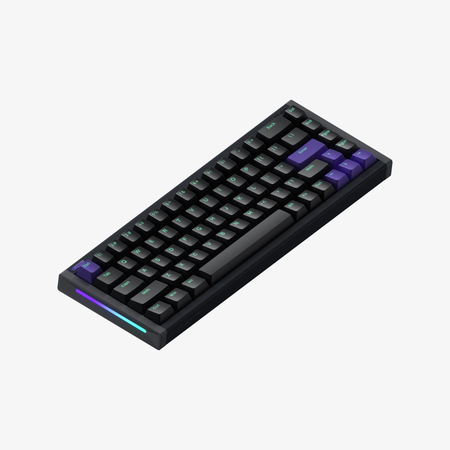
The primary differences are OS compatibility and color scheme. The Ariel is listed with Mac and Windows support, while the Aurora does not mention Mac compatibility. The Ariel comes in Blue/White keycaps and case, while the Aurora is Navy/Blue. The Aurora vendor description also mentions a tray mount design.
Yes, both the Ariel and Aurora support software-based per-switch actuation point adjustment according to the vendor descriptions. The adjustable dead zones can go to a minimum of 0, allowing for very sensitive key presses. The software also allows RGB adjustment and 3-level latency control.
Both the Ariel and Aurora have 67 keys in a compact 65% layout. They follow the ANSI physical layout standard with a US QWERTY logical layout. The compact size omits the function row and some navigation keys compared to larger keyboards.
Yes, both the Ariel and Aurora include multi-layer Poron sound absorption according to the vendor descriptions. This foam padding inside the case helps reduce hollow sounds and echo from the aluminum case, resulting in a quieter typing experience.
According to the vendor description for the Ariel, Linux compatibility is listed as yes. The Aurora's vendor description does not explicitly list Linux compatibility in the provided data, but it shares the same hardware and likely functions similarly on Linux if the software features are supported.
Not sold on either?



Still torn?
Answer a few quick questions and the keyboard finder ranks 2,000+ boards by how you will actually use yours.