Nuphy Air75 HE vs Air75 V3Gaming Speed vs Wireless Versatility
Choose the Air75 HE for competitive gaming speed, or the Air75 V3 for wireless flexibility and a more customizable typing experience.
KeebFinder may earn a commission when you buy through these links, at no extra cost to you.
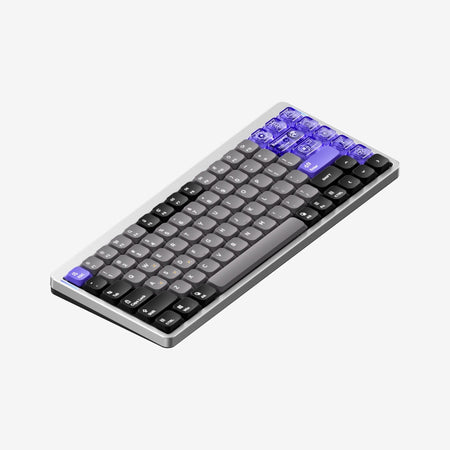

Which one should you get?
Get the
Nuphy Air75 HE
Gaming Speed
Build quality in the bottom 45% of 75% boards under $150.
- Features an 8000Hz polling rate for ultra-low latency gaming.
- Magnetic Hall effect switches with adjustable actuation (0.1-3.3mm) and Rapid Trigger support.
- Includes a web-based driver (NuPhyIO) with deep per-key configuration for gaming features.
- Magnetic switches only. Standard MX switches will not fit.
- Low-profile switches and keycaps only. Standard MX keycaps will not fit.
- South-facing LEDs. Shine-through legends stay dark, and some sculpted keycaps can clip the LED.
- No ISO layout. ISO-DE, UK, and other ISO variants are not offered.
Get the
Nuphy Air75 V3
Wireless Versatility
Build quality in the top 5% of 75% boards under $150.
- Offers tri-mode connectivity: Bluetooth, 2.4 GHz, and wired.
- Includes a large 4000mAh battery for extended wireless use.
- Features a hot-swappable PCB and gasket mount for customization and a softer typing feel.
- Low-profile switches and keycaps only. Standard MX keycaps will not fit.
- North-facing LEDs. Cherry-profile keycaps can hit the switch housing.
- South-facing LEDs. Shine-through legends stay dark, and some sculpted keycaps can clip the LED.
Your primary need dictates the choice. If you are a competitive gamer where every millisecond counts, the Nuphy Air75 HE's wired 8000Hz connection and magnetic switches are non-negotiable. For everyone else—whether you work in an office, travel, program, or create content—the Air75 V3's wireless versatility, hot-swappable design, and practical knob make it the more adaptable and convenient daily driver.
The differences that matter
Skip the 40-row spec sheet. These are the specs that change how each board feels, sounds, and fits your desk.
Nuphy Air75 HE
Nuphy Air75 V3
Hall effect (magnetic)
Yes
No
Adjustable actuation helps in games and not in normal typing
Rapid trigger
Yes
No
Faster resets help in games and not in normal typing
Connection
Wired
Bluetooth, 2.4 GHz, Wired
Wireless for several devices and wired for lower latency
Max polling rate
8,000 Hz
1,000 Hz
Higher polling helps competitive FPS and does nothing for typing
Case material
Aluminum, Plastic
ABS, Aluminum, Plastic, Polycarbonate
- Nuphy Air75 HE
- Nuphy Air75 V3
- Performance
- 9882
- Build quality
- 6388
- Productivity
- 7697
- Customizability
- 6898
- Portability
- 6682
- Layout size: 75%
- Hot-swappable
- Low profile
- Sound dampening
What will you mostly use it for?
The Air75 V3 wins in most productivity and lifestyle categories due to its wireless freedom, hot-swappable design, and included knob. It is the clear choice for office work, programming, travel, and content creation. The Air75 HE dominates solely in the gaming category, where its extreme polling rate, magnetic switches, and rapid trigger features provide a tangible competitive edge that the V3's 1000Hz polling rate cannot match.
Pick the Nuphy Air75 HE
- The Air75 HE offers an 8000Hz polling rate for minimal latency.
- Its magnetic Hall effect switches support Rapid Trigger and adjustable actuation from 0.1mm to 3.3mm.
- The vendor description cites an ultra-low latency of 0.125ms.
Nuphy Air75 HE vs Air75 V3 specs
Every tracked spec, side by side. Rows marked with a dot differ between the boards.
17 of 30 specs differ
Nuphy Air75 HE
Nuphy Air75 V3
Switch options
Hall effect (magnetic)
Rapid trigger
Hot-swappable
Mount style
Low profile
Sound dampening
Screw-in stabilizers
Layout size
Layout standard
Ergonomics
Knob
Display
Media keys
Connection
Max polling rate
Battery
USB-C
Case material
Plate material
Keycaps
Weight
Dimensions
Typing angle
Backlight
QMK
VIA
N-key rollover
Mac & Windows
Released
ISO layouts by store
Which stores sell ISO-DE, UK, and the other regional layouts.
Nuphy Air75 HE
No ISO layout at the stores we track.
Nuphy Air75 V3
Input Gear
ISO-DE
In stockShips to you
Input Gear
ISO-FR
In stockShips to you
Input Gear
ISO-DE
In stockShips to you
Compare prices
Live prices from the stores we track, cheapest in-stock offer first.
Prices in USD are converted to your currency and can change at any time. KeebFinder may earn a commission when you buy through these links, at no extra cost to you.
Lowest price across stores, Amazon excluded.




Nuphy Air75 HE vs Air75 V3: your questions
The Air75 HE is specifically designed for gaming. It has an 8000Hz polling rate, Hall effect magnetic switches with rapid trigger, and an advertised latency of 0.125ms. The Air75 V3 has a standard 1000Hz polling rate and lacks these advanced gaming features.
Yes. The Air75 V3's vendor description explicitly markets it for Mac and iPad use, and it supports Bluetooth connectivity. The Air75 HE is wired-only and cannot connect wirelessly to an iPad.
Only the Air75 V3 has a hot-swappable PCB, allowing you to easily change switches. The Air75 HE uses magnetic switches that are power-off replaceable, but the vendor description does not call it hot-swappable, and it is designed for its specific magnetic switches.
The Air75 V3 has a 4000mAh battery. Its vendor page claims up to 1200 hours of use with RGB off. The Air75 HE is a wired-only keyboard and does not have a battery.
No. Only the Air75 V3 includes a programmable knob. The Air75 HE does not have a knob, as its design focus is on minimal latency for gaming.
The Air75 V3 is thinner, with a front height of 13mm according to its specifications. The Air75 HE has a front height of 18mm. Combined with its wireless functionality, the V3 is the more portable option.
No. The adjustable actuation point feature (from 0.1mm to 3.3mm) is exclusive to the Air75 HE's magnetic Hall effect switches. The Air75 V3 uses traditional mechanical nano switches with a fixed actuation point.
The Air75 HE uses a top mount system. The Air75 V3 uses a gasket mount, which typically provides a softer, more cushioned typing feel by isolating the plate from the case.
Both keyboards use a web-based configuration tool called NuPhyIO. The Air75 V3's description mentions NuPhyIO 2.0 with a streamlined UI, while the Air75 HE's software is focused on configuring gaming parameters like rapid trigger sensitivity.
The Air75 V3 has advantages for extended typing. It offers a 3-stage adjustable kickstand for ergonomic angles and a gasket mount for a potentially more forgiving feel. The Air75 HE has a fixed, lower 3° typing angle by default, though its specs list adjustable feet for 7° and 10° angles.
Yes, both keyboards list Mac/Win support. The Air75 V3's vendor description highlights dedicated F-key caps for each OS and a mode switch to ease transitions between operating systems.
Not sold on either?


Still torn?
Answer a few quick questions and the keyboard finder ranks 2,000+ boards by how you will actually use yours.