AULA F98 vs Keychron K10 ProCompact Gasket vs Full-Size Custom
Choose the AULA F98 for a compact, gasket-mounted experience at a lower cost, or the Keychron K10 Pro for a full-size layout with deep firmware customization.
KeebFinder may earn a commission when you buy through these links, at no extra cost to you.

No reviews
from$69at WhatGeek
90-day lowLowest price in 90 days
4.8 (13)4.8 · 13 reviews
from$79at Keychron
Which one should you get?
Get the
AULA F98
Compact Gasket
Build quality in the bottom 45% of 98% boards under $100.
- Compact 98% layout saves desk space while retaining most keys.
- Gasket mount design with Poron foam and silicone padding for a softer typing feel.
- Includes a 2.4 GHz wireless mode alongside Bluetooth and wired.
- No ISO layout. ISO-DE, UK, and other ISO variants are not offered.
- Compact full-size layout. The numpad is present, the gaps of a full-size board are not.
Get the
Keychron K10 Pro
Full-Size Custom
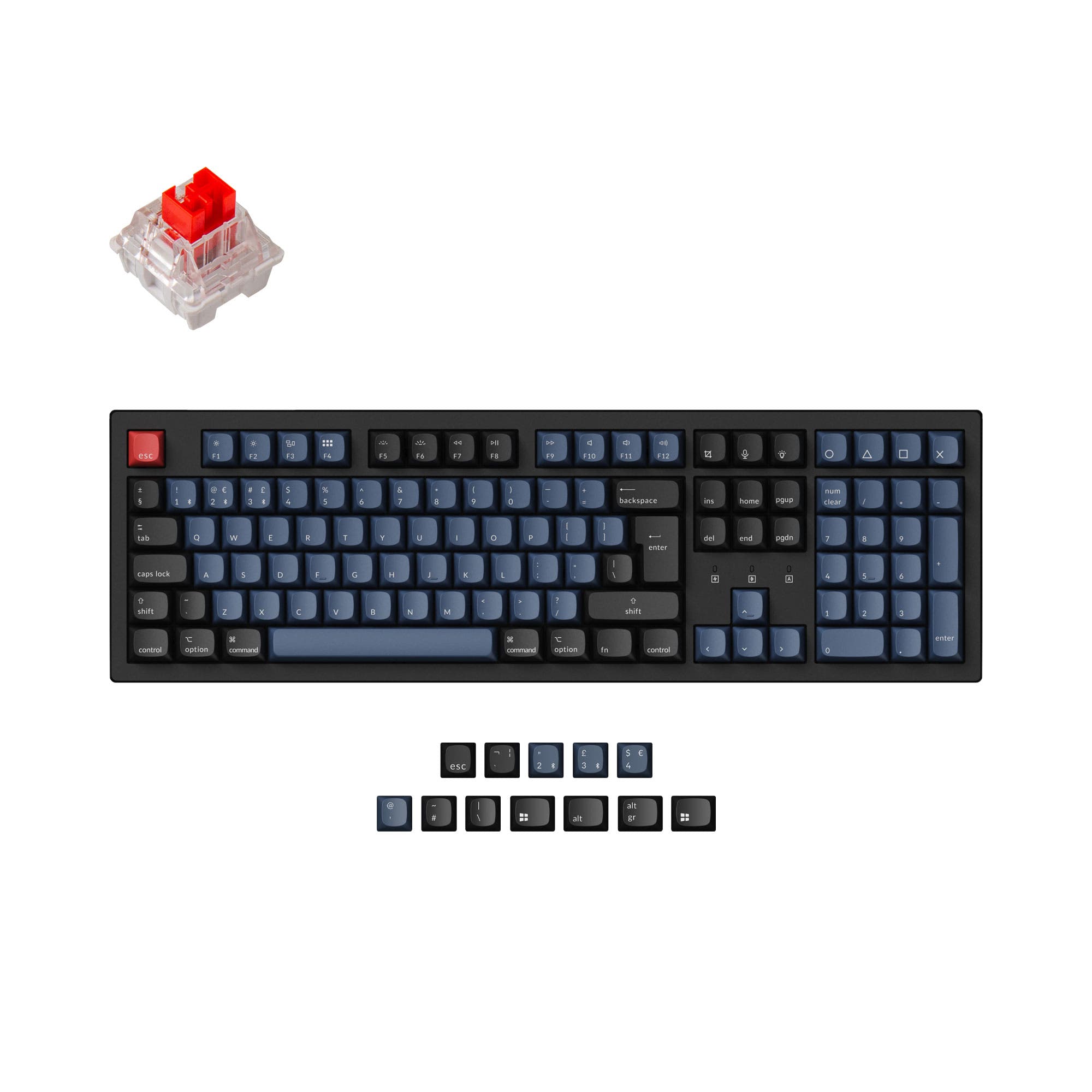
Build quality in the top 5% of 100% boards under $100.
- Extensive customization via QMK and VIA firmware support.
- Available in multiple switch types (linear, tactile, clicky) and as a barebone kit.
- Features a steel plate and screw-in PCB stabilizers for a solid feel.
- South-facing LEDs. Shine-through legends stay dark, and some sculpted keycaps can clip the LED.
Select the AULA F98 if you want a more compact keyboard with a gasket-mounted feel and 2.4 GHz wireless at a competitive price. Opt for the Keychron K10 Pro if you need a full-size layout, deep programmability with QMK/VIA, and superior long-term customization potential for switches and keycaps. Your primary need for space or software control dictates the choice.
The differences that matter
Skip the 40-row spec sheet. These are the specs that change how each board feels, sounds, and fits your desk.
AULA F98
Keychron K10 Pro
Layout size
98%
100%
Connection
Bluetooth, 2.4 GHz, Wired
Bluetooth, Wired
Wireless for several devices and wired for lower latency
Case material
Plastic
ABS, Plastic, Steel
Switch options
Linear
Clicky, Linear, Tactile
Mount style
Gasket Mount
PCB Mount, Plate Mount, Tray Mount
- AULA F98
- Keychron K10 Pro
- Performance
- 7581
- Build quality
- 6189
- Productivity
- 7795
- Customizability
- 6196
- Portability
- 5553
- Hot-swappable
- Battery: 4,000 mAh
- Max polling rate: 1,000 Hz
- Sound dampening
- Keycaps: ABS, PBT
What will you mostly use it for?
The Keychron K10 Pro is the more versatile choice for productivity-focused tasks like office work, programming, and content creation, thanks to its full layout and superior software. The AULA F98 wins for travel due to its smaller, lighter design. For gaming, both are capable, while modders will strongly prefer the K10 Pro for its open firmware and barebone options.
It's a tie
- Both offer a 1000 Hz polling rate for low latency.
- Both support N-key rollover for simultaneous key presses.
- The AULA F98 includes a 2.4 GHz wireless mode for a stable connection, while the Keychron K10 Pro's vendor page highlights its low latency for competitive gaming.
AULA F98 vs Keychron K10 Pro specs
Every tracked spec, side by side. Rows marked with a dot differ between the boards.
15 of 26 specs differ
AULA F98
Keychron K10 Pro
Switch options
Hot-swappable
Mount style
Sound dampening
Screw-in stabilizers
Layout size
Layout standard
Ergonomics
Display
Media keys
Connection
Max polling rate
Battery
USB-C
Case material
Plate material
Keycaps
Weight
Dimensions
Typing angle
Backlight
QMK
VIA
N-key rollover
Mac & Windows
Released
ISO layouts by store
Which stores sell ISO-DE, UK, and the other regional layouts.
AULA F98
No ISO layout at the stores we track.
Keychron K10 Pro
Keychron
ISO-DE, ISO-UK, ISO-FR, ISO-ES, ISO-SW
In stockShips to you
Keychron (DE)
ISO-DE, ISO-UK, ISO-FR, ISO-ES, ISO-SW
Out of stockDoes not ship to you
Compare prices
Live prices from the stores we track, cheapest in-stock offer first.
Prices in USD are converted to your currency and can change at any time. KeebFinder may earn a commission when you buy through these links, at no extra cost to you.
Lowest price across stores, Amazon excluded.




AULA F98 vs Keychron K10 Pro: your questions
The AULA F98 is better for small desks. Its 98% layout is 60mm shorter in length than the full-size Keychron K10 Pro, saving significant space while keeping the function row and navigation cluster.
Only the Keychron K10 Pro offers deep, system-level key remapping. It supports QMK and VIA firmware, allowing you to reprogram every key and create macros. The AULA F98's vendor description mentions software for RGB customization but not for key remapping.
Yes, both keyboards list Mac and Windows support. The Keychron K10 Pro includes keycaps for both operating systems in the box, as noted in its vendor description.
Both keyboards have the same 4000mAh battery capacity. Actual battery life will depend on usage patterns like RGB brightness and wireless mode, but the capacity is identical.
Both keyboards offer hot-swappable versions. The AULA F98's listing confirms a full-key hot-swappable PCB. The Keychron K10 Pro is available in hot-swappable and non-hot-swappable versions, so you must select the correct model when purchasing.
The AULA F98 uses a gasket mount, where the plate is suspended on rubber or silicone gaskets for a softer, more cushioned typing feel. The Keychron K10 Pro uses a tray (or plate) mount, where the plate is fixed directly to the case, typically resulting in a firmer, more direct feedback.
Both feature sound-dampening materials. The AULA F98 uses Poron foam and silicone padding in its gasket mount. The Keychron K10 Pro uses sound-absorbing foam and a silicone dampening pad. The final sound depends on the switches installed, but both are designed to reduce noise.
The Keychron K10 Pro has south-facing RGB LEDs. Its vendor page states this design prevents interference with Cherry-profile keycaps. The AULA F98's keycap compatibility is not specifically detailed regarding Cherry profile.
Yes, the Keychron K10 Pro is suitable for gaming. It has a 1000 Hz polling rate and N-key rollover. Its vendor description also highlights the 1000 Hz polling rate for making latency 'non-existent for the competitive game.'
The AULA F98 includes a keycap and switch puller, a USB-C cable, a 2.4G receiver, and a manual. The Keychron K10 Pro's contents are not fully listed, but its vendor page shows optional add-ons like palm rests and coiled cables.
The AULA F98 vendor description lists 19 RGB lighting effects with a music-sync mode. The Keychron K10 Pro vendor page mentions more than 22 types of RGB backlight settings, suggesting a slightly wider variety.
Not sold on either?


Still torn?
Answer a few quick questions and the keyboard finder ranks 2,000+ boards by how you will actually use yours.