Azio Cascade vs Cascade Slim75% Low-Profile vs Standard
Choose the Azio Cascade for standard MX switch compatibility and a larger 4000mAh battery, or the Cascade Slim for a lighter, low-profile design with Gateron low-profile switches.


Which one should you get?
Get the
Azio Cascade
75% Low-Profile
- Uses standard MX-switch compatible hot-swappable sockets for a huge range of switch choices.
- Has a large 4000mAh battery, which is double the capacity of the Slim version.
- Includes screw-in stabilizers for a more stable feel on larger keys.
- Thicker body profile (24mm) makes it less portable than the low-profile Slim version.
- Heavier than the Slim at 612g, adding weight for travel.
Get the
Azio Cascade Slim
Standard
- Has a slim low-profile design (19mm thick) that is easier to pack and transport.
- Significantly lighter than the standard Cascade at 454g.
- Uses Gateron low-profile switches for a typing experience similar to laptop keyboards.
- Uses clip-in stabilizers, which may feel less stable than the screw-in stabilizers on the standard Cascade.
- Battery capacity is 2000mAh, half of what the standard Cascade offers.
- Low-profile switch ecosystem is much more limited than standard MX switches, restricting modding options.
The Azio Cascade is the better choice for those who prioritize extensive switch customization and longer battery life. The Azio Cascade Slim is ideal for users who want a lighter, thinner keyboard for travel or prefer a low-profile typing feel. Your decision comes down to whether you value the performance and modding of standard components or the portability and sleek profile of a slim design.
The differences that matter
Skip the 40-row spec sheet. These are the specs that change how each board feels, sounds, and fits your desk.
Azio Cascade
Azio Cascade Slim
Connection
Bluetooth, Wired
Bluetooth, 2.4 GHz, Wired
Low profile
No
Yes
Weight
748 g
1,111 g
Dimensions
41 x 126 x 318 mm
41 x 126 x 27 mm
- Azio Cascade
- Azio Cascade Slim
- Performance
- 7676
- Build quality
- 7575
- Productivity
- 8787
- Customizability
- 7979
- Portability
- 8181
- Layout size: 75%
- Hot-swappable
- Battery: 4,000 mAh
- Case material: Aluminum
- Switch options: Clicky, Linear, Tactile
- Sound dampening
What will you mostly use it for?
The Azio Cascade (standard) wins use cases that benefit from customization and feel, such as Gaming and Programming, due to its standard MX switch support and screw-in stabilizers. The Cascade Slim wins Travel by being lighter and thinner. Both keyboards are tied in the Office and Content Creation categories, as their shared features like Bluetooth device switching and sound dampening make them equally suited for those tasks. Modding clearly favors the standard Cascade for its more standard and modder-friendly components.
Pick the Azio Cascade
- Standard MX switches offer a wider variety of options with different actuation points and feel for gaming.
- Includes a 4000mAh battery (versus 2000mAh in the Slim) for longer wireless sessions.
- Uses screw-in stabilizers, which are generally more stable than the clip-in stabilizers on the Slim.
Azio Cascade vs Cascade Slim specs
Every tracked spec, side by side. Rows marked with a dot differ between the boards.
4 of 21 specs differ
Azio Cascade
Azio Cascade Slim
Switch options
Hot-swappable
Low profile
Sound dampening
Screw-in stabilizers
Layout size
Layout standard
Ergonomics
Display
Connection
Battery
USB-C
Case material
Plate material
Keycaps
Weight
Dimensions
Backlight
N-key rollover
Mac & Windows
Released
Compare prices
Live prices from the stores we track, cheapest in-stock offer first.


Prices in USD are converted to your currency and can change at any time. KeebFinder may earn a commission when you buy through these links, at no extra cost to you.
Azio Cascade vs Cascade Slim: your questions
Yes, both the Azio Cascade and Cascade Slim are hot-swappable. The standard Cascade uses standard MX-style sockets, while the Slim uses sockets compatible with Gateron low-profile switches.
The standard Azio Cascade is designed for standard MX mechanical switches. The Azio Cascade Slim uses Gateron low-profile switches, which have a smaller travel distance and shorter overall height.
The standard Azio Cascade has a larger battery at 4000mAh. The Cascade Slim has a 2000mAh battery, so the standard model will likely last longer between charges.
Yes, according to the vendor specifications, both the Cascade and Cascade Slim have full Mac and PC compatibility. They come with dedicated keycaps for both macOS and Windows layouts.
The Azio Cascade Slim uses clip-in stabilizers. This is in contrast to the standard Cascade, which uses screw-in stabilizers, which are generally considered more stable.
The Cascade Slim is better for traveling because it is both thinner (19mm vs 24mm) and lighter (454g vs 612g) than the standard Cascade, making it easier to carry in a bag.
Yes, both keyboards feature full RGB backlighting. The vendor description confirms they include 4 light modes: Static, Breathing, Wave, and Reactive.
The vendor description for both products mentions interchangeable top plates as a customization feature. This means you can likely change the color or style of the top case.
Both the Cascade and Cascade Slim include sound dampening materials. They have a mid-damper using PORON foam above the PCB and a bottom-damper using silicone, which helps reduce the sound of key presses and case ping.
Yes, the Azio Cascade Slim is positioned as a low-profile keyboard. Its specifications list a body profile of Low-Profile and a total height of only 19mm.
According to the product metadata, the Cascade Slim supports Bluetooth, 2.4 GHz, Wired, and Wireless connectivity. The standard Cascade supports Bluetooth, Wired, and Wireless, but does not list 2.4 GHz support.
No, keycaps are likely not cross-compatible. The standard Cascade uses standard MX-style keycaps, while the Cascade Slim uses low-profile keycap stems designed for Gateron low-profile switches.
Not sold on either?


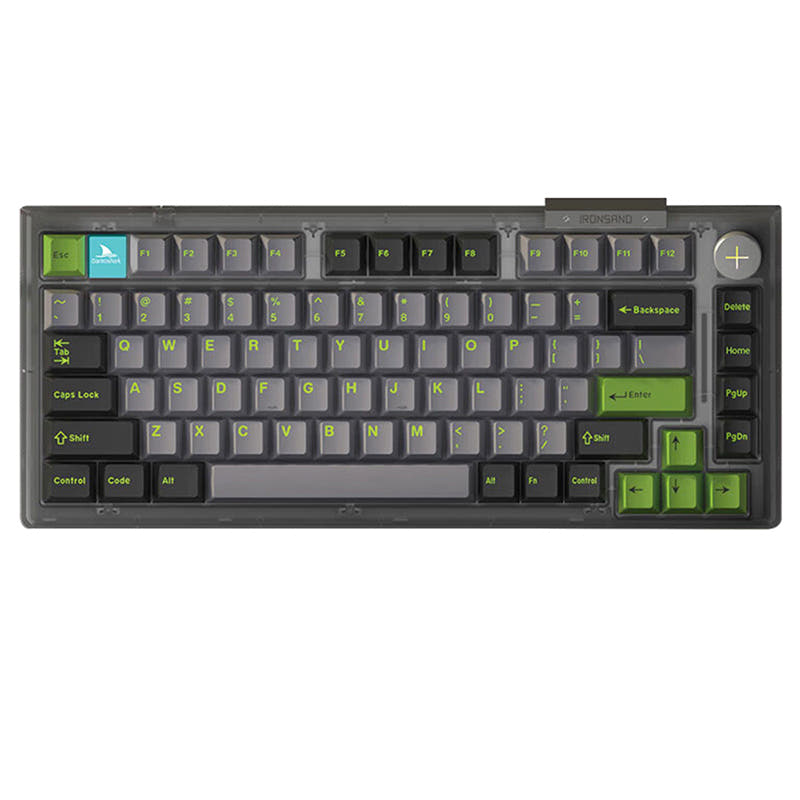


Still torn?
Answer a few quick questions and the keyboard finder ranks 2,000+ boards by how you will actually use yours.