Cidoo QK61 V2 vs Qwertykeys Neo60 CorePre-Built vs DIY Kit
Choose the Cidoo QK61 V2 for a complete, sound-tuned package out of the box, or the Qwertykeys Neo60 Core for a high-end, customizable aluminum build from a barebones kit.


Which one should you get?
Get the
Cidoo QK61 V2
Pre-Built
- Comes as a fully assembled unit with switches, keycaps, and pre-lubed stabilizers.
- Includes five layers of sound-dampening materials like sandwich foam, PET film, and a silicone pad.
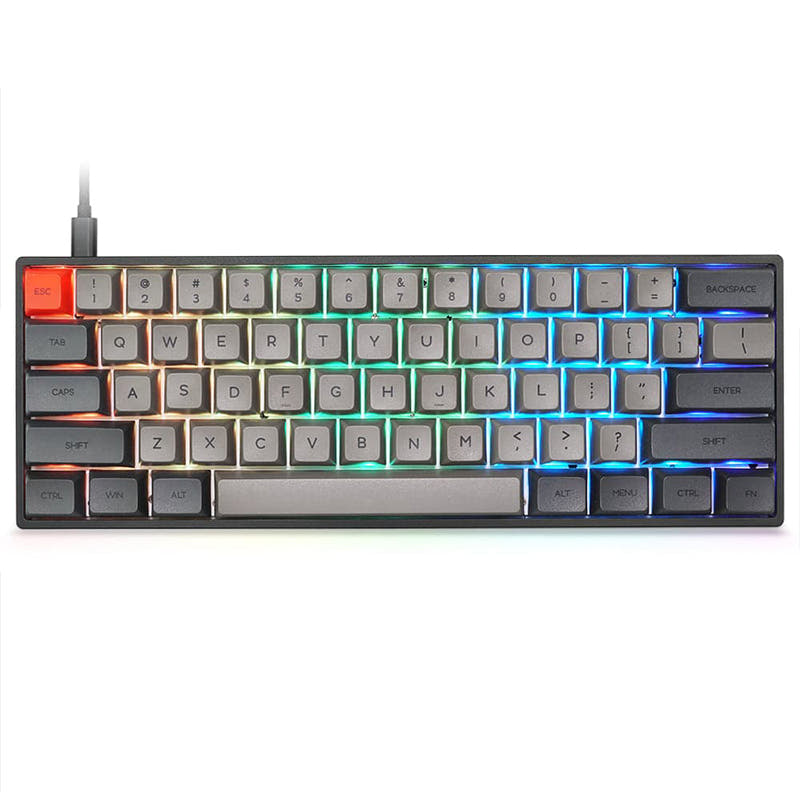
- Features south-facing RGB LEDs and a 3000mAh battery.
- Plastic case construction compared to the aluminum alternative.
- Limited to the included plate material and pre-installed foam configuration.
- No explicit mention of N-key rollover in its listed specifications.
Get the
Qwertykeys Neo60 Core
DIY Kit
- Features a premium aluminum case with a unibody design and optional stainless steel or copper weight.
- Offers extensive customization with a choice of five different plate materials.
- Includes a comprehensive kit with a carrying case, foam kit, multiple mounting options (PCB gasket, O-ring), and assembly tools.
- Sold as a DIY/barebones kit, requiring separate purchase of switches and keycaps.
- Has no per-key RGB lighting.
- Longer lead time, as the vendor lists it as a 'made to order' item with an estimated 12-week production and ship time.
Your decision should be guided by your willingness to build. For a superb, feature-complete keyboard that works perfectly out of the box with thoughtful sound tuning, the Cidoo QK61 V2 delivers exceptional value. If your priority is building a high-end custom keyboard from the ground up, with premium materials and extensive configuration options, the Qwertykeys Neo60 Core kit is the compelling choice, provided you can wait for its production and supply your own switches and keycaps.
The differences that matter
Skip the 40-row spec sheet. These are the specs that change how each board feels, sounds, and fits your desk.
Cidoo QK61 V2
Qwertykeys Neo60 Core
Battery
3,000 mAh
2,200 mAh
Case material
Plastic
Aluminum
Mount style
Gasket Mount
PCB Mount
QMK
Yes
No
Sound dampening
Yes
No
- Cidoo QK61 V2
- Qwertykeys Neo60 Core
- Performance
- 4358
- Build quality
- 7080
- Productivity
- 7161
- Customizability
- 8173
- Portability
- 8487
- Layout size: 60%
- Connection: Bluetooth, 2.4 GHz, Wired
- Hot-swappable
- VIA
What will you mostly use it for?
The Cidoo QK61 V2 is the clear choice for office use, travel, and content creation due to its complete package, wireless features, and lighter weight. It also holds a slight edge for gaming with its included RGB. The Qwertykeys Neo60 Core is the definitive winner for modding enthusiasts who want to select every component. For programming, both are capable, making it a tie that depends on preference for a heavier, custom feel versus a lighter, ready-to-use board.
Pick the Cidoo QK61 V2
- The Cidoo QK61 V2 is a pre-built unit ready to use immediately.
- It includes south-facing RGB lighting, which the Neo60 Core lacks.
- Its lighter weight (880g) may be preferable for quick desk adjustments.
What owners say
Ratings and quotes collected from verified store reviews, including the critical ones.
Cidoo QK61 V2
No owner reviews collected yet.
Qwertykeys Neo60 Core
14 owner reviews
“Exceeded my expectations, iv been using my salvation that cost more than double and i feel its better and espcially the even sound throughout the keeb”
Cidoo QK61 V2 vs Qwertykeys Neo60 Core specs
Every tracked spec, side by side. Rows marked with a dot differ between the boards.
10 of 22 specs differ
Cidoo QK61 V2
Qwertykeys Neo60 Core
Switch options
Hot-swappable
Mount style
Sound dampening
Layout size
Layout standard
Ergonomics
Display
Connection
Battery
USB-C
Case material
Plate material
Keycaps
Weight
Dimensions
Typing angle
Backlight
QMK
VIA
N-key rollover
Released
Compare prices
Live prices from the stores we track, cheapest in-stock offer first.
Lowest price across stores, Amazon excluded.



Prices in USD are converted to your currency and can change at any time. KeebFinder may earn a commission when you buy through these links, at no extra cost to you.
Cidoo QK61 V2 vs Qwertykeys Neo60 Core: your questions
Yes. The Cidoo QK61 V2 is a pre-built keyboard. According to the vendor description, it comes fully assembled with CIDOO Pearl White switches, double-shot PBT keycaps, and all necessary accessories including a USB cable and 2.4GHz dongle.
The Qwertykeys Neo60 Core is a DIY kit. The listing confirms it does not include switches or keycaps. You must purchase those separately to complete the build.
Only the Cidoo QK61 V2 has RGB lighting. Its specifications and vendor description confirm it has south-facing LEDs. The Qwertykeys Neo60 Core product listing explicitly states it has 'No Per-key RGB'.
Yes, both keyboards offer tri-mode connectivity. The specifications for both list Bluetooth, 2.4 GHz wireless, and wired USB-C connectivity.
The Cidoo QK61 V2 has a plastic case. The Qwertykeys Neo60 Core features an aluminum case with a unibody design, which is typically more premium and heavier.
Yes. Both keyboards list VIA Support as an extra feature, allowing for key remapping and macro programming through the VIA software.
The Cidoo QK61 V2 is explicitly tuned for this sound profile. Its vendor description details five layers of sound-improving materials, including foam and film, and a polycarbonate plate to achieve a 'thocky yet poppy' sound. The Neo60 Core's sound will depend heavily on your choice of plate and switches.
The vendor page for the Qwertykeys Neo60 Core states it is a 'made to order' item with an 'Estimated Production & Ship Time: 12 weeks after ordering'. This is a significant wait time compared to typical in-stock products.
Yes, both the Cidoo QK61 V2 and the Qwertykeys Neo60 Core list 'Hot-Swappable' as an extra feature, allowing you to change switches without soldering.
According to its listing, the kit includes a keyboard carrying case, a keycap & switch puller, a screwdriver, a set of PCB stabilizers, a USB-C cable, a foam kit, gaskets, and a disassembly tool, among other assembly parts.
The Cidoo QK61 V2 has a 3000mAh battery. The Qwertykeys Neo60 Core includes two 2200mAh batteries for its tri-mode version, totaling 4400mAh, but this is for a hotswap PCB configuration as per the vendor description.
Not sold on either?



Still torn?
Answer a few quick questions and the keyboard finder ranks 2,000+ boards by how you will actually use yours.