Dagk Pro vs Keychron Q14 ProWood vs Metal Layout Showdown
Choose the Dagk Pro for a lightweight, portable 96% layout, or the Keychron Q14 Pro Alice for a premium, heavy-duty ergonomic southpaw design.


Which one should you get?
Get the
Dagk Pro
Wood
- Unique CNC-machined solid walnut wood case for a distinct aesthetic.
- Significantly lighter at 660g, enhancing portability.
- Vendor description lists support for 2.4 GHz wireless, Bluetooth, and wired connectivity.
- Lacks the advanced ergonomic features of an Alice or southpaw layout.
- No mention of specific firmware like QMK/VIA, relying on a custom driver.
- Smaller 2500mAh battery compared to the Keychron's 4000mAh.
Get the
Keychron Q14 Pro
Metal Layout Showdown
- Premium full CNC-machined aluminum case with a double-gasket mount design.
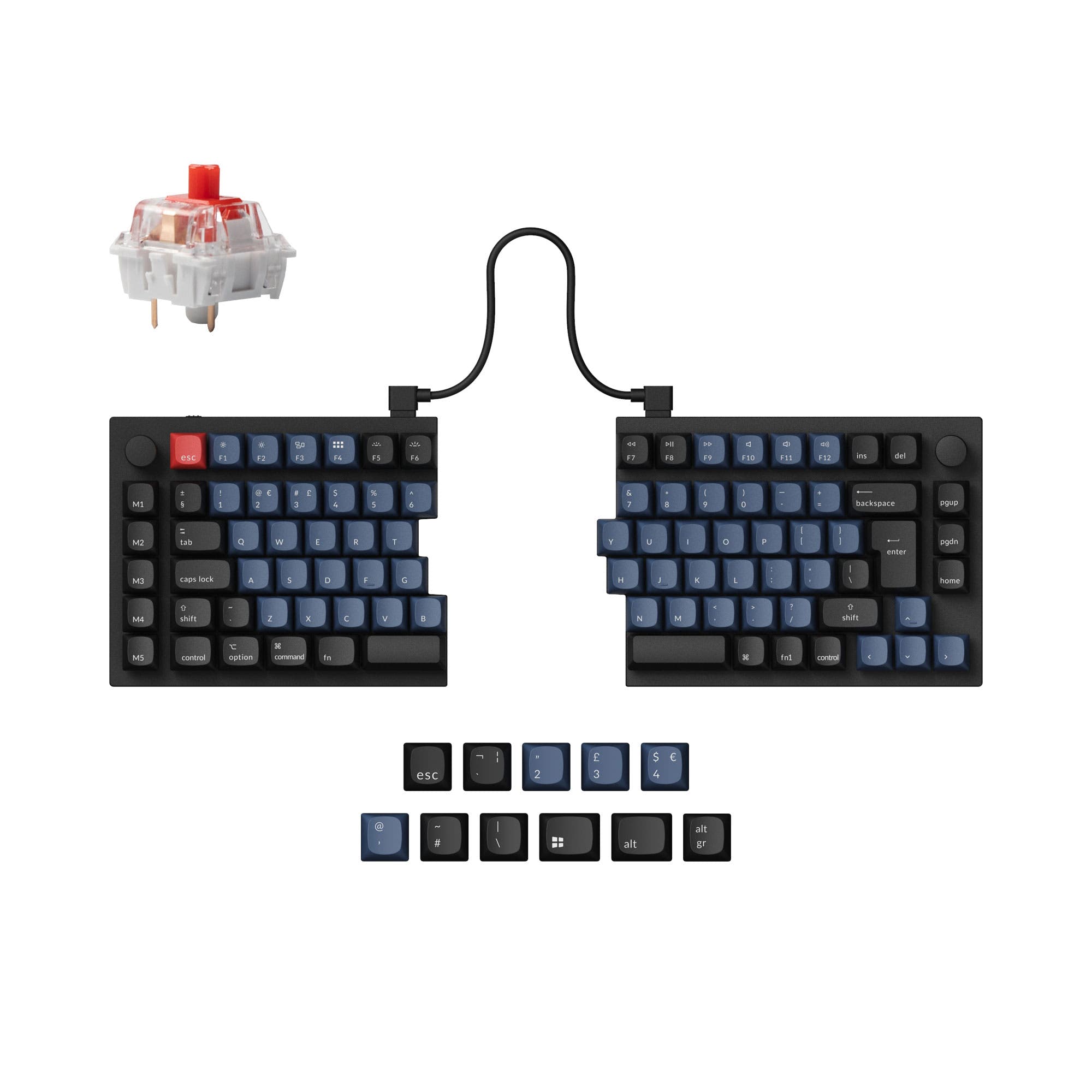
- Specialized 96% Alice ergonomic layout with a left-side (southpaw) numpad.
- Full support for QMK and VIA open-source firmware for deep customization.
- Extremely heavy at 2395g, making it difficult to move.
- The unique Alice southpaw layout requires an adjustment period for typing muscle memory.
- Larger physical footprint (445mm long) consumes more desk space.
Your primary need dictates the choice. If you value a unique wooden build, maximum portability, and a standard 96% layout, the Dagk Pro is a compelling, lighter-weight option. If you seek a top-tier typing experience with unparalleled customization through QMK/VIA, can accommodate a heavy, large keyboard, and want the ergonomic benefits of an Alice southpaw layout, the Keychron Q14 Pro Alice is the definitive investment. Consider how much you prioritize ergonomics and firmware freedom versus weight and material uniqueness.
The differences that matter
Skip the 40-row spec sheet. These are the specs that change how each board feels, sounds, and fits your desk.
Dagk Pro
Keychron Q14 Pro
Connection
Bluetooth, 2.4 GHz, Wired
Bluetooth, Wired
Battery
2,500 mAh
4,000 mAh
Ergonomics
Standard
Southpaw, Alice
Case material
Ceramic, Wood
Aluminum
Knob
No
Yes
- Dagk Pro
- Keychron Q14 Pro
- Performance
- 7182
- Build quality
- 7189
- Productivity
- 85100
- Customizability
- 7798
- Portability
- 8356
- Layout size: 96%
- Hot-swappable
- Sound dampening
What will you mostly use it for?
The Keychron Q14 Pro Alice wins in scenarios demanding high customization, ergonomics, and premium construction, such as programming, modding, and content creation. Its specialized layout and firmware are clear advantages. The Dagk Pro takes the lead for travel due to its vastly lower weight and more compact form. For general office use and gaming, the choice depends on whether you prioritize the Keychron's confirmed high polling rate and unique layout or the Dagk Pro's lighter weight and potential 2.4 GHz connectivity.
Pick the Keychron Q14 Pro
- The Keychron Q14 Pro Alice has a specified 1000 Hz polling rate in wired mode, which the Dagk Pro's listing does not mention.
- Its southpaw layout with left-side numpad can free up mouse space on the right.
- The manufacturer states its latency is hardly noticeable in competitive games.
What owners say
Ratings and quotes collected from verified store reviews, including the critical ones.
Dagk Pro
No owner reviews collected yet.
Keychron Q14 Pro
6 owner reviews
“This is my second Alice layout keyboard and is my daily driver. The ergonomics are great, and the build is solid. The south paw layout is exactly what I've been looking for in a keyboard. There are lots of customization options but the prebuilt straight out…”
Dagk Pro vs Keychron Q14 Pro specs
Every tracked spec, side by side. Rows marked with a dot differ between the boards.
14 of 27 specs differ
Dagk Pro
Keychron Q14 Pro
Switch options
Hot-swappable
Mount style
Sound dampening
Screw-in stabilizers
Layout size
Layout standard
Ergonomics
Knob
Display
Media keys
Connection
Max polling rate
Battery
USB-C
Case material
Plate material
Keycaps
Weight
Dimensions
Typing angle
Backlight
QMK
VIA
N-key rollover
Mac & Windows
Released
Compare prices
Live prices from the stores we track, cheapest in-stock offer first.
Lowest price across stores, Amazon excluded.




Prices in USD are converted to your currency and can change at any time. KeebFinder may earn a commission when you buy through these links, at no extra cost to you.
Dagk Pro vs Keychron Q14 Pro: your questions
The Keychron Q14 Pro Alice is specifically designed with a southpaw layout, placing the numpad on the left side. The manufacturer states this design leaves more room for your mouse on the right, benefiting both left and right-handed users. The Dagk Pro uses a standard right-side numpad layout.
Yes, both keyboards list Mac support. The Keychron Q14 Pro Alice includes a system toggle and an additional set of keycaps for both macOS and Windows. The Dagk Pro's vendor description also states support for Mac, iOS, Android, and Windows systems.
Yes, both the Dagk Pro and Keychron Q14 Pro Alice feature hot-swappable PCBs. The Dagk Pro uses Kailh hot-swappable sockets, while the Keychron supports most 3-pin and 5-pin MX-style switches. Both allow for easy switch replacement without soldering.
The Keychron Q14 Pro Alice has a larger 4000mAh battery, with the manufacturer claiming up to 300 hours with backlighting off. The Dagk Pro has a 2500mAh battery, but no specific runtime estimates are provided in its listing.
Yes, according to Keychron's specifications, the Q14 Pro Alice has a 1000 Hz polling rate in wired mode and a 90 Hz polling rate in wireless mode. The manufacturer claims this makes latency hardly noticeable in competitive games.
The Keychron Q14 Pro Alice is designed for ergonomics with its Alice layout, which splits the keyboard, and a 5-degree typing angle. The gasket mount and polycarbonate plate also contribute to a softer typing feel. The Dagk Pro has a standard layout with an ergonomic radian design and anti-slip pads.
The Keychron Q14 Pro Alice offers extensive remapping capabilities through open-source QMK and VIA firmware. The Dagk Pro's vendor page mentions a custom driver that allows customization of lighting effects, buttons, and macro functions, but it does not specify the same level of open-source support as QMK/VIA.
The Keychron Q14 Pro Alice (in its fully assembled version) comes with KSA profile double-shot PBT keycaps. The Dagk Pro's listing does not specify the keycap material, as it is sold primarily as a DIY kit without keycaps and switches included.
Yes, the Dagk Pro supports multiple connectivity modes. The vendor description for the 100-key model specifies Bluetooth and wired Type-C, while noting that an 84-key version also supports a 2.4 GHz wireless connection.
The Dagk Pro's case is made from CNC walnut wood and ceramic, offering a unique, lightweight aesthetic. The Keychron Q14 Pro Alice features a full CNC-machined aluminum body, which is much heavier (2395g vs. 660g) and typically associated with a premium, solid feel.
Yes, both keyboards include sound-dampening. The Dagk Pro listing mentions noise reduction foam. The Keychron Q14 Pro Alice uses a double-gasket design with silicone pads between the cases to reduce acoustic resonance and metal impact noise.
The Dagk Pro DIY kit includes the walnut wood case, PCB, stabilizers, a Type-C cable, and a manual. The Keychron Q14 Pro Alice is available as a barebone kit (without switches and keycaps) or fully assembled, which includes the aluminum case, PC plate, PBT keycaps, K Pro switches, and screw-in stabilizers.
Not sold on either?




Still torn?
Answer a few quick questions and the keyboard finder ranks 2,000+ boards by how you will actually use yours.