Not sure which keyboard to choose? Try the Keyboard Finder now!

Compare Keychron Q11 vs Q14 Pro Differences Side by Side

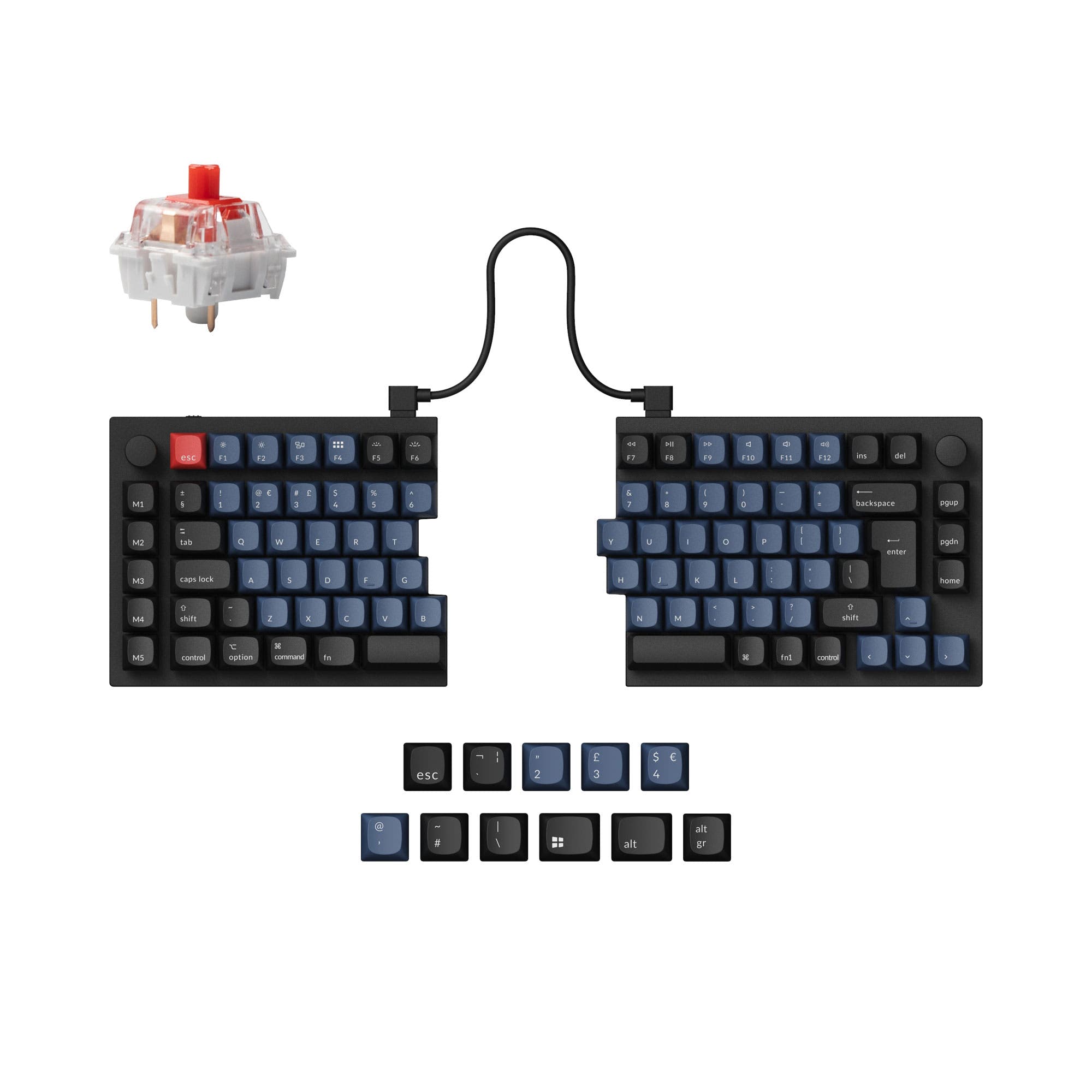
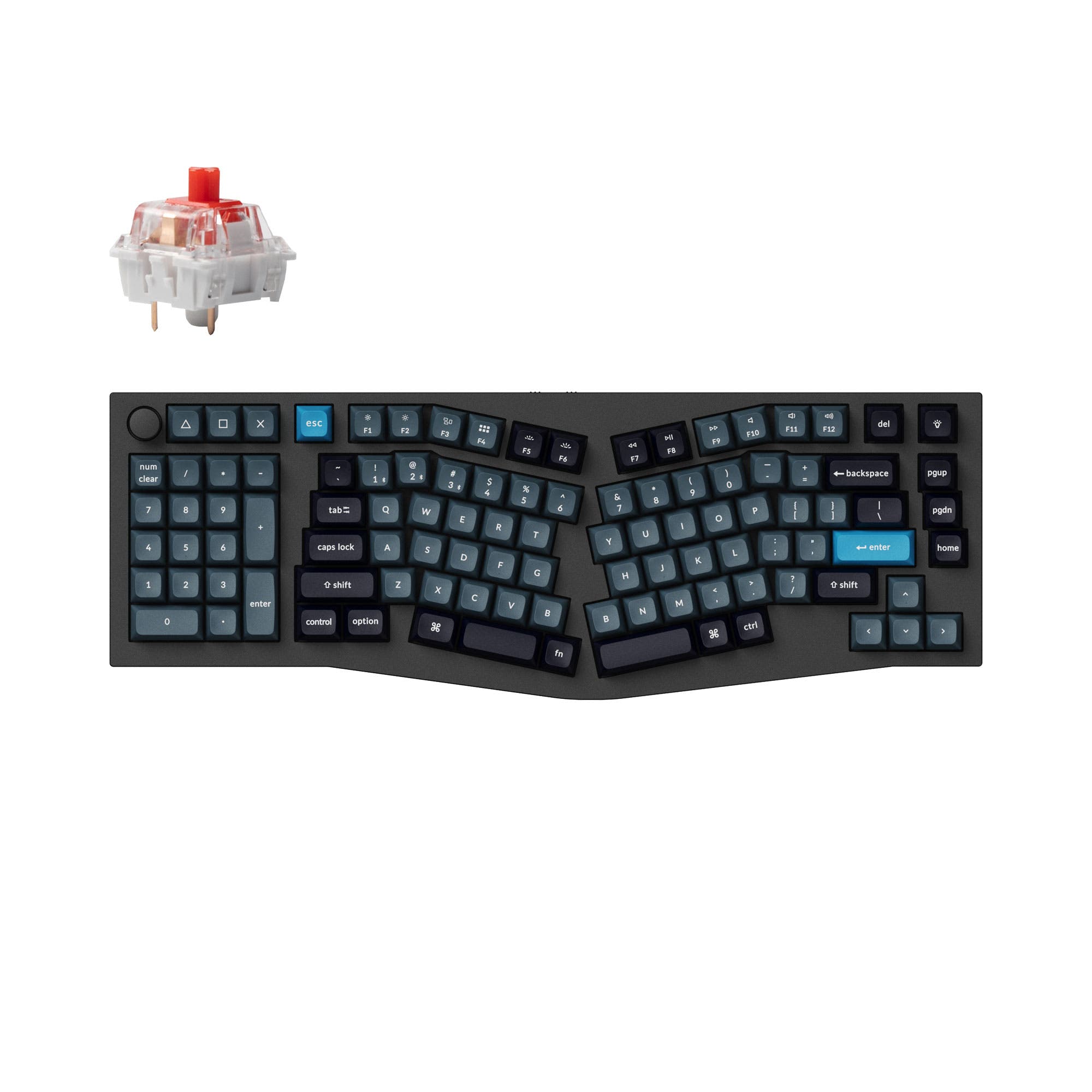
This comparison is for buyers torn between two distinct ergonomic approaches from Keychron: the Q11 offers a fully split 75% layout for independent half positioning, while the Q14 Pro provides an Alice-style frame with a southpaw numpad. The decision is hard because both boards feature premium aluminum builds, QMK/VIA support, and hot-swappable switches, yet they cater to very different workflow preferences. The Q11 is purely wired and lighter, making it a dedicated desktop tool, whereas the Q14 Pro adds Bluetooth wireless and a heavier, more expansive footprint. Understanding whether you need physical separation or a consolidated angled frame with a numpad will guide the right choice.

95
Keychron Q11 QMK Custom Mechanical Keyboard ISO Layout Collection
98
Keychron Q14 Pro (Alice Layout) QMK/VIA Wireless Custom Mechanical Keyboard

Select a keyboard to compare

4.7 (26)
4.3 (6)
  • Available in a Other layout
  • Built with the ISO, ISO-DE, ISO-Nordic, ISO-UK, JIS, ANSI layout standard
  • Offers Split ergonomics
  • Uses a Tray Mount mounting style
  • Supports Wired, Wired only connectivity
  • Weighs about 1186 g
  • Sized at 10 x 134 x 345 mm
  • Features ABS, PBT keycaps
  • Available in a 96% layout
  • Built with the ANSI, ISO layout standard
  • Offers Southpaw ergonomics
  • Features N-key rollover
  • Uses a Gasket Mount mounting style
  • Supports Bluetooth, Wired, Wireless connectivity
  • Equipped with a 4000 mAh battery
  • Weighs about 2395 g
  • Sized at 34 x 157 x 445 mm
  • Features PBT keycaps
Scores
  • Performance: 68.2
  • Build Quality: 88
  • Productivity: 96.9
  • Customizability: 99.6
  • Portability: 72.9
Scores
  • Performance: 82
  • Build Quality: 89.1
  • Productivity: 99.9
  • Customizability: 99.5
  • Portability: 55.7
Name
Keychron Q11
Name
Keychron Q14 Pro
Release year
2023
Release year
2023
Switch Options
Linear, Tactile, Clicky
Switch Options
Linear, Tactile, Clicky
Profile
Normal Profile
Profile
Normal Profile
Hot Swappable
 
Hot Swappable
 
Layout Size
Other
Layout Size
96%
Layout Standard
ISO, ISO-DE, ISO-Nordic, ISO-UK, JIS, ANSI
Layout Standard
ANSI, ISO
Layout Ergonomics
Split
Layout Ergonomics
Southpaw
Knob Support
 
Knob Support
 
Display Support
 
Display Support
 
Mac/Win Support
 
Mac/Win Support
 
Multi-Media Keys
 
Multi-Media Keys
 
USB-C
 
USB-C
 
USB passthrough
 
USB passthrough
 
Connection
Wired, Wired only
Connection
Bluetooth, Wired, Wireless
Polling Rate
1000 Hz
Polling Rate
1000 Hz
Battery capacity
-
Battery capacity
4000 mAh
Hall Effect Support
 
Hall Effect Support
 
QMK Support
 
QMK Support
 
VIA Support
 
VIA Support
 
VIAL Support
 
VIAL Support
 
N-Key Rollover
 
N-Key Rollover
 
Rapid Trigger
 
Rapid Trigger
 
Mount Style
Tray Mount
Mount Style
Gasket Mount
Screw in Stabilizers
 
Screw in Stabilizers
 
Sound Dampening
 
Sound Dampening
 
Backlight
 
Rgb, South-face
Backlight
 
Rgb, South-face
Case Colors
Case Colors
Case Material
Aluminum
Case Material
Aluminum
Keycaps Material
ABS, PBT
Keycaps Material
PBT
Dimensions
10 x 134 x 345 mm
Dimensions
34 x 157 x 445 mm
Weight
1186g
Weight
2395g
*Something incorrect or missing? Please
let me know
!

Pros and Trade-offs

For users seeking maximum ergonomic flexibility through physical separation of the keyboard halves, the Keychron Q11 is the clear choice. However, if your priority is a consolidated angled layout with a built-in numpad and wireless capability for a cleaner workspace, the Keychron Q14 Pro is the better fit. Both keyboards offer high build quality and deep customization, so the final decision rests on your preferred ergonomic style and need for wireless functionality.

Keychron Q11

  • +True split design allows each half to be positioned independently for better ergonomics.
  • +Lighter weight at 1186g and smaller footprint make it more desk-space friendly.
  • +Supports multiple layout standards including ISO, ISO-DE, and JIS for international users.
  • +Can be used as a single non-split keyboard by connecting the halves with a bridge cable.

  • Wired-only connectivity limits desk setup flexibility compared to a wireless option.
  • Does not feature N-Key Rollover based on provided specifications.
  • The tray mount design may be less flexible in typing feel than a gasket mount.

Keychron Q14 Pro

  • +Includes a left-positioned numpad, beneficial for data entry and left-handed users.
  • +Offers Bluetooth 5.1 wireless connectivity with a 4000mAh battery for up to 300 hours of use (backlight off).
  • +Features a double-gasket mount design with a PC plate for a flexible typing feel.
  • +Supports N-Key Rollover in both wired and wireless modes.

  • Heavier at 2395g and larger footprint make it less portable and desk-space efficient.
  • The Alice layout may require a learning curve for those accustomed to standard row-staggered keyboards.
  • The KSA profile keycaps are non-shine-through, which can reduce RGB visibility.
  • The southpaw numpad layout may confuse finger muscle memory according to user reviews.

Which Keyboard Is Better for Your Needs?

The Q14 Pro takes the lead for Gaming, Office, and Content Creation due to its N-Key Rollover, southpaw numpad, and wireless convenience. The Q11 wins for Programming and Travel because its true split design offers superior ergonomic adjustability and its lighter weight makes it more portable. Both boards are equally matched for Modding, as they share core features like QMK/VIA support and hot-swappable sockets.

GamingKeychron Q14 Pro
  • Features N-Key Rollover in both wired and wireless modes according to the vendor.
  • Offers a higher vendor-provided performance score relative to its price tier.
  • The gasket mount design with a PC plate may provide a different feel preferred by some gamers.
OfficeKeychron Q14 Pro
  • Includes a dedicated left-positioned numpad for data entry tasks.
  • Supports Bluetooth 5.1 wireless connectivity for a cleaner desk setup.
  • Has a higher vendor productivity score, indicating strong suitability for office work.
ProgrammingKeychron Q11
  • The true split design allows for independent half positioning to reduce shoulder strain.
  • Lighter weight at 1186g makes it easier to reposition on a desk.
  • Can be converted to a non-split keyboard with a bridge cable for versatility.
TravelKeychron Q11
  • Significantly lighter at 1186g compared to the Q14 Pro's 2395g.
  • Has a smaller footprint with dimensions of 10 x 134 x 345 mm.
  • Does not require charging as it is a wired-only keyboard.
ModdingTie
  • Both keyboards support hot-swappable switches (3-pin and 5-pin MX compatible).
  • Both offer QMK and VIA support for extensive firmware customization.
  • Both feature screw-in PCB stabilizers for easy upgrades and improved stability.
Content CreationKeychron Q14 Pro
  • The Alice layout can provide a more natural wrist angle for long editing sessions.
  • The left numpad allows simultaneous use of mouse and number entry.
  • Wireless connectivity reduces cable clutter on a multimedia desk.
  • The rotary knob can be programmed for tasks like zooming or brush size adjustment.

Frequently Asked Questions (FAQ)


Discover similar products

You might also like similar products in that price range:

96
$199
Keychron Q5 Max QMK/VIA Wireless Custom Mechanical Keyboard
Keychron Q5 Max
96%,
Hotswap,
Wireless,
Wired,
RGB,
Knob,
VIA,
QMK,
Alu case,
Gasket Mount

98
$186
Keychron Q1 Max QMK/VIA Wireless Custom Mechanical Keyboard
Keychron Q1 Max
75%,
Hotswap,
Wireless,
Wired,
RGB,
Knob,
VIA,
QMK,
Alu case,
Gasket Mount

95
$159
Keychron Q10 Pro (Alice Layout) QMK/VIA Wireless Custom Mechanical Keyboard
Keychron Q10 Pro
75%,
Hotswap,
Wireless,
Wired,
RGB,
Knob,
VIA,
QMK,
Alu case,
Gasket Mount

94
$194
Lemokey L1 QMK/VIA Wireless Custom Gaming Keyboard
Keychron Lemokey L1
75%,
Hotswap,
Wireless,
Wired,
RGB,
Knob,
VIA,
QMK,
Alu case,
Gasket Mount

97
$199
Keychron Q6 Max QMK/VIA Wireless Custom Mechanical Keyboard ISO Layout Collection
Keychron Q6 Max
100%,
Hotswap,
Wireless,
Wired,
RGB,
Knob,
VIA,
QMK,
Alu case,
Gasket Mount

95
$186
Keychron Q3 Max QMK/VIA Wireless Custom Mechanical Keyboard
Keychron Q3 Max
80%,
Hotswap,
Wireless,
Wired,
RGB,
Knob,
VIA,
QMK,
Alu case,
Gasket Mount

96
$149
Keychron Q3 Pro QMK/VIA Wireless Custom Mechanical Keyboard ISO Layout Collection
Keychron Q3 Pro
80%,
Hotswap,
Wireless,
Wired,
RGB,
Knob,
VIA,
QMK,
Alu case,
Gasket Mount

100
$160
Keychron Q1 HE QMK Wireless Custom Keyboard ISO Layout Collection
Keychron Q1 HE
75%,
Hotswap,
Wireless,
Wired,
RGB/ White LEDs,
Knob,
VIA,
QMK,
HE,
Rapid trigger,
Alu case,
Gasket Mount

95
$159
Keychron Q5 Pro QMK/VIA Wireless Custom Mechanical Keyboard
Keychron Q5 Pro
96%,
Hotswap,
Wireless,
Wired,
RGB,
Knob,
VIA,
QMK,
Alu case,
Gasket Mount

98
$219
Keychron Q3 HE QMK Wireless Custom Keyboard ISO Layout Collection
Keychron Q3 HE
80%,
Hotswap,
Wireless,
Wired,
RGB/ White LEDs,
Knob,
VIA,
QMK,
HE,
Rapid trigger,
Metal case,
Gasket Mount