Ducky OK M 65 vs One 2 Pro PuddingWireless 65% vs Full-Size
Choose the Ducky OKM 65 for modern wireless flexibility and modding, or the One 2 Pro Pudding for a dedicated, full-size wired layout.


Which one should you get?
Get the
Ducky OK M 65
Wireless 65%
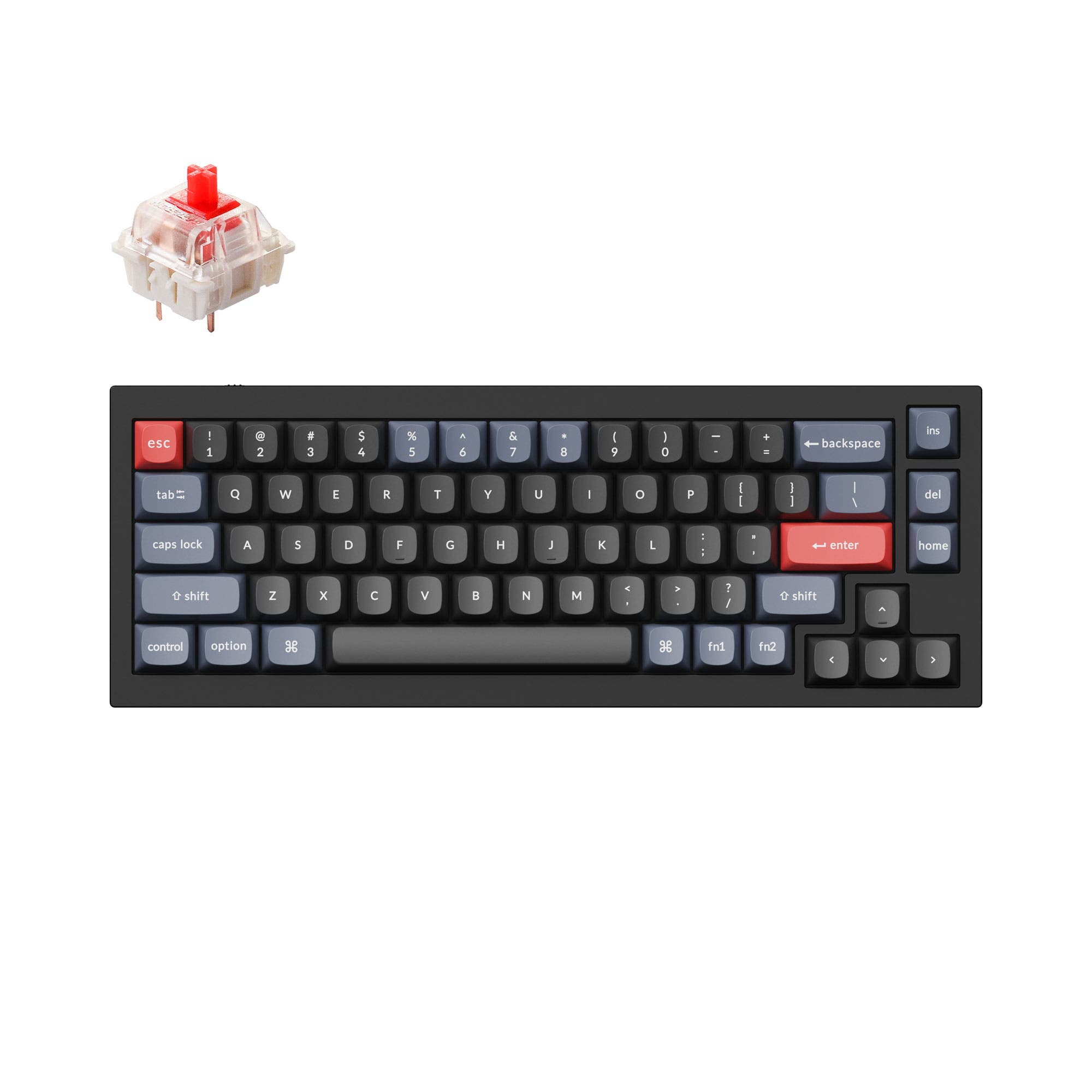
- Triple connectivity with wired USB-C, 2.4GHz wireless, and Bluetooth.
- Hot-swappable PCB supports both 3-pin and 5-pin switches for easy customization.
- Gasket mount design with five sound-dampening layers including poron and IXPE foam.
- 65% layout lacks dedicated arrow keys, function row, and number pad.
- North-facing RGB LEDs may cause interference with certain Cherry-profile keycaps.
- Relies on layers and programming for media and some function controls.
Get the
Ducky One 2 Pro Pudding
Full-Size
- Full-size 108-key layout includes a number pad and dedicated arrow keys.
- Includes dedicated multimedia keys for immediate playback and volume control.
- Features OEM profile double-shot PBT pudding keycaps for vibrant RGB side glow.
- Wired-only connectivity with no wireless option.
- Switches are soldered, not hot-swappable, limiting easy customization.
- The product listing states it is not compatible with Mac or Linux systems.
Your primary need dictates the choice. If you value a clean desk, wireless freedom, and the ability to easily modify your keyboard, the Ducky OKM 65 is the more versatile and modern option, often at a lower cost. If your work is stationary, relies heavily on a number pad, and you prefer a classic, complete layout ready out of the box, the Ducky One 2 Pro Pudding is the straightforward pick.
The differences that matter
Skip the 40-row spec sheet. These are the specs that change how each board feels, sounds, and fits your desk.
Ducky OK M 65
Ducky One 2 Pro Pudding
Layout size
65%
100%
Connection
Bluetooth, 2.4 GHz, Wired
Wired
Hot-swappable
Yes
No
Switch options
Clicky, Linear
Clicky, Linear, Silent, Tactile
Mount style
Gasket Mount
Plate Mount
- Ducky OK M 65
- Ducky One 2 Pro Pudding
- Performance
- 6273
- Build quality
- 7347
- Productivity
- 8456
- Customizability
- 7848
- Portability
- 8542
- Sound dampening
- Keycaps: PBT
What will you mostly use it for?
The Ducky OKM 65 is the clear choice for mobile users, modders, and those wanting a modern, flexible desk setup. It wins for Travel and Modding due to its wireless design and hot-swap sockets, and ties for Programming thanks to VIA support. The Ducky One 2 Pro Pudding is better suited for stationary, number-heavy tasks, taking the lead for Office use and Content Creation with its full layout and media keys. For Gaming, the OKM 65's wireless options and space-saving design give it the edge.
Pick the Ducky OK M 65
- The OKM 65 offers triple connectivity (wired, 2.4GHz, Bluetooth) for flexibility.
- Its gasket mount design with multiple foam layers may provide a more consistent typing feel.
- The 65% size frees up more desk space for mouse movement.
Ducky OK M 65 vs One 2 Pro Pudding specs
Every tracked spec, side by side. Rows marked with a dot differ between the boards.
13 of 20 specs differ
Ducky OK M 65
Ducky One 2 Pro Pudding
Switch options
Hot-swappable
Mount style
Sound dampening
Layout size
Layout standard
Ergonomics
Knob
Display
Media keys
Connection
USB-C
Case material
Plate material
Keycaps
Backlight
VIA
N-key rollover
Mac & Windows
Released
Compare prices
Live prices from the stores we track, cheapest in-stock offer first.
Lowest price across stores, Amazon excluded.


Prices in USD are converted to your currency and can change at any time. KeebFinder may earn a commission when you buy through these links, at no extra cost to you.
Ducky OK M 65 vs One 2 Pro Pudding: your questions
The Ducky OKM 65 offers wireless connectivity via both Bluetooth and a 2.4GHz USB dongle, in addition to a wired USB-C connection. The Ducky One 2 Pro Pudding is a wired-only keyboard.
No. The Ducky One 2 Pro Pudding features a soldered PCB, meaning the switches are not hot-swappable and cannot be changed without desoldering. The Ducky OKM 65 has hot-swappable sockets for easy switch changes.
The Ducky OKM 65 is listed as Mac compatible. The vendor specifications for the Ducky One 2 Pro Pudding explicitly state it is not compatible with Mac systems.
Yes, according to the product description, the Ducky OKM 65 includes a programmable volume knob. The Ducky One 2 Pro Pudding does not mention a knob in its listed features.
The Ducky OKM 65 is a 65% compact keyboard with 67 keys, omitting the number pad, function row, and navigation cluster. The Ducky One 2 Pro Pudding is a full-size keyboard with 108 keys, including all standard keys and a number pad.
The Ducky OKM 65 is fully programmable using VIA software. The Ducky One 2 Pro Pudding is not listed as compatible with VIA or QMK, so its key programming capabilities are limited to any onboard functions it may have.
Both have sound dampening, but the approach differs. The OKM 65 uses a gasket mount with five layers including poron foam, an IXPE switch pad, a PET pad, and silicone pads. The One 2 Pro Pudding uses a plate mount with a Quack Mechanics EVA sound dampener and Q-Bounce synthetic padding.
Yes, both keyboards feature double-shot PBT keycaps. The OKM 65 uses Cherry profile keycaps, while the One 2 Pro Pudding uses OEM profile 'pudding' keycaps with translucent sides for RGB lighting.
The OKM 65 uses a gasket mount, where the plate is suspended on rubber or silicone gaskets for a softer, more flexible typing feel. The One 2 Pro Pudding uses a traditional plate mount, where the plate is rigidly fixed to the case for a firmer feel.
The Ducky OKM 65 listing includes a 2.4GHz dongle, USB-C cable, USB-C to A adapter, a brush, and a keycap/switch puller. The Ducky One 2 Pro Pudding includes bonus Year of the Dragon keycaps and mentions a silicone dust cover.
The Ducky OKM 65 has north-facing RGB LEDs. The Ducky One 2 Pro Pudding has south-facing RGB LEDs, which typically avoid interference with Cherry-profile keycaps.
Not sold on either?




Still torn?
Answer a few quick questions and the keyboard finder ranks 2,000+ boards by how you will actually use yours.