Gamakay LK75 vs TK75PROTFT Screen vs Aluminum Case
Choose the LK75 if you want a built-in TFT screen and silent switches; pick the TK75PRO if an aluminum case and mod-friendly gasket mount matter more.
KeebFinder may earn a commission when you buy through these links, at no extra cost to you.
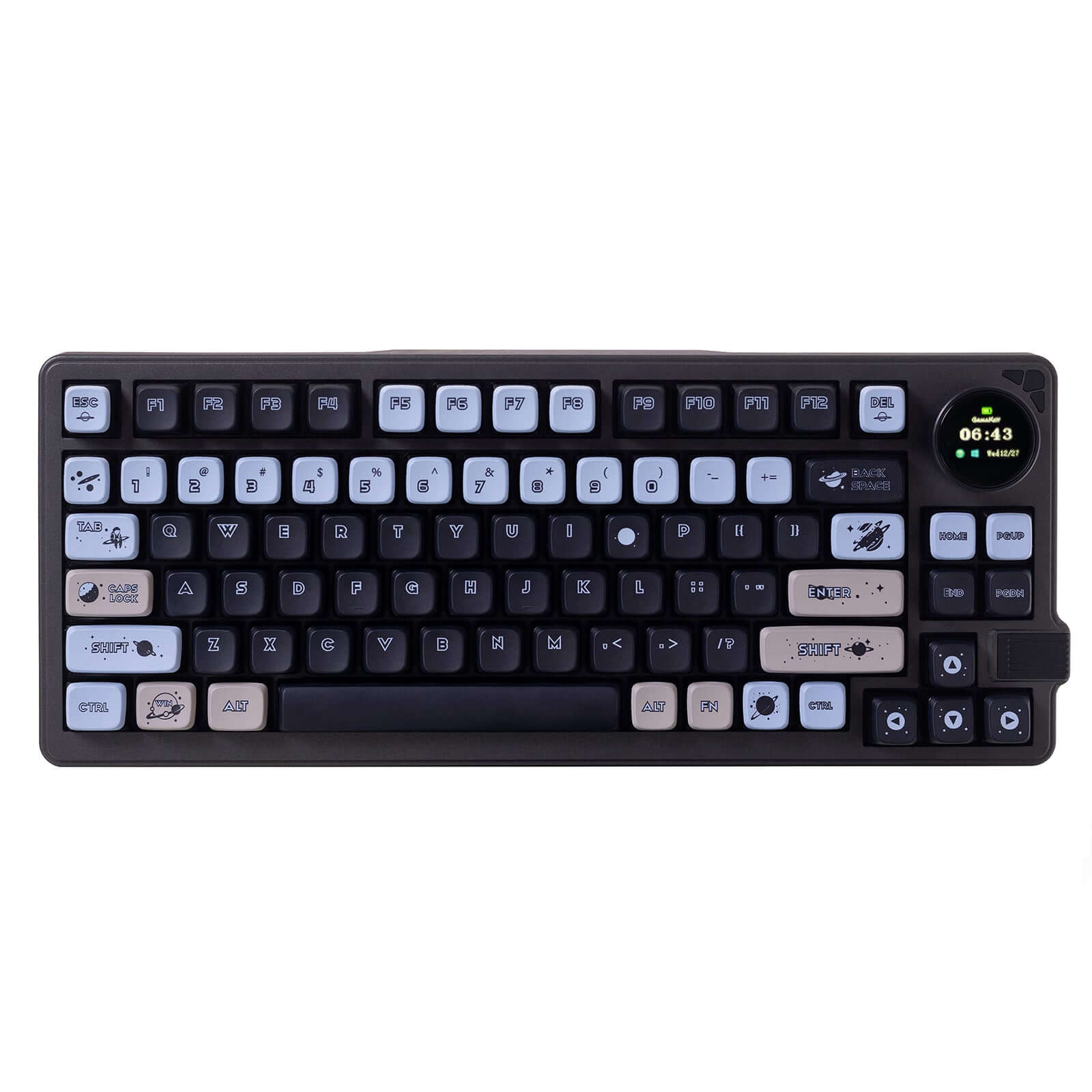

Which one should you get?
Get the
Gamakay LK75
TFT Screen
Build quality in the bottom 30% of 75% boards under $100.
- TFT smart display that can show custom images or GIFs, adding unique interactivity.
- Comes with silent switch options (Pegasus, Phoenix) for quiet typing.
- Larger 5000mAh battery for extended wireless use between charges.
- Switches are soldered. Swapping them means soldering.
Get the
Gamakay TK75PRO
Aluminum Case
Build quality in the top 25% of 75% boards under $100.
- Full aluminum alloy case for a premium, sturdy feel.
- Gasket mount with laminated silicone padding and polycarbonate plate for a cushioned typing experience.
- Available as both a pre-built and DIY kit/barebones, ideal for switch and keycap hobbyists.
The Gamakay LK75 is the better pick for users who want a silent typing experience and a TFT screen out of the box. The TK75PRO is the stronger choice for modders and those who prefer a gasket-mounted aluminum build. Your decision rests on whether you value convenience features or material quality.
The differences that matter
Skip the 40-row spec sheet. These are the specs that change how each board feels, sounds, and fits your desk.
Gamakay LK75
Gamakay TK75PRO
Hot-swappable
No
Yes
Switch changes without soldering
Battery
5,000 mAh
4,000 mAh
A larger battery means fewer cables during the day
Mount style
Top Mount
Gasket Mount
Display
TFT
None
A case display rather than a typing feature
Released
2025
2024
- Gamakay LK75
- Gamakay TK75PRO
- Performance
- 4952
- Build quality
- 5575
- Productivity
- 5459
- Customizability
- 4661
- Portability
- 7376
- Layout size: 75%
- Connection: Bluetooth, 2.4 GHz, Wired
- Knob
- Keycaps: ABS, PBT
What will you mostly use it for?
The LK75 wins in office and content creation due to its silent switches and TFT screen, while the TK75PRO takes programming and modding with its gasket mount and barebones availability. Gaming and travel are ties because both share wireless connectivity and battery trade-offs. The biggest split is between feature-rich convenience (LK75) and build-focused customization (TK75PRO).
It's a tie
- Both support 2.4 GHz wireless and wired connectivity for low-latency play.
- Both lack per-key RGB, which may disappoint gamers who rely on backlighting.
- The LK75's silent switches could be preferred in quiet gaming environments.
Gamakay LK75 vs TK75PRO specs
Every tracked spec, side by side. Rows marked with a dot differ between the boards.
5 of 16 specs differ
Gamakay LK75
Gamakay TK75PRO
Switch options
Hot-swappable
Mount style
Layout size
Layout standard
Ergonomics
Knob
Display
Connection
Battery
USB-C
Case material
Plate material
Keycaps
Backlight
Released
Compare prices
Live prices from the stores we track, cheapest in-stock offer first.
Prices in USD are converted to your currency and can change at any time. KeebFinder may earn a commission when you buy through these links, at no extra cost to you.
Lowest price across stores, Amazon excluded.


Gamakay LK75 vs TK75PRO: your questions
The TK75PRO features a full aluminum alloy case, gasket mount, and polycarbonate plate, which generally indicate a more premium build than the LK75. The LK75 uses a top mount structure and its case material is not specified as aluminum in the provided data.
Yes, the LK75 vendor description states it supports hot-swappable 3-pin and 5-pin mechanical switches without soldering. This is also backed by its switch type being listed as 'Silent' without mentioning a specific solder-only model.
Yes, the TK75PRO is offered as a DIY kit or barebones option, based on the extra features field. This means you can purchase it without switches and keycaps and install your own.
The LK75 has a larger 5000mAh battery, while the TK75PRO has a 4000mAh battery. All else being equal, the LK75 should last longer between charges, though actual runtime depends on usage and connectivity mode.
The TK75PRO vendor description explicitly states compatibility with both Windows and Mac operating systems. The LK75 specification does not mention macOS compatibility, so it may not support all Mac functions out of the box.
According to the vendor, the LK75's TFT knob is programmable and can display custom images, GIFs, or control volume and media. This suggests software-level customization is available.
The LK75 is the quieter option as it is available with GamaKay Silent Switches (Pegasus, Phoenix) designed for reduced noise. The TK75PRO uses KTT pre-lube Hyacinth linear switches, which are not described as silent.
Yes, the TK75PRO includes a brushed silver metal knob per the vendor specification. However, it does not have a TFT screen like the LK75's knob display.
Yes, both the LK75 and TK75PRO support tri-mode connectivity: Bluetooth, 2.4 GHz wireless, and wired USB-C. This is confirmed by their connectivity fields and vendor descriptions.
The LK75 vendor lists GamaKay Silent Switches (Phoenix, Griffin, Pegasus) and GamaKay Planet Switches (Venus, Jupiter, Mercury, Mars). The 'Silent' switch type in metadata likely refers to the silent variants.
Not sold on either?


Still torn?
Answer a few quick questions and the keyboard finder ranks 2,000+ boards by how you will actually use yours.