Gamakay TK75 V2 vs TK75PROSilent Pre-Built vs Aluminum DIY Kit
Choose the TK75 V2 for a silent, feature-rich out-of-box experience, or the TK75PRO for a premium aluminum build to customize with your own switches.


Which one should you get?
Get the
Gamakay TK75 V2
Silent Pre-Built
- Comes with silent switches pre-installed for a quiet typing experience.
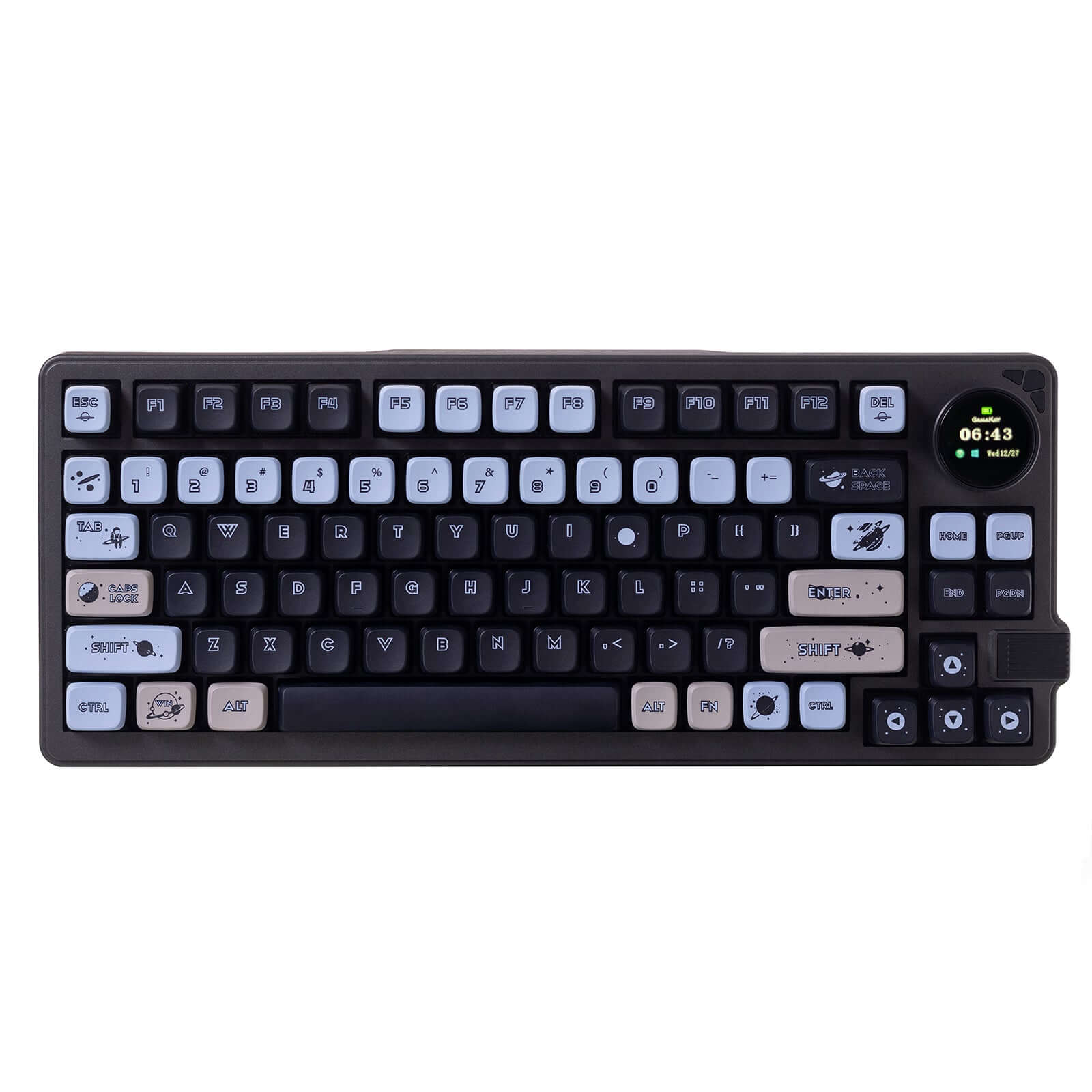
- Includes a TFT screen for displaying battery, connection mode, and custom animations.
- Features multi-layer foam (EVA, IXPE, PE) for enhanced acoustic dampening.
- Uses an ABS plastic case, which may feel less premium than metal alternatives.
- The switch type is fixed as silent, limiting acoustic variety without modification.
- Hot-swap capability is not explicitly confirmed in the core specifications.
Get the
Gamakay TK75PRO
Aluminum DIY Kit
- Constructed with a full aluminum alloy case for a premium feel and durability.
- Explicitly listed as hot-swappable and sold as a DIY kit for easy customization.
- Features a polycarbonate plate, which can contribute to a softer typing feel.
- Lacks any RGB lighting.
- Does not include a screen for status information or customization.
- Being a DIY kit, it requires the user to source and install their own switches and keycaps for a complete build.
Your choice fundamentally comes down to the desired user experience. Opt for the Gamakay TK75 V2 if you want a ready-to-use, quiet keyboard with modern features like a screen and RGB, ideal for offices or shared spaces. Choose the TK75PRO if you value a solid aluminum build and want the flexibility to install your preferred switches and keycaps from the start, accepting the extra effort and cost for components.
The differences that matter
Skip the 40-row spec sheet. These are the specs that change how each board feels, sounds, and fits your desk.
Gamakay TK75 V2
Gamakay TK75PRO
Case material
ABS
Aluminum
Display
TFT
None
Sound dampening
Yes
No
Plate material
Aluminum
Polycarbonate
Keycaps
PBT
ABS, PBT
- Gamakay TK75 V2
- Gamakay TK75PRO
- Performance
- 6652
- Build quality
- 7675
- Productivity
- 8060
- Customizability
- 7361
- Portability
- 7576
- Layout size: 75%
- Connection: Bluetooth, 2.4 GHz, Wired
- Hot-swappable
- Battery: 4,000 mAh
- Mount style: Gasket Mount
- Knob
What will you mostly use it for?
The TK75 V2 is the stronger choice for environments where silence and out-of-box features are paramount, winning in Gaming, Office, and Content Creation. The TK75PRO excels for users who prioritize a customizable, premium foundation, taking the Modding and Travel categories. For Programming, the decision hinges on whether you value immediate quietness or long-term switch customization potential.
Pick the Gamakay TK75 V2
- The TK75 V2 includes silent switches, which are less likely to disturb others during late-night sessions.
- It features RGB lighting, which the TK75PRO lacks.
- The vendor description positions it for gaming, mentioning silent switches for late-night use.
Gamakay TK75 V2 vs TK75PRO specs
Every tracked spec, side by side. Rows marked with a dot differ between the boards.
8 of 18 specs differ
Gamakay TK75 V2
Gamakay TK75PRO
Switch options
Hot-swappable
Mount style
Sound dampening
Screw-in stabilizers
Layout size
Layout standard
Ergonomics
Knob
Display
Connection
Battery
USB-C
Case material
Plate material
Keycaps
Backlight
Released
Compare prices
Live prices from the stores we track, cheapest in-stock offer first.
Lowest price across stores, Amazon excluded.


Prices in USD are converted to your currency and can change at any time. KeebFinder may earn a commission when you buy through these links, at no extra cost to you.
Gamakay TK75 V2 vs TK75PRO: your questions
The TK75 V2 is designed to be the quieter option. It comes with silent switches pre-installed and features multi-layer foam dampening including EVA, IXPE, and PE foam, as described by the manufacturer. The TK75PRO's acoustics will depend entirely on the switches the user installs.
No, the TK75PRO is listed as a DIY kit. The product specifications list it under 'Diy Kit/Barebones', meaning it typically ships without switches and keycaps. You will need to purchase these separately to complete the build.
The product metadata for the TK75 V2 does not explicitly list it as hot-swappable. It is listed as a 'Pre-Built' with 'Silent' switch type. To change switches, you would likely need to desolder the existing ones, which is a more involved process than hot-swapping.
According to the vendor description, the 0.85-inch TFT screen on the TK75 V2 can monitor battery life and connection mode. It also supports custom animations, allowing for personalization of the keyboard's display.
The vendor description for the TK75PRO states it is compatible with both Windows and Mac operating systems. The TK75 V2 description does not explicitly state this, but it is a common feature for modern keyboards. It's advisable to check the manual for specific key mapping details.
The materials suggest different strengths. The TK75PRO uses an aluminum alloy case, which is generally considered more premium and durable than the ABS plastic case on the TK75 V2. However, the TK75 V2 includes pre-installed sound-dampening foams and screw-in stabilizers, contributing to its overall construction quality.
Yes, both the Gamakay TK75 V2 and TK75PRO list 'Knob Support' in their extra features. The TK75 V2 description mentions an 'aluminum knob', and the TK75PRO specs list a 'brushed silver metal knob'.
The TK75 V2 uses dye-sublimated PBT keycaps with a Cherry profile. The TK75PRO's keycap material is listed as both PBT and ABS, and its description mentions 'Cherry Profile Keycaps', but as a kit, these may or may not be included depending on the bundle purchased.
Both the Gamakay TK75 V2 and TK75PRO are equipped with a 4000mAh battery. Actual battery life will vary significantly based on usage patterns, backlighting (on the V2), and connection mode.
The TK75 V2 is likely better for first-time buyers as it is a complete pre-built. You can use it immediately without needing to research and purchase additional components like switches and keycaps. The TK75PRO is better suited for those interested in the customization process from the beginning.
Both the Gamakay TK75 V2 and TK75PRO utilize a gasket mount style. This design typically isolates the plate and PCB from the case with rubber gaskets, aiming to provide a softer, more consistent typing feel and reduce case noise.
Not sold on either?




Still torn?
Answer a few quick questions and the keyboard finder ranks 2,000+ boards by how you will actually use yours.