Keychron B1 Pro vs K1 ProBudget Slim vs Premium Customizable
Choose the B1 Pro for its low price and ultra-portable design, or the K1 Pro for its premium build, extensive customization, and backlighting.
KeebFinder may earn a commission when you buy through these links, at no extra cost to you.

4.0 (8)4.0 · 8 reviews
from$37at MK

5.0 (5)5.0 · 5 reviews
from$67at Keychron
Which one should you get?
Get the
Keychron B1 Pro
Budget Slim
Build quality in the bottom 5% of 75% boards under $50.
- More affordable price point.
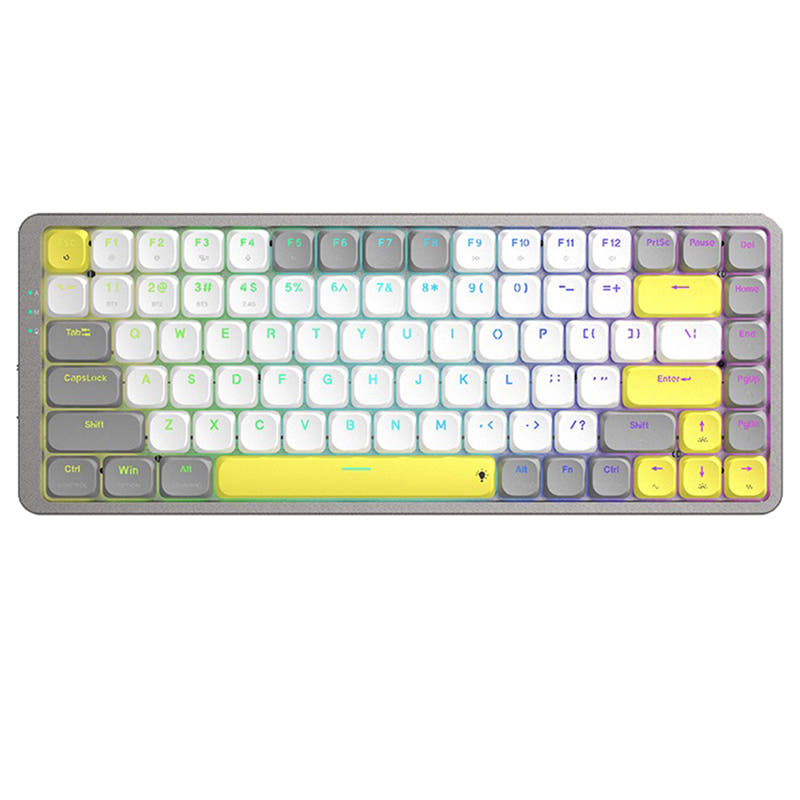
- Lighter weight (425g) and more compact 75% layout for portability.
- Includes a 2.4 GHz wireless connection option alongside Bluetooth.
- Switches are soldered. Swapping them means soldering.
- Low-profile switches and keycaps only. Standard MX keycaps will not fit.
- Missing ISO-DE, ISO-UK, ISO-Nordic. The other board is sold in those layouts.
- No numpad.
Get the
Keychron K1 Pro
Premium Customizable
Build quality in the top 15% of 80% boards under $100.
- Hot-swappable version allows for easy switch customization.
- Open-source QMK and VIA firmware support for advanced programming.
- Features a more durable double-shot PBT keycap set.
- Low-profile switches and keycaps only. Standard MX keycaps will not fit.
- North-facing LEDs. Cherry-profile keycaps can hit the switch housing.
- No numpad.
Your budget and need for customization dictate the choice here. The Keychron B1 Pro is an excellent, no-frills wireless keyboard for those who want a slim, lightweight, and affordable tool for typing on the go. The Keychron K1 Pro justifies its higher cost with a premium aluminum build, extensive programmability via QMK/VIA, hot-swap capability, and backlighting, making it a long-term investment for enthusiasts and power users.
The differences that matter
Skip the 40-row spec sheet. These are the specs that change how each board feels, sounds, and fits your desk.
Keychron B1 Pro
Keychron K1 Pro
Layout size
75%
80%
Connection
Bluetooth, 2.4 GHz, Wired
Bluetooth, Wired
Wireless for several devices and wired for lower latency
Hot-swappable
No
Yes
Switch changes without soldering
Battery
800 mAh
2,000 mAh
A larger battery means fewer cables during the day
Case material
ABS, Plastic
ABS, Aluminum, Plastic
- Keychron B1 Pro
- Keychron K1 Pro
- Performance
- 5081
- Build quality
- 4280
- Productivity
- 6880
- Customizability
- 4688
- Portability
- 7873
- Low profile
- Max polling rate: 1,000 Hz
- Switch options: Clicky, Linear, Tactile
What will you mostly use it for?
The K1 Pro is the clear choice for users who value customization, whether through hardware (hot-swap switches) or software (QMK/VIA), and for tasks like gaming or programming where its specified N-key rollover and programmability are assets. The B1 Pro wins for travel due to its lighter weight and smaller size, making it a highly portable option. For general office use, both are competent, leaving the decision to budget and preferred build feel.
Pick the Keychron K1 Pro
- Both have a 1000 Hz polling rate in wired mode for low latency.
- The K1 Pro's listing specifies N-key rollover for both wireless and wired modes, a detail not mentioned for the B1 Pro.
- User reviews for the B1 Pro mention key rollover issues with fast, multi-key sequences.
What owners say
Ratings and quotes collected from verified store reviews, including the critical ones.
Keychron B1 Pro
8 owner reviews
“I really like this keyboard, particularly due to its ISO PT layout. For the next iteration, I suggest using a higher-quality plastic, as the keycaps feel a bit cheap. I would easily pay 20/30 EUR more if the keyboard felt more premium.”
“I bought this keyboard from Amazon and I thought I love it. A little over a year later (15ish months) the keyboard starts glitching like the shift key is stuck and would randomly type in ALL CAPS and add weird punctuations. The keyboard made my…”
Keychron K1 Pro
5 owner reviews
“I realy like this keyboard. I feel is harder to make typos compared to the K3 v2. I decided to go with the K1 Pro instead of the K3 Pro and it's going to to take time to adjust to the new layout, but the feeling and shape of the keys is definitely better.”
Keychron B1 Pro vs K1 Pro specs
Every tracked spec, side by side. Rows marked with a dot differ between the boards.
14 of 24 specs differ
Keychron B1 Pro
Keychron K1 Pro
Switch options
Hot-swappable
Mount style
Low profile
Layout size
Layout standard
Ergonomics
Display
Media keys
Connection
Max polling rate
Battery
USB-C
Case material
Keycaps
Weight
Dimensions
Typing angle
Backlight
QMK
VIA
N-key rollover
Mac & Windows
Released
ISO layouts by store
Which stores sell ISO-DE, UK, and the other regional layouts.
Keychron B1 Pro
Keychron
ISO
In stockShips to you
Keychron (DE)
ISO
In stockDoes not ship to you
Keychron K1 Pro
Keychron
ISO-DE, ISO-UK, ISO-Nordic, ISO-FR, ISO-ES, ISO-SW
In stockShips to you
Keychron (DE)
ISO-DE, ISO-UK, ISO-Nordic, ISO-FR, ISO-ES, ISO-SW
In stockDoes not ship to you
Compare prices
Live prices from the stores we track, cheapest in-stock offer first.
Prices in USD are converted to your currency and can change at any time. KeebFinder may earn a commission when you buy through these links, at no extra cost to you.
Lowest price across stores, Amazon excluded.



Keychron B1 Pro vs K1 Pro: your questions
The K1 Pro generally offers a more premium typing experience with its double-shot PBT keycaps and aluminum frame. However, the B1 Pro uses similar low-profile switches and may be sufficient for those prioritizing a lighter, more budget-friendly option. User reviews for the K1 Pro specifically praise its typing feel.
The product metadata and description for the B1 Pro do not mention hot-swappable sockets. It is listed as a pre-built keyboard, suggesting the switches are not user-replaceable without soldering. The K1 Pro offers a dedicated hot-swappable version.
No. According to the connectivity metadata, the Keychron K1 Pro only supports Bluetooth and wired connections. The B1 Pro is the model that includes a 2.4 GHz wireless option alongside Bluetooth.
Yes. The K1 Pro uses low-profile double-shot PBT keycaps. Since it features a standard low-profile mechanical switch, you should be able to replace them with other compatible low-profile keycap sets.
The vendor description for the B1 Pro claims a battery life of up to 1200 hours. The K1 Pro has a larger 2000mAh battery, but its official runtime is not stated in the provided information. Actual battery life will depend on usage patterns like backlighting.
Potential caution is advised. A user review for the B1 Pro notes that fast typists may experience key rollover issues with certain multi-key sequences. The K1 Pro's specification explicitly lists N-key rollover for both wireless and wired modes.
Yes, but through a different method. The B1 Pro vendor description states it can be programmed using the Keychron Launcher web app for key remapping and macros. The K1 Pro adds the more advanced, open-source QMK and VIA support on top of the Launcher.
The B1 Pro case is made of plastic/ABS. The K1 Pro features a hybrid construction with an aluminum frame and ABS, giving it a more substantial and premium feel on the desk.
Both are highly compatible. Each offers a Mac layout with Windows support and includes keycaps for both systems. The K1 Pro's listing shows support for a wider array of specific ISO layouts (like German, UK, Nordic).
The product description does not list a wrist rest as included in the box. However, the vendor page shows compatible resin, wooden, and silicone palm rests available for separate purchase as add-ons.
Yes, both are marketed as suitable for Mac users. Their descriptions state they offer the same multimedia and function key functions as Apple keyboards and come with Mac-specific keycaps, while remaining fully compatible with Windows.
Not sold on either?




Still torn?
Answer a few quick questions and the keyboard finder ranks 2,000+ boards by how you will actually use yours.