AULA F75 vs Keychron K1 ProGasket vs Low-Profile Showdown
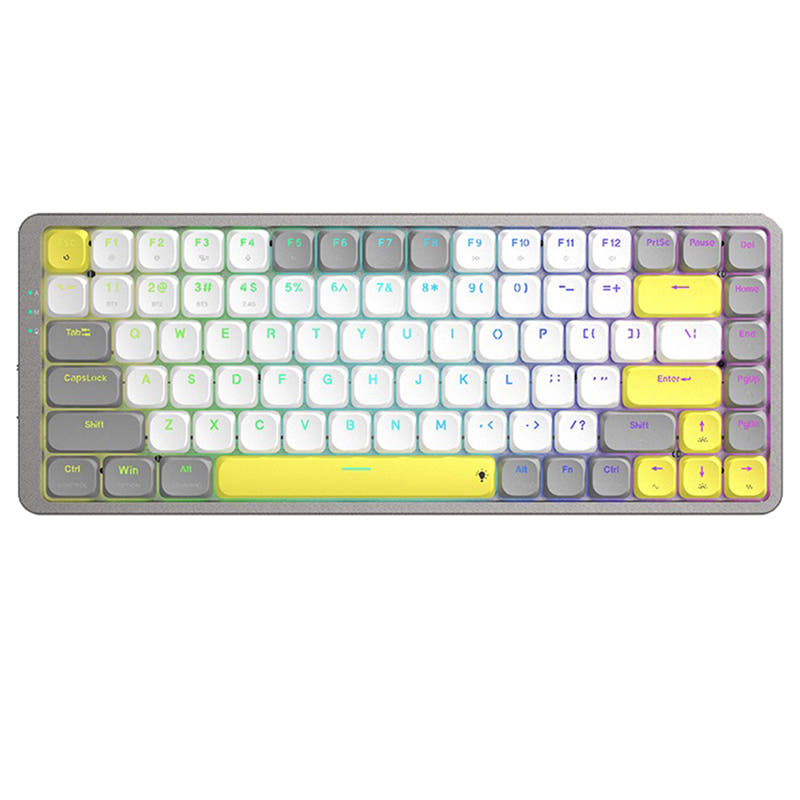
Choose the AULA F75 for a premium acoustic experience and long battery life, or the Keychron K1 Pro for a slim, low-profile build with extensive firmware customization.
KeebFinder may earn a commission when you buy through these links, at no extra cost to you.

4.5 (510)4.5 · 510 reviews
from$42at Epomaker
90-day lowLowest price in 90 days

5.0 (5)5.0 · 5 reviews
from$67at Keychron
Which one should you get?
Get the
AULA F75
Gasket
Build quality in the bottom 35% of 75% boards under $50.
- Gasket mount structure with a five-layer sound-dampening interior including Poron foam and a silicone pad.
- Large 4000mAh rechargeable battery for extended wireless use.
- Includes a 2.4 GHz wireless dongle for a stable, low-latency connection.
- North-facing LEDs. Cherry-profile keycaps can hit the switch housing.
- South-facing LEDs. Shine-through legends stay dark, and some sculpted keycaps can clip the LED.
- No ISO layout. ISO-DE, UK, and other ISO variants are not offered.
- No numpad.
Get the
Keychron K1 Pro
Low-Profile Showdown
Build quality in the top 15% of 80% boards under $100.
- Ultra-slim low-profile design with Gateron low-profile mechanical switches.
- Fully programmable via open-source QMK and VIA firmware.
- Ergonomic design with a 3° typing angle and three levels of adjustable feet.
- Low-profile switches and keycaps only. Standard MX keycaps will not fit.
- North-facing LEDs. Cherry-profile keycaps can hit the switch housing.
- No numpad.
Your priority dictates the choice. If you want a thocky, immersive typing sound with great wireless battery life and a media knob, the AULA F75 is the compelling option. If you need a sleek, travel-friendly keyboard with best-in-class programmability and a distinct low-profile feel, the Keychron K1 Pro is the clear selection. Both offer excellent value in their respective niches.
The differences that matter
Skip the 40-row spec sheet. These are the specs that change how each board feels, sounds, and fits your desk.
AULA F75
Keychron K1 Pro
Layout size
75%
80%
Connection
Bluetooth, 2.4 GHz, Wired
Bluetooth, Wired
Wireless for several devices and wired for lower latency
Battery
4,000 mAh
2,000 mAh
A larger battery means fewer cables during the day
Low profile
No
Yes
Case material
Plastic
ABS, Aluminum, Plastic
- AULA F75
- Keychron K1 Pro
- Performance
- 6381
- Build quality
- 6680
- Productivity
- 9380
- Customizability
- 8288
- Portability
- 8373
- Hot-swappable
- Max polling rate: 1,000 Hz
- Keycaps: ABS, PBT
What will you mostly use it for?
The Keychron K1 Pro wins for office use, programming, and travel due to its ergonomic low-profile design, multi-device Bluetooth, and powerful QMK/VIA software. The AULA F75 is the stronger pick for gaming and content creation, thanks to its 2.4GHz dongle, multimedia knob, and larger battery. For modding, it's a tie, as each excels in a different area: the F75 in physical sound tuning and the K1 Pro in firmware customization.
Pick the AULA F75
- Includes a 2.4 GHz wireless dongle for low-latency connectivity, which the K1 Pro's listing does not mention.
- Features a dedicated multimedia control knob for quick audio adjustments.
- Lists 'Rapid Trigger' as a specific feature for gaming responsiveness.
What owners say
Ratings and quotes collected from verified store reviews, including the critical ones.
AULA F75
510 owner reviews
“Works exactly as intended and still works as new. The 2.4 GHz Receiver doesn't communicate correctly and isn't reliable but on BT and Cable it works perfectly”
“I made an order for EPOMAKER x AULA 75 with express shipping on 27/1/24. Emailed the team TWICE. Now its 19/3/24, and i still dont have the item. Very poor service”
Keychron K1 Pro
5 owner reviews
“I realy like this keyboard. I feel is harder to make typos compared to the K3 v2. I decided to go with the K1 Pro instead of the K3 Pro and it's going to to take time to adjust to the new layout, but the feeling and shape of the keys is definitely better.”
AULA F75 vs Keychron K1 Pro specs
Every tracked spec, side by side. Rows marked with a dot differ between the boards.
16 of 27 specs differ
AULA F75
Keychron K1 Pro
Switch options
Hot-swappable
Mount style
Low profile
Sound dampening
Screw-in stabilizers
Layout size
Layout standard
Ergonomics
Knob
Display
Media keys
Connection
Max polling rate
Battery
USB-C
Case material
Keycaps
Weight
Dimensions
Typing angle
Backlight
QMK
VIA
N-key rollover
Mac & Windows
Released
ISO layouts by store
Which stores sell ISO-DE, UK, and the other regional layouts.
AULA F75
No ISO layout at the stores we track.
Keychron K1 Pro
Keychron
ISO-DE, ISO-UK, ISO-Nordic, ISO-FR, ISO-ES, ISO-SW
In stockShips to you
Keychron (DE)
ISO-DE, ISO-UK, ISO-Nordic, ISO-FR, ISO-ES, ISO-SW
In stockDoes not ship to you
Compare prices
Live prices from the stores we track, cheapest in-stock offer first.
Prices in USD are converted to your currency and can change at any time. KeebFinder may earn a commission when you buy through these links, at no extra cost to you.
Lowest price across stores, Amazon excluded.






AULA F75 vs Keychron K1 Pro: your questions
The Keychron K1 Pro is explicitly designed for Mac compatibility. The manufacturer states it has the same multimedia and function key functions as Apple keyboards and includes Mac-specific keycaps. The AULA F75 lists Mac support, but its configuration software is noted to be for Windows only.
The Keychron K1 Pro product listing specifies Bluetooth and wired connectivity. It does not mention including a 2.4 GHz wireless dongle. The AULA F75 explicitly includes a 2.4G dongle for a dedicated wireless connection.
No. The Keychron K1 Pro is designed for low-profile switches. The manufacturer specifies that its hot-swappable version is currently compatible with Gateron low-profile mechanical switches only.
The AULA F75 has a larger 4000mAh battery, which the vendor claims allows for extended usage times. The Keychron K1 Pro has a 2000mAh battery, which is half the capacity.
Potential software issues are noted in vendor reviews for the AULA F75, where some users reported the software failing to detect the keyboard. The software is also listed as supporting Windows systems only.
The AULA F75 uses standard-profile, pre-lubricated mechanical switches in a gasket-mounted case aimed for a cushioned, quiet sound. The Keychron K1 Pro uses low-profile Gateron switches for a slimmer key travel distance and a distinct, shallow tactile feel.
For physical mods like sound dampening, the AULA F75 has an advantage with its gasket mount and multi-layer foam. For software and key mapping, the Keychron K1 Pro is superior due to its full QMK and VIA firmware support, allowing for deep customization.
Yes. The AULA F75 uses Cherry-profile double-shot PBT keycaps. The Keychron K1 Pro uses low-profile double-shot PBT keycaps with an LSA profile, designed specifically for its low-profile switch design.
The AULA F75 lists specific gaming features like 'Rapid Trigger' and includes a 2.4GHz dongle for low-latency wireless, which is often preferred for gaming. Both keyboards have a 1000 Hz polling rate in wired mode.
The AULA F75's capabilities for key remapping are not detailed in the provided information. It requires proprietary Windows software. In contrast, the Keychron K1 Pro uses the open-source QMK/VIA ecosystem, which is renowned for easy and powerful remapping.
The AULA F75 is marketed with a focus on acoustic mastery, featuring silent switch options, a five-layer sound-dampening design, and pre-lubricated switches to reduce noise. The Keychron K1 Pro's low-profile switches may also be relatively quiet, but its vendor description does not emphasize sound dampening to the same degree.
Not sold on either?




Still torn?
Answer a few quick questions and the keyboard finder ranks 2,000+ boards by how you will actually use yours.