Not sure which keyboard to choose? Try the Keyboard Finder now!

Compare Keychron J1 vs K3 V3 Differences Side by Side

This comparison is for buyers seeking a low-profile 75% mechanical keyboard who are torn between the newer Keychron J1 and the revised K3 V3. The decision is difficult because both offer QMK/VIA support, hot-swap sockets, and a similar form factor, but they diverge on connectivity, build materials, and battery life. The J1 introduces a 2.4GHz mode and a larger 2000mAh battery, while the K3 V3 doubles down on slimness with an aluminum frame and specialized Milk POM switches. Your choice depends on whether you prioritize wireless gaming responsiveness or a more premium, ultra-slim typing platform.

82
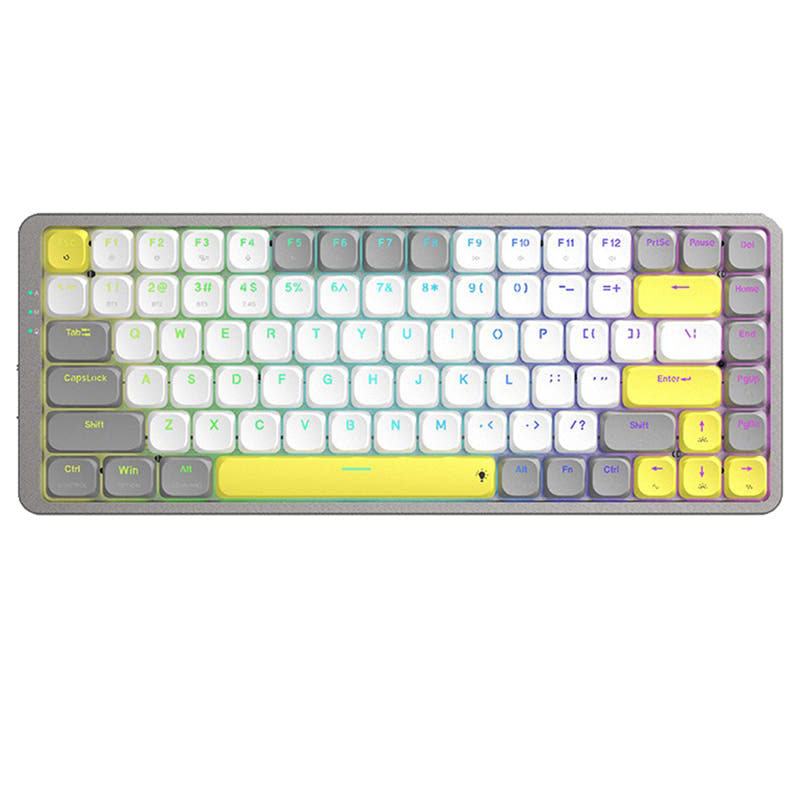
Keychron J1 QMK Wireless Mechanical Keyboard
83
Keychron K3 QMK Wireless Mechanical Keyboard (ISO Layout) - Version 3

Select a keyboard to compare

2.8 (8)
0.0 (0)
  • Released in 2025
  • Built with the ANSI layout standard
  • Connects via USB-C
  • Has built-in sound dampening
  • Supports Bluetooth, 2.4 GHz, Wired, Wireless connectivity
  • Equipped with a 2000 mAh battery
  • Weighs about 661 g
  • Sized at 23 x 327 x 144 mm
  • Made with a ABS case
  • Features PBT keycaps
  • Released in 2024
  • Built with the ANSI, ISO, ISO-UK, ISO-DE, ISO-SW, ISO-Nordic layout standard
  • Provides dedicated media keys
  • Uses a Top Mount mounting style
  • Supports Bluetooth, Wired, Wireless connectivity
  • Equipped with a 1550 mAh battery
  • Weighs about 540 g
  • Sized at 19 x 306 x 116 mm
  • Made with a ABS, Aluminum case
  • Features PBT, ABS keycaps
Scores
  • Performance: 81.5
  • Build Quality: 70.9
  • Productivity: 89
  • Customizability: 86.4
  • Portability: 80.2
Scores
  • Performance: 81.8
  • Build Quality: 81.8
  • Productivity: 70.3
  • Customizability: 90
  • Portability: 74.6
Name
Keychron J1
Name
Keychron K3 V3
Release year
2025
Release year
2024
Switch Options
Linear, Tactile, Clicky
Switch Options
Linear, Tactile, Clicky
Profile
Low Profile
Profile
Low Profile
Hot Swappable
 
Hot Swappable
 
Layout Size
75%
Layout Size
75%
Layout Standard
ANSI
Layout Standard
ANSI, ISO, ISO-UK, ISO-DE, ISO-SW, ISO-Nordic
Layout Ergonomics
Normal
Layout Ergonomics
Normal
Knob Support
 
Knob Support
 
Display Support
 
Display Support
 
Mac/Win Support
 
Mac/Win Support
 
Multi-Media Keys
 
Multi-Media Keys
 
USB-C
 
USB-C
 
USB passthrough
 
USB passthrough
 
Connection
Bluetooth, 2.4 GHz, Wired, Wireless
Connection
Bluetooth, Wired, Wireless
Polling Rate
1000 Hz
Polling Rate
1000 Hz
Battery capacity
2000 mAh
Battery capacity
1550 mAh
Hall Effect Support
 
Hall Effect Support
 
QMK Support
 
QMK Support
 
VIA Support
 
VIA Support
 
VIAL Support
 
VIAL Support
 
N-Key Rollover
 
N-Key Rollover
 
Rapid Trigger
 
Rapid Trigger
 
Mount Style
-
Mount Style
Top Mount
Screw in Stabilizers
 
Screw in Stabilizers
 
Sound Dampening
 
Sound Dampening
 
Backlight
 
Rgb, White, North-face
Backlight
 
Rgb, White, North-face
Case Colors
Case Colors
Case Material
ABS
Case Material
ABS, Aluminum
Keycaps Material
PBT
Keycaps Material
PBT, ABS
Dimensions
23 x 327 x 144 mm
Dimensions
19 x 306 x 116 mm
Weight
661g
Weight
540g
*Something incorrect or missing? Please
let me know
!

Pros and Trade-offs

The Keychron J1 is the better choice for gamers and users who want the lowest-latency wireless performance and longer battery life, along with PBT keycaps out of the box. The Keychron K3 V3 is ideal for travelers and those who prioritize an ultra-slim, lightweight build with a premium aluminum frame and smoother switch options. If you value versatility in connectivity and a stronger battery, pick the J1; if portability and typing comfort are your top concerns, go with the K3 V3.

Keychron J1

  • +2.4 GHz wireless mode with 1000 Hz polling rate, plus a built-in receiver compartment in the keyboard.
  • +Larger 2000mAh battery capacity for extended wireless use between charges.
  • +Includes low-profile double-shot PBT keycaps, which resist shine and oil better than ABS.
  • +Last Key Priority (LKP) feature helps reduce input delay in competitive gaming.
  • +Comes with IXPE and latex acoustic foam pre-installed for a quieter typing experience.

  • User reviews report intermittent Bluetooth drops and faster-than-expected battery drain (2-3 days).
  • Frame is made of ABS plastic, which may feel less premium than metal options.
  • Some user reviews report units arriving with a bent case, suggesting quality control issues.

Keychron K3 V3

  • +Ultra-slim design with a 3° typing angle and a lightweight 540g aluminum frame for portability.
  • +Uses Keychron's Milk POM switches, pre-lubed for a deeper, smoother typing feel.
  • +Offers three adjustable typing angles (2.5°, 4.2°, 6.5°) for ergonomic wrist support.
  • +Redesigned stabilizers with less wobble on larger keys like the space bar and Enter key.
  • +Available in multiple ISO layouts (UK, German, Swiss, Nordic) for regional keyboard preferences.

  • No 2.4 GHz connectivity; relies on Bluetooth and wired mode only.
  • Smaller 1550mAh battery capacity compared to the J1's 2000mAh battery.
  • Comes with ABS keycaps, which are more prone to developing shine over time than PBT.
  • Higher starting price point for equivalent configurations.

Which Keyboard Is Better for Your Needs?

The Keychron J1 takes the lead in gaming due to its dedicated 2.4GHz mode and larger battery, while the K3 V3 wins for travel thanks to its lighter weight and ultra-slim profile. For office and programming tasks, both keyboards are evenly matched, offering Bluetooth multi-device pairing and full QMK programmability. In modding, the J1 benefits from included PBT keycaps and a receiver compartment, but for content creation both provide the same flexible keymapping and per-key RGB. Overall, the J1 excels in performance-oriented use cases, while the K3 V3 is the more portable and visually slim option.

GamingKeychron J1
  • J1 supports a 2.4 GHz wireless connection with a 1000 Hz polling rate for lower latency gaming.
  • J1 features Last Key Priority (LKP) for smoother directional changes in competitive titles.
  • J1 has a larger 2000mAh battery, reducing the need for frequent charging during long sessions.
OfficeTie
  • Both have a compact 75% layout that saves desk space while retaining function row keys.
  • Both support Bluetooth 5.2 for connecting to multiple devices like a laptop, phone, or tablet.
  • Both include keycaps for macOS and Windows, making cross-platform office work seamless.
ProgrammingTie
  • Both run QMK firmware and support the Keychron Launcher web app for full key remapping and macros.
  • Both have a 75% layout with dedicated navigation cluster (Home, End, PgUp, PgDn) useful for code editing.
  • Both offer hot-swappable low-profile switches, allowing programmers to choose their preferred switch feel.
TravelKeychron K3 V3
  • The K3 V3 is lighter at 540g compared to the J1's 661g, making it easier to carry.
  • The K3 V3 has a smaller footprint (306 x 116 mm vs 327 x 144 mm) for tighter bags.
  • The K3 V3 is one of the thinnest wireless mechanical keyboards, especially with the ultra-slim Milk POM switches.
ModdingKeychron J1
  • J1 includes a built-in receiver compartment, offering a cleaner mod for 2.4GHz users.
  • J1 features IXPE and latex acoustic foams from the factory, a solid starting point for further sound dampening mods.
  • J1 uses low-profile double-shot PBT keycaps, which are more durable and oil-resistant than ABS for repeated handling during modding.
Content CreationTie
  • Both support QMK/VIA for creating custom shortcuts for editing software like Premiere Pro or DaVinci Resolve.
  • Both have per-key RGB lighting to color-code shortcut layers for video or photo editing workflows.
  • Both offer low-profile switches that reduce wrist strain during long editing sessions.

Frequently Asked Questions (FAQ)


Discover similar products

You might also like similar products in that price range:

86
$67
Keychron K1 Pro QMK/VIA Wireless Custom Mechanical Keyboard ISO Layout Collection
Keychron K1 Pro
80%,
Hotswap,
Wireless,
Wired,
RGB/ White LEDs,
VIA,
QMK,
Alu case,
Tray Mount

94
$84
Keychron K3 Max QMK/VIA Wireless Custom Mechanical Keyboard ISO Layout Collection
Keychron K3 Max
75%,
Hotswap,
Wireless,
Wired,
RGB/ White LEDs,
VIA,
QMK,
Alu case,
Plate Mount

87
$67
Keychron K13 Pro QMK/VIA Wireless Custom Mechanical Keyboard ISO Layout Collection
Keychron K13 Pro
80%,
Hotswap,
Wireless,
Wired,
RGB/ White LEDs,
VIA,
QMK,
Alu case,
Tray Mount

87
$83
Keychron K3 Pro QMK/VIA Wireless Mechanical Keyboard ISO Layout Collection
Keychron K3 Pro
75%,
Hotswap,
Wireless,
Wired,
RGB/ White LEDs,
VIA,
QMK,
Alu case,
Tray Mount

83
$67
Keychron K9 Pro QMK/VIA Wireless Custom Mechanical Keyboard
Keychron K9 Pro
60%,
Hotswap,
Wireless,
Wired,
RGB/ White LEDs,
VIA,
QMK,
Alu case,
Tray Mount

68
$96
Keychron K3 Ultra-slim Wireless Mechanical Keyboard (Version 2)
Keychron K3 V2
75%,
Hotswap,
Wireless,
Wired,
RGB/ White LEDs,
Alu case,
Tray Mount

88
$69
Keychron K5 Pro QMK/VIA Wireless Custom Mechanical Keyboard ISO Layout Collection
Keychron K5 Pro
100%,
Hotswap,
Wireless,
Wired,
RGB/ White LEDs,
VIA,
QMK,
Alu case,
Tray Mount

84
$94
Keychron K1 QMK Wireless Mechanical Keyboard (ISO Layout) - Version 6
Keychron K1 V6
80%,
Hotswap,
Wireless,
Wired,
RGB/ White LEDs,
VIA,
QMK,
HE,
Alu case,
Top Mount

96
$54
Keychron V3 QMK Custom Mechanical Keyboard ISO Layout Collection
Keychron V3
80%,
Hotswap,
Wired,
RGB/ White LEDs,
Knob,
VIA,
QMK,
Tray Mount

84
$109
Keychron K13 Max QMK Wireless Custom Mechanical Keyboard ISO Layout Collection
Keychron K13 Max
80%,
Hotswap,
Wireless,
Wired,
RGB/ White LEDs,
VIA,
QMK,
Alu case,
PCB Mount