Not sure which keyboard to choose? Try the Keyboard Finder now!

Compare Keychron J1 vs K3 Ultra Differences Side by Side

This comparison is for buyers seeking a low-profile 75% mechanical keyboard who are torn between two of Keychron's latest offerings. The J1 is a proven, well-rounded wireless keyboard with solid battery life and robust QMK/VIA software support, while the K3 Ultra pushes performance boundaries with an 8K polling rate in both wired and wireless modes and a unique wood-and-metal frame. The decision is hard because both are hot-swappable, low-profile boards from the same brand, but they cater to different priorities: the J1 emphasizes productivity and customizability, and the K3 Ultra is a specialist tool for competitive gamers. Your choice ultimately depends on whether you value the K3 Ultra's raw speed or the J1's established reliability and superior software ecosystem.

82
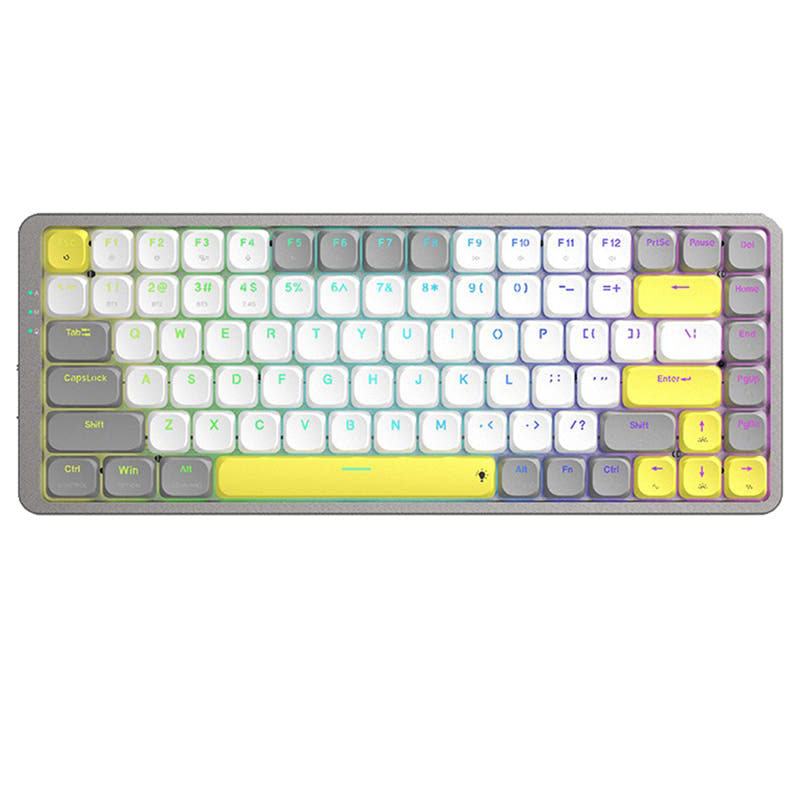
Keychron J1 QMK Wireless Mechanical Keyboard
78
Keychron K3 Ultra 8K Wireless Custom Mechanical Keyboard

Select a keyboard to compare

2.8 (8)
0.0 (0)
  • Released in 2025
  • Built with the ANSI layout standard
  • Connects via USB-C
  • Features N-key rollover
  • Has built-in sound dampening
  • Runs at a 1000 Hz polling rate
  • Equipped with a 2000 mAh battery
  • Weighs about 661 g
  • Sized at 23 x 327 x 144 mm
  • Made with a ABS case
  • Offers Yes, Rgb, White, North-face, Rgb North-face, White North-face RGB lighting
  • Released in 2026
  • Built with the ANSI, ISO layout standard
  • Runs at a 8000 Hz polling rate
  • Offers Yes, Rgb RGB lighting
Scores
  • Performance: 81.5
  • Build Quality: 70.9
  • Productivity: 89
  • Customizability: 86.4
  • Portability: 80.2
Scores
  • Performance: 86.5
  • Build Quality: 69.2
  • Productivity: 69.9
  • Customizability: 86.6
  • Portability: 74.5
Name
Keychron J1
Name
Keychron K3 Ultra
Release year
2025
Release year
2026
Switch Options
Linear, Tactile, Clicky
Switch Options
Linear, Tactile, Clicky
Profile
Low Profile
Profile
Low Profile
Hot Swappable
 
Hot Swappable
 
Layout Size
75%
Layout Size
75%
Layout Standard
ANSI
Layout Standard
ANSI, ISO
Layout Ergonomics
Normal
Layout Ergonomics
Normal
Knob Support
 
Knob Support
 
Display Support
 
Display Support
 
Mac/Win Support
 
Mac/Win Support
 
Multi-Media Keys
 
Multi-Media Keys
 
USB-C
 
USB-C
 
USB passthrough
 
USB passthrough
 
Connection
Bluetooth, 2.4 GHz, Wired, Wireless
Connection
Bluetooth, 2.4 GHz, Wired, Wireless
Polling Rate
1000 Hz
Polling Rate
8000 Hz
Battery capacity
2000 mAh
Battery capacity
-
Hall Effect Support
 
Hall Effect Support
 
QMK Support
 
QMK Support
 
VIA Support
 
VIA Support
 
VIAL Support
 
VIAL Support
 
N-Key Rollover
 
N-Key Rollover
 
Rapid Trigger
 
Rapid Trigger
 
Mount Style
-
Mount Style
-
Screw in Stabilizers
 
Screw in Stabilizers
 
Sound Dampening
 
Sound Dampening
 
Backlight
 
Rgb, White, North-face
Backlight
 
Rgb
Case Colors
Case Colors
Case Material
ABS
Case Material
-
Keycaps Material
PBT
Keycaps Material
PBT
Dimensions
23 x 327 x 144 mm
Dimensions
-
Weight
661g
Weight
-
*Something incorrect or missing? Please
let me know
!

Pros and Trade-offs

For most users, the Keychron J1 is the more practical and reliable choice, offering a better balance of features, software maturity, and silent typing out of the box. However, if your primary use case is competitive gaming and you require the absolute fastest input response, the Keychron K3 Ultra's 8K polling rate is a significant advantage that justifies choosing it over the J1. The K3 Ultra's unique wood frame also appeals to those who want a more distinctive aesthetic.

Keychron J1

  • +Mature QMK and VIA support for extensive key remapping and macro creation.
  • +Built-in receiver compartment for secure storage of the 2.4 GHz dongle.
  • +Higher productivity score, indicating a better fit for office and typing tasks.
  • +Includes advanced IXPE and latex acoustic foam for a quieter typing experience.
  • +Offers a dedicated Mac layout with keycaps for both macOS and Windows out of the box.

  • User reviews report battery drain issues and Bluetooth connectivity drops.
  • Some users reported the keyboard arriving with a bent frame.
  • The 1000 Hz polling rate is standard, not cutting-edge for competitive gaming.

Keychron K3 Ultra

  • +Industry-leading 8000 Hz polling rate in both wireless (2.4 GHz) and wired modes for ultra-low latency.
  • +Unique and premium build quality with a natural wood and metal frame.
  • +Impressive battery life, with the vendor stating up to 550 hours with the backlight off.
  • +Powerful ARM-based MCU with 1MB of flash memory for advanced customization.

  • Uses the newer ZMK firmware, which may have a smaller community and fewer guides compared to the mature QMK ecosystem.
  • Lacks a built-in receiver compartment for the 2.4 GHz dongle.
  • Uses non-shine-through LSA PBT keycaps, which may be a deal-breaker if you want legends visible in the dark with RGB on.
  • This is a pre-sale item as of the listing, meaning it may not be immediately available.

Which Keyboard Is Better for Your Needs?

The Keychron K3 Ultra wins for gaming due to its superior 8K polling rate, making it the choice for latency-sensitive players. However, the Keychron J1 takes the lead in office, programming, travel, and content creation because of its better productivity-oriented features, mature QMK/VIA software, built-in receiver, and quieter acoustic foam. For modding, it is a tie as both offer hot-swappable PCBs and multiple foam layers, though they use different firmware ecosystems. Overall, the J1 is the more versatile daily driver, while the K3 Ultra is a niche performer.

GamingKeychron K3 Ultra
  • Features an 8000 Hz polling rate in 2.4 GHz and wired modes for the lowest possible latency.
  • Powered by a more powerful ARM MCU with 1 MB flash memory for faster processing.
  • Includes a 2.4 GHz connection with an 8K polling rate, outperforming the J1's 1000 Hz polling rate.
OfficeKeychron J1
  • Includes built-in sound dampening with advanced IXPE and latex foam for a quieter typing experience.
  • Higher productivity score relative to its price tier, indicating a better fit for office tasks.
  • Offers a dedicated Mac layout with included keycaps for both macOS and Windows, simplifying the switch.
  • Features a built-in receiver compartment to prevent loss of the wireless dongle.
ProgrammingKeychron J1
  • Supports the mature QMK firmware and VIA software, which are widely preferred for complex key remapping and macros.
  • Offers a higher productivity score, suggesting a layout and feature set more suited for extended typing sessions.
  • Includes a built-in receiver compartment for a clutter-free desk.
TravelKeychron J1
  • Has a built-in receiver compartment to securely store the 2.4 GHz dongle, preventing loss on the go.
  • Weighs 661g, which is slightly heavier than the K3 Ultra but offers a 2000mAh battery for reliable wireless use.
  • Supports Bluetooth 5.2 for connecting to multiple devices like a laptop or tablet.
ModdingTie
  • Both are hot-swappable, allowing switch changes without soldering, with compatibility for Gateron/Keychron low-profile switches.
  • Both have a gasket-like structure with sound-absorbing foam layers, providing a good base for acoustic modding.
  • The J1 uses QMK/VIA while the K3 Ultra uses ZMK, offering different software customization paths for firmware modders.
Content CreationKeychron J1
  • The J1's QMK and VIA support provide a well-documented, powerful platform for creating complex shortcuts and macros for editing software.
  • Includes advanced IXPE and latex acoustic foam for a quieter typing experience, which is beneficial for recording or streaming.
  • Offers a dedicated Mac layout that integrates seamlessly with macOS multimedia keys, a common choice for creative professionals.

Frequently Asked Questions (FAQ)


Discover similar products

You might also like similar products in that price range:

86
$67
Keychron K1 Pro QMK/VIA Wireless Custom Mechanical Keyboard ISO Layout Collection
Keychron K1 Pro
80%,
Hotswap,
Wireless,
Wired,
RGB/ White LEDs,
VIA,
QMK,
Alu case,
Tray Mount

83
$94
Keychron K3 QMK Wireless Mechanical Keyboard (ISO Layout) - Version 3
Keychron K3 V3
75%,
Hotswap,
Wireless,
Wired,
RGB/ White LEDs,
VIA,
QMK,
Alu case,
Top Mount

87
$67
Keychron K13 Pro QMK/VIA Wireless Custom Mechanical Keyboard ISO Layout Collection
Keychron K13 Pro
80%,
Hotswap,
Wireless,
Wired,
RGB/ White LEDs,
VIA,
QMK,
Alu case,
Tray Mount

94
$84
Keychron K3 Max QMK/VIA Wireless Custom Mechanical Keyboard ISO Layout Collection
Keychron K3 Max
75%,
Hotswap,
Wireless,
Wired,
RGB/ White LEDs,
VIA,
QMK,
Alu case,
Plate Mount

83
$67
Keychron K9 Pro QMK/VIA Wireless Custom Mechanical Keyboard
Keychron K9 Pro
60%,
Hotswap,
Wireless,
Wired,
RGB/ White LEDs,
VIA,
QMK,
Alu case,
Tray Mount

87
$83
Keychron K3 Pro QMK/VIA Wireless Mechanical Keyboard ISO Layout Collection
Keychron K3 Pro
75%,
Hotswap,
Wireless,
Wired,
RGB/ White LEDs,
VIA,
QMK,
Alu case,
Tray Mount

88
$69
Keychron K5 Pro QMK/VIA Wireless Custom Mechanical Keyboard ISO Layout Collection
Keychron K5 Pro
100%,
Hotswap,
Wireless,
Wired,
RGB/ White LEDs,
VIA,
QMK,
Alu case,
Tray Mount

68
$96
Keychron K3 Ultra-slim Wireless Mechanical Keyboard (Version 2)
Keychron K3 V2
75%,
Hotswap,
Wireless,
Wired,
RGB/ White LEDs,
Alu case,
Tray Mount

96
$54
Keychron V3 QMK Custom Mechanical Keyboard ISO Layout Collection
Keychron V3
80%,
Hotswap,
Wired,
RGB/ White LEDs,
Knob,
VIA,
QMK,
Tray Mount

83
$104
Keychron K3 Max SE QMK Wireless Custom Mechanical Keyboard
Keychron K3 Max SE
75%,
Hotswap,
Wireless,
Wired,
RGB/ White LEDs,
VIA,
QMK